
Are you running it in a container, or bare metal (not in a container).
Guess I got confused when you said bare metal and that is my fault. It is in a container. Debian 13 is running on bare metal. Meaning no proxmox or anything like that.
Our current Docker implementation, which uses a custom version of the virtual display server Xvfb, does not support hardware encoding (decoding only). In older versions of PrismCast, it wouldn't have mattered if it did. However, with this new HEVC option, it'd be nice to get it enabled. Not sure if it's possible, but I'll play around with it when I get a chance.
If you'd like to confirm what I'm saying, open a new tab in PrismCast's Chrome, and navigate to chrome://gpu.
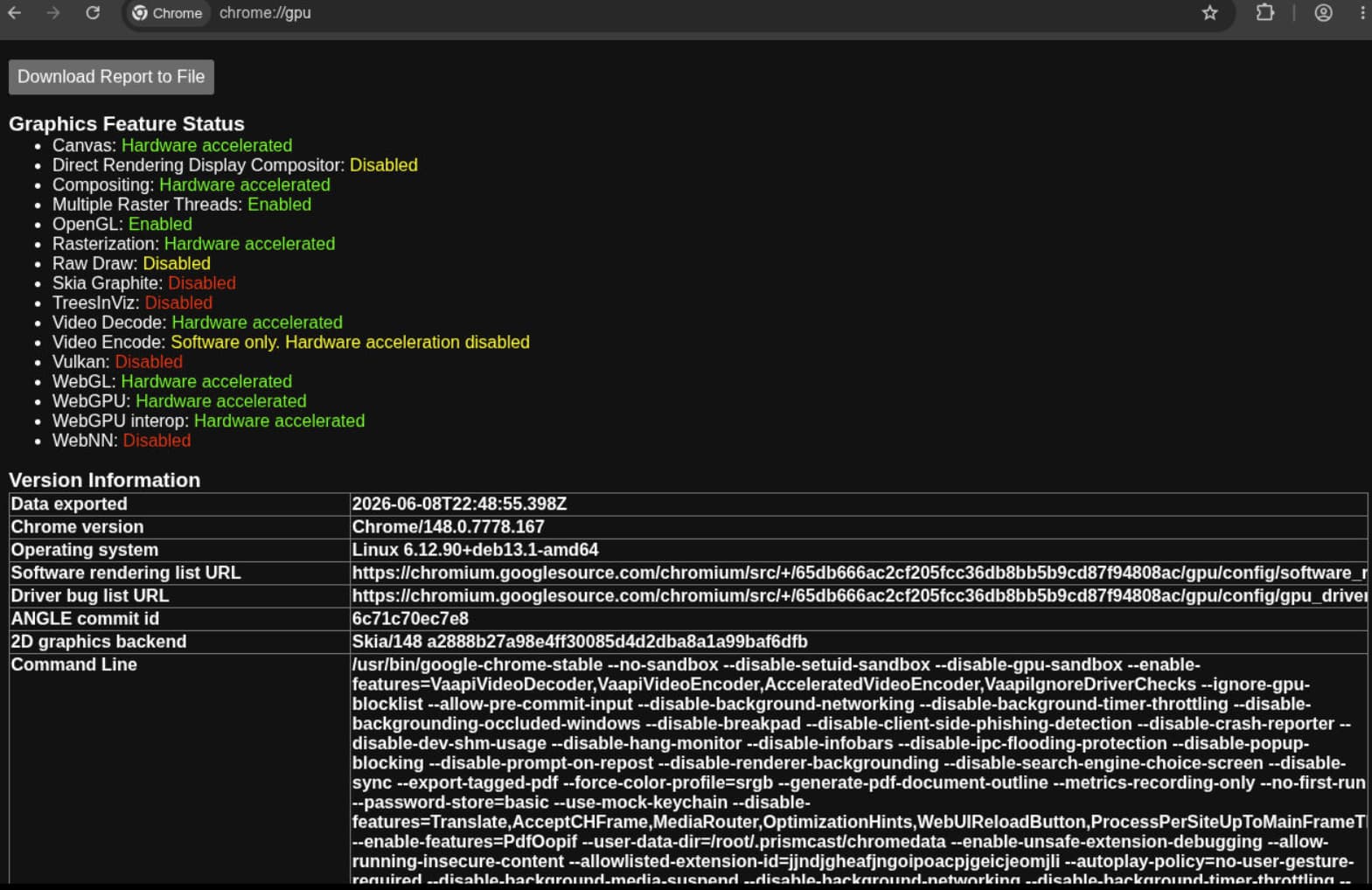
So, as you can see, Video Encode is Software only. Whether we can do anything about that in the Docker world is unknown at this point. It was only a fairly recent development to have all the Hardware acceleration we do have working, and that's the result of the custom Xvfb build.
So your saying if I want that working I would need to dump Docker and run native with the npm install? Would I run into an issue with setting the resolution with no gui or monitor setup. Sorry very green with a lot of this.
Edit post. I see you said you might see if you can get it to work in the docker. I really do appreciate the hard work you guys did on this project.
I'm not sure I am saying that. But it would be interesting to know if that would work -- if you're willing to experiment.
I'd suggest starting with installing Chrome directly on your Debian system, and see what chrome://gpu reports. Linux Chrome doesn't get the attention from Google that the Windows and MacOS versions do, so just because something works under those OS's doesn't mean it'll work with the Linux version.
If you can't get chrome://gpu to "light up the board", there's little point in moving on to a PrismCast install.
You over looked this in your docker run statement --device /dev/dri:/dev/dri
https://github.com/hjdhjd/prismcast#gpu-acceleration
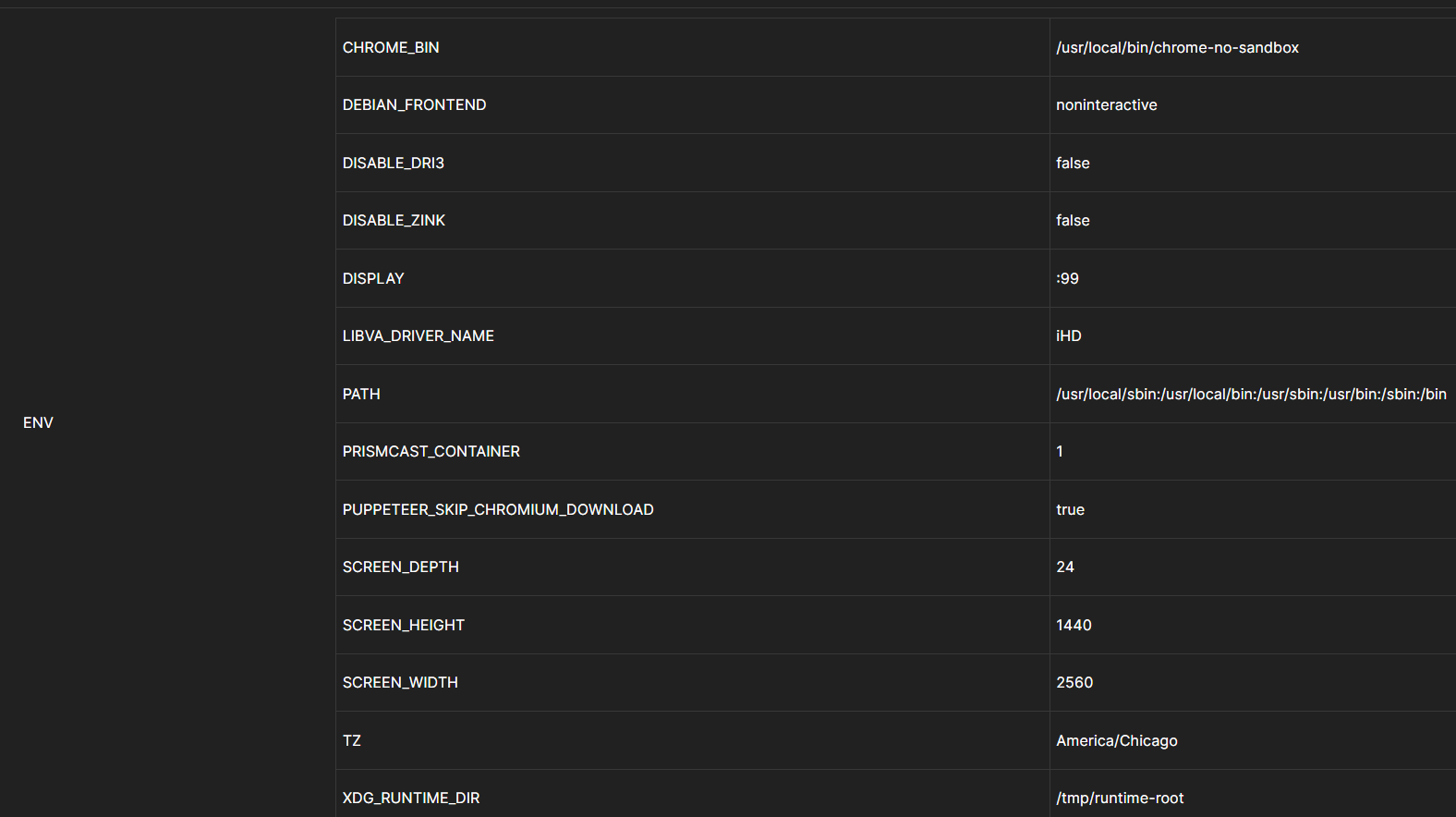
No, I'm talking about your docker run statement not passing thru the GPU device like it says
If your host has an Intel GPU with Quick Sync Video support, pass the GPU device to the container:
Here is what I actually used to spin it up.
docker run -d \
  --name prismcast \
  --shm-size=4g \
  --device /dev/dri:/dev/dri \
  -p 5589:5589 -p 5900:5900 -p 6080:6080 -p 5004:5004 \
  -v prismcast-data:/root/.prismcast \
  -e SCREEN_WIDTH=2560 -e SCREEN_HEIGHT=1440 -e SCREEN_DEPTH=24 -e TZ=America/Chicago \
  ghcr.io/hjdhjd/prismcast:latest
OK, I give up. That's not what you originally posted.
Like I said with the device /dev/dri:/dev/dri statement. The GPU actually does most of the work and runs at 8 percent. If I remove it. Then the processor jumps to 33%. So the GPU does seem to work using the container.
Yup my fault. That was in reference to the container website and the location of the files.
I went back and edited with what I actually used.
It is working -- for decoding.
I happen to have an old laptop running Debian 13 Desktop and Chrome, and the report is the same:
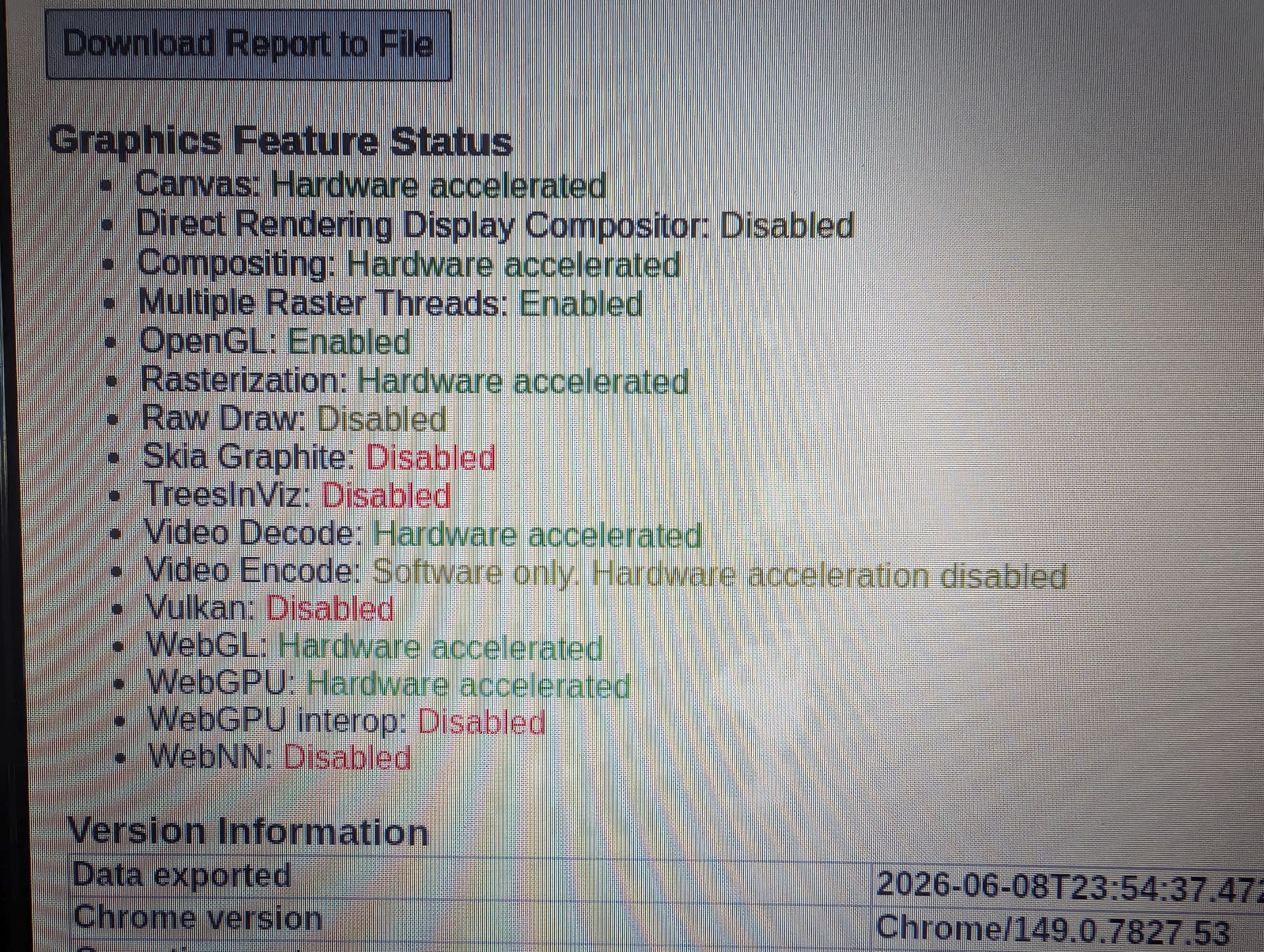
Keep in mind here, I'm only talking about the issue you raised with why HEVC encoding is grayed-out.
I don't know how helpful this could be but here it is. Zorin OS 18.1 , Chrome just updated to latest stable. CPU is AMD 5700U.
Graphics Feature Status
=======================
*   Canvas: Hardware accelerated
*   Direct Rendering Display Compositor: Disabled
*   Compositing: Hardware accelerated
*   Multiple Raster Threads: Enabled
*   OpenGL: Enabled
*   Rasterization: Hardware accelerated
*   Raw Draw: Disabled
*   Skia Graphite: Disabled
*   TreesInViz: Disabled
*   Video Decode: Hardware accelerated
*   Video Encode: Software only. Hardware acceleration disabled
*   Vulkan: Disabled
*   WebGL: Hardware accelerated
*   WebGPU: Hardware accelerated
*   WebGPU interop: Disabled
*   WebNN: Disabled

Version Information
===================
Data exported              : 2026-06-09T14:10:05.113Z
Chrome version             : Chrome/149.0.7827.102
Operating system           : Linux 6.17.0-35-generic
Software rendering list URL: https://chromium.googlesource.com/chromium/src/+/112f665d98a2fe84b156c74fbea2aed742f16c15/gpu/config/software_rendering_list.json
Driver bug list URL        : https://chromium.googlesource.com/chromium/src/+/112f665d98a2fe84b156c74fbea2aed742f16c15/gpu/config/gpu_driver_bug_list.json
ANGLE commit id            : 4b8c7f0f3219
2D graphics backend        : Skia/149 92a56ebeef43061f4878aa869aa1f2160265c24c
Command Line               : /usr/bin/google-chrome-stable --ozone-platform=wayland --flag-switches-begin --flag-switches-end --render-node-override=/dev/dri/renderD128

Driver Information
==================
Initialization time             : 99
In-process GPU                  : false
Skia Backend                    : GaneshGL
Passthrough Command Decoder     : true
Sandboxed                       : false
GPU0                            : VENDOR= 0x1002 [Google Inc. (AMD)], DEVICE=0x164c [ANGLE (AMD, AMD Radeon Graphics (radeonsi renoir ACO), OpenGL ES 3.2 Mesa 25.2.8-0ubuntu0.24.04.1)], DRIVER_VENDOR=Mesa, DRIVER_VERSION=25.2.8 *ACTIVE*
Optimus                         : false
AMD switchable                  : false
Pixel shader version            : 3.00
Vertex shader version           : 3.00
Max. MSAA samples               : 8
Machine model name              :
Machine model version           :
GL implementation parts         : (gl=egl-angle,angle=opengl)
Display type                    : ANGLE_OPENGL
GL_VENDOR                       : Google Inc. (AMD)
GL_RENDERER                     : ANGLE (AMD, AMD Radeon Graphics (radeonsi renoir ACO), OpenGL ES 3.2 Mesa 25.2.8-0ubuntu0.24.04.1)
GL_VERSION                      : OpenGL ES 3.0 (ANGLE 2.1.27738 git hash: 4b8c7f0f3219)
GL_EXTENSIONS                   : GL_AMD_performance_monitor GL_ANGLE_blob_cache GL_ANGLE_client_arrays GL_ANGLE_clip_cull_distance GL_ANGLE_compressed_texture_etc GL_ANGLE_depth_texture GL_ANGLE_framebuffer_blit GL_ANGLE_framebuffer_multisample GL_ANGLE_get_serialized_context_string GL_ANGLE_get_tex_level_parameter GL_ANGLE_instanced_arrays GL_ANGLE_memory_size GL_ANGLE_program_binary_readiness_query GL_ANGLE_program_cache_control GL_ANGLE_renderability_validation GL_ANGLE_request_extension GL_ANGLE_robust_client_memory GL_ANGLE_shader_pixel_local_storage GL_ANGLE_stencil_texturing GL_ANGLE_texture_compression_dxt3 GL_ANGLE_texture_compression_dxt5 GL_ANGLE_texture_external_update GL_ANGLE_texture_multisample GL_ANGLE_translated_shader_source GL_ARM_rgba8 GL_CHROMIUM_bind_generates_resource GL_CHROMIUM_bind_uniform_location GL_CHROMIUM_copy_texture GL_CHROMIUM_lose_context GL_EXT_blend_func_extended GL_EXT_blend_minmax GL_EXT_clear_texture GL_EXT_clip_control GL_EXT_clip_cull_distance GL_EXT_color_buffer_float GL_EXT_color_buffer_half_float GL_EXT_compressed_ETC1_RGB8_sub_texture GL_EXT_conservative_depth GL_EXT_debug_label GL_EXT_debug_marker GL_EXT_depth_clamp GL_EXT_discard_framebuffer GL_EXT_disjoint_timer_query GL_EXT_draw_buffers GL_EXT_draw_buffers_indexed GL_EXT_float_blend GL_EXT_frag_depth GL_EXT_instanced_arrays GL_EXT_map_buffer_range GL_EXT_memory_object GL_EXT_memory_object_fd GL_EXT_occlusion_query_boolean GL_EXT_polygon_offset_clamp GL_EXT_read_format_bgra GL_EXT_render_snorm GL_EXT_robustness GL_EXT_sRGB GL_EXT_sRGB_write_control GL_EXT_semaphore GL_EXT_semaphore_fd GL_EXT_shadow_samplers GL_EXT_texture_border_clamp GL_EXT_texture_compression_bptc GL_EXT_texture_compression_dxt1 GL_EXT_texture_compression_rgtc GL_EXT_texture_compression_s3tc_srgb GL_EXT_texture_cube_map_array GL_EXT_texture_filter_anisotropic GL_EXT_texture_format_BGRA8888 GL_EXT_texture_mirror_clamp_to_edge GL_EXT_texture_norm16 GL_EXT_texture_rg GL_EXT_texture_sRGB_R8 GL_EXT_texture_sRGB_decode GL_EXT_texture_shadow_lod GL_EXT_texture_storage GL_EXT_texture_type_2_10_10_10_REV GL_EXT_unpack_subimage GL_KHR_blend_equation_advanced GL_KHR_blend_equation_advanced_coherent GL_KHR_debug GL_KHR_parallel_shader_compile GL_KHR_robustness GL_KHR_texture_compression_astc_ldr GL_KHR_texture_compression_astc_sliced_3d GL_MESA_framebuffer_flip_y GL_NV_depth_buffer_float2 GL_NV_fence GL_NV_framebuffer_blit GL_NV_pack_subimage GL_NV_pixel_buffer_object GL_NV_read_depth GL_NV_read_stencil GL_NV_shader_noperspective_interpolation GL_OES_EGL_image GL_OES_EGL_image_external GL_OES_EGL_image_external_essl3 GL_OES_EGL_sync GL_OES_compressed_EAC_R11_signed_texture GL_OES_compressed_EAC_R11_unsigned_texture GL_OES_compressed_EAC_RG11_signed_texture GL_OES_compressed_EAC_RG11_unsigned_texture GL_OES_compressed_ETC1_RGB8_texture GL_OES_compressed_ETC2_RGB8_texture GL_OES_compressed_ETC2_RGBA8_texture GL_OES_compressed_ETC2_punchthroughA_RGBA8_texture GL_OES_compressed_ETC2_punchthroughA_sRGB8_alpha_texture GL_OES_compressed_ETC2_sRGB8_alpha8_texture GL_OES_compressed_ETC2_sRGB8_texture GL_OES_depth24 GL_OES_draw_buffers_indexed GL_OES_element_index_uint GL_OES_fbo_render_mipmap GL_OES_get_program_binary GL_OES_mapbuffer GL_OES_packed_depth_stencil GL_OES_required_internalformat GL_OES_rgb8_rgba8 GL_OES_sample_variables GL_OES_shader_multisample_interpolation GL_OES_standard_derivatives GL_OES_surfaceless_context GL_OES_texture_3D GL_OES_texture_border_clamp GL_OES_texture_cube_map_array GL_OES_texture_float GL_OES_texture_float_linear GL_OES_texture_half_float GL_OES_texture_half_float_linear GL_OES_texture_npot GL_OES_texture_stencil8 GL_OES_texture_storage_multisample_2d_array GL_OES_vertex_array_object GL_WEBGL_video_texture
Disabled Extensions             : GL_KHR_blend_equation_advanced GL_KHR_blend_equation_advanced_coherent
Disabled WebGL Extensions       :
Window system binding vendor    : Google Inc. (AMD)
Window system binding version   : 1.5 (ANGLE 2.1.27738 git hash: 4b8c7f0f3219)
Window system binding extensions: EGL_EXT_create_context_robustness EGL_KHR_create_context EGL_KHR_image EGL_KHR_image_base EGL_KHR_gl_colorspace EGL_KHR_gl_texture_2D_image EGL_KHR_gl_texture_cubemap_image EGL_KHR_gl_texture_3D_image EGL_KHR_gl_renderbuffer_image EGL_KHR_get_all_proc_addresses EGL_KHR_fence_sync EGL_KHR_wait_sync EGL_ANGLE_create_context_webgl_compatibility EGL_CHROMIUM_create_context_bind_generates_resource EGL_KHR_swap_buffers_with_damage EGL_EXT_pixel_format_float EGL_KHR_surfaceless_context EGL_ANGLE_display_texture_share_group EGL_ANGLE_display_semaphore_share_group EGL_ANGLE_create_context_client_arrays EGL_ANGLE_program_cache_control EGL_ANGLE_robust_resource_initialization EGL_ANGLE_create_context_extensions_enabled EGL_ANDROID_blob_cache EGL_ANDROID_recordable EGL_ANDROID_native_fence_sync EGL_ANGLE_create_context_backwards_compatible EGL_KHR_no_config_context EGL_KHR_create_context_no_error EGL_EXT_image_dma_buf_import EGL_EXT_image_dma_buf_import_modifiers EGL_KHR_reusable_sync EGL_ANGLE_external_context_and_surface EGL_EXT_buffer_age EGL_ANGLE_context_virtualization EGL_ANGLE_memory_usage_report EGL_ANGLE_create_context_passthrough_shaders
XDG_CURRENT_DESKTOP             : zorin:GNOME
XDG_SESSION_TYPE                : wayland
GDMSESSION                      : zorin
Interfaces exposed by the Wayland compositor: wl_compositor:6 wl_shm:1 zxdg_output_manager_v1:3 wl_data_device_manager:3 zwp_primary_selection_device_manager_v1:1 wl_subcompositor:1 xdg_wm_base:6 gtk_shell1:5 wp_viewporter:1 wp_fractional_scale_manager_v1:1 zwp_pointer_gestures_v1:3 zwp_tablet_manager_v2:1 wl_seat:8 zwp_relative_pointer_manager_v1:1 zwp_pointer_constraints_v1:1 zxdg_exporter_v2:1 zxdg_importer_v2:1 zxdg_exporter_v1:1 zxdg_importer_v1:1 wp_single_pixel_buffer_manager_v1:1 zwp_keyboard_shortcuts_inhibit_manager_v1:1 zwp_text_input_manager_v3:1 wp_presentation:1 xdg_activation_v1:1 zwp_idle_inhibit_manager_v1:1 wl_output:4 zwp_linux_dmabuf_v1:5
Ozone platform                  : wayland
Direct rendering version        : unknown
Reset notification strategy     : 0x8252
GPU process crash count         : 0

Driver Bug Workarounds
======================
*   disable_software_to_accelerated_canvas_upgrade
*   enable_webgl_timer_query_extensions
*   exit_on_context_lost
*   force_cube_map_positive_x_allocation
*   force_int_or_srgb_cube_texture_complete
*   disabled_extension_GL_KHR_blend_equation_advanced
*   disabled_extension_GL_KHR_blend_equation_advanced_coherent

Problems Detected
=================
*   Accelerated video encode has been disabled, either via blocklist, about:flags or the command line.
    Disabled Features: video_encode

*   Disable webgpu on vk via gl interop:
    (http://crbug.com/442791440), (http://crbug.com/475935650)
    Disabled Features: webgpu_on_vk_via_gl_interop

*   Linux ATI drivers crash on binding incomplete cube map texture to FBO:
    (http://crbug.com/518889)
    Applied Workarounds: force_cube_map_positive_x_allocation

*   Disable KHR_blend_equation_advanced until cc shaders are updated:
    (http://crbug.com/661715)
    Applied Workarounds: disable(GL_KHR_blend_equation_advanced),
        disable(GL_KHR_blend_equation_advanced_coherent)

*   Software to Accelerated canvas update breaks Linux AMD:
    (http://crbug.com/710029)
    Applied Workarounds: disable_software_to_accelerated_canvas_upgrade

*   Force integer or srgb cube map texture complete on Linux AMD:
    (http://crbug.com/712117)
    Applied Workarounds: force_int_or_srgb_cube_texture_complete

*   Expose WebGL's disjoint_timer_query extensions on platforms with site isolation:
    (http://crbug.com/808744), (http://crbug.com/870491)
    Applied Workarounds: enable_webgl_timer_query_extensions

*   Some drivers can't recover after OUT_OF_MEM and context lost:
    (http://crbug.com/893177)
    Applied Workarounds: exit_on_context_lost
I don't know how you make that text compress into the tiny little expansion arrow, sorry. That is not the complete report but didn't figure it was a good idea to paste the whole thing.
I ran into the same issue and eventually got 1080p and 4K working. A few things to check:
1. Verify your actual display resolution in macOS.
Go to System Settings → Displays and make sure the display is running at 3840×2160 (4K) or at least higher than 1080p. PrismCast requires the display resolution to be larger than the capture resolution because Chrome's toolbars and window chrome consume vertical pixels.
2. Check what Chrome sees, not just what macOS reports.
Open Chrome and visit a viewport test site such as whatismyviewport.com. Make sure your viewport size is large enough for your target capture resolution. A larger viewport gives PrismCast more room to work with.
3. Run Chrome full-screen or maximized.
A smaller browser window can prevent PrismCast from allowing higher capture resolutions even when the display itself is high resolution.
4. Check Chrome zoom/appearance settings.
In my testing, increasing Chrome's zoom reduced the available viewport size, while reducing zoom increased it significantly. If you're having trouble getting 1080p, try setting Chrome appearancce in settings to 100% or lower, maximize or full-screen the browser window, then restart Chrome and PrismCast before testing again.
5. Completely quit and restart both Chrome and PrismCast after making changes.
PrismCast may cache the previous display resolution or browser state and continue reporting incorrect limits until both applications are restarted.
6. If you're running headless, verify the detected display resolution.
macOS often falls back to a virtual 1920×1080 display when no monitor is attached. In that case, consider using: an HDMI dummy plug, or a virtual display utility such as BetterDisplay to create a higher-resolution display environment.
7. If you're using a TV, confirm the Mac is actually running at 4K.
Some TVs and display scaling modes can make macOS appear to be using 4K while applications still detect a lower effective resolution. Verify the actual resolution in both macOS and Chrome.
In my case, the breakthrough came when I confirmed the Mac was running at a true 4K resolution, Chrome was maximized, Chrome zoom was set appropriately, and both Chrome and PrismCast were fully restarted. After that, PrismCast correctly allowed 1080p capture. Hope this helps.
cc: @dkrach
2 Likes
I noticed there are missing channels, specifically from YouTubeTV - 'Adult Swim' & 'Nickelodeon'.
I've tried to add channels manually and the server side chrome webpage opens and plays, but the ChannelsDVR side view and record do not. While waiting, the PrismCast server side opens and closes a few times and plays each time fine, then eventually just closes and stops trying. (PrismCast is on a different Windows 10 machine)
All the other pre-found YTTV channels work fine.
what should I enter for the manual selection at:
channel key: nickelodeon
display name: Nickelodeon
stream url: ?????? ( tried this --- https://tv.youtube.com/watch/-1-V0jhsLv0 )
profile: autodetect
Doesn't Add channel work?
Go to the Channels tab
Manage Channels > Add channel
Select Service: YouTube TV
Channel Key: nickelodeon
Display Name: Nickelodeon
Stream URL: should auto populate with https://tv.youtube.com/live
Profile: Autodetect
Channel Selector: start keying in Nickelodeon and select it from the dropdown
These exact steps were unclear to me or I missed where it was explained.
This worked to add 'Nickelodeon' channel... but did not work for 'Adult Swim' channel. The "channel selector:" box does not contain the adult swim in it's dropdown box. it is on the YTTV live page listings. (maybe because it has a space in the name)
channel key: adultswim
display name: Adult Swim
For Adult Swim you probably have to wait until it's airing something to get the selector.


Just checked here and it says the channel starts airing at 5pm my time, which is when the Cartoon Network goes off air. I'll check mine again after 5pm.
UPDATE: Yep, once Adult Swim starts airing, it's available to add as a channel. If you have YouTube TV selected for Channel Lineup Precaching and have YouTube TV in the channels Filter it should work for you.
If you don't see Adult Swim in the channel selector dropdown
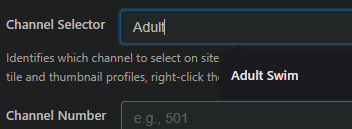
Force it to rescan the YTTV channels using the API

http://192.168.1.9:5589/services/yttv/channels?refresh=true
[
  {
    "channelSelector": "ABC",
    "name": "ABC 10",
    "affiliate": "ABC"
  },
  {
    "channelSelector": "ABC News Live",
    "name": "ABC News Live"
  },
  {
    "channelSelector": "ACC Network",
    "name": "ACC Network"
  },
  {
    "channelSelector": "Adult Swim",
    "name": "Adult Swim"
  },
1 Like