
We've pretty much circled back to the same place we were a couple of days ago. The puzzle pieces you're describing just don't fit together. Hopefully someone else will think of something I'm not.
I really appreciate your helping me on this. It is mind-bogglingly frustrating.
I attached a PrismCast log snippet showing the same error, “waiting for selector video failed. I had this a couple of weeks ago. For me, all I had to do was open up my preferred browser, DuckDuckGo, go to PrismCast page and reauthorize CNN. I believe you are not getting a good authorization. My system is a Mac Mini M4 Pro with PrismCast installed as a service. I'm not running headless.
My suggestion:
Hook up a monitor, keyboard, and mouse.
Open Safari, DuckDuckGo - anything except Chrome.
Go to your PrismCast webui and authenticate CNN using cnn.com as the source.
Your PrismCast Chrome should pop up and allow you to authenticate. After you authenticate, go back to other browser and hit the Done button.
After you get it working, then explore your options for running headless.
[2026/09/30 03:09:42.433 PM] Precached DirecTV Stream: 304 channels (5.5s).

[2026/09/30 03:09:49.403 PM] Precached Fox: 14 channels (6.3s).

[2026/09/30 03:09:50.125 PM] Channel lineup precaching complete: 2 services cached in 13.2s.

[2026/09/30 06:22:14.991 PM] [WARN] [cnn-2mumo5] Attempt 1 failed for page navigation for https://www.cnn.com/videos/cnn: Operation timed out after 10000ms.

[2026/09/30 06:22:27.488 PM] [ERROR] [cnn-2mumo5] Stream setup failed for https://www.cnn.com/videos/cnn: Waiting for selector `video` failed.

[2026/09/30 06:22:27.492 PM] [cnn-2mumo5] Stream ended after 23s (setup failed).

[2026/09/30 06:22:27.493 PM] GET /hls/cnn/stream.m3u8 from 10.0.1.65 responded 404 in 1674.834 ms.

[2026/09/30 06:22:42.542 PM] [cnbc-4dm87m] Streaming CNBC: CNBC.com, fullscreenApi, FFmpeg [⚡ HEVC]. Tuned in 7.6s (direct).

[2026/09/30 06:23:41.639 PM] [cnbc-4dm87m] Stream ended after 1m 7s.

[2026/09/30 06:25:28.748 PM] Login mode started for https://www.cnn.com/videos/cnn.

[2026/09/30 06:26:38.223 PM] Login tab was closed. Ending login mode.

[2026/09/30 06:26:38.929 PM] Login mode ended.

[2026/09/30 06:27:04.063 PM] Login mode started for https://www.cnn.com/videos/cnn.

[2026/09/30 06:27:13.887 PM] Login tab was closed. Ending login mode.

[2026/09/30 06:27:14.589 PM] Login mode ended.

[2026/09/30 09:15:01.673 PM] Restarting browser for scheduled maintenance (uptime: 6h 5m).

[2026/09/30 09:15:03.218 PM] Capture system verified successfully.

[2026/09/30 09:15:03.237 PM] Chrome ready: Chrome/153.0.8010.55 (GPU: Apple M4 Pro [AV1, H264, HEVC]).

[2026/09/30 09:15:03.904 PM] Browser restart complete. Fresh instance is ready.
I agree that @lmolmud's setup is behaving as though he's not logged in. But one comment I'll make here, is that the PrismCast WebUI provider login button is just a convenience. In other words, one can also skip that step entirely, by simply opening a tab and navigating to a provider's login page (using the PrismCast-controlled Chrome instance of course) followed by logging in.
1 Like
I didn’t realize you could authenticate that way but that convenience button is handy.
I know he’s running headless and I think that's part of his issue trying to solve his problem. I'm hoping he hooks that keyboard and mouse up and try’s to authenticate that way. If he's successful, it points to where he needs to look at fixing his headless stuff, which I know nothing about.
I know that he installed the same way as I did, with brew. The only differences are sources (DirectvStream vs Xfinity) and how we manage PrismCast (headless vs non-headless). There's no reason he can’t get it to work.
PrismCast can now be easily installed in a Proxmox Debian 13 LXC. Complete with hardware accelerated decoding and encoding! More details here:
I have a couple of ways of accessing the server. It is only "headless" as it doesn't have a dedicated monitor. It is hooked to my 55 inch Bravia, and I just switch the input from one HDMI to the other for tv/Mac. I only remote into it to see what the Prismcast browser is doing when I interact with the ChannelsDVR app in the Apple Tv.
Hey there. I tried this for CNN, using Safari, pointing the channel @ cnn.com. It worked, which proves something about what is failing. However, doing the same for a few Xfinity and YouTubeTV channels again fails in the same way. So, it seems the "architecture" of the solution can work, but some opaque fskery is afoot with the log-in for Xfinity and Youtube.
So, when you hooked up the keyboard & mouse, you utilized Safari to get to the PrismCast webui.
1 Like
That said, playing content in Prismcast's Chrome directly is hit and miss. Sometimes audio plays in browser and the video is black. Kind of how it looks when fed into ChannelsDVR. I notice that when Prismcast spawns a Chrome insatnce, there are three tabs with one of them loading some kind of video extension. Could this be something?
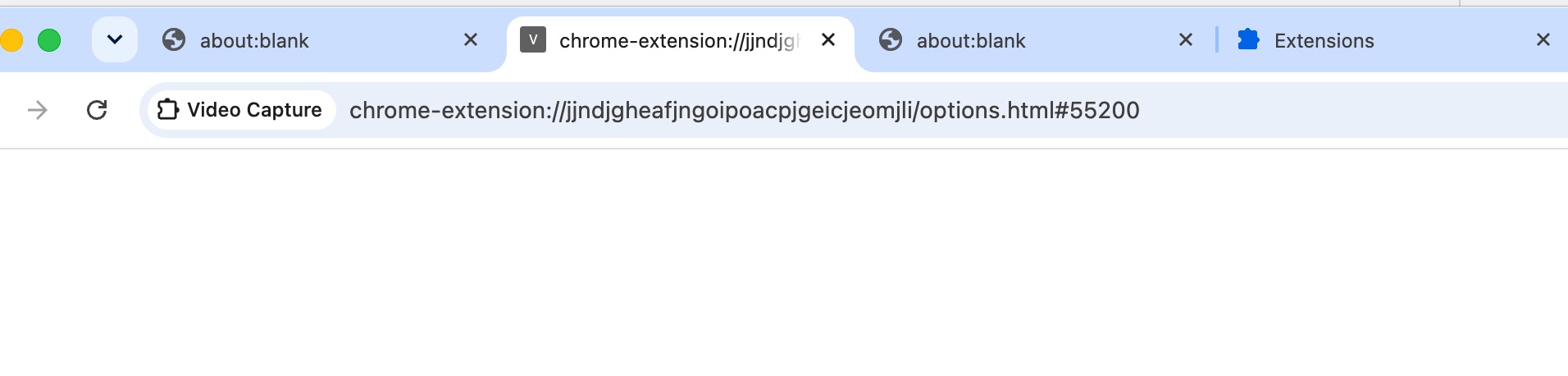
No, that's in mine also. At one time, there was a box to check in that tab. I’ll find the post that talked about that. I’m not sure if it still necessary.
I’m not sure if it’s required any more but here are the instructions
I run it as a service on a Mac Mini.
I ran prismcast service restart
After Chrome came up and minimized a few times, I brought up the Chrome that was minimized.
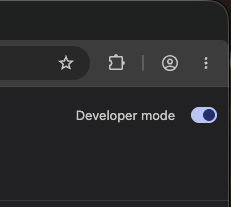
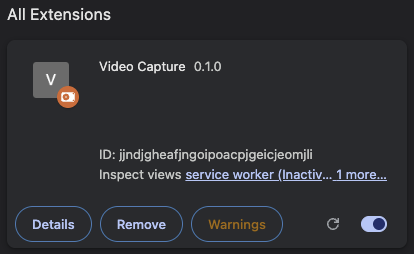
I then went to Manage Extensions, saw Video Capture 0.1.0, and on the upper right is the Developer mode toggle.
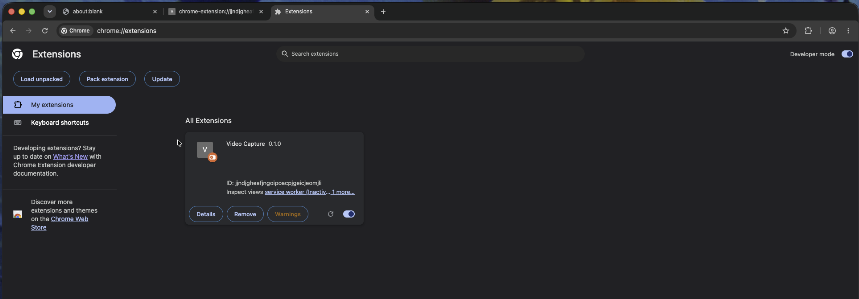
Turned on Developer Mode, closed the Manage Extensions tab and ran prismcast service restart
Developer mode is still enabled. Make sure the extension is there and enabled.
Now that you authenticated thru cnn.com, did you try and tune to that station on your Apple TV? If so, what were the results.
Also, it would sometime require me to tune twice for CNN. The first attempt would "stall" and my ah4c would fire up. I'd back out and retune to CNN and the 2nd attempt would tune thru. PrismCast.
Dev mode has always been on. Yes, I hit CNN on ChannelsDVR on the Apple TV and it worked. Played for about an hour before kind of freezing up and then I could not actualize the channel again, even after reauthorizing. And roger on the having to punch the channel a couple of times to get it flowing. Prismcast.
I even completely uninstalled Chrome and all the assorted files that go with and then reinstalled the Prismcast service. Same bs. This machine is pretty new and pristine and has zero connectivity issues. The same issue happens on an install on my Macbook Pro, that I did as a test. Maybe I am cursed.
I don’t think you’re cursed but the PrismCast Gods aren’t happy with you.
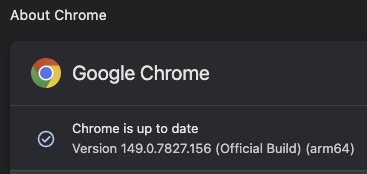
Which version of PrismCast are you on? I'm still on the first version I installed. For what I use it for, if it ain’t broke, I’m not fixing!!
You might try using the ah4c bridge thru Fast Channels. You can grab a capture card for around $20. It would only get you one tuner but it’s a cheap test.
Have you installed docker desktop and Portainer on your Mac?
I installed Channels, Prismcast and all else using Homebrew, I believe. I upgraded to 14 Prismcast last week thinking it would solve issues but no. ah4c bridge thru Fast Channels... is this another service and hardware solution?
This entire issue started when my TVE feed from Xfinity started failing for CNN and a couple other Turner properties, because of their DRM changes. TVE still works for many other Xfinity channels in their 6000 range, but not 9000 range, and we are subscribers to all of the ones that don't work.
It should be noted that Prismcast mostly worked for the first several weeks I had it, then it just stopped. No idea what could have changed on my server, network, or Xfinity service. Also noteworthy same failure happens with Youtube TV, to which I also subscribe
You should take a look at Fast Channels, especially with the ah4c & Capture Card portions. It'd cost you $20-30 for the card and some time.
You can install Docker Desktop & Portainer using brew. Google it. Copy and paste with detailed instructions. After you get Portainer installed, install Olive Tin which gives you access to Project 1 Click. One button push to install containers for you.
Plenty of support for all of this in the community by the experts.
Thanks. Like one of these?
I would think that card would probably work but I’d check in the Fast Channels Topic for recommendations because I have no experience with them. I use a Link Pi 5 port video encoder with Firestick 4K Max's. You’ll need one of those or an ONN stick to plug into. If you get a Firestick, make sure it's a 4K Max. The newer sticks have a different OS that's not compatible.
Fast Channels also has TVE options.
I'm using the Android Bridge under FastChannels with a cheap capture card and a 3rd Gen Firestick HD (not 4K). Works fine.