Introducing PrismCast: Browser-based Live TV Capture for Channels DVR and Plex

The project is in flux, but the latest from the dev is this

Would be nice if that could be put on his github page Wiki or Readme for those not familiar with node and npm

Or ask your favorite AI agent the question and maybe it will read this forum or his github repo

Whether you run install or update it will retain settings on upgrade.

and of course -g means global
which we all knew because we know npm :exploding_head:

Sometimes developers just assume their users are developers too
But on the off chance a non-developer user uses their project, it would be nice to document such things.

A good example of this is a docker run time statement and a docker newbie doing a copy/paste :no_entry_sign:
What do you mean by mappings?

And don't get me wrong.
I appreciate that @hjd has shared this personal project as open source and is taking feedback.
It's just that some of his testers are not developers, don't have a github account and won't be submitting PR's there.

I've been setting this up on Windows using the OliveTin/One-Click version from @bnhf. My issue is that PrismCast doesn't seem to be launching an instance of Chrome for login to a channel or when attempting to tune to a PrismCast channel. Should I have chrome installed on the Debian WSL on my Windows host machine or do I need to make an alias of the installed Windows version of Chrome or something else?

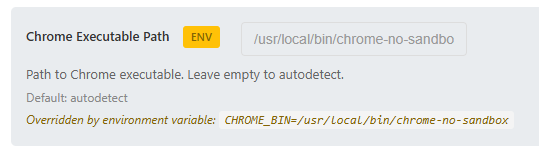
Screenshot of PrismCast's setting for Chrome's executable path.
image
It gets set in the OliveTin Dockerfile (relevant lines)

# Create Chrome wrapper script with --no-sandbox for container environments
RUN echo '#!/bin/bash\nexec /usr/bin/google-chrome-stable --no-sandbox --disable-setuid-sandbox "$@"' > /usr/local/bin/chrome-no-sandbox \
    && chmod +x /usr/local/bin/chrome-no-sandbox

# Environment variables
ENV CHROME_BIN=/usr/local/bin/chrome-no-sandbox

Thanks for this update! Using the keyboardMultiVideo profile with the ESPN channels and the newer link format got them to work for me too!

I was wondering if anyone has had any luck getting Disney Channel and Disney Jr. Channel to work? I already notified the DEV and he said he'd be working on this with a future update but just wanted to see if anyone else out there had some luck. Again, I don't have a Disney+ account, but I'm able to use my TV provider to login and watch live feeds through the following link format: https://disneynow.com/watch-live?brand=004

It is running in a docker container. To get to chrome you have to VNC into the container using the port under HOST_VNC_PORT which defaults to 5900.

Thanks for this update! Using the keyboardMultiVideo profile with the ESPN channels and the newer link format got them to work for me too!

I was wondering if anyone has had any luck getting Disney Channel and Disney Jr. Channel to work? I already notified the DEV and he said he'd be working on this with a future update but just wanted to see if anyone else out there had some luck. Again, I don't have a Disney+ account, but I'm able to use my TV provider to login and watch live feeds through the following link format: Watch Disney Channel, Disney Junior & Disney XD Live | DisneyNOW

Disney Now support will be in the next update coming sometime today/tomorrow. You will not get it working in the current PrismCast given the way Disney Now works.

There's going to be a bunch of changes coming.

Thank you! I totally missed that part.
http://yourserverip:6080/vnc.html

Thanks! If you can resolve the lag on video load to channels this will make it a completely reliable source.

Several of us have tried this on macOS (me) and other platforms with heftier processors...we're all at sub-ten seconds by and large. I get it's an issue for some...it's on the backlog to think through, but it's not at the top.

You've got 14 seconds from what I've seen in the DVR logs, lol. And they won't change that timeout, you've got to feed some sort of video before that. Even if it's a static screen that switches to live when you get the actual feed, it has to be something. You can't time out on the http request.

I am aware. :smile: Once a channel is tuned PrismCast will keep it open for a minute after the last client disconnects...so, if Channels retries to connect within the window, things will come up instantaneously. A workaround might be for you to proactively ask PrismCast to tune a channel a minute before you want to record something, if it's critical to you. Then when Channels requests the channel, it'll already be tuned in.

I appreciate the enthusiasm about PrismCast. It's early days.

I'm with you on this. After I downloaded PrismCast, I couldn't get "npm install -g prismcast" to run, so I googled it and discovered that I first needed to install a program called node.js (Node.js — Download Node.js®) to be able to run a npm command. After doing that, the command ran but failed to install because I apparently didn't have admin privileges. So I googled once again to figure out that if I added the word "sudo" to the command line (sudo npm install -g prismcast) it would let me type in my admin password to finally install the program.

2 Likes

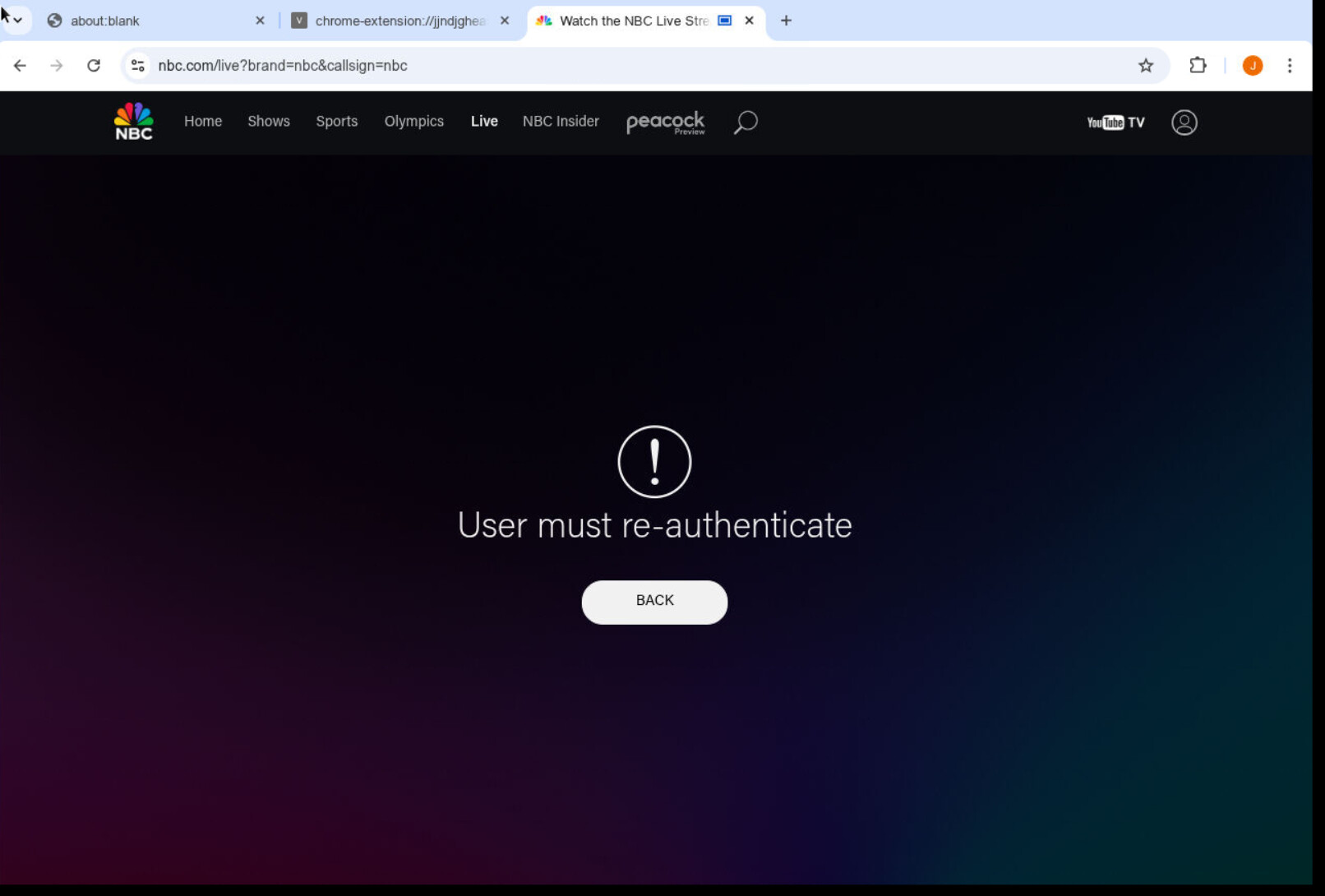
Anyone else having issues with NBC having to be reauthorized frequently?

I click on the YTTV logo above and reauthenticate but it keeps giving me the above picture. I have to actually go in and click unlink which then prompts me to reconnect to YTTV to get it to work. Seems to require after 2-3 hours after previous log in.

Has anyone tried to add SlingTV channels? I tried to test it out via a Freestream channel and was running into an authentication issue - Stream Live TV Now | Get Started

[2026/02/06 10:40:09.323] POST /auth/login from 127.0.0.1 responded 404 in 0.236 ms.
[2026/02/06 10:40:09.873] POST /auth/login from 127.0.0.1 responded 404 in 0.221 ms.

1 Like

Like I said before the issue isn't whether or not channels will retry, I know it would if I didn't have a backup source configured for those channels (that I don't want to use If I don't have to). So it tries once times out and then switches to the backup source. I'm not comfortable yet removing those channels from the backup considering how new this is.

I really think that this should be more of a priority, but I appreciate the response.

Is native faster and just as reliable as FFmpeg? I know you have comments in the admin page that it might have issues but CC4C was always native. Guess I can try it out and see.

Big thanks to the dev for creating this project--I'm stoked to get ESPN and FX back! Is there any chance we could get the NBCUniversal channels like SYFY, USA, Golf, etc to play in the Channels app instead of kicking out to stream links?

Yes, Sling works. Search this thread for more info.

Just set this up. By default, mine are playing in the channels app?

I have prismcast up and running. Got CNBC, Golf, and USA working. Any help with setting up ESPN? I usually login with my cable creds directly through ESPN website, not through Disney+. Tried adding a new ESPN source with The Pat McAfee Show (2/6/26) - Live Stream - Watch ESPN, but it still keeps pointing me to Disney+ to login.

Oh okay, I see what the problem was--I still had a Stream Links as a Live TV Source and Channel Collection. Once I deleted both of those, the NBCUniversal channels played in the Channels app instead of kicking out. :beers:

Scroll up to post 186, and they explain how to change the ESPN url links. Just paste that link into a Chrome browser sign in with your Cable credentials then go back and replace all the ESPN channels in PrismCast using the appropriate url

I'm still trying to get ESPN to work. I've tried the things suggested in this thread, (using the URL: https://www.espn.com/watch/player?network=espn and "keyboardmultivideo") but it always opens up the Disney+ login no matter what. I am already logged into the espn.com/watch site too. But when I check the logs it says "Login mode started for https://www.disneyplus.com/browse/live". So, it's like it's just ignoring the URL I put in for the channel. I've tried re-starting Prismcast, and even rebooting my Mac Mini, but it still acts the same.

1 Like