
For people looking to use PrismCast with the multiple pre-defined websites, and provider credentials, I believe you're on the right track.
However, for those of us using streaming websites like Sling, YouTubeTV and even Weatherscan, a slightly different setup is needed.
Let's take my use case as an example:
I have a subscription to a set of Sling Premium channels that I'd like to use with PrismCast. Also, I'd like to be able to view Weatherscan. I'm not particularly interested in any of the pre-defined PrismCast channels -- as I have those well covered through other sources.
So, I converted a cc4c M3U file I've been using into a JSON to import into PrismCast, and M3U text to paste into a Custom CDVR Source.
The source cc4c M3U looks like this:
#EXTM3U

#EXTINF:-1 channel-id="WTHRSCN" tvc-guide-stationid="21586",Weatherscan
chrome://cc4c2:5589/stream?url=https://v2.weatherscan.net

#EXTINF:-1 channel-id="STZHD" tvc-guide-stationid="34941",Starz HD
chrome://cc4c2:5589/stream?url=https://watch.sling.com/1/channel/1a3c345b84b149918e0bad8f797df70a/watch

#EXTINF:-1 channel-id="STZHDP" tvc-guide-stationid="34949",Starz HD West
chrome://cc4c2:5589/stream?url=https://watch.sling.com/1/channel/8a84458592844ff5849712ef7766fb4e/watch

#EXTINF:-1 channel-id="STZKHD" tvc-guide-stationid="57581",Starz Kids & Family HD
chrome://cc4c2:5589/stream?url=https://watch.sling.com/1/channel/148a1e391db94edf96bf25e25beb307d/watch

#EXTINF:-1 channel-id="STZCHD" tvc-guide-stationid="57569",Starz Comedy HD
chrome://cc4c2:5589/stream?url=https://watch.sling.com/1/channel/d96b102ac5c54967bf56b8b57e20c84e/watch

#EXTINF:-1 channel-id="STZEHD" tvc-guide-stationid="57573",Starz Edge HD
chrome://cc4c2:5589/stream?url=https://watch.sling.com/1/channel/1535e572f07348159d8924d58200690e/watch

#EXTINF:-1 channel-id="STRZIBH" tvc-guide-stationid="67235",Starz in Black HD
chrome://cc4c2:5589/stream?url=https://watch.sling.com/1/channel/23a6ea3c163a47f390f73900ccc76bc1/watch

#EXTINF:-1 channel-id="STRZCIH" tvc-guide-stationid="67236",Starz Cinema HD
chrome://cc4c2:5589/stream?url=https://watch.sling.com/1/channel/0eedb59656d243da914fef990a8db903/watch

#EXTINF:-1 channel-id="STZENHD" tvc-guide-stationid="36225",Starz Encore HD
chrome://cc4c2:5589/stream?url=https://watch.sling.com/1/channel/ed5d0f85928f45249f8a67c9746a80b7/watch

#EXTINF:-1 channel-id="STZENCP" tvc-guide-stationid="17125",Starz Encore West
chrome://cc4c2:5589/stream?url=https://watch.sling.com/1/channel/a0515fde0c074dc389981e8881874aae/watch

#EXTINF:-1 channel-id="STZENCL" tvc-guide-stationid="14764",Starz Encore Classic
chrome://cc4c2:5589/stream?url=https://watch.sling.com/1/channel/2230d31d16d541c08e654d4a11863d2c/watch

#EXTINF:-1 channel-id="STZEWSS" tvc-guide-stationid="102906",Starz Encore Westerns
chrome://cc4c2:5589/stream?url=https://watch.sling.com/1/channel/73ab11e5664241a9811e7e22602bfda9/watch

#EXTINF:-1 channel-id="STZENSU" tvc-guide-stationid="14766",Starz Encore Suspense
chrome://cc4c2:5589/stream?url=https://watch.sling.com/1/channel/04e4a4f1e0ec4dfba961414197e57d7f/watch

#EXTINF:-1 channel-id="STZENBK" tvc-guide-stationid="14870",Starz Encore Black
chrome://cc4c2:5589/stream?url=https://watch.sling.com/1/channel/1ec67d324b564a528f6901ed8e09334e/watch

#EXTINF:-1 channel-id="SZEAHD" tvc-guide-stationid="72015",Starz Encore Action HD
chrome://cc4c2:5589/stream?url=https://watch.sling.com/1/channel/8aed8223a6104b53b24f03555fc933a9/watch

#EXTINF:-1 channel-id="STZENFS" tvc-guide-stationid="102903",Starz Encore Family
chrome://cc4c2:5589/stream?url=https://watch.sling.com/1/channel/22076462a8124832967e30e0f9f92213/watch

#EXTINF:-1 channel-id="INDIEHD" tvc-guide-stationid="65795",IndiePlex HD
chrome://cc4c2:5589/stream?url=https://watch.sling.com/1/channel/7a17fd0c15754658885b368a0b273565/watch

#EXTINF:-1 channel-id="RETROHD" tvc-guide-stationid="65791",RetroPlex HD
chrome://cc4c2:5589/stream?url=https://watch.sling.com/1/channel/9ad3916eb22d4c169c7713afa5ee0f2b/watch

#EXTINF:-1 channel-id="MPLEXHD" tvc-guide-stationid="83075",MoviePlex HD
chrome://cc4c2:5589/stream?url=https://watch.sling.com/1/channel/deba2421b6ff44478320b2c60051f1d7/watch
I've added an Action in OliveTin-for-Channels to POST a JSON to PrismCast that looks like this, based on the above M3U as an input:
{
  "indiehd": {
    "name": "IndiePlex HD",
    "url": "https://watch.sling.com/1/channel/7a17fd0c15754658885b368a0b273565/watch",
    "stationId": "65795"
  },
  "mplexhd": {
    "name": "MoviePlex HD",
    "url": "https://watch.sling.com/1/channel/deba2421b6ff44478320b2c60051f1d7/watch",
    "stationId": "83075"
  },
  "retrohd": {
    "name": "RetroPlex HD",
    "url": "https://watch.sling.com/1/channel/9ad3916eb22d4c169c7713afa5ee0f2b/watch",
    "stationId": "65791"
  },
  "strzcih": {
    "name": "Starz Cinema HD",
    "url": "https://watch.sling.com/1/channel/0eedb59656d243da914fef990a8db903/watch",
    "stationId": "67236"
  },
  "strzibh": {
    "name": "Starz in Black HD",
    "url": "https://watch.sling.com/1/channel/23a6ea3c163a47f390f73900ccc76bc1/watch",
    "stationId": "67235"
  },
  "stzchd": {
    "name": "Starz Comedy HD",
    "url": "https://watch.sling.com/1/channel/d96b102ac5c54967bf56b8b57e20c84e/watch",
    "stationId": "57569"
  },
  "stzehd": {
    "name": "Starz Edge HD",
    "url": "https://watch.sling.com/1/channel/1535e572f07348159d8924d58200690e/watch",
    "stationId": "57573"
  },
  "stzenbk": {
    "name": "Starz Encore Black",
    "url": "https://watch.sling.com/1/channel/1ec67d324b564a528f6901ed8e09334e/watch",
    "stationId": "14870"
  },
  "stzencl": {
    "name": "Starz Encore Classic",
    "url": "https://watch.sling.com/1/channel/2230d31d16d541c08e654d4a11863d2c/watch",
    "stationId": "14764"
  },
  "stzencp": {
    "name": "Starz Encore West",
    "url": "https://watch.sling.com/1/channel/a0515fde0c074dc389981e8881874aae/watch",
    "stationId": "17125"
  },
  "stzenfs": {
    "name": "Starz Encore Family",
    "url": "https://watch.sling.com/1/channel/22076462a8124832967e30e0f9f92213/watch",
    "stationId": "102903"
  },
  "stzenhd": {
    "name": "Starz Encore HD",
    "url": "https://watch.sling.com/1/channel/ed5d0f85928f45249f8a67c9746a80b7/watch",
    "stationId": "36225"
  },
  "stzensu": {
    "name": "Starz Encore Suspense",
    "url": "https://watch.sling.com/1/channel/04e4a4f1e0ec4dfba961414197e57d7f/watch",
    "stationId": "14766"
  },
  "stzewss": {
    "name": "Starz Encore Westerns",
    "url": "https://watch.sling.com/1/channel/73ab11e5664241a9811e7e22602bfda9/watch",
    "stationId": "102906"
  },
  "stzhd": {
    "name": "Starz HD",
    "url": "https://watch.sling.com/1/channel/1a3c345b84b149918e0bad8f797df70a/watch",
    "stationId": "34941"
  },
  "stzhdp": {
    "name": "Starz HD West",
    "url": "https://watch.sling.com/1/channel/8a84458592844ff5849712ef7766fb4e/watch",
    "stationId": "34949"
  },
  "stzkhd": {
    "name": "Starz Kids & Family HD",
    "url": "https://watch.sling.com/1/channel/148a1e391db94edf96bf25e25beb307d/watch",
    "stationId": "57581"
  },
  "szeahd": {
    "name": "Starz Encore Action HD",
    "url": "https://watch.sling.com/1/channel/8aed8223a6104b53b24f03555fc933a9/watch",
    "stationId": "72015"
  },
  "wthrscn": {
    "name": "Weatherscan",
    "url": "https://v2.weatherscan.net",
    "stationId": "21586"
  }
}
This Action also outputs a text-based M3U that looks like this, which can then be pasted into the CDVR Custom Source in place of the standard PrismCast "playlist" URL:
#EXTM3U

#EXTINF:-1 channel-id="INDIEHD" tvc-guide-stationid="65795",IndiePlex HD
http://convertible-pc3:5589/hls/indiehd/stream.m3u8

#EXTINF:-1 channel-id="MPLEXHD" tvc-guide-stationid="83075",MoviePlex HD
http://convertible-pc3:5589/hls/mplexhd/stream.m3u8

#EXTINF:-1 channel-id="RETROHD" tvc-guide-stationid="65791",RetroPlex HD
http://convertible-pc3:5589/hls/retrohd/stream.m3u8

#EXTINF:-1 channel-id="STRZCIH" tvc-guide-stationid="67236",Starz Cinema HD
http://convertible-pc3:5589/hls/strzcih/stream.m3u8

#EXTINF:-1 channel-id="STRZIBH" tvc-guide-stationid="67235",Starz in Black HD
http://convertible-pc3:5589/hls/strzibh/stream.m3u8

#EXTINF:-1 channel-id="STZCHD" tvc-guide-stationid="57569",Starz Comedy HD
http://convertible-pc3:5589/hls/stzchd/stream.m3u8

#EXTINF:-1 channel-id="STZEHD" tvc-guide-stationid="57573",Starz Edge HD
http://convertible-pc3:5589/hls/stzehd/stream.m3u8

#EXTINF:-1 channel-id="STZENBK" tvc-guide-stationid="14870",Starz Encore Black
http://convertible-pc3:5589/hls/stzenbk/stream.m3u8

#EXTINF:-1 channel-id="STZENCL" tvc-guide-stationid="14764",Starz Encore Classic
http://convertible-pc3:5589/hls/stzencl/stream.m3u8

#EXTINF:-1 channel-id="STZENCP" tvc-guide-stationid="17125",Starz Encore West
http://convertible-pc3:5589/hls/stzencp/stream.m3u8

#EXTINF:-1 channel-id="STZENFS" tvc-guide-stationid="102903",Starz Encore Family
http://convertible-pc3:5589/hls/stzenfs/stream.m3u8

#EXTINF:-1 channel-id="STZENHD" tvc-guide-stationid="36225",Starz Encore HD
http://convertible-pc3:5589/hls/stzenhd/stream.m3u8

#EXTINF:-1 channel-id="STZENSU" tvc-guide-stationid="14766",Starz Encore Suspense
http://convertible-pc3:5589/hls/stzensu/stream.m3u8

#EXTINF:-1 channel-id="STZEWSS" tvc-guide-stationid="102906",Starz Encore Westerns
http://convertible-pc3:5589/hls/stzewss/stream.m3u8

#EXTINF:-1 channel-id="STZHD" tvc-guide-stationid="34941",Starz HD
http://convertible-pc3:5589/hls/stzhd/stream.m3u8

#EXTINF:-1 channel-id="STZHDP" tvc-guide-stationid="34949",Starz HD West
http://convertible-pc3:5589/hls/stzhdp/stream.m3u8

#EXTINF:-1 channel-id="STZKHD" tvc-guide-stationid="57581",Starz Kids & Family HD
http://convertible-pc3:5589/hls/stzkhd/stream.m3u8

#EXTINF:-1 channel-id="SZEAHD" tvc-guide-stationid="72015",Starz Encore Action HD
http://convertible-pc3:5589/hls/szeahd/stream.m3u8

#EXTINF:-1 channel-id="WTHRSCN" tvc-guide-stationid="21586",Weatherscan
http://convertible-pc3:5589/hls/wthrscn/stream.m3u8
This works well, although there are some things to know, and settings changes needed for Sling that could be relevant to similar setups others might be trying.
First, as far as login goes, using VNC or noVNC (before even attempting to tune) and navigating to the provider's website independently is the way to go.
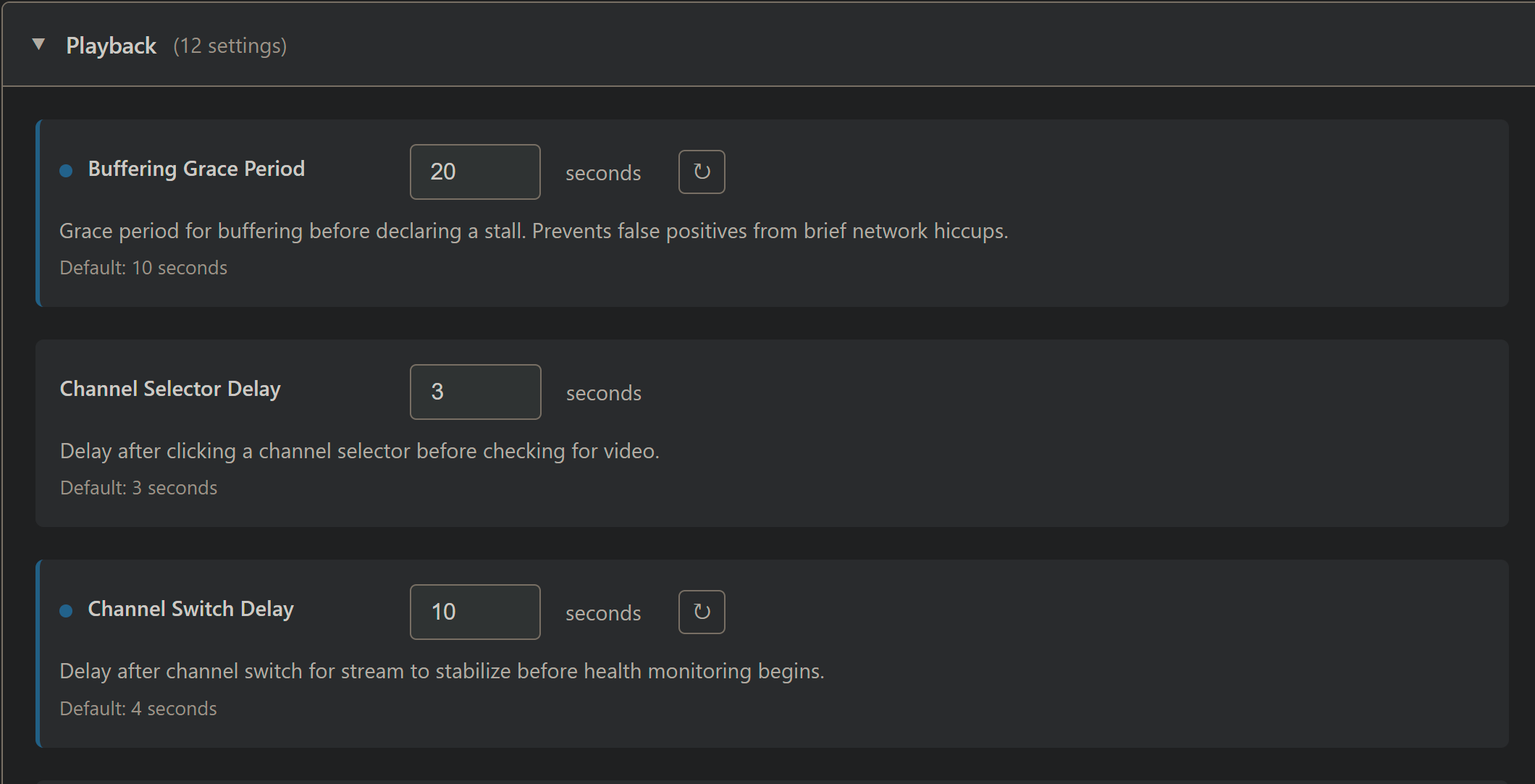
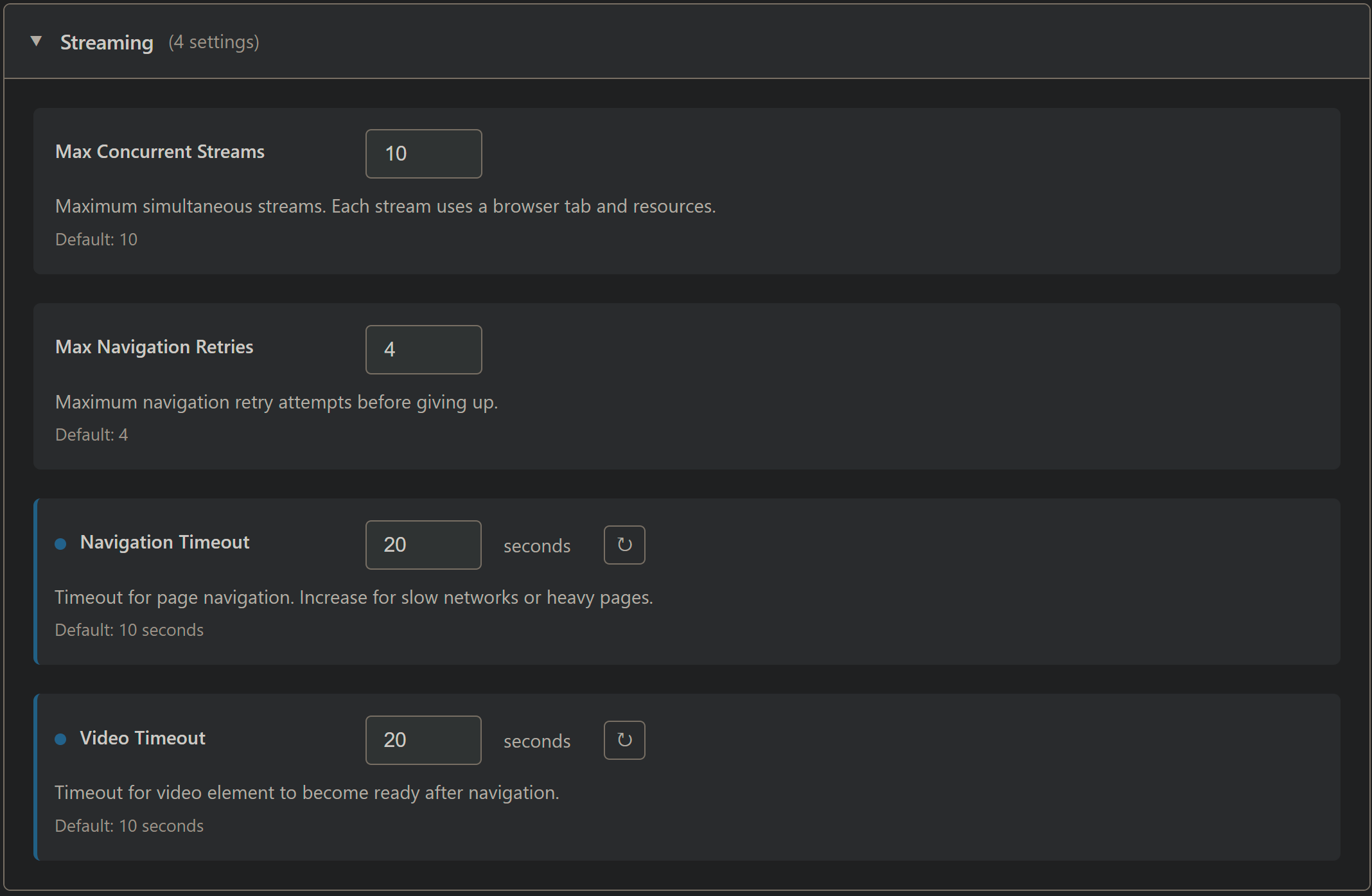
Also, for a provider like Sling several settings are too aggressive. Here are the adjustmens that worked for me (non-default shown in blue -- as you know):
Playback settings:
Streaming settings:
The stack needs to be stopped and restarted to apply those changes. With the above setup, the experience is similar to cc4c/ch4c, while benefitting from the reduced CPU requirements of this project.
One thing that may need a code fix though is Weatherscan. When I attempt to tune to it, PrismCast keeps resetting the connection. PrismCast is recognizing that it's a "static" page, but keeps looking for video elements -- so the page is reset again and again.
Logs for Weatherscan tune:
[2026/01/29 14:42:22.829] [wthrscn-e1npe8] Streaming Weatherscan (staticPage, FFmpeg).
[2026/01/29 14:42:24.837] [WARN] [wthrscn-e1npe8] Video element not found (attempt 1/3). Context: main page, frames: 1, videoCount: 0.
[2026/01/29 14:42:26.830] [WARN] [wthrscn-e1npe8] Video element not found (attempt 2/3). Context: main page, frames: 1, videoCount: 0.
[2026/01/29 14:42:26.831] [wthrscn-e1npe8] Re-searching frames for video element.
[2026/01/29 14:42:26.832] [WARN] [wthrscn-e1npe8] Re-search did not find video in any frame.
[2026/01/29 14:42:28.830] [WARN] [wthrscn-e1npe8] Video element not found (attempt 3/3). Context: main page, frames: 1, videoCount: 0.
[2026/01/29 14:42:28.830] [WARN] [wthrscn-e1npe8] Video element not found. Attempting page navigation...
[2026/01/29 14:42:49.375] [WARN] [wthrscn-e1npe8] Failed to reinitialize video after page navigation: Waiting for selector `video` failed.
[2026/01/29 14:42:49.375] [WARN] [wthrscn-e1npe8] Page navigation unsuccessful.
[2026/01/29 14:42:50.831] [WARN] [wthrscn-e1npe8] Video element not found (attempt 4/3). Context: main page, frames: 1, videoCount: 0.
[2026/01/29 14:42:50.831] [WARN] [wthrscn-e1npe8] Video element not found. Attempting page navigation...
[2026/01/29 14:43:11.585] [WARN] [wthrscn-e1npe8] Failed to reinitialize video after page navigation: Waiting for selector `video` failed.
[2026/01/29 14:43:11.586] [WARN] [wthrscn-e1npe8] Page navigation unsuccessful.
[2026/01/29 14:43:12.831] [WARN] [wthrscn-e1npe8] Video element not found (attempt 5/3). Context: main page, frames: 1, videoCount: 0.
[2026/01/29 14:43:12.831] [WARN] [wthrscn-e1npe8] Video element not found. Attempting page navigation...
[2026/01/29 14:43:33.579] [WARN] [wthrscn-e1npe8] Failed to reinitialize video after page navigation: Waiting for selector `video` failed.
[2026/01/29 14:43:33.579] [WARN] [wthrscn-e1npe8] Page navigation unsuccessful.
[2026/01/29 14:43:34.834] [WARN] [wthrscn-e1npe8] Video element not found (attempt 6/3). Context: main page, frames: 1, videoCount: 0.
[2026/01/29 14:43:34.834] [WARN] [wthrscn-e1npe8] Video element not found. Attempting page navigation...
[2026/01/29 14:43:34.834] [ERROR] [wthrscn-e1npe8] Exceeded maximum page navigations (3 in 15 minutes). Cannot recover without video element.
[2026/01/29 14:43:34.835] [wthrscn-e1npe8] Stream ended after 1m 13s (too many errors). Recoveries: 4 attempted, 0 succeeded.