
Im attempting this again I can have it run in Docker BUT was hoping for "native" Win11 I sort of had it running but not reliably So ive unistalled Node etc etc Killed docker for now and will retry installing on Win I'm not worried about seeing any pop ups as its running on a headless I5 with 32gb ram etc and a HDMI dummy plug which ran CC4C rather well and very quick to load etc.
Anyone else missing ESPN guide data? It was there yesterday, gone today. Fetching guide updates from the Channels admin page didn't fix it.
OK - I got it working with yttv; the key is that since the login button does not go to the overridden URL, I have to manually open a new chrome tab and log into yttv in the VNC (port 6080) window - that part is confusing to me - I guess the chrome browser is remembering the credentials and will open the URL to YTTV on subsequent attempts after I do this manually 1X?
So, 1 more question about all of this - is real-time transcoding occurring on PrismCast streams? It seems to be using a decent amount of CPU while watching - I am not sure if Intel HW transcoding is being performed or not since this is Unraid but I do have the Intel GPU Top plug-in
1 Like
So, 1 more question about all of this - is real-time transcoding occurring on PrismCast streams? It seems to be using a decent amount of CPU while watching - I am not sure if Intel HW transcoding is being performed or not since this is Unraid but I do have the Intel GPU Top plug-in
Not for video. For audio, we transcode to AAC - the CPU consumption is negligible for those elements. That's not the droid you're looking for.  Your CPU consumption is because driving video in Chrome and scraping it consumes CPU/GPU...it's the nature of the beast.
1 Like
Anyone else having issues with USA Network logging me out and having to re-authenticate after any period of inactivity?
Making some progress I think..... i can get NBC to play after reinstalling Nodejs and Prismcast etc and modifying my task scheduler Prismcast started after a reboot
So getting there slowly BUT when poking around i see this
Video quality preset. Determines capture resolution. Bitrate and frame rate can be further customized.
Your display cannot support this resolution. Streams will use 480p instead.
Default: 720p-high
This is via a Teamvier login which does allow Chrome window to pop up for login I have an HDMI dummy plug How do I get 720/1080 to the TV??
Has anyone figured out a way to get Closed Captions working with tools like this (for people who have no hearing)?
S i hooked up the Channels PC to the TV and fired up the Prismcast page and it still says 480p max........what am i missing??
I figured it out. Just needed to remap the channels in the admin page.
Significant update...
- Installation options have improved - you can use Homebrew if you're on macOS like me (see below). Docker support is now fully automated via release builds, based directly on the excellent work by @bnhf. I don’t personally use Docker, so I’d appreciate confirmation from Docker users that everything behaves as expected (see below for details).
- Hulu+Live TV is a provider that's available now.
- DisneyNOW and others are now available as well.
- The channels tab has been rethought a bit to scale to real world use. You can go into the channels tab and choose which channels you would like tuned by which provider. For example, I prefer CBS through my Paramount+ subscription, while I prefer CNN through the direct CNN site. Comedy Central, I use Hulu.
- Several bugfixes - notably the "login" button issue that I was hoping folks wouldn't notice before I fixed it.
If you’ve created user-defined channels that are now covered by predefined options, I recommend deleting those overrides and using the defaults. Predefined channels are what I test and maintain; overrides are entirely optional, but they do create long-term configuration debt for you as PrismCast evolves.
I really appreciate the feedback, enthusiasm, and passion around PrismCast. Almost every feature added since 1.0.0 has come from thoughtful, respectful discussion with this community.
My only ask is simple: please be kind, not demanding. PrismCast started as a project for my own needs, and I share it because I enjoy this community and wanted to give something back. Respectful feedback is always welcome; entitlement is not.
Thank you to everyone who’s shared encouragement or joy in using PrismCast—it genuinely keeps this project fun to work on.
1.2.0 (2026-02-07)
- New feature: Homebrew tap for macOS installation (
brew install hjdhjd/prismcast/prismcast). Upgrade it like any Homebrew package after that. - New feature: Automated Docker builds based on the contributions of @bnhf. Latest official release can always be installed from:
docker pull ghcr.io/hjdhjd/prismcast:latest. - New feature: Hulu support.
- Improvement: DisneyNOW, Hulu, Sling, and additional channels and providers added.
- Improvement: The channels tab has been rethought to handle multiple provider types. Now you can decide which provider you'd like to use for which channel, or override them all with a user-defined channel if you prefer. Note: I would strongly encourage users to embrace the defaults and not create user-defined channels unless they are necessary in your environment. The predefined channels represent what is tested and will be maintained. If you've defined channels previously that are now built into PrismCast, I would encourage you to streamline your environment and delete the user-defined channel and use the appropriate builtin version. You don't have to do this...but it will make your quality of life better as PrismCast evolves and your user-defined channels don't keep up with PrismCast's updates.
- Improvement: UI refinements.
- Behavior change: native capture mode is now disabled due to a Chrome bug that produces corrupt output after a few minutes. Hopefully Chrome addresses this in the future and I can make this available again.
- Housekeeping.
5 Likes
@bnhf If you want to try the Docker build, I'd appreciate it since I don't use it. I'd also love your feedback on how things are working for your use cases at this point.
2 Likes
Is native faster and just as reliable as FFmpeg? I know you have comments in the admin page that it might have issues but CC4C was always native. Guess I can try it out and see.
Yes and no. CC4C is "native" in that it pulls a WebM/opus stream from Chrome via puppeteer and then sends it right to Channels which then ingests it as MPEG-TS, despite that it's not, but Channels is a bit forgiving and will happily read Matroska-derived formats it seems. You don't need FFmpeg for that.
You do need FFmpeg if you want to drive an HLS backend, or something similar. Which is what I've build for PrismCast. HLS is a lot more architecturally forgiving of stream/signal issues and recovery, so when a connection needs to be reloaded, etc. it can do so a bit more gracefully and gives me more control over the things I care about. HLS also requires AAC audio rather than opus. That's where FFmpeg comes in - for audio, not video transcoding.
The native mode in PrismCast exists because for the last couple of years, Chrome/puppeteer has had an option to emit the very formats one would need natively to just do HLS. Except it's buggy and error prone and until the Chrome team gets to addressing it, assuming they do, it's not a viable long-term answer for something that wants to be HLS-first, as I do.
PrismCast fully supports the MPEG-TS model, if that's what you want. But it doesn't default to that and you're going to need to build your own M3U to do it, but you're welcome to do so. MPEG-TS is what Plex expects and all it supports, since it's looking for an HDHomeRun tuner and that's what we need to emulate to provide Plex tuner support. You can tune in any channel you would like in PrismCast, using MPEG-TS using http://prismcast/stream/abc as an example, just add it to your M3U and go. The complete documentation for PrismCast's API is right in the PrismCast webUI.
Well said.
3 Likes
Do we need to uninstall the node version if we're switching to homebrew? And if so, what steps do we take to uninstall? npm uninstall prismcast didn't seem to do anything.
EDIT: ok, maybe it did, but the launchagent was still running so killing that and trying to restart it, it seems to be gone.
Do we need to uninstall the node version if we're switching to homebrew? And if so, what steps do we take to uninstall? npm uninstall prismcast didn't seem to do anything
On macOS only:
If you installed locally:
npm uninstall prismcast
If you installed globally:
npm uninstall -g prismcast
Then:
brew install hjdhjd/prismcast/prismcast
In the future, you'd do brew upgrade or brew upgrade prismcast.
2 Likes
I got it installed. Installed as a service, started the service, but it's not running
➜  ~ prismcast service status
PrismCast Service Status
────────────────────────────────────────
Platform:        darwin
Service manager: launchd
Service file:    /Users/scott/Library/LaunchAgents/com.github.hjdhjd.prismcast.plist
Installed:       Yes
Running:         No
➜  ~ prismcast service start
Starting PrismCast service...
Service started successfully.
➜  ~ prismcast service status
PrismCast Service Status
────────────────────────────────────────
Platform:        darwin
Service manager: launchd
Service file:    /Users/scott/Library/LaunchAgents/com.github.hjdhjd.prismcast.plist
Installed:       Yes
Running:         No
EDIT - It was a MACOS secutrity setting. I had to turn Node on in App Management section.
Thank you for the detailed explanation of why native doesn't work.
I'm giving this a full stress test with the Olympics on USA because I'm using prism for all those recordings as primary, so far so good with FFmpeg. I'm recording basically everything except hockey and curling on USA for that (it's a lot of recordings). Will let you know how it goes!
Does the new version use the espn links or does it still default to Disney plus?
@hjd on an m4 16gb Mac mini how many streams concurrently do you think it could handle at once? Trying to get an idea for football season next year if it’s viable for multiview.
Thank you for your work sir!
1 Like
Ok I've got the new homebrew version working, but can't get any of the ESPN channels to work in Channels. I've reset settings, and verified I am logged in in Chrome. I had these channels manually mapped in the old version, but deleted that when I upgraded. Thoughts?
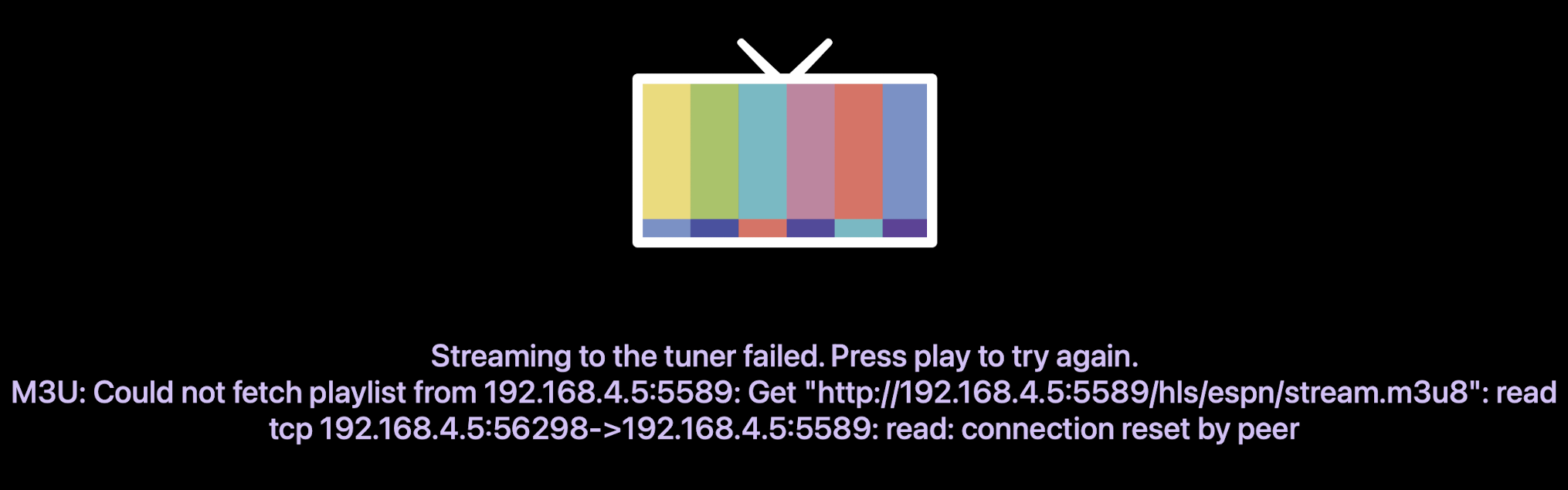
And similar message in Channels logs
2026/02/07 19:37:49.324084 [ERR] Could not start stream for M3U-PrismCast ch9588 ESPN: M3U: Could not fetch playlist from 192.168.4.5:5589: Get "http://192.168.4.5:5589/hls/espn/stream.m3u8": EOF
Prismcast doesn't have anything in the log
So dumb question.. I uninstalled and reinstalled using brew, but how can i be sure it actually upgraded? I can't find a version listed anywhere any only thing I see on the top is the 1.1 ----> 1.2 link, no where else does it show the version number? Is there another way to check?