
Tried using Project On-Click to install this, but dvr box does not allow typing. When I click on it, it only shows a second dropdown choice. I did do the clear cached images and files tip you posted in the other topic.
1 Like
So are you saying that neither of the dropdown choices are correct for your servers? Is this using the "classic" dashboard or WebUI+? Not having the correct DVRs defined in your env vars is something you should definitely fix.
Either way, that's defined by your OliveTin env vars. If you have a single DVR defined then you'll have a field that allows data entry, with that server as the default. If you've defined multiple DVRs then it's a dropdown.
Feel free to post your current env vars if you have questions (might require a redaction or two)...
1 Like
It's on the "classic" dashboard. If I use any of the other buttons, that I don't already have installed, they prepopulate correctly with my dvr.
Right on -- I see the issue now. I'm building a new container as I write this, which should be available to pull in about 15 minutes. Thanks for reporting this!
EDIT: Re-pull and redeploy
That's fixed, thanks. Now I get this error;
exit status 1
jq: error (at :0): Cannot index string with string "Name"
JSON response from http://192.168.88.240:9000/api/stacks/create/standalone/string?endpointId=:
{
"message": "Invalid JWT token",
"details": "Unauthorized"
}
false
Let's move this discussion over to the Project One-Click thread. That error indicates a problem with your env vars, so if you could post an OliveTin Post-Install Healthcheck in that thread, we'll get it sorted out. Needed redactions are handled automatically with the healthcheck output.
Thanks for adding this...when you're ready with the PR for Docker/containers, I look forward to incorporating it.
Any other observations from your experience?
No problem, I'll submit a PR as soon as I'm confident we have a container that functions in multiple setups.
If someone is not interested in using any of the standard channels you've included, is it possible to use an independent M3U file, rather than the in-built playlist -- like what we've been using with cc4c or ch4c?
For example I have premium Sling channels, which is primarily what I want to use. It's a one-time login, and then all the channels are good to go. When I went from testing cc4c to ch4c, a couple of quick finds and replaces was all that was needed to move the "text" M3U from one to the other.
Is there anyway to craft a URL, for use in an M3U, that doesn't require the channel to already be setup through the PrismCast interface? Or if not, is that something you'd be willing to add?
1 Like
See the Configuration tab in the PrismCast UI - under backup. You can save/restore your custom channels. Importing M3Us into PrismCast should be straightforward as well...and not quite what you want, but you can save/restore custom channels. Internally, it's all a JSON anyway. I think that's a useful future feature potentially...but ultimately this is a one-time exercise for most users, no?
The ability to tune a bespoke channel that's not preconfigured...doable, but from an end user perspective it can easily become a maintenance mess. What's the use case where that makes sense? Can you help me better understand it?
Current thinking:
- If you don't want any of the preconfigured PrismCast channels, you can disable them in Channels DVR.
- If you want to override any of the preconfigured PrismCast channels, you can - just add the same channel key as a custom channel and it will override the builtin one.
- The benefit of creating and maintaining custom channels in PrismCast is that no restarts are needed. You can add/remove/tweak the profiles and use them right away. If you add/remove, you will need to reload the M3U on Channels DVR so it's aware.
1 Like
So I've been playing around with this a little in Windows Docker and have a couple of observations.
The preprogrammed channels work fine and I was able to correct the Golf Channel url so that it also plays well.
I was also able to add the Weatherstar 4K channel as a static page. But I've noticed that for Channels to show it in the guide, I have to first save it with the "auto" profile, then change it to static.
I tried to add a Spectrum channel that works in CC4C, but it doesn't here. The url is https://watch.spectrum.net/livetv?tmsid=64593 for the Paramount channel. When I add it and try to watch, it does not open Chrome.
Finally, I tried to add a channel from Fruitdeeplinks (another project here in Channels) and it opened the Peacock site, but then I got the "little kitty" page saying something went wrong. This url is http://192.168.88.240:6655/api/lane/3/launch?deeplink_format=http.
The problem I have is that I can't get some of the channels that I want, and that work in CC4C, here. I would like to have all of these in one project. Tagging @KineticMan and @bnhf here for their information.
1 Like
For people looking to use PrismCast with the multiple pre-defined websites, and provider credentials, I believe you're on the right track.
However, for those of us using streaming websites like Sling, YouTubeTV and even Weatherscan, a slightly different setup is needed.
Let's take my use case as an example:
I have a subscription to a set of Sling Premium channels that I'd like to use with PrismCast. Also, I'd like to be able to view Weatherscan. I'm not particularly interested in any of the pre-defined PrismCast channels -- as I have those well covered through other sources.
So, I converted a cc4c M3U file I've been using into a JSON to import into PrismCast, and M3U text to paste into a Custom CDVR Source.
The source cc4c M3U looks like this:
#EXTM3U

#EXTINF:-1 channel-id="WTHRSCN" tvc-guide-stationid="21586",Weatherscan
chrome://cc4c2:5589/stream?url=https://v2.weatherscan.net

#EXTINF:-1 channel-id="STZHD" tvc-guide-stationid="34941",Starz HD
chrome://cc4c2:5589/stream?url=https://watch.sling.com/1/channel/1a3c345b84b149918e0bad8f797df70a/watch

#EXTINF:-1 channel-id="STZHDP" tvc-guide-stationid="34949",Starz HD West
chrome://cc4c2:5589/stream?url=https://watch.sling.com/1/channel/8a84458592844ff5849712ef7766fb4e/watch

#EXTINF:-1 channel-id="STZKHD" tvc-guide-stationid="57581",Starz Kids & Family HD
chrome://cc4c2:5589/stream?url=https://watch.sling.com/1/channel/148a1e391db94edf96bf25e25beb307d/watch

#EXTINF:-1 channel-id="STZCHD" tvc-guide-stationid="57569",Starz Comedy HD
chrome://cc4c2:5589/stream?url=https://watch.sling.com/1/channel/d96b102ac5c54967bf56b8b57e20c84e/watch

#EXTINF:-1 channel-id="STZEHD" tvc-guide-stationid="57573",Starz Edge HD
chrome://cc4c2:5589/stream?url=https://watch.sling.com/1/channel/1535e572f07348159d8924d58200690e/watch

#EXTINF:-1 channel-id="STRZIBH" tvc-guide-stationid="67235",Starz in Black HD
chrome://cc4c2:5589/stream?url=https://watch.sling.com/1/channel/23a6ea3c163a47f390f73900ccc76bc1/watch

#EXTINF:-1 channel-id="STRZCIH" tvc-guide-stationid="67236",Starz Cinema HD
chrome://cc4c2:5589/stream?url=https://watch.sling.com/1/channel/0eedb59656d243da914fef990a8db903/watch

#EXTINF:-1 channel-id="STZENHD" tvc-guide-stationid="36225",Starz Encore HD
chrome://cc4c2:5589/stream?url=https://watch.sling.com/1/channel/ed5d0f85928f45249f8a67c9746a80b7/watch

#EXTINF:-1 channel-id="STZENCP" tvc-guide-stationid="17125",Starz Encore West
chrome://cc4c2:5589/stream?url=https://watch.sling.com/1/channel/a0515fde0c074dc389981e8881874aae/watch

#EXTINF:-1 channel-id="STZENCL" tvc-guide-stationid="14764",Starz Encore Classic
chrome://cc4c2:5589/stream?url=https://watch.sling.com/1/channel/2230d31d16d541c08e654d4a11863d2c/watch

#EXTINF:-1 channel-id="STZEWSS" tvc-guide-stationid="102906",Starz Encore Westerns
chrome://cc4c2:5589/stream?url=https://watch.sling.com/1/channel/73ab11e5664241a9811e7e22602bfda9/watch

#EXTINF:-1 channel-id="STZENSU" tvc-guide-stationid="14766",Starz Encore Suspense
chrome://cc4c2:5589/stream?url=https://watch.sling.com/1/channel/04e4a4f1e0ec4dfba961414197e57d7f/watch

#EXTINF:-1 channel-id="STZENBK" tvc-guide-stationid="14870",Starz Encore Black
chrome://cc4c2:5589/stream?url=https://watch.sling.com/1/channel/1ec67d324b564a528f6901ed8e09334e/watch

#EXTINF:-1 channel-id="SZEAHD" tvc-guide-stationid="72015",Starz Encore Action HD
chrome://cc4c2:5589/stream?url=https://watch.sling.com/1/channel/8aed8223a6104b53b24f03555fc933a9/watch

#EXTINF:-1 channel-id="STZENFS" tvc-guide-stationid="102903",Starz Encore Family
chrome://cc4c2:5589/stream?url=https://watch.sling.com/1/channel/22076462a8124832967e30e0f9f92213/watch

#EXTINF:-1 channel-id="INDIEHD" tvc-guide-stationid="65795",IndiePlex HD
chrome://cc4c2:5589/stream?url=https://watch.sling.com/1/channel/7a17fd0c15754658885b368a0b273565/watch

#EXTINF:-1 channel-id="RETROHD" tvc-guide-stationid="65791",RetroPlex HD
chrome://cc4c2:5589/stream?url=https://watch.sling.com/1/channel/9ad3916eb22d4c169c7713afa5ee0f2b/watch

#EXTINF:-1 channel-id="MPLEXHD" tvc-guide-stationid="83075",MoviePlex HD
chrome://cc4c2:5589/stream?url=https://watch.sling.com/1/channel/deba2421b6ff44478320b2c60051f1d7/watch
I've added an Action in OliveTin-for-Channels to POST a JSON to PrismCast that looks like this, based on the above M3U as an input:
{
  "indiehd": {
    "name": "IndiePlex HD",
    "url": "https://watch.sling.com/1/channel/7a17fd0c15754658885b368a0b273565/watch",
    "stationId": "65795"
  },
  "mplexhd": {
    "name": "MoviePlex HD",
    "url": "https://watch.sling.com/1/channel/deba2421b6ff44478320b2c60051f1d7/watch",
    "stationId": "83075"
  },
  "retrohd": {
    "name": "RetroPlex HD",
    "url": "https://watch.sling.com/1/channel/9ad3916eb22d4c169c7713afa5ee0f2b/watch",
    "stationId": "65791"
  },
  "strzcih": {
    "name": "Starz Cinema HD",
    "url": "https://watch.sling.com/1/channel/0eedb59656d243da914fef990a8db903/watch",
    "stationId": "67236"
  },
  "strzibh": {
    "name": "Starz in Black HD",
    "url": "https://watch.sling.com/1/channel/23a6ea3c163a47f390f73900ccc76bc1/watch",
    "stationId": "67235"
  },
  "stzchd": {
    "name": "Starz Comedy HD",
    "url": "https://watch.sling.com/1/channel/d96b102ac5c54967bf56b8b57e20c84e/watch",
    "stationId": "57569"
  },
  "stzehd": {
    "name": "Starz Edge HD",
    "url": "https://watch.sling.com/1/channel/1535e572f07348159d8924d58200690e/watch",
    "stationId": "57573"
  },
  "stzenbk": {
    "name": "Starz Encore Black",
    "url": "https://watch.sling.com/1/channel/1ec67d324b564a528f6901ed8e09334e/watch",
    "stationId": "14870"
  },
  "stzencl": {
    "name": "Starz Encore Classic",
    "url": "https://watch.sling.com/1/channel/2230d31d16d541c08e654d4a11863d2c/watch",
    "stationId": "14764"
  },
  "stzencp": {
    "name": "Starz Encore West",
    "url": "https://watch.sling.com/1/channel/a0515fde0c074dc389981e8881874aae/watch",
    "stationId": "17125"
  },
  "stzenfs": {
    "name": "Starz Encore Family",
    "url": "https://watch.sling.com/1/channel/22076462a8124832967e30e0f9f92213/watch",
    "stationId": "102903"
  },
  "stzenhd": {
    "name": "Starz Encore HD",
    "url": "https://watch.sling.com/1/channel/ed5d0f85928f45249f8a67c9746a80b7/watch",
    "stationId": "36225"
  },
  "stzensu": {
    "name": "Starz Encore Suspense",
    "url": "https://watch.sling.com/1/channel/04e4a4f1e0ec4dfba961414197e57d7f/watch",
    "stationId": "14766"
  },
  "stzewss": {
    "name": "Starz Encore Westerns",
    "url": "https://watch.sling.com/1/channel/73ab11e5664241a9811e7e22602bfda9/watch",
    "stationId": "102906"
  },
  "stzhd": {
    "name": "Starz HD",
    "url": "https://watch.sling.com/1/channel/1a3c345b84b149918e0bad8f797df70a/watch",
    "stationId": "34941"
  },
  "stzhdp": {
    "name": "Starz HD West",
    "url": "https://watch.sling.com/1/channel/8a84458592844ff5849712ef7766fb4e/watch",
    "stationId": "34949"
  },
  "stzkhd": {
    "name": "Starz Kids & Family HD",
    "url": "https://watch.sling.com/1/channel/148a1e391db94edf96bf25e25beb307d/watch",
    "stationId": "57581"
  },
  "szeahd": {
    "name": "Starz Encore Action HD",
    "url": "https://watch.sling.com/1/channel/8aed8223a6104b53b24f03555fc933a9/watch",
    "stationId": "72015"
  },
  "wthrscn": {
    "name": "Weatherscan",
    "url": "https://v2.weatherscan.net",
    "stationId": "21586"
  }
}
This Action also outputs a text-based M3U that looks like this, which can then be pasted into the CDVR Custom Source in place of the standard PrismCast "playlist" URL:
#EXTM3U

#EXTINF:-1 channel-id="INDIEHD" tvc-guide-stationid="65795",IndiePlex HD
http://convertible-pc3:5589/hls/indiehd/stream.m3u8

#EXTINF:-1 channel-id="MPLEXHD" tvc-guide-stationid="83075",MoviePlex HD
http://convertible-pc3:5589/hls/mplexhd/stream.m3u8

#EXTINF:-1 channel-id="RETROHD" tvc-guide-stationid="65791",RetroPlex HD
http://convertible-pc3:5589/hls/retrohd/stream.m3u8

#EXTINF:-1 channel-id="STRZCIH" tvc-guide-stationid="67236",Starz Cinema HD
http://convertible-pc3:5589/hls/strzcih/stream.m3u8

#EXTINF:-1 channel-id="STRZIBH" tvc-guide-stationid="67235",Starz in Black HD
http://convertible-pc3:5589/hls/strzibh/stream.m3u8

#EXTINF:-1 channel-id="STZCHD" tvc-guide-stationid="57569",Starz Comedy HD
http://convertible-pc3:5589/hls/stzchd/stream.m3u8

#EXTINF:-1 channel-id="STZEHD" tvc-guide-stationid="57573",Starz Edge HD
http://convertible-pc3:5589/hls/stzehd/stream.m3u8

#EXTINF:-1 channel-id="STZENBK" tvc-guide-stationid="14870",Starz Encore Black
http://convertible-pc3:5589/hls/stzenbk/stream.m3u8

#EXTINF:-1 channel-id="STZENCL" tvc-guide-stationid="14764",Starz Encore Classic
http://convertible-pc3:5589/hls/stzencl/stream.m3u8

#EXTINF:-1 channel-id="STZENCP" tvc-guide-stationid="17125",Starz Encore West
http://convertible-pc3:5589/hls/stzencp/stream.m3u8

#EXTINF:-1 channel-id="STZENFS" tvc-guide-stationid="102903",Starz Encore Family
http://convertible-pc3:5589/hls/stzenfs/stream.m3u8

#EXTINF:-1 channel-id="STZENHD" tvc-guide-stationid="36225",Starz Encore HD
http://convertible-pc3:5589/hls/stzenhd/stream.m3u8

#EXTINF:-1 channel-id="STZENSU" tvc-guide-stationid="14766",Starz Encore Suspense
http://convertible-pc3:5589/hls/stzensu/stream.m3u8

#EXTINF:-1 channel-id="STZEWSS" tvc-guide-stationid="102906",Starz Encore Westerns
http://convertible-pc3:5589/hls/stzewss/stream.m3u8

#EXTINF:-1 channel-id="STZHD" tvc-guide-stationid="34941",Starz HD
http://convertible-pc3:5589/hls/stzhd/stream.m3u8

#EXTINF:-1 channel-id="STZHDP" tvc-guide-stationid="34949",Starz HD West
http://convertible-pc3:5589/hls/stzhdp/stream.m3u8

#EXTINF:-1 channel-id="STZKHD" tvc-guide-stationid="57581",Starz Kids & Family HD
http://convertible-pc3:5589/hls/stzkhd/stream.m3u8

#EXTINF:-1 channel-id="SZEAHD" tvc-guide-stationid="72015",Starz Encore Action HD
http://convertible-pc3:5589/hls/szeahd/stream.m3u8

#EXTINF:-1 channel-id="WTHRSCN" tvc-guide-stationid="21586",Weatherscan
http://convertible-pc3:5589/hls/wthrscn/stream.m3u8
This works well, although there are some things to know, and settings changes needed for Sling that could be relevant to similar setups others might be trying.
First, as far as login goes, using VNC or noVNC (before even attempting to tune) and navigating to the provider's website independently is the way to go.
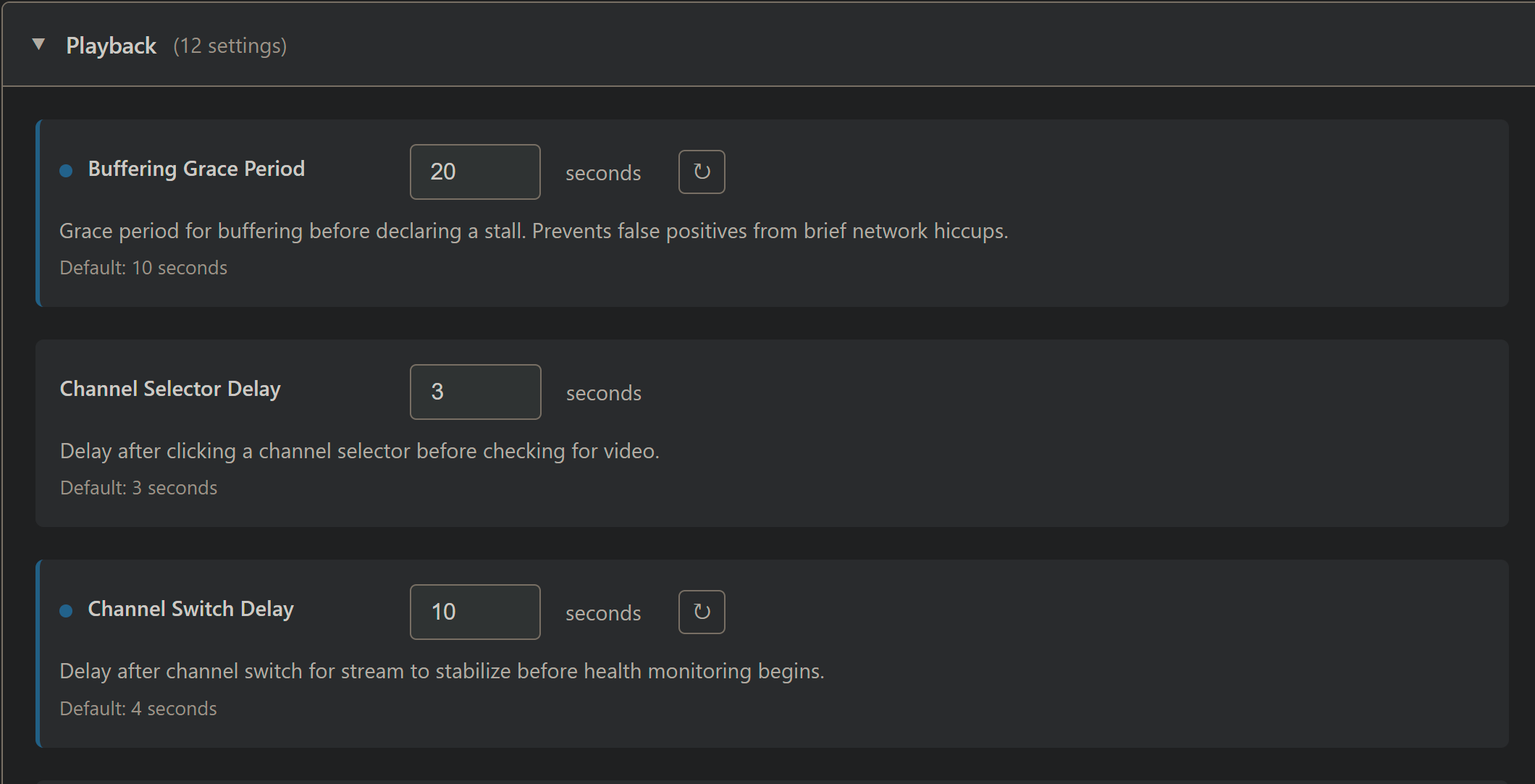
Also, for a provider like Sling several settings are too aggressive. Here are the adjustmens that worked for me (non-default shown in blue -- as you know):
Playback settings:
Streaming settings:
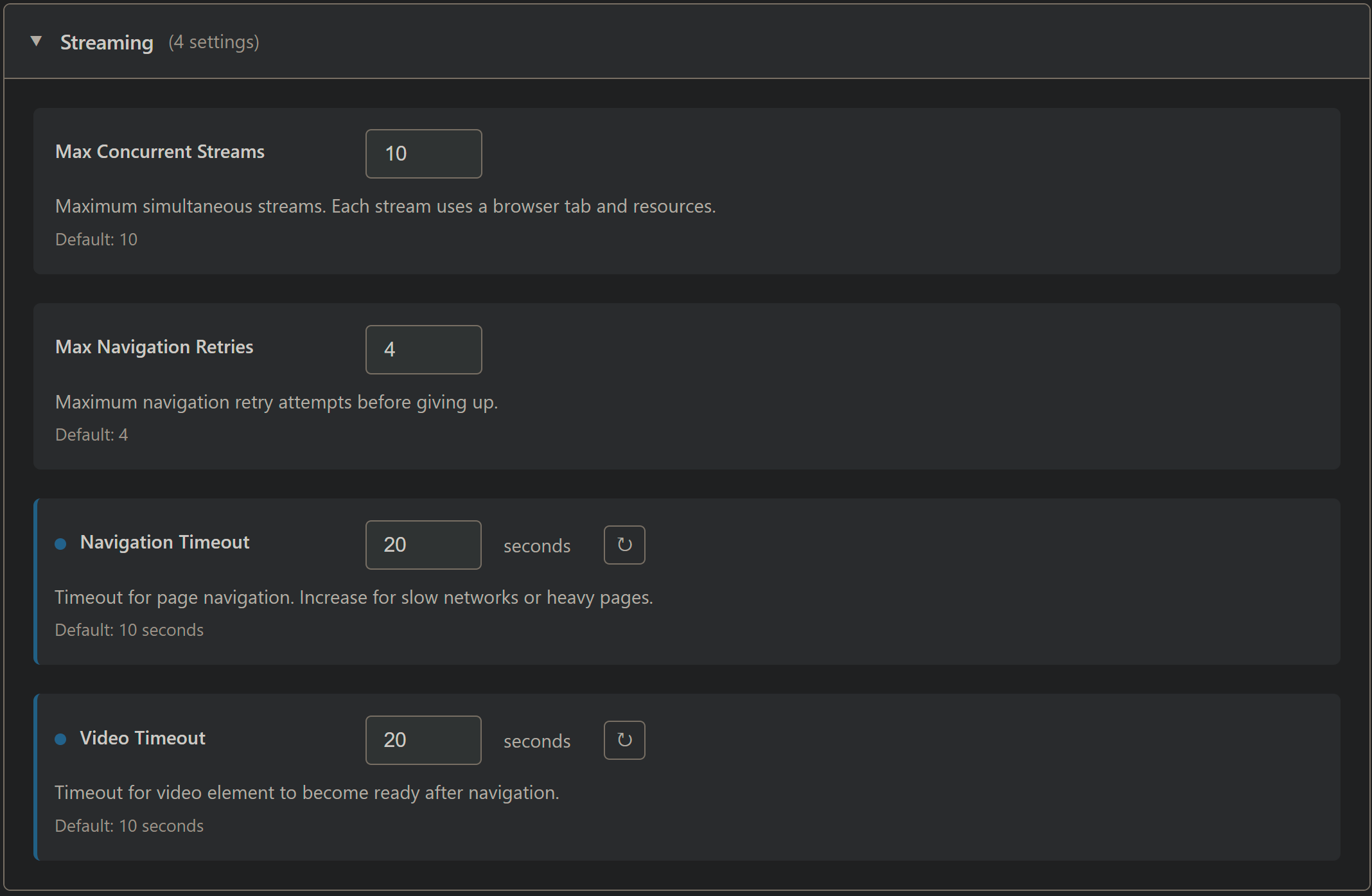
The stack needs to be stopped and restarted to apply those changes. With the above setup, the experience is similar to cc4c/ch4c, while benefitting from the reduced CPU requirements of this project.
One thing that may need a code fix though is Weatherscan. When I attempt to tune to it, PrismCast keeps resetting the connection. PrismCast is recognizing that it's a "static" page, but keeps looking for video elements -- so the page is reset again and again.
Logs for Weatherscan tune:
[2026/01/29 14:42:22.829] [wthrscn-e1npe8] Streaming Weatherscan (staticPage, FFmpeg).
[2026/01/29 14:42:24.837] [WARN] [wthrscn-e1npe8] Video element not found (attempt 1/3). Context: main page, frames: 1, videoCount: 0.
[2026/01/29 14:42:26.830] [WARN] [wthrscn-e1npe8] Video element not found (attempt 2/3). Context: main page, frames: 1, videoCount: 0.
[2026/01/29 14:42:26.831] [wthrscn-e1npe8] Re-searching frames for video element.
[2026/01/29 14:42:26.832] [WARN] [wthrscn-e1npe8] Re-search did not find video in any frame.
[2026/01/29 14:42:28.830] [WARN] [wthrscn-e1npe8] Video element not found (attempt 3/3). Context: main page, frames: 1, videoCount: 0.
[2026/01/29 14:42:28.830] [WARN] [wthrscn-e1npe8] Video element not found. Attempting page navigation...
[2026/01/29 14:42:49.375] [WARN] [wthrscn-e1npe8] Failed to reinitialize video after page navigation: Waiting for selector `video` failed.
[2026/01/29 14:42:49.375] [WARN] [wthrscn-e1npe8] Page navigation unsuccessful.
[2026/01/29 14:42:50.831] [WARN] [wthrscn-e1npe8] Video element not found (attempt 4/3). Context: main page, frames: 1, videoCount: 0.
[2026/01/29 14:42:50.831] [WARN] [wthrscn-e1npe8] Video element not found. Attempting page navigation...
[2026/01/29 14:43:11.585] [WARN] [wthrscn-e1npe8] Failed to reinitialize video after page navigation: Waiting for selector `video` failed.
[2026/01/29 14:43:11.586] [WARN] [wthrscn-e1npe8] Page navigation unsuccessful.
[2026/01/29 14:43:12.831] [WARN] [wthrscn-e1npe8] Video element not found (attempt 5/3). Context: main page, frames: 1, videoCount: 0.
[2026/01/29 14:43:12.831] [WARN] [wthrscn-e1npe8] Video element not found. Attempting page navigation...
[2026/01/29 14:43:33.579] [WARN] [wthrscn-e1npe8] Failed to reinitialize video after page navigation: Waiting for selector `video` failed.
[2026/01/29 14:43:33.579] [WARN] [wthrscn-e1npe8] Page navigation unsuccessful.
[2026/01/29 14:43:34.834] [WARN] [wthrscn-e1npe8] Video element not found (attempt 6/3). Context: main page, frames: 1, videoCount: 0.
[2026/01/29 14:43:34.834] [WARN] [wthrscn-e1npe8] Video element not found. Attempting page navigation...
[2026/01/29 14:43:34.834] [ERROR] [wthrscn-e1npe8] Exceeded maximum page navigations (3 in 15 minutes). Cannot recover without video element.
[2026/01/29 14:43:34.835] [wthrscn-e1npe8] Stream ended after 1m 13s (too many errors). Recoveries: 4 attempted, 0 succeeded.
1 Like
So I've got this running on Windows 11, I can get to the config web page and log into the channels that I want no problem. But none of the channels will launch.
Here's the error that I get:
[2026/01/29 16:29:05.290] [ERROR] [nbc-bqk3q7] Stream setup failed for https://www.nbc.com/live?brand=nbc&callsign=nbc: Stream initialization timed out.
It says Chrome ready when it starts up in the logs and I can see it launching Chrome with a video-capture extension tab but nothing happens. I'm running the latest Chrome version, checked for updates and downloaded it before trying this. Also tried uninstalling/reinstalling Chrome (with browsing data deletion).
EDIT: just wanted to add that I can RDP into my server and go to abc.com, usanetwork.com etc. and play live streams from Chrome with no issue. It is headless but I have a dummy HDMI plug to make it think it has a display. I used to run cc4c long ago but gave up when Chrome updates kept messing things up.
I have this running on Windows 11 and it seems to be doing just fine with USA Network Channels. I was wondering though, is there a way I can have this run headless. Like, is it possible to have this service run completely hidden and no chrome window pop up on my desktop as well. I've figured out how to get the command prompt and chrome window to automatically minimize after they startup, but it would be nice if there was a way these could run entirely hidden.
You'll never avoid the chrome window popping up, it's always going to happen. But it's really strange that your setup works and mine doesn't, I don't know what's going on here.
1 Like
So I got it working on a headless server, had to disable GPU accel.
Went into C:\Users\David\AppData\Roaming\npm\node_modules\prismcast\dist\browser, edited index.js, added these flags to chrome startup args:
"--disable-gpu",
"--disable-software-rasterizer"
This does not seem to radically increase CPU usage but it's the only way I can get it to work.
Also changed the invalid pkill command to "taskkill /F /IM chrome.exe"
But I have a remaining problem, which is that prismcast does not shutdown the running chrome tab that's streaming the video when I exit out of the channel in Channels. It's still streaming (minimized) and I can't find the code that's supposed to shut it down. ffmpeg goes away but the tab doesn't.
2 Likes
If you're not able to utilize the GPU, and the performance difference is modest anyway, wouldn't it make more sense to use the Docker version I created?
I've been playing around with both myself -- installing it directly and using the Docker version. It's working fine for me either way, with Docker version being the easier to install and maintain from a user perspective.
Does it have to be Google Chrome or can I use Brave?
Chrome only.
2 Likes
There's actually code that looks for Brave as a fallback but I don't know if it works. Saw that when I was troubleshooting.
Oh and I was wrong about having to disable the GPU, I had forgotten that I had my server connected to an HDMI port on my TV that wasn't active. Once I put my dummy HDMI plug in it works fine with GPU acceleration.