Introducing PrismCast: Browser-based Live TV Capture for Channels DVR and Plex

I'll keep playing with it to see if I can narrow down the situation, but if anyone has any suggestions, I'm open to them.

@jator I can’t speak to most of this since I don’t run these solutions, and the community will likely be more helpful there.

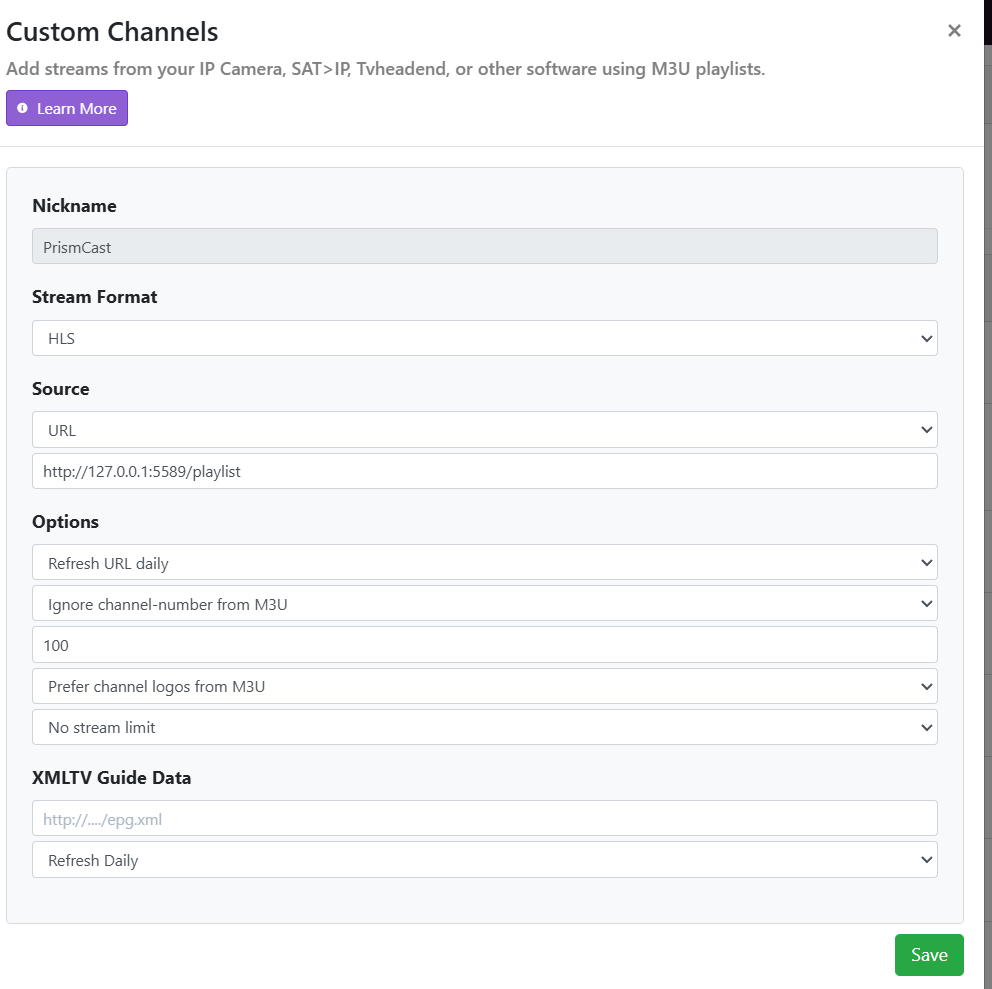
That said, if a PrismCast site isn’t tuning in an environment where it should, the first thing I’d check is whether the custom channel was configured exactly per the PrismCast instructions...in particular ensuring the stream format is set to HLS rather than MPEG-TS in Channels DVR for this custom source.

PrismCast was heavily inspired by CC4C, but I wouldn't conflate them. There are material differences for Channels DVR. Settings that work for CC4C may not work for PrismCast.

@hjd thanks for the playSelector implementation on apiMultiVideo :slight_smile:

I am testing 1.4.0 in Unraid and I have not yet seen the same stuttering / async. video issues - it may be worthwhile for other docker users to try 1.4.0 and chime in...

1 Like

Using 1.4.0/Linux/Docker and no video issues so far. The app is much tighter on the streaming workflow. :smile:

Thanks @hjd. I confirmed that PrismCast is setup per instructions (see below). I did do a couple of scenarios and if I feed PrismCast directly to Emby, or if I send PrismCast from my Backend Channels DVR server but bypass Threadfin to Emby, it then works. So the handoff between Threadfin and Emby/TiviMate seems to be the problem even though my frontend Channels DVR works fine with the Threadfin feed.

EDIT - Was able to use the Frontend Channels DVR (which derives it's sources from Backend CDVR through Threadfin) as the source to feed into Emby and it appears to work. Reaffirms that this is an issue between Threadfin and Emby (even though other sources such as ADBTuner pass through just fine).

Does everyone get

format/protocol: mpegts

Even when using HLS?

Also if using ‘Stream’ or while remote streaming. If you’re injesting the HLS streams, will it still remux or it’ll see its hls and just use that? Obviously when it’s mpegts channels likes to remux to HLS when set to ‘Stream’ or while streaming remotely.

1 Like

Freaking great now he adds an easy update option....LOL ....NOT COMPLAINING AT ALL....Ill manually update to get 1.4 and then use the new update option from now on sweet!!!!

Has anyone else had issues trying to watch/record sports events on SEC Network or any of the other ESPN channels? I've recorded 2 UF basketball games with this setup. The game starts just fine, but then after 30 min or so when it comes out of commercial it switched to another game. It may or may not switch back after another commercial a little later.

Running 1.4.0 in Node.js on Windows Server 2019 Datacenter. All is smooth. No more stutter, sync, or dropped frame issues… Thank you so much. Prismcast is amazing!!!

So it wasn't just me. Yes I saw that about 2 weeks ago, though I record using ADBTuner now and don't see the same issue.

1 Like

Thanks! - 1.4.0 is working well and I have switched to this version for home use! Will update in the future with any findings

So you had the issue in Prism but not ADBTuner? I haven't purchased all the hardware for ADBTuner, trying to use the software solutions. I can still watch through the ESPN app, but odd that it happens. If there are any logs that can help diagnose, I'm willing to test it more and share, but for now, I know I can't rely on it to record sporting events without issues.

Been doing abit of testing for prismcast/cc4c.

Manually added the mimeType: 'video/x-matroska;codecs=hvc1.1.6.L120.90' to my puppeteer-stream node_module and set my testing main.js up accordingly.

Have stream a 1080p50 souce for 90 minutes with almost no hiccups.

I know the native fmp4 segmenter is quite buggy atm, but from my small amount of testing so far - this seems quite stable.

Could be a good optional/experimental setting for those who want to risk abit of instability to get abit more efficiency, as chrome capture/prismcast tends to be a little more inefficient when compared to a raw source/stream.

1 Like

Correct. I've watched things on Prismcast for ESPN and not noticed the "bounce", but I know of situations that it did happen when using Prismcast. But no observed issues with ADBTuner.

I'm archiving the UF Basketball games and ADBTuner has a better PQ and I had them setup as my backup to TVE previously, so now they are my primary for recording and I use Prismcast to watch when I know I am at risk my 3 tuner limit is close to being hit for ADBTuner.

1 Like

I'm running on a M2 Mac Mini, and using 720-high at 6Mbps seems to work well. I've been making a bunch of longer recordings (most of them of the Olympics on USA Network) and they do all end up being 12Mbps when prismcast is set for 6Mbps. The recordings are somewhat larger than with either OTA or TVE, but they look good and play back fine. I just wish there was some way to get closed captions encoded into the streams with prismcast.

I'm unable to capture 1080p - saw this in the log file:

[2026/02/20 13:46:15.102] [WARN] Display supports maximum 1920×939. Configured 1080p preset will use 720p-high instead.

Does anyone know a way to increase the display size or otherwise fix this?

Glad it's working well for you!

On the bitrate…the 720p High preset defaults to 12 Mbps, so if you haven't manually changed it, the 12Mbps recordings are exactly what's expected. If you did lower it to 6 Mbps, Chrome's MediaRecorder uses variable bitrate encoding and treats the configured value as a target hint, not a hard ceiling, so high-motion content like sports will exceed it. Chrome sets the peak at roughly 2x the target, which lines up with what you're seeing.

On closed captions…I've looked into this and unfortunately it's not currently feasible. Channels DVR doesn't support WebVTT subtitle tracks from custom M3U/HLS sources (they're silently ignored). The only caption format Channels DVR seems to support in my testing is CEA-608 embedded in H.264, which is the legacy broadcast format used by HDHomeRun tuners.

TL;DR: it’s something that’s on my radar, but I don’t see a straightforward path to get there with how Channels DVR handles custom sources today. Who knows what the future holds though.

Does anyone know a way to increase the display size or otherwise fix this?

It’s not broken. :smile: Set your display to something larger than 1080p, as the documentation states. Please look at the builtin PrismCast documentation for common issues like this (there’s a whole section under the Help tab about it).

my bad - didn't see that information but now I have it capturing at 1080p - thanks!

Getting this on ABC NYC was working fine the other day
[ERROR] [abc-0lg0zm] Stream setup failed for https://abc.com/watch-live: Waiting for selector video failed.
with a custom link i get this
[ERROR] [abc-xj29c1] Stream setup failed for https://abc.com/watch-live/b2f23a6e-a2a4-4d63-bd3b-e330921b0942