
This is unrelated to shm_size though. Docker sets it by default at something like 64MB, we set it to 1gb in the compose, but 2gb is better for systems that need it. Have you tried making that change?
Thanks. You know, I do have an M1 Mac Mini lying around.
I was using it as an iMessage server but I've since moved that off to a VPS using a reverse engineering project that I helped contribute quite a bit of code to and am now spending a lot of time maintaining. That a whole different story though. So the M1 Mac Mini is kind of freed up now, so I might end up using that for PrismCast perhaps.
Although, you're right, hardware acceleration is definitely beneficial for this, so it might be fruitless to try to troubleshoot this in Docker, considering all the other things I have running on my server at the same time. I also wonder if there are issues with the Docker engine on Unraid right now, given the issues I reported with the Channels DVR docker container and my Nvidia Shield devices that was not reproducible under a Windows VM on Unraid. Essentially after a packet capture I observed reset storms and dropped connections that were just easily reproducible for some reason with the Shield and and docker on Unraid but not a Windows VM on Unraid and the Shield-- or an Apple TV and Unraid docker, super weird head-scratcher stuff that makes me think something else is up. I also run 2 Unraid servers so it's not like it's a specific server acting funky, both behaved the same way. I even bought a different network controller to test.
I also kind of invested hundreds of dollars in a LinkPi and Osprey set up with six tuners, so it might not be worth it to configure something else given my financial investment in the encoders and Android boxes. I just wanted to spin up PrismCast to tinker!
Although, I'm really glad I was able to help contribute that channel list for others. I really do like the community here, so anything I can do to help out, I always try to. 
Please let me know if I can an be of any assistance, in this case I'm more likely to blame Lime Tech than anything else given the Shield issues that I isolated to Unraid docker. I even built my own custom (and now published) Docker container for Channels to confirm it wasn't the Fancy Bits container.
Yes I changed that as well. I honestly think something is weird with the docker engine in Unraid 7 or TCP/IP stack.
Just curious if this stuttering is happening when you are trying to capture at 1080? I run in a docker with an i5-10400 and when I capture at 720 high it’s fine but if I bump it up to 1080 high I get what I call super micro stuttering. Hard to explain it. Even at 1080 high it’s only using about 15-20% CPU. It feels less like a resource thing than a chrome thing. @bnhf is the container using chrome or chromium?
It's exactly that micro stuttering at 1080p high which my hardware should totally be able to handle but clearly there's something causing it to struggle.
1 Like
Just wanted to report this YouTube TV (auto) problem (using v1.52). I have it working now.
Yesterday I deleted all my custom new and overridden channels, set my Provider to FoxOne and YTTV and assigned all channels to YTTV. I then deleted all channels I don't receive and went through the rest of the predefined channels to set them up.
With the Paramount channel using the default profile YouTube TV (auto), it kept failing like it couldn't find the channel selector Paramount, even though it's there. I could see it repeatedly opening a browser tab to the live guide and then closing the tab.
Once I edited the channel to change the profile to youtubeTV, it started working.
[2026/03/02 16:05:35.749] Provider filter updated: foxcom, yttv.
[2026/03/02 16:14:48.736] Bulk assign to 'yttv': 138 of 212 channels affected.

[2026/03/03 00:09:17.066] [ERROR] [paramountp-qwntnh] Stream setup failed for https://tv.youtube.com/live: Waiting failed: 11000ms exceeded.
[2026/03/03 00:09:17.067] GET /hls/paramountp/stream.m3u8 from 192.168.1.4 responded 500 in 12461.358 ms.
[2026/03/03 00:09:27.328] [oxygenp-22drc0] Stream ended after 1m 2s.
[2026/03/03 00:09:29.634] [ERROR] [paramountp-40qf1y] Stream setup failed for https://tv.youtube.com/live: Waiting failed: 11000ms exceeded.
[2026/03/03 00:09:29.636] GET /hls/paramountp/stream.m3u8 from 192.168.1.4 responded 500 in 12466.586 ms.
[2026/03/03 00:09:46.154] [ERROR] [paramountp-1ks3p7] Stream setup failed for https://tv.youtube.com/live: Waiting failed: 11000ms exceeded.
[2026/03/03 00:09:46.295] GET /hls/paramountp/stream.m3u8 from 192.168.1.4 responded 500 in 1006.061 ms.
[2026/03/03 00:10:02.402] [ERROR] [paramountp-5y4vuh] Stream setup failed for https://tv.youtube.com/live: Waiting failed: 11000ms exceeded.
[2026/03/03 00:10:02.429] GET /hls/paramountp/stream.m3u8 from 192.168.1.4 responded 500 in 803.294 ms.
[2026/03/03 00:10:16.660] [ERROR] [paramountp-3ffml0] Stream setup failed for https://tv.youtube.com/live: Waiting failed: 11000ms exceeded.
[2026/03/03 00:10:16.663] GET /hls/paramountp/stream.m3u8 from 192.168.1.4 responded 500 in 12640.424 ms.
[2026/03/03 00:12:12.378] User channel 'paramountp' updated.
[2026/03/03 00:12:33.032] [paramountp-jzt1aq] Streaming Paramount (Pacific) (youtubeTV, FFmpeg). Tuned in 2.5s (direct).
[2026/03/03 00:13:57.352] [paramountp-jzt1aq] Stream ended after 1m 27s.
Thinking it may have been a fluke, today I changed the Profile back to Autodetect and it failed again.
[2026/03/03 17:47:12.698] Provider for Paramount (Pacific) changed to YouTube TV.
[2026/03/03 17:49:53.677] [ERROR] [paramountp-vykjcu] Stream setup failed for https://tv.youtube.com/live: Waiting failed: 11000ms exceeded.
[2026/03/03 17:49:53.677] GET /hls/paramountp/stream.m3u8 from 192.168.1.8 responded 500 in 14405.254 ms.
[2026/03/03 17:50:08.276] [ERROR] [paramountp-7nmif7] Stream setup failed for https://tv.youtube.com/live: Waiting failed: 11000ms exceeded.
[2026/03/03 17:50:08.277] GET /hls/paramountp/stream.m3u8 from 192.168.1.8 responded 500 in 14548.647 ms.
Let me know if there's anything else you want me to try to make it work.
Chrome.
Does yours also smooth out at 720 high? If so I don’t think it’s an unraid thing.
Try changing the PrismCast Config bitrate.
For 1080p High I'm setting it to 5 Mbps which results in a 10 Mbps stream.
I'm going to drop the config setting to 4 Mbps to get an 8 Mbps stream.
It's definitely better at 720p high, but comparing it to my LinkPi output, it's definitely noticeably lower quality. I'm not sure why. Perhaps it's a DirecTV issue. I noticed once DirecTV's buffering kind of picks up and the quality of the streams ramps up on their end it starts to microstutter. I also notice I lose a lot of output frames pretty consistently, whereas with my encoder setup I don't.
Lower quality than the TVE streams too. A bit softer (loss of detail). Even using the default bitrate at 1080p High, which results in a 25 Mbps stream.
You know, I think I'm spoiled by the LinkPi output. Honestly, I think there's nothing wrong and it's really just the LinkPi encoders are really, really good quality for the money and that's where my Channels DVR experience is coming from, not really any other tools. DirecTV also has very good picture quality coming out of the Ospreys. It's actually sharper than a regular Android TV box, honestly. They definitely give priority to their own hardware. You know, I spent a lot of money on hardware and I think I spoiled myself a little bit too much. 
1 Like
While your money tree is still growing, just buy a Mac Mini and be done with it 
I have a Mac Mini.
It was running BlueBubbles, but now I'm running GitHub - lrhodin/imessage: A Matrix-iMessage puppeting bridge · GitHub on VPS instead bridged into Beeper. I actually wrote like 25% of the code for this lol. The Mac Mini is freed up and basically a headless dev box now!
Got this setup and think its working pretty well. I would be interested if this could be setup for the Masters next month to get the live stream off their website, masters.com. Practice rounds start Tuesday April 7th. I believe it the plan is for the coverage to be a mixture of CBS, ESPN, Paramount+ and Amazon prime video. What a mess. One feed from masters.com would be ideal, without all the crap those stations pump in.
I'm running this exact cpu on ubuntu server, NVMe SSD, but only 32GB DDR4. I installed the docker using olivetin. It works fine for me. no stuttering. no settings modifications for me
Hey there. Thanks @hjd for the great work and effort put into PrismCast!
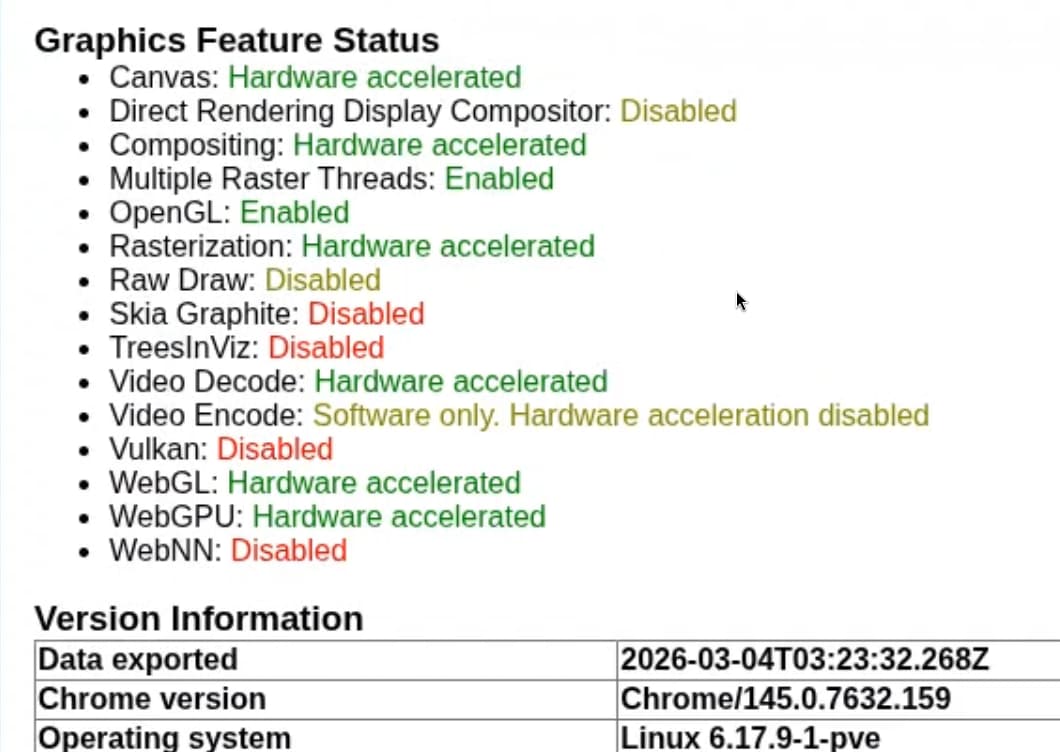
I've managed to get some hardware acceleration working in a Docker container by building a new image based off linuxserver/docker-chrome. It's brought down CPU usage on an old mini PC with an i7-6700 significantly for me.
I don't have much time available to dive in deeper, but thought maybe someone else could pick it up and run with it. The container repo can be found here with a sample Docker compose in the readme: GitHub - ajvolin/prismcast-hwa · GitHub
For anyone looking to play with it - this container is fundamentally different than the official PrismCast container. Only three of the environment variables are retained:
PRISMCAST_DATA_DIR
PRISMCAST_LOG_FILE
PORT
The container inherits environment variables from the docker-chrome image, and in turn its source: GitHub - linuxserver/docker-baseimage-selkies: Base Images for remote web based Linux desktops using Selkies for many popular distros. · GitHub
2 Likes
FINALLY
GPU support in Prismcast. You did it!! I'll give it a whirl later in the week. This looks good
I've actually been down this road before with the linuxserver Chrome image. In fact, I created a version of cc4c that used it. What they did is implement a hardware accelerated version of Xvfb, and when you're actively using noVNC, you have the appearance of improved performance.
Hopefully you've found something I didn't, but I've also been able to get chrome://gpu to look just like what you posted, but when you look at GPU usage on the host you'll see Chrome isn't using it. With the linuxserver image, you'll see Xvfb will use it, but that's really only a factor when you're using noVNC to look-in.
I hope I'm wrong -- but I just wanted to let you know this approach has been previously explored.
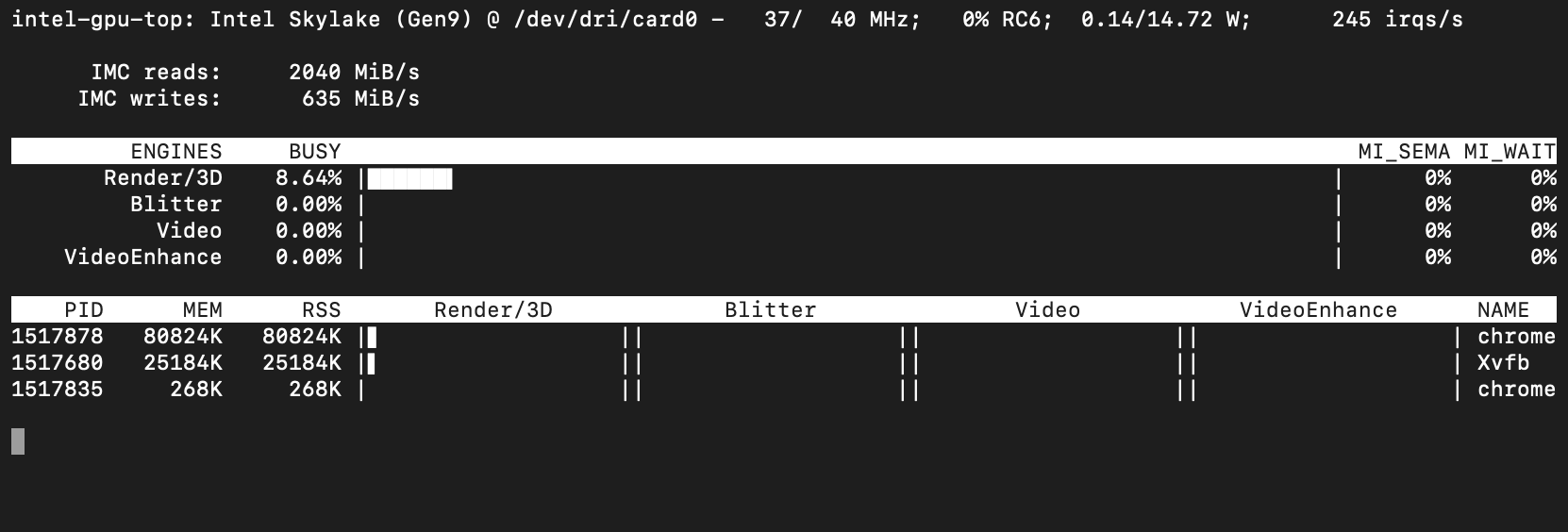
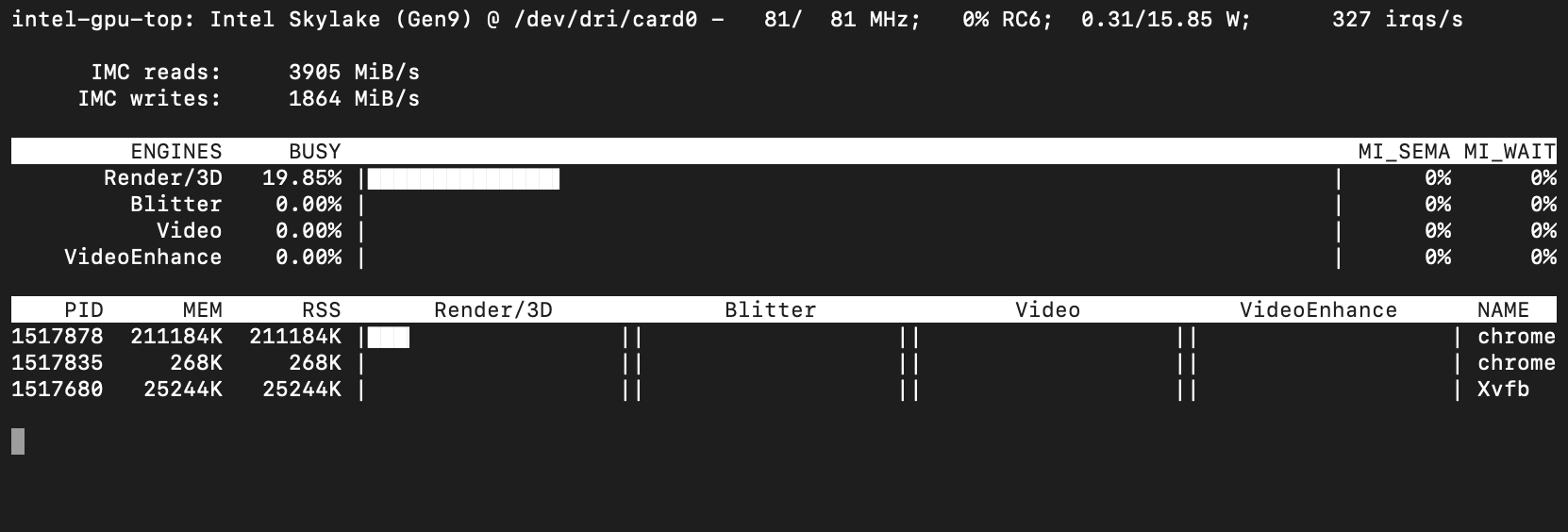
If you could install intel-gpu-tools on your host, and post your intel_gpu_top results that would help confirm one-way-or-the-other whether Chrome is using the GPU in your container.
Here's a bit of the backstory on GitHub:
1 Like
@bnhf Sure, I took a few screenshots, all without connecting to the desktop session via browser/noVNC.
Without streaming anything:
While streaming:
I'm running Docker in an LXC container on a Proxmox host. CPU usage while streaming in my container:
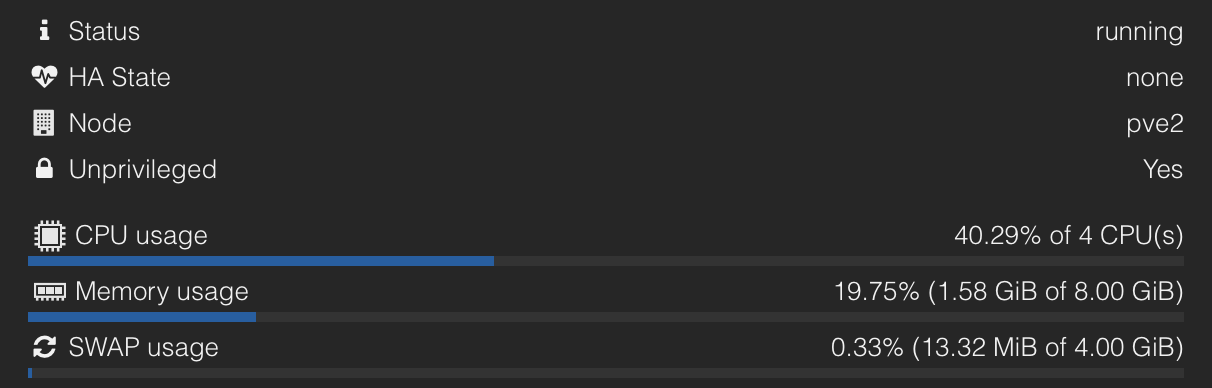
With my container down and the official PrismCast container running one stream:
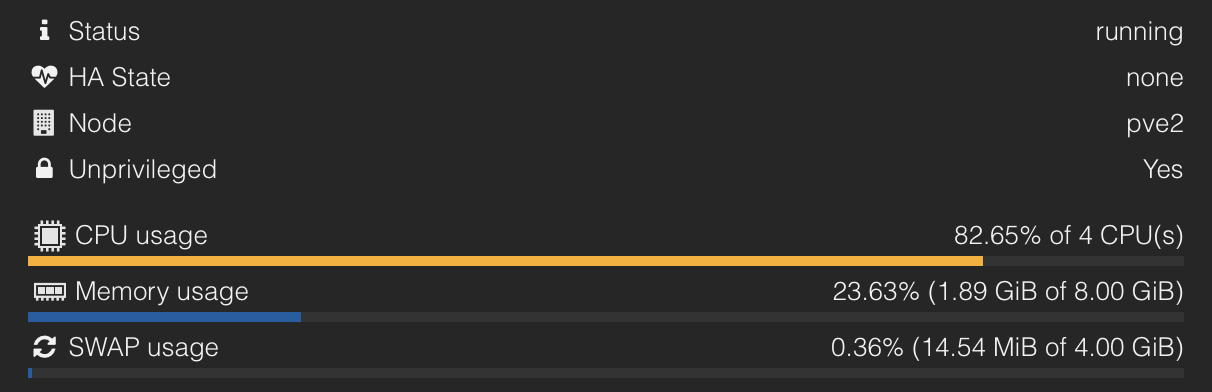
Usage is twice as much as mine, looking promising to me 