Introducing PrismCast: Browser-based Live TV Capture for Channels DVR and Plex

I agree, that looks very promising. Maybe linuxserver (or the Chrome team?) has worked some new magic since I built the version of cc4c based on it?

What do you feel still needs to be done, that requires a deeper dive?

Many thanks for what you've done so far btw.

I don't have the capacity to keep up with all the incredible developments happening with PrismCast, and the image likely needs some cleanup, fine-tuning, and better documentation/inclusion of the docker-chrome configuration options.

Many thanks to you and @hjd for your numerous contributions :slight_smile:

2 Likes

One other note, when running the container with Wayland enabled, it would sporadically hang after a few minutes even with nothing streaming and I'd have to restart the LXC container. Sticking with X11 has kept it stable without issue for a few days now. It could just be a side effect of running Docker inside of LXC but I can't be sure and after chasing down a resolution without success, I gave up on Wayland.

Excellent, thanks! I'll have a look at those things tomorrow, and verify what you're seeing with GPU usage on a newer generation iGPU.

Thanks for the clarification on not using Wayland -- I was just looking at that in your repo. Assuming everything checks out, and tests out -- I'll submit this as a PR to @hjd, if that's OK with you?

2 Likes

That would be incredible - 1000% okay and much appreciated.

1 Like

Just wanted to report this YouTube TV (auto) problem (using v1.52). I have it working now.

Yesterday I deleted all my custom new and overridden channels, set my Provider to FoxOne and YTTV and assigned all channels to YTTV. I then deleted all channels I don't receive and went through the rest of the predefined channels to set them up.

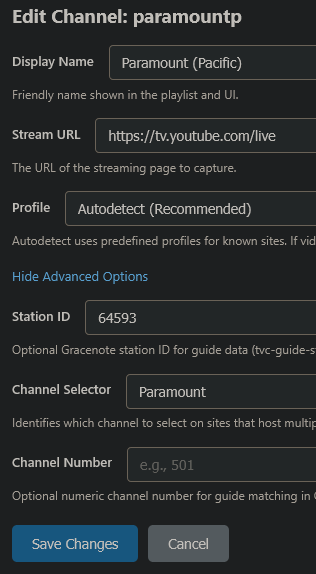
With the Paramount channel using the default profile YouTube TV (auto), it kept failing like it couldn't find the channel selector Paramount, even though it's there. I could see it repeatedly opening a browser tab to the live guide and then closing the tab.

Once I edited the channel to change the profile to youtubeTV, it started working.

Thanks for the detailed report and for testing both ways to confirm it's reproducible. I've been looking into this and the autodetected profile should resolve identically to explicitly setting youtubeTV, so I'd like to trace what's actually happening on your end to find the discrepancy.

Could you send me two things?

  1. Your channels file β€” ~/.prismcast/channels.json. This will let me see exactly how the Paramount channel is stored and whether the override/variant resolution is behaving as expected.

  2. A log capture of both scenarios back-to-back β€” start PrismCast fresh, try streaming Paramount with the auto profile (let it fail), then switch to explicit youtubeTV and stream again (let it succeed). Then grab ~/.prismcast/prismcast.log. The log will show the exact profile resolution and channel selector values used for each attempt, which should reveal where the two paths diverge.

Feel free to DM those if you'd prefer not to post them publicly.

1 Like

Many thanks to you and @hjd for your numerous contributions :slight_smile:

Your welcome! And thank you @ajvolin for your contribution. If a few folks can replicate the results, it would be a game changer for those with GPUs running docker.

Happily. The key question is, can others reproduce the behavior and what constraints does it have (e.g. specific hardware support, etc.). Thanks @bnhf.

Can you share your WS 4k configuration. I am running it on a docker container on my NAS. PrismCast is running on a Win 11 PC.

Thanks

Unfortunately, I could never get it to show consistently, so I removed it. Sorry.

@uspino Can you pull a bit more of your logs from one of these that failed and share it? I’d also like to see the startup precaching log entries please. I’m trying to ensure I understand all the contours of what you’re running into.

Thanks!

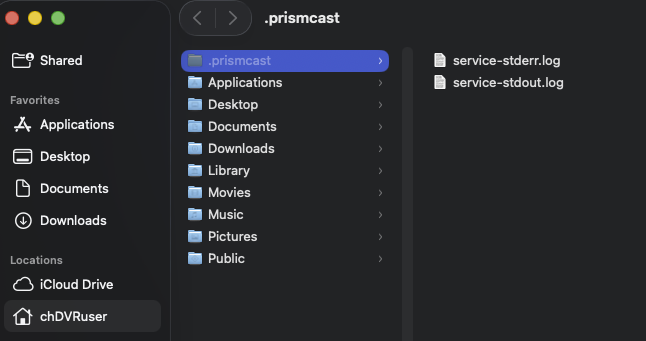
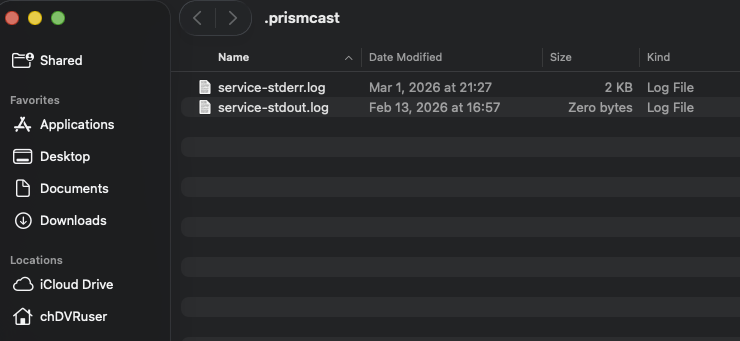
They don't exist.
Screenshot 2026-03-04 at 13.13.11

service-stderr.log
shell-init: error retrieving current directory: getcwd: cannot access parent directories: No such file or directory
service-stdout.log

I'm running it as a service and the last upgrade I did (1.5.1 > 1.5.2) was from the button on the update notes in the PrismCast web page.
Before that I always did it this way

sudo npm install -g prismcast
sudo prismcast service restart

So I updated PrismCast again using this

sudo npm install -g prismcast
sudo prismcast service restart

Set Paramount channel to Autodetect


and it works now

But still no
~/.prismcast/channels.json or ~/.prismcast/prismcast.log files
So I went searching (sudo find / -name "prismcast.*") and found them in /System/Volumes/Data/private/var/root/.prismcast/

Complete authentication in the Chrome window on the PrismCast server, then click Done.
For some reason, no chrome window opens so I can't complete this step. There is a dialog box that says a browser window is open but I do not see anything.
I have the Prismcast Container installed and running on my Synology NAS. I can access the admin panel. I'm using Mac OS Safari for the browser but I do have Chrome installed on my Mac. I'm I missing a step?

I doubt your Synology NAS is powerful enough to run this project (do any?), but you need to get to the Chrome instance running in the container on port 6080.

If you have a Mac, run it on the Mac instead of in a container on your Synology NAS (which will probably not work anyway)

Yes, Let me try this. I have an IMAC M3.

Working fine on my M4 Mac Mini (base model)

Just asking for opinions ..... Im running on n I5-8500 with 48gb Ram and 500gb ssd also using the built in intel hd630 graphics card
If i added a 4gb dedicated graphics card say a rx550 Low profile card (using SFF case) would i see any solid bump in the channel loading time ?? I'm around 10 seconds now So im asking since im running natively in Windows via Node,exe etc so I have full gpu services available to Chrome
Just wondering thats all

PrsimCast looks great, will be installing and testing soon. I thought others here might be interested in this idea for a channel to integrate:

A bit of an update to those of you interested in iGPU-based hardware acceleration for the Docker version of PrismCast.

First, thanks to @ajvolin for his efforts, which brought an old path of exploration back into view. Drilling down on a somewhat complicated container image (produced by the folks at linuxserver.io -- which is what @ajvolin's test/dev image is based on), it turns out enhancements to their custom version of Xvfb is what's behind all this.

This is great news, as we can take our existing container with some additional drivers added, and use this customized version of Xvfb. I've done this, and have completed some basic testing -- but I'm feeling the need for a limited "alpha" on this before we make a more general "beta" available.

So, if you're willing and able to test a PrismCast container with Intel-based GPU acceleration, respond here or PM me, and I'll send you the Docker Compose to use. Keep in mind, this really only applies to people with Linux-derivative hosts. If you're on MacOS or Windows, and want GPU hardware acceleration, install PrismCast natively.

I'd prefer Portainer users, and you'll definitely need to be able to provide before and after comparisons of system resource usage. Also, you'll need to be able/willing to install intel-gpu-tools on your host computer, in order to capture intel_gpu_top results.

2 Likes