Introducing PrismCast: Browser-based Live TV Capture for Channels DVR and Plex

Is there any way to get a listing of the channels that are currently enabled, showing the same information that appears on the Channels tab?

I can copy/paste the info from the browser page, but that doesn't copy Provider if there's a dropdown for a channel.
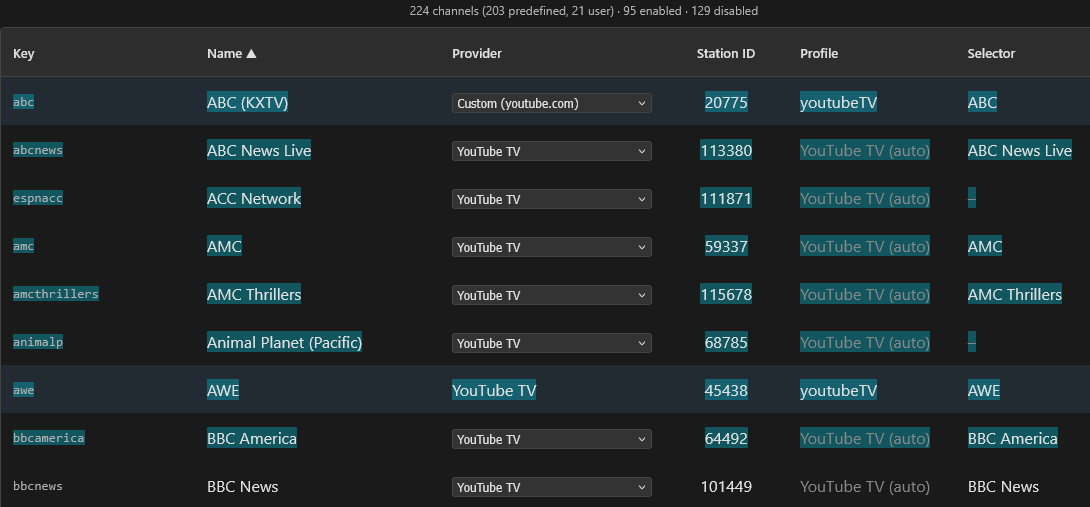
I looked at the /channels API json, but it's showing the wrong url for some of my channels.
example

"enabled": true,
"key": "amc",
"name": "AMC",
"source": "predefined",
"url": "https://watch.sling.com/dashboard/grid_guide/grid_guide_a_z",
"channelSelector": "AMC",
"stationId": "59337"

Those showing enabled with the wrong url don't appear in the /config/channels/export API

  "abc": {
    "name": "ABC (KXTV)",
    "url": "https://tv.youtube.com/live",
    "channelSelector": "ABC",
    "profile": "youtubeTV",
    "stationId": "20775"
  },
  "awe": {
    "name": "AWE",
    "url": "https://tv.youtube.com/live",
    "profile": "youtubeTV",
    "stationId": "45438",
    "channelSelector": "AWE"
  },
  "cbs": {
    "name": "CBS (KOVR)",
    "url": "https://tv.youtube.com/live",
    "channelSelector": "CBS",
    "stationId": "21214"
  },
I have to say I’ve not been able to reproduce the error in the last couple of days, not even after reboots. Maybe it was fixed in the latest update?

I'd be interested in testing to see if it perhaps resolves the stuttering I was experiencing. I've been using Portainer on Unraid for your other projects, so I'd be happy to test in that environment. And I also have QuickSync working in other containers, so it shouldn't be an issue for my case.

I would be able to test Prismcast with Intel GPU acceleration - I already have other dockers working in Unraid with the Intel GPU and intel_gpu_top is already installed

Doubtful. But there will be some additional resiliency in a future release that tries to catch edge cases like yours where the connection is a bit slower than what PrismCast typically waits for.

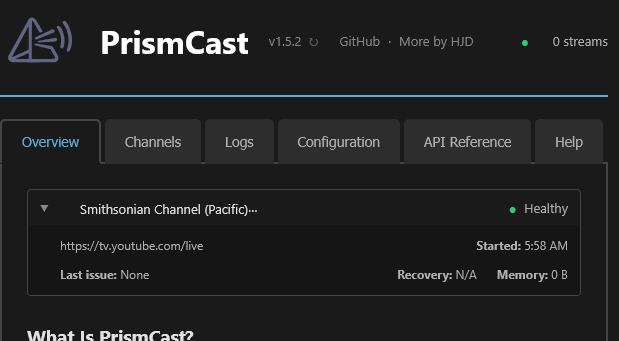
Is this supposed to be displaying only current streams?
Screenshot 2026-03-06 at 14-25-13 PrismCast

Reason I'm asking is that stream ended over an hour ago. Even refreshed the browser page.

[2026/03/06 05:59:02.710] [smithsonianp-0o96it] Streaming Smithsonian Channel (Pacific) (youtubeTV, FFmpeg). Tuned in 2.7s (direct).
[2026/03/06 13:01:44.209] [smithsonianp-0o96it] Stream ended after 7h 2m.
[2026/03/06 13:06:54.089] Restarting browser for scheduled maintenance (uptime: 9h 31m).
[2026/03/06 13:06:54.770] Chrome ready: Chrome/145.0.7632.160.
[2026/03/06 13:06:54.975] Browser restart complete. Fresh instance is ready.
[2026/03/06 13:06:59.771] Starting channel lineup precaching for 1 provider.
[2026/03/06 13:07:03.430] Precached YouTube TV: 139 channels (3.7s).
[2026/03/06 13:07:03.711] Channel lineup precaching complete: 1 provider cached in 3.9s.

And tried another browser.

Appreciated. This was super helpful in letting me track down this bug. Will be fixed in the next release. Thanks!

PS: one request - I genuinely have a difficult time understanding some of your posts - the way they're written are hard for me to follow and feel like they jump from point to point. I'd appreciate it if you could simplify it a bit and/or present them in a more organized way, so I can better address them.

1 Like

Thanks.

Point to one and I'll see what I can do to simplify it.

1 Like

If you look at the top right, it shows 0 streams. You might need to clear the cache or similar...but it always only displays active streams. Or should. :smile:

OK, looks the same opening the page in another browser, so I assume it's some PrismCast cache you're talking about?

This one: Introducing PrismCast: Browser-based Live TV Capture for Channels DVR and Plex - #898 by chDVRuser

I spent a few minutes trying to understand it. I got there eventually, but for me to be able to follow along, I need a clear problem statement, (ideally) a way to recreate the issue, and any supporting data/telemetry to go along with it.

Replied on top of replies are hard enough as well...so ideally, they're self-contained and self-referencing.

Nope, now that's on me to see if there's something going on. Stay tuned. Thanks for raising it.

OK.
I thought I was clear in asking

I'm trying to figure out what data I need to backup in order to remove & reinstall or move PrismCast to another directory or device and restore that backed up data so I don't need to reconfigure anything.

I'm trying to figure out what data I need to backup in order to remove & reinstall or move PrismCast to another directory or device and restore that backed up data so I don't need to reconfigure anything.

This is the problem statement. :smile:

You need to backup (ideally) the entire contents of the PrismCast data directory, which should be ~/.prismcast on most installations. If it's not there, you can find where it is in the startup logs:

[2026/03/06 14:19:00.702]   Configuration file: /Users/someuser/.prismcast/config.json
[2026/03/06 14:19:00.702]   Chrome profile: /Users/someuser/.prismcast/chromedata

Finally, there are backup/restore options under Configuration|Backup in the webUI. You'll also find a reference to where configuration files are located on that tab. If you don't backup your chormedata directory, you're going to need to re-login when you move across devices as you won't be taking your Chrome profile with you.

Thank You.
Mine (running as a service) is in /System/Volumes/Data/private/var/root/.prismcast/
I'll have to figure out how to backup the .prismcast/chromedata directory owned by root with 700 perms

I would not recommend anyone run PrismCast, on a Mac or not, under root. It doesn't need those privileges, and it's unwise security hygiene.

Good morning. Is there a way to get around the Pkill error when installing via NPM on a Windows PC?

Jim, on Windows 10 I didn't seem to have any trouble installing Prismcast via the NPM command line (if there were any errors, I ignored them). I now run it from npm command prismcast in console. I was not, however, able to get the windows service to install that way, pkill dumped the installation.

The developer looks like he [graciously] has this on his radar. It's probably more work than one might think to adjust for Windows.

I just decided to try out PrismCast on a 2018 Mac Mini (one of the last Intel models) and DirecTV Stream. I have it working, though I’m experiencing a few issues:

  1. When using DirecTV Stream as the provider for channels, only one such channel may be tuned at a time. If I try to view multiple DirecTV Stream channels at the same time (in my case on multiview, but probably on separate devices and recording as well), the second channel refuses to tune, with DirecTV giving an error that only one tab can stream at the same time. Is there any way around this aside from using a different provider for the channel? The DirecTV Stream provider option seems to have the best quality/framerate for many channels, and has less issues aside from this one…

  2. The documentation suggests I just have to log in once for the channel-based sources to work (and the login indicator on the channels page makes it look like this is the case by appearing on all channels after authenticating one). However, I find I have to log in at least for each channel group (ESPN, FOX, etc). Is there something I’m doing wrong here, or is DirecTV Stream different from most providers?

  3. The ABC channel using the ABC source shows ABC News Live, not my local ABC affiliate. Is this link incorrect, or does it only work with owned and operated ABC channels?

I fixed it. Now running as a service under my user login.