I didn't think the CW had a live feed?
I’m fairly sure the Channel name for YTTV, isn’t correct. It is CW 18 for Orlando. The others did work.
Just fyi I had to do a channel override for my local Fox station, the default tag it was looking for was FOXD2C which is not the Fox 35 Orlando feed, it's a local infomercial feed. Overrode it to the station's callsign (WOFL) and now it works.
May or may not be an issue for others.
The new changes to preload the tunes are awesome, thanks!
1 Like
Thanks! I'm testing...
This seems like a great idea!
But how do I tell Prismcast my Channels DVR Server running on my Synology NAS in a docker container is at 192.168.1.4:8089, when Prismcast is on my M4 Mac Mini at 192.168.1.9?
I checked config settings and couldn't find anything related to the Channels DVR Server.
But how do I tell Prismcast my Channels DVR Server running on my Synology NAS in a docker container is at 192.168.1.4:8089, when Prismcast is on my M4 Mac Mini at 192.168.1.9?
I checked config settings and couldn't find anything related to the Channels DVR Server.
You do not. As you've been learning a bit about my style of opinionated software development...trust PrismCast and the defaults. Do not try to outthink it...it will likely bite you later or cause more work. 
Once your Channels DVR connects to PrismCast once, it'll remember it on its own...it's not a once-per-restart thing, it's literally once - PrismCast always remembers the most recent Channels DVR server that connects to it. This is not a user-configurable feature, nor do I have any plans of making it one.
Pretuning is also always-on.
Edit: I should add - the reason for this is that pretuning is always a win. The worst case is a tune that disappears if a client doesn't connect to it after a reasonable timeout. With respect to Channels DVR...keeping track of the DVR shouldn't need to be something a user thinks about. "It just works" is the motto I apply to many of my projects...users should only need to configure something when there's something that can't obviously be inferred or understood, or an affirmative choice needs to be made to do something.
Enjoy!
2 Likes
I'm impressed. Nice work!
[2026/03/15 19:59:05.374] Pretuned CBS (KOVR) for Tracker (starts in 25s).
It's there now
"dvrHost": "192.168.1.4"
Yeah, thanks. I see now that there are various local feeds for any given nationwide channel. I just realized that if I tune the channel in YTTV in a browser that it has the deep link right in the address bar, and I was able to verify the Channel ID with my OTA tuner that has the same channel for my local. Due to this I suppose various local channels will always have a user locale specific override in PrismCast, unless I'm misunderstanding this.
You're mostly right, but PrismCast actually handles this automatically for most local affiliates on YTTV. When you set the Channel Selector to "CW", PrismCast's YTTV strategy uses three-tier matching:
- Exact match - looks for "CW" in the guide
- Prefix + digit - looks for entries like "CW 18", "CW 26", etc. (your local affiliate number)
- Known alternates - tries alternate names like "WGN" for markets where the CW affiliate uses a different name
So channelSelector: "CW" should automatically find "CW 18" in Orlando without any user override. The same applies to ABC, CBS, Fox, NBC, and PBS - PrismCast matches the network name to whatever "{Network} {Number}" format your local affiliate uses in the YTTV guide.
The cases where you do need a user override are:
- Markets where the affiliate uses a completely different name that isn't a prefix match (e.g., WGN for CW in Chicago - this one is actually handled via a builtin alternate list)
- PBS affiliates that use branded names like "Cascade PBS" or local call letters like "KQED" (the most common ones are covered by the builtin alternate list, but smaller markets may need overrides)
If the predefined CW channel isn't finding "CW 18" for you (presuming that's your local), that would be a bug worth reporting - it should work out of the box.
It seems to work on NBC and Fox. ABC seems to play the 24 hours news channel. CBS loops checking availability and optimizing. Both can connect via the app. YTTV works as expected.
Thanks for your great efforts!
[2026/03/16 07:43:06.712] Login mode started for https://www.nbc.com/live?brand=nbc&callsign=nbc.
[2026/03/16 07:43:43.766] Login tab was closed. Ending login mode.
[2026/03/16 07:43:43.898] Login mode ended.
[2026/03/16 07:44:01.270] [nbc-6aev8s] Streaming NBC (keyboardDynamic, FFmpeg). Tuned in 5.3s (direct).
[2026/03/16 07:44:51.324] Login mode started for https://abc.com/watch-live.
[2026/03/16 07:45:16.894] [nbc-6aev8s] Stream ended after 1m 21s.
[2026/03/16 07:45:46.946] Login tab was closed. Ending login mode.
[2026/03/16 07:45:47.083] Login mode ended.
[2026/03/16 07:46:18.474] [abc-nqi335] Streaming ABC (keyboardMultiVideo, FFmpeg). Tuned in 4.1s (direct).
CBS is connecting to the CBS 17 Raleigh feed using defaults.
I should have added: I'm not solving for everyone's locale - nor do I plan to. I'm just explaining how PrismCast handles local channels for YouTube TV. Folks are going to need to tailor to their environments / geographies as appropriate.
Though personally, with the advent of native streaming...I would favor that over YouTube TV for locals, where it's available for you (e.g. CBS via cbs.com). It's going to be the best overall video quality since it completely bypasses screen capture.
Enjoy!
So I just wanted to share, I observed, at least in Docker, that it seems to be capping at about 52 fps at best. The issue is as the bit rate fluctuates, the frame rate fluctuates. And that's what seems to be causing issues that I've been noticing. I want to say I spent most of Friday night and all day Saturday kind of just tinkering with PrismCast, trying to get it in a way that worked well in Docker. Trying to contribute back to the community, but ended up failing in the end.
It seems to be isolated to Chrome, as I was able to do some testing on my end and used GStreamer to capture the entire screen and with that set up, although I wasn't able to get audio working, I had fantastic video quality. The issue with that is you only have one stream at a time because you're capturing the entire screen rather than the tab.
This was just on a fork I was tinkering with over the weekend. I just thought I'd share my findings that capturing the full screen with GStreamer worked really well on Linux Docker. I can share the fork if interested, and perhaps someone wants to pick up from that, or it's probably a dead end because of the single instance nature unless you were to spawn multiple virtual displays in Docker.
Minus the audio issues I had it working extremely well, like the picture quality was incredible.
I also saw this in Docker desktop. It is flawless in NPM. I even gave Docker all cores and no joy. So, I am running NPM.
Yeah, I just wanted to share my findings. I did a lot of work on this over the weekend, so I thought it would be okay to share what I discovered in the event that it might help benefit the community in some way.
I probably put in a good fifteen to twenty hours of labor trying to sort this out and just couldn't get it, but thought what I found might be helpful to the developers.
I'm not sure I follow your logic here. In the separate thread on this subject you were posting in, you said you were having the exact same issue as the OP (@chDVRuser) with dropped frames. However, he's running on a Mac Mini M4, so if this is a general issue that needs to be looked at -- it seems unlikely it'll be solved through Docker-specific solutions.
I spent some time this weekend myself experimenting with some of the non-default settings I know both of you use, but was unable to duplicate what you're seeing. Maybe the streaming site is tied in somehow? In between March Madness lead-in tournaments, and some great tennis from Indian Wells, I tried a number of tests.
This was pretty typical:
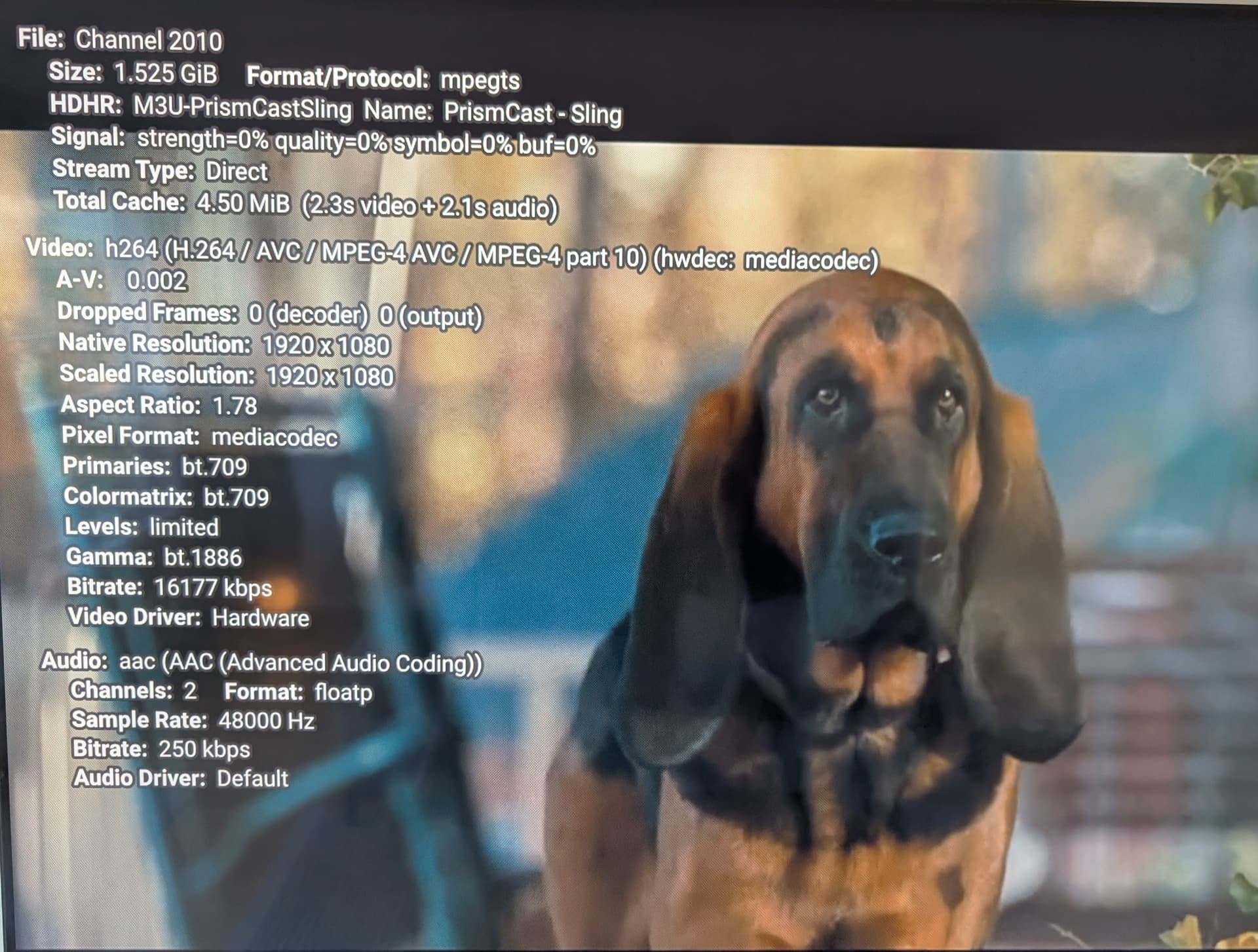
And that's with me using a client that's thousands of miles away from base camp.
That's very strange then. I'm using DirecTV only, like DirecTV's website, so I wonder if perhaps it has something to do with streaming from that source.
I actually also noticed when DirecTV initially loads, the picture is very low bit rate and low quality but smooth and all of a sudden it bumps up to a very high bit rate on DTVs side, and I wonder if that is when the frames start to drop.
Also, in my setup, I get nowhere near 16 Mbps. Chrome just never pushes that much. So I wonder if maybe there's something with the DirecTV implementation and that could be the cause and @chDVRuser happens to be using the same source as me, and that could be possibly the commonality here, and why no one else is seeing this.
I don't really have any other sources to test with, so I've only tried DirecTV, but perhaps I'll try a TVE source and see if that maybe works better and that would narrow it down to something with the DirecTV implementation.
Also my caching is also super weird. Like I see yours is pretty much a line two seconds for audio, two seconds for video. But mine will jump to like two seconds for audio, seven seconds for video, and then drop frames and then catch back up.
I'm on an Apple TV, everything in my environment is wired, so it's not like a weird networking issue since I would be having issues with my Osprey setup if it were something networking related.
Edit: I also want to be very clear, I am not complaining in any way. I think this is a very cool project. I'm very happy with my Osprey setup with ADBTuner, so this is really just a nice to have for me. I was working on this Friday from 8 p.m. until about 4 a.m. and then Saturday from about 11 a.m. until 8 p.m. just trying to find a solution, not really for me, but for others in the community having the issues with Docker.
Like this is more of a nice to have for me, not a necessity. I just wanted to try to find some sort of fix for others that were reporting the same issue since I could reproduce it and have some skill set to troubleshoot it. Honestly, even if I did find a fix and PR it, probably wouldn't really use it day to day. I just wanted to try to help others in the Channels community. I just don't want my comments to be seen as a complaint or anything against Prismcast. I think it's really awesome. I just wanted to try to find a fix for others reporting the same problem.
I'm still having trouble reconciling what you've written. Is this a Docker-specific issue or not? You seemed confident it was the same issue as what @chDVRuser was reporting in the other thread. Could this be something settings related? Do you experience the same issues at 720p resolution?
1 Like
I experience the issues at all resolutions and bitrates set. Although I believe it is Docker specific because I have an M1 Mac Mini and I tested it on that and it was perfect. I'm just not willing to use that device for this because I have other services tied to that hardware.
I actually tested WebRTC as well through patching Puppeteer at runtime just to see if it was something related to MediaRecorder, and that also produced the same weird output. What I was able to narrow this down to was something related to Chrome running under Docker. I don't know why though. It might just be intrinsic to Chrome not being able to push the same frames as under Mac OS or Windows. I also confirmed that it's not on the FFmpeg side because I installed FFmpeg into the Docker container and did a hardware accelerated VAAPI re-encode rather than a remux. I completely narrowed it down to the Chrome tab capture, at least from what I could tell. What further narrowed it was when I used GStreamer to actually capture the whole screen and it was just perfect video, like indistinguishable from my Ospreys.
Like I said, none of this is a complaint or anything. I think this is such an innovative idea. I'm just trying to narrow this down to help others. I'm not planning on using this as my day-to-day streamer because I have such an investment in physical encoder hardware. Since I have the skill set and can reproduce the issue, I thought I'd try and find a solution, or at least debug a little bit. I was more of trying to contribute back a little bit since this is such a nice community. I was trying to help out.
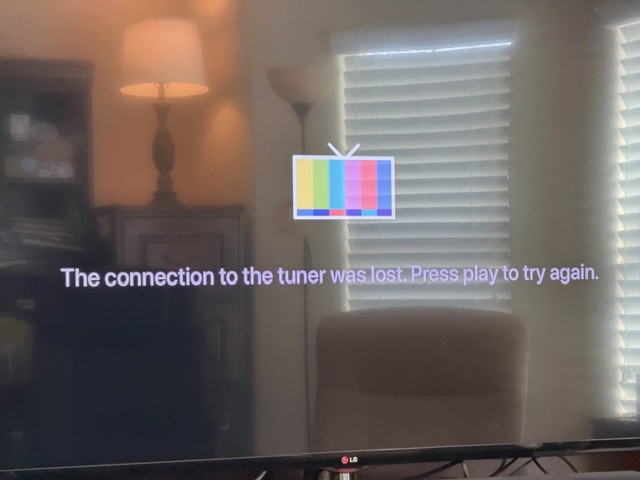
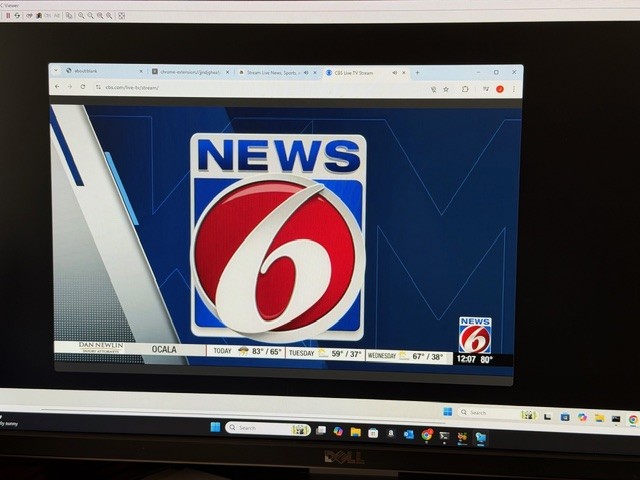
I am hesitant to post but feel this is strange issue. I discovered I could force CBS to go local by disabling location settings in Chrome. It then sees my Google info and starts the stream in chrome.
However, CDVR doesn't stream it. I wouldn't post but CBS seems to be the only provider with this issue. The HLS streams are perfect. Our local Fox is better than OTA! Here are log shots and a couple of quick photos. If this is something not worthwhile, I do understand.
[2026/03/16 12:12:09.495] [ERROR] [cbs-u81d7v] Stream setup failed for https://www.cbs.com/live-tv/stream: Waiting for selector `video` failed.
[2026/03/16 12:12:09.497] [cbs-u81d7v] Stream ended after 13s (setup failed).
[2026/03/16 12:12:09.497] [WARN] Stream setup failed for cbs: Failed to start stream..
[2026/03/16 12:12:14.492] [WARN] [cbs-pozqni] No iframe contained video element. Falling back to main page context (searched 5 frames).
[2026/03/16 12:12:14.493] [WARN] [cbs-pozqni] Main page fallback: no video element found in main page either.
[2026/03/16 12:12:25.884] [cbs-pozqni] Streaming CBS (keyboardIframe, native HLS). Tuned in 13.9s (direct).
[2026/03/16 12:13:01.855] [cbs-pozqni] Stream ended after 50s.
CDVR:
2026/03/16 12:12:09.016184 [SNR] Rewriter statistics for 192.168.1.37 (Office TV) for ch60021 CBS: discontinuity_detected=0 transport_errors=0 saw_pcr=false saw_pmt=true highest_pts=10.239322
2026/03/16 12:12:09.016184 [SNR] Buffer statistics for 192.168.1.37 (Office TV) for ch60021 CBS: buf=0% drop=0%
2026/03/16 12:12:09.016184 [SNR] Streaming statistics for 192.168.1.37 (Office TV) for ch60021 CBS: timeouts=0 segment_timeouts=0 playlist_timeouts=0
2026/03/16 12:12:09.019623 [TNR] Closed connection to M3U-Prism for ch60021 CBS
2026/03/16 12:12:09.019623 [TNR] Retrying live stream for ch60021 CBS: Transcoder Reset: Playlist reset to a lower sequence (5 -> 4): http://192.168.1.62:5589/hls/cbs/stream.m3u8
2026/03/16 12:12:09.024934 [TNR] Opened connection to M3U-Prism for ch60021 CBS
2026/03/16 12:12:27.529212 [SNR] Rewriter statistics for 192.168.1.37 (Office TV) for ch60021 CBS: discontinuity_detected=0 transport_errors=0 saw_pcr=false saw_pmt=true highest_pts=82736.094644
2026/03/16 12:12:27.529212 [SNR] Buffer statistics for 192.168.1.37 (Office TV) for ch60021 CBS: buf=0% drop=0%
2026/03/16 12:12:27.529212 [SNR] Streaming statistics for 192.168.1.37 (Office TV) for ch60021 CBS: timeouts=0 segment_timeouts=0 playlist_timeouts=0
2026/03/16 12:12:27.531449 [TNR] Closed connection to M3U-Prism for ch60021 CBS
2026/03/16 12:12:27.531449 [TNR] Retrying live stream for ch60021 CBS: Transcoder Reset: Playlist skipped to a higher sequence (5 -> 12): http://192.168.1.62:5589/hls/cbs/stream.m3u8
2026/03/16 12:12:27.536000 [TNR] Opened connection to M3U-Prism for ch60021 CBS
2026/03/16 12:12:28.084828 [SNR] Buffer statistics for 192.168.1.37 (Office TV) for ch60021 CBS: buf=0% drop=0%
2026/03/16 12:12:28.084828 [SNR] Streaming statistics for 192.168.1.37 (Office TV) for ch60021 CBS: timeouts=0 segment_timeouts=0 playlist_timeouts=0
2026/03/16 12:12:28.084828 [TNR] Closed connection to M3U-Prism for ch60021 CBS
2026/03/16 12:12:28.084828 [TNR] Error during live stream for ch60021 CBS: mp4 to mpegts converter: decode box at position 1254: decode �
 pos 1254: read box body length 6702192 does not match expected length 1195376648
New bnhf/olivetin:latest (aka bnhf/olivetin:2026.03.16) pushed with updated Project One-Click and Project WebUI+ support for PrismCast Docker iGPU hardware acceleration:
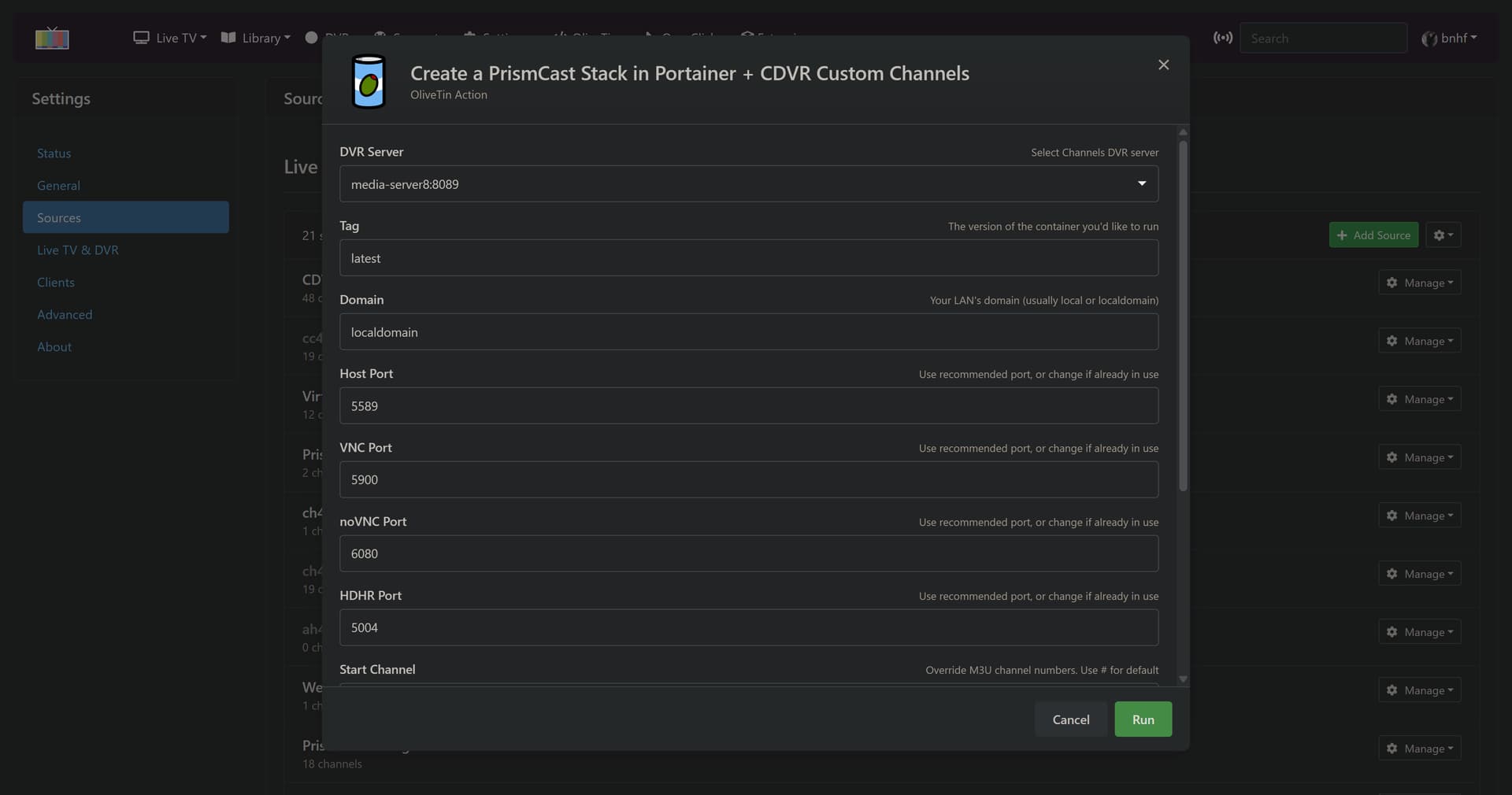

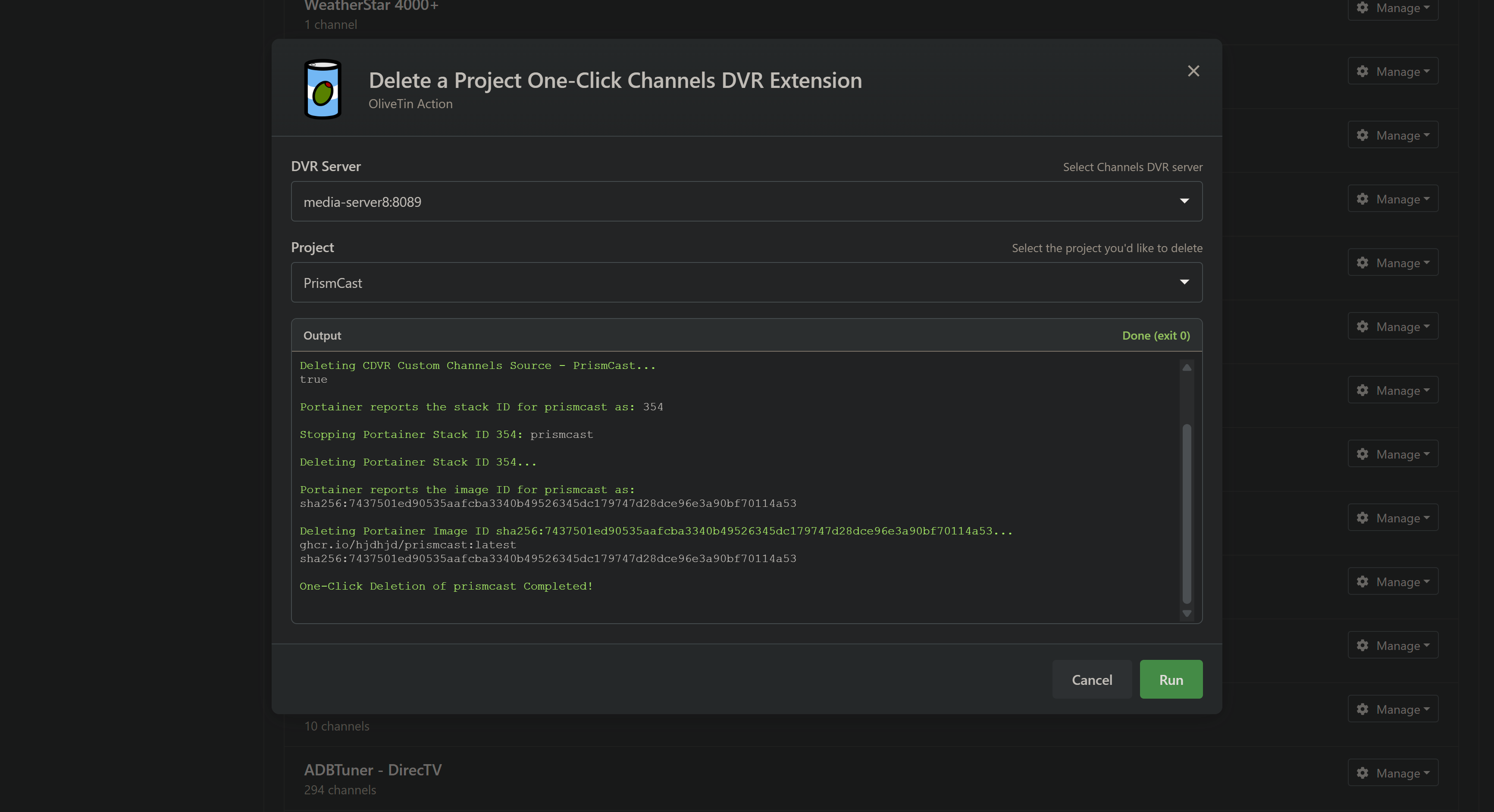
And as always, if you're just taking an extension out for a test flight, you can delete a project with one click too. Including the CDVR Custom Channels Source, Portainer Stack and Portainer Image: