Introducing PrismCast: Browser-based Live TV Capture for Channels DVR and Plex

The developer needs to update it to use different quote marks or escape double quotes.

    ==> Spaces in file paths can be used by using two sets of quotes, one
        set for CMD.EXE and one for SchTasks.exe.  The outer quotes for CMD
        need to be double quotes("); the inner quotes can be single quotes(') or
        escaped double quotes(\"):
        SCHTASKS /Create
           /tr "'c:\program files\internet explorer\iexplorer.exe'
           \"c:\log data\today.xml\"" ...

Refer to Windows schtasks /Create /?

I can't get FS1 and 2 to stream at all now, channels reports connection to tuner lost.

Here's the prism log:

[2026/03/17 18:33:12.139] [WARN] [fs1-j6av1t] Window resize failed after 3 attempts: expected 1934×1225, got 1935×1226.
[2026/03/17 18:33:14.404] [fs1-j6av1t] Streaming FS1 (fullscreenApi, native HLS). Tuned in 7.4s (direct).
[2026/03/17 18:33:51.110] [fs1-j6av1t] Stream ended after 44s.
[2026/03/17 18:33:53.555] [WARN] [fs2-u40tmj] Attempt 1 failed for page navigation for https://www.foxsports.com/live/fs2: Operation timed out after 20000ms
[2026/03/17 18:33:59.276] [WARN] [fs2-u40tmj] Window resize failed after 3 attempts: expected 1934×1225, got 1935×1226.
[2026/03/17 18:34:00.066] [fs2-u40tmj] Streaming FS2 (fullscreenApi, native HLS). Tuned in 26.7s (direct).
[2026/03/17 18:34:41.123] [fs2-u40tmj] Stream ended after 1m 8s

Here's the channels log:

2026/03/17 18:33:16.041686 [TNR] Opened connection to M3U-Prismcast for ch7078 FS1
2026/03/17 18:33:19.042905 [SNR] Rewriter statistics for 192.168.4.35 (Apple TV) for ch7078 FS1: discontinuity_detected=0 transport_errors=0 saw_pcr=false saw_pmt=true highest_pts=6.228656
2026/03/17 18:33:19.042905 [SNR] Buffer statistics for 192.168.4.35 (Apple TV) for ch7078 FS1: buf=0% drop=0%
2026/03/17 18:33:19.043571 [SNR] Streaming statistics for 192.168.4.35 (Apple TV) for ch7078 FS1: timeouts=0 segment_timeouts=0 playlist_timeouts=0
2026/03/17 18:33:19.043571 [TNR] Closed connection to M3U-Prismcast for ch7078 FS1
**2026/03/17 18:33:19.043571 [TNR] Retrying live stream for ch7078 FS1: Transcoder Reset: Playlist skipped to a higher sequence (3 -> 14):** http://localhost:5589/hls/fs1/stream.m3u8
2026/03/17 18:33:19.047912 [TNR] Opened connection to M3U-Prismcast for ch7078 FS1
2026/03/17 18:33:19.563102 [SNR] Buffer statistics for 192.168.4.35 (Apple TV) for ch7078 FS1: buf=0% drop=0%
2026/03/17 18:33:19.563102 [SNR] Streaming statistics for 192.168.4.35 (Apple TV) for ch7078 FS1: timeouts=0 segment_timeouts=0 playlist_timeouts=0
2026/03/17 18:33:19.563616 [TNR] Closed connection to M3U-Prismcast for ch7078 FS1
**2026/03/17 18:33:19.563616 [TNR] Error during live stream for ch7078 FS1: mp4 to mpegts converter: decode box at position 1254: decode B�% pos 1254: read box body length 1700076 does not match expected length 1195381001**
2026/03/17 18:33:42.322681 [TNR] Opened connection to M3U-Prismcast for ch7079 FS2
2026/03/17 18:34:01.327814 [SNR] Rewriter statistics for 192.168.4.35 (Apple TV) for ch7079 FS2: discontinuity_detected=0 transport_errors=0 saw_pcr=false saw_pmt=true highest_pts=22.228656
2026/03/17 18:34:01.327814 [SNR] Buffer statistics for 192.168.4.35 (Apple TV) for ch7079 FS2: buf=0% drop=0%
2026/03/17 18:34:01.327814 [SNR] Streaming statistics for 192.168.4.35 (Apple TV) for ch7079 FS2: timeouts=0 segment_timeouts=0 playlist_timeouts=0
2026/03/17 18:34:01.328336 [TNR] Closed connection to M3U-Prismcast for ch7079 FS2
2026/03/17 18:34:01.328336 [TNR] Retrying live stream for ch7079 FS2: Transcoder Reset: Playlist skipped to a higher sequence (11 -> 13): http://localhost:5589/hls/fs2/stream.m3u8
2026/03/17 18:34:01.342245 [TNR] Opened connection to M3U-Prismcast for ch7079 FS2
2026/03/17 18:34:01.850941 [SNR] Buffer statistics for 192.168.4.35 (Apple TV) for ch7079 FS2: buf=0% drop=0%
2026/03/17 18:34:01.850941 [SNR] Streaming statistics for 192.168.4.35 (Apple TV) for ch7079 FS2: timeouts=0 segment_timeouts=0 playlist_timeouts=0
2026/03/17 18:34:01.851472 [TNR] Closed connection to M3U-Prismcast for ch7079 FS2
2026/03/17 18:34:01.851472 [TNR] Error during live stream for ch7079 FS2: mp4 to mpegts converter: decode box at position 1254: decode B�% pos 1254: read box body length 439912 does not match expected length 1195381001

Looks like something's broken in the HLS streaming?

Both of these used to work before 1.6.0.

1 Like

Both work fine…

PrismCast log:
2026/03/17 18:58:13.905] [fs1-26luju] Streaming FS1 (foxLive, native HLS). Tuned in 6.1s.
CDVR LOG:
2026/03/17 18:58:20.635593 [TNR] Opened connection to M3U-Prism for ch60051 FS1
2026/03/17 18:58:20.635593 [HLS] Starting live stream for channel 60051 from 192.168.1.15
2026/03/17 18:58:21.200731 [HLS] Session ch60051-dANY-ip192.168.1.15 started in 565.1382ms
2026/03/17 18:58:21.295395 [HLS] Probed live stream in 658.3948ms: h264 1920x1080 progressive 3886968bps

Check PrismCast and verify you are logged in.

Try a configuration change with PrismCast:
Under advanced:
Iframe Init Delay 5seconds

Delay for iframe content to initialize before searching for video elements.
Default: 1.5 seconds

Navigation Timeout 30 seconds

Timeout for page navigation. Increase for slow networks or heavy pages.
Default: 10 seconds

Looks like bumping up the iFrame timer might have helped, might not have because the logs show that prism is getting the stream directly from Fox for FS1 and 2. That stream is 720p/60 so I don't know what Chrome would provide.

After doing a bit of work...I put an old monitor on my Headless PC and discovered all sites work from default settings. So I am scratching my head.... Is there a setting or config change to run headless that I am missing? Thanks all!

Don't know about any specific settings but you can try a HDMI Dummy Plug which emulates a connected monitor.

1 Like

Thanks Jay. I was headless with a dummy plug. Orderd a new one which supports EDID.

That explains a lot. Thanks.

How does Chrome/PrismCast report the real frame rate and/or frame duration in the stream? I am trying to use PrismCast recordings with MythTV whose VFR support is lacking. I'm trying to improve it but haven't made much progress yet. I see that the frame duration reported by ffmpeg is 1 which is typical of VFR content. In the ESPN+ samples I have so far, I also see that the PTS delta between frames is what I'd expect for 30fps. That doesn't make sense as the nominal rate for such content should probably be 60fps.

My Windows 1.6.0 install is crashing on startup after a PC reboot, here are the logs:

[2026/03/20 13:59:13.502] Starting PrismCast v1.6.0 with configuration:
[2026/03/20 13:59:13.503]   Configuration file: C:\Users\David\.prismcast\config.json
[2026/03/20 13:59:13.503]   Chrome profile: C:\Users\David\.prismcast\chromedata
[2026/03/20 13:59:13.503]   Server port: 5589
[2026/03/20 13:59:13.503]   Quality preset: 1080p (1920×1080)
[2026/03/20 13:59:13.503]   Video bitrate: 8000000
[2026/03/20 13:59:13.503]   Max retries: 4
[2026/03/20 13:59:13.503]   Max concurrent streams: 10
[2026/03/20 13:59:13.503]   Circuit breaker threshold: 10 failures in 5 minutes
[2026/03/20 13:59:13.503]   Chrome executable: autodetect
[2026/03/20 13:59:13.503]   HLS segment duration: 2s, max segments: 10
[2026/03/20 13:59:13.503]   HDHomeRun emulation: disabled
[2026/03/20 13:59:13.526] Using FFmpeg at: C:\ProgramData\channelsdvr\latest\ffmpeg.exe
[2026/03/20 13:59:13.539] Loaded 1004 channels (2 user, 1002 predefined).
[2026/03/20 13:59:13.540] Loaded health state: 5 channel(s), 3 domain(s).
[2026/03/20 13:59:13.988] Chrome ready: Chrome/146.0.7680.153.
[2026/03/20 13:59:18.990] Starting channel lineup precaching for 1 provider.
[2026/03/20 13:59:21.387] [WARN] Capture probe attempt 1 of 3 failed: Capture probe timed out. Retrying in 5s.
[2026/03/20 13:59:22.981] Precached Fox: 15 channels (4s).
[2026/03/20 13:59:23.232] [WARN] Window resize failed after 3 attempts: expected 1934×1225, got 1935×1226.
[2026/03/20 13:59:23.343] Channel lineup precaching complete: 1 provider cached in 4.4s.
[2026/03/20 13:59:31.435] [WARN] Capture probe attempt 2 of 3 failed: Capture probe timed out. Retrying in 5s.
[2026/03/20 13:59:41.499] [ERROR] Capture system verification failed during startup: Capture system verification failed after 3 attempts: Capture probe timed out.
[2026/03/20 13:59:41.499] [ERROR] Fatal startup error occurred: Capture system verification failed after 3 attempts: Capture probe timed out.

I see it opening Chrome as usual with the two tabs (blank and capture), then it keeps trying to open new tabs and gives up.

EDIT: Uninstalled Chrome with browser data deletion, installed again but still same problem. Nothing else with Chrome changed before reboot.

Anyone have ideas? I'm dead in the water here. I guess I could try reverting back to the prior version to see if that fixes it.

EDIT: Tried reverting to prior version, same issue. Renamed .prismcast config dir to get fresh config, same issue. For some reason prism cannot find the capture tab even though it loads up fine when I watch it run on VNC. It loads the two tabs then starts trying to load new tabs 3 times until it bombs out.

Is this possibly an issue with the latest Chrome version?

EDIT2: downloaded the latest version of Chrome capture for channels (cc4c.exe 2.01) as a test, it doesn't work at all using the weatherscan URL. It loads up Chrome when channels tunes it but doesn't even try to start the capture tab for some reason. Then it just sits there and times out. And absolutely no errors are logged.

I don't know what else to try other than reverting to a prior chrome version but I don't want to go down that road again, that's what killed CC4C for me. Well that and the video freezing while audio continued issue.

@bnhf any help would be appreciated!

I don't think so, as on a Windows system I'm seeing this in the log:

[2026/03/21 08:22:13.840] Starting PrismCast v1.6.0 with configuration:
[2026/03/21 08:22:13.841]   Configuration file: C:\Users\slayer\.prismcast\config.json
[2026/03/21 08:22:13.841]   Chrome profile: C:\Users\slayer\.prismcast\chromedata
[2026/03/21 08:22:13.841]   Server port: 5589
[2026/03/21 08:22:13.841]   Quality preset: 720p-high (1280×720)
[2026/03/21 08:22:13.841]   Video bitrate: 12000000
[2026/03/21 08:22:13.841]   Max retries: 4
[2026/03/21 08:22:13.841]   Max concurrent streams: 10
[2026/03/21 08:22:13.841]   Circuit breaker threshold: 10 failures in 5 minutes
[2026/03/21 08:22:13.841]   Chrome executable: autodetect
[2026/03/21 08:22:13.842]   HLS segment duration: 2s, max segments: 10
[2026/03/21 08:22:13.842]   HDHomeRun emulation: enabled (port 5004)
[2026/03/21 08:22:14.593] Using FFmpeg at: C:\ProgramData\channelsdvr\latest\ffmpeg.exe
[2026/03/21 08:22:14.599] Loaded 1002 channels.
[2026/03/21 08:22:14.600] Loaded health state: 1 channel(s), 0 domain(s).
[2026/03/21 08:22:16.179] Chrome ready: Chrome/146.0.7680.81.
[2026/03/21 08:22:20.627] Capture system verified successfully.
[2026/03/21 08:22:20.873] [WARN] Window resize failed after 3 attempts: expected 1295×815, got 1297×817.
[2026/03/21 08:22:21.108] PrismCast is now listening on 0.0.0.0:5589.
[2026/03/21 08:22:21.108] HDHomeRun emulation is now listening on 0.0.0.0:5004 (DeviceID: D5BFC50F).

I'm also getting a warning about Window re-size, but no Capture system crash.

On MacOS, no issues:

[2026/03/21 08:16:56.601] Starting PrismCast v1.6.0 with configuration:
[2026/03/21 08:16:56.601]   Configuration file: /Users/slayer/.prismcast/config.json
[2026/03/21 08:16:56.601]   Chrome profile: /Users/slayer/.prismcast/chromedata
[2026/03/21 08:16:56.601]   Server port: 5589
[2026/03/21 08:16:56.601]   Quality preset: 1080p (1920×1080)
[2026/03/21 08:16:56.601]   Video bitrate: 15000000
[2026/03/21 08:16:56.602]   Max retries: 4
[2026/03/21 08:16:56.602]   Max concurrent streams: 10
[2026/03/21 08:16:56.602]   Circuit breaker threshold: 10 failures in 5 minutes
[2026/03/21 08:16:56.602]   Chrome executable: autodetect
[2026/03/21 08:16:56.602]   HLS segment duration: 2s, max segments: 10
[2026/03/21 08:16:56.602]   HDHomeRun emulation: enabled (port 5004)
[2026/03/21 08:16:56.613] Using FFmpeg at: /Users/slayer/.nvm/versions/node/v24.13.0/lib/node_modules/prismcast/node_modules/ffmpeg-for-homebridge/ffmpeg
[2026/03/21 08:16:56.615] Loaded 1003 channels (1 user, 1002 predefined).
[2026/03/21 08:16:56.616] Loaded health state: 3 channel(s), 1 domain(s).
[2026/03/21 08:17:00.523] Chrome ready: Chrome/146.0.7680.153.
[2026/03/21 08:17:02.621] Capture system verified successfully.
[2026/03/21 08:17:03.362] PrismCast is now listening on 0.0.0.0:5589.
[2026/03/21 08:17:03.362] HDHomeRun emulation is now listening on 0.0.0.0:5004 (DeviceID: 56C8600D).
[2026/03/21 08:17:05.525] Starting channel lineup precaching for 1 provider.
[2026/03/21 08:17:33.712] Precached Sling TV: 450 channels (28.2s).
[2026/03/21 08:17:34.444] Channel lineup precaching complete: 1 provider cached in 28.9s.

Is this possibly an issue with the latest Chrome version?

Not on macOS at least. I don't see any fundamental issues.

Anyone have ideas? I'm dead in the water here. I guess I could try reverting back to the prior version to see if that fixes it.

The nuclear option: delete PrismCast's Chrome profile directory. You mentioned resetting the config, but the Chrome profile is separate - delete C:\Users\David\.prismcast\chromedata entirely (or rename it to be safe) and let PrismCast recreate it. A corrupted Chrome profile can cause extension loading issues.

Beyond that, not much I can offer I'm afraid.

Thanks. Your windows version of Chrome is slightly older, can you update to latest and try again?

[2026/03/21 10:29:07.880] Chrome ready: Chrome/146.0.7680.154.
[2026/03/21 10:29:10.611] Capture system verified successfully.

Running in portainer I keep getting this

image

Running npm it works but will not install as a service on Windows 11 pro.

1 Like

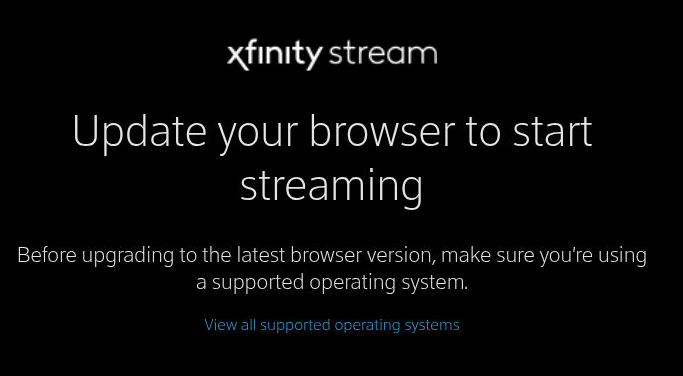
Have you clicked on the "View all supported operating systems" link to see what's listed?

yes I have and the only thing maybe an outdated chrome version as Windows is listed as supported. I'm kind of spit balling here as I said running as native with NPM the Xfinity links work but PrismCast does not install as a service on windows.
Running PrismCast from Portainer the Xfinity links error with update your browser.

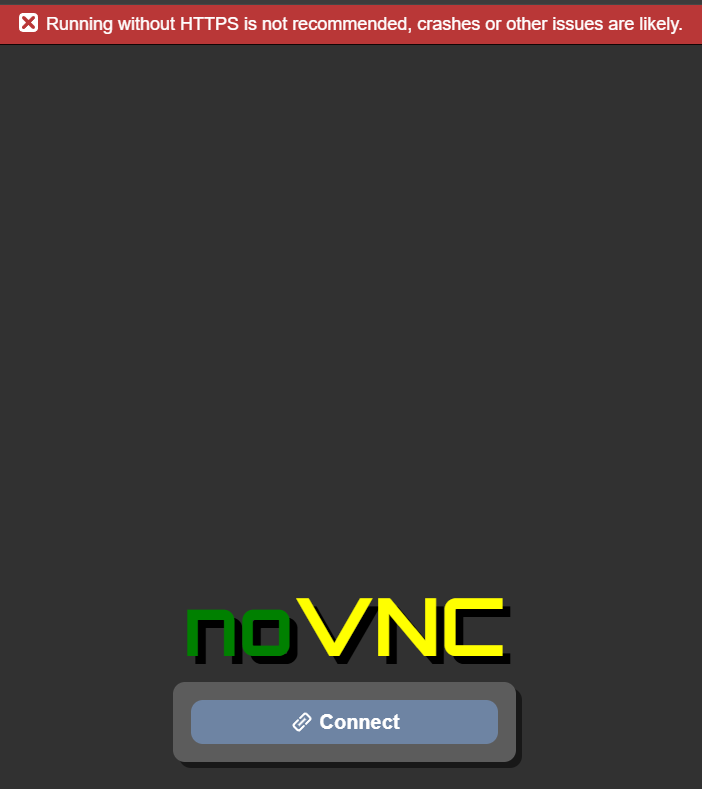
Could this be a possible cause ?

And if so I'm not sure how to get it to use "https"

1 Like

I thought you were seeing that screen when running from Portainer? If so, you're using the Chrome in the container which is running on the container's Linux. When you connect via noVNC, and click on the "View all supported operating systems" link, does it show Linux as a compatible OS?

Running it as a service is just a convenience, you can also start it from Terminal and then minimize it.

That warning doesn't apply to what we're doing.

I see this also. I'm on Unraid, using Docker.