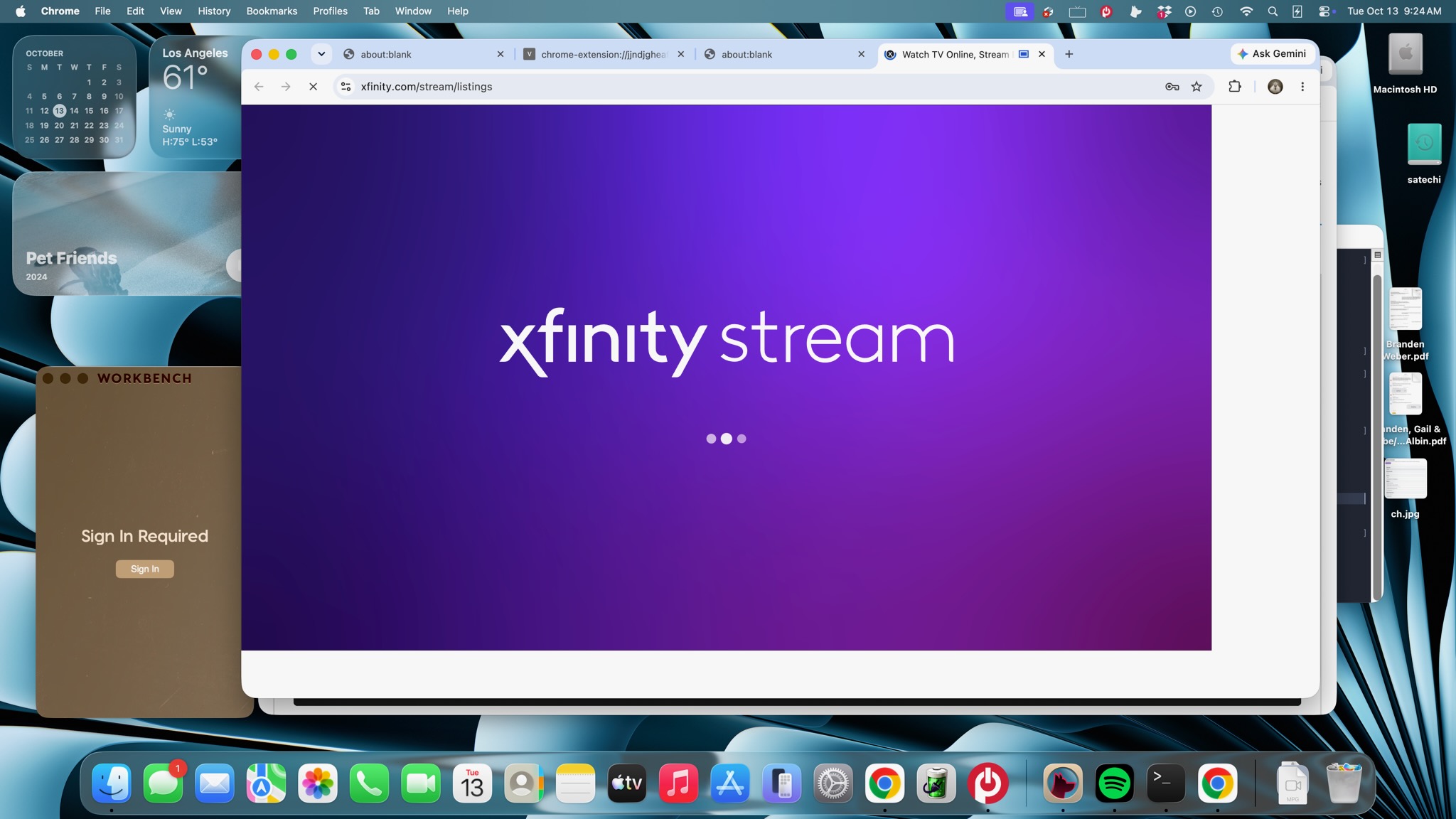
It doesn't look like you've posted any PrismCast logs, showing a failed tune. That might be helpful. If CNN is working when configured to use the CNN website, but it doesn't when trying to tune it via the Xfinity Stream website -- that suggests your PrismCast installation is functional.
After I went to bed, CNN had been playing ok for a couple of hours. I woke up this morning and nothing was working agian, the logs say:
[2026/10/11 09:23:33.155 PM] [cnn-yql0pm] Stream ended after 2h 51m. Recoveries: 10 (10x tab replacement), avg 2.7s.

[2026/10/12 12:33:12.838 AM] Restarting browser for scheduled maintenance (uptime: 6h 5m).

[2026/10/12 12:33:13.777 AM] Capture system verified successfully.

[2026/10/12 12:33:13.785 AM] Chrome ready: Chrome/154.0.8037.99 (GPU: Apple M4 [AV1, H264, HEVC]).

[2026/10/12 12:33:15.475 AM] Browser restart complete. Fresh instance is ready.

[2026/10/12 12:33:18.787 AM] Starting channel lineup precaching for 1 service.

[2026/10/12 12:33:30.623 AM] Precached Xfinity Stream: 460 channels (11.8s).

[2026/10/12 12:33:30.758 AM] Channel lineup precaching complete: 1 service cached in 12s.

[2026/10/12 06:38:14.318 AM] Restarting browser for scheduled maintenance (uptime: 6h 5m).

[2026/10/12 06:38:15.188 AM] Capture system verified successfully.

[2026/10/12 06:38:15.199 AM] Chrome ready: Chrome/154.0.8037.99 (GPU: Apple M4 [AV1, H264, HEVC]).

[2026/10/12 06:38:15.894 AM] Browser restart complete. Fresh instance is ready.

[2026/10/12 06:38:20.202 AM] Starting channel lineup precaching for 1 service.

[2026/10/12 06:38:33.065 AM] [WARN] Xfinity Stream channel lineup did not return any channels.

[2026/10/12 06:38:40.137 AM] Precached Xfinity Stream: 460 channels (19.9s).

[2026/10/12 06:38:40.267 AM] Channel lineup precaching complete: 1 service cached in 20.1s.

[2026/10/12 08:53:27.203 AM] [ERROR] [cnn-8yy7p8] Stream setup failed for https://www.cnn.com/videos/cnn: Waiting for selector `video` failed.

[2026/10/12 08:53:27.209 AM] [cnn-8yy7p8] Stream ended after 13s (setup failed).

[2026/10/12 08:53:27.209 AM] [WARN] Stream setup failed for cnn: Failed to start stream.

[2026/10/12 08:53:39.899 AM] [ERROR] [cnn-87k25w] Stream setup failed for https://www.cnn.com/videos/cnn: Waiting for selector `video` failed.

[2026/10/12 08:53:39.903 AM] [cnn-87k25w] Stream ended after 12s (setup failed).

[2026/10/12 08:53:39.903 AM] [WARN] Stream setup failed for cnn: Failed to start stream.

[2026/10/12 08:53:52.505 AM] [ERROR] [cnn-bh4ebh] Stream setup failed for https://www.cnn.com/videos/cnn: Waiting for selector `video` failed.

[2026/10/12 08:53:52.512 AM] [cnn-bh4ebh] Stream ended after 12s (setup failed).

[2026/10/12 08:53:52.512 AM] [WARN] Stream setup failed for cnn: Failed to start stream.

[2026/10/12 08:54:05.162 AM] [ERROR] [cnn-qs42rq] Stream setup failed for https://www.cnn.com/videos/cnn: Waiting for selector `video` failed.

[2026/10/12 08:54:05.167 AM] [cnn-qs42rq] Stream ended after 13s (setup failed).

[2026/10/12 08:54:05.167 AM] [WARN] Stream setup failed for cnn: Failed to start stream.

[2026/10/12 08:54:18.099 AM] [ERROR] [cnn-xevnck] Stream setup failed for https://www.cnn.com/videos/cnn: Waiting for selector `video` failed.

[2026/10/12 08:54:18.103 AM] [cnn-xevnck] Stream ended after 12s (setup failed).

[2026/10/12 08:54:18.103 AM] [WARN] Stream setup failed for cnn: Failed to start stream.

[2026/10/12 08:54:30.730 AM] [ERROR] [cnn-h8bc4p] Stream setup failed for https://www.cnn.com/videos/cnn: Waiting for selector `video` failed.

[2026/10/12 08:54:30.735 AM] [cnn-h8bc4p] Stream ended after 13s (setup failed).

[2026/10/12 08:54:30.735 AM] [WARN] Stream setup failed for cnn: Failed to start stream.

[2026/10/12 08:54:43.577 AM] [ERROR] [cnn-78h732] Stream setup failed for https://www.cnn.com/videos/cnn: Waiting for selector `video` failed.

[2026/10/12 08:54:43.582 AM] [cnn-78h732] Stream ended after 12s (setup failed).

[2026/10/12 08:54:43.582 AM] [WARN] Stream setup failed for cnn: Failed to start stream.

[2026/10/12 08:54:56.674 AM] [ERROR] [cnn-l3wy4j] Stream setup failed for https://www.cnn.com/videos/cnn: Waiting for selector `video` failed.

[2026/10/12 08:54:56.676 AM] [cnn-l3wy4j] Stream ended after 13s (setup failed).

[2026/10/12 08:54:56.676 AM] [WARN] Stream setup failed for cnn: Failed to start stream.

[2026/10/12 08:55:09.366 AM] [ERROR] [cnn-zi38te] Stream setup failed for https://www.cnn.com/videos/cnn: Waiting for selector `video` failed.

[2026/10/12 08:55:09.371 AM] [cnn-zi38te] Stream ended after 12s (setup failed).

[2026/10/12 08:55:09.371 AM] [WARN] Stream setup failed for cnn: Failed to start stream.

[2026/10/12 08:55:21.790 AM] [ERROR] [cnn-b3ioym] Stream setup failed for https://www.cnn.com/videos/cnn: Waiting for selector `video` failed.

[2026/10/12 08:55:21.793 AM] [cnn-b3ioym] Stream ended after 12s (setup failed).

[2026/10/12 08:55:21.793 AM] [WARN] Stream setup failed for cnn: Failed to start stream.

[2026/10/12 08:55:34.498 AM] [ERROR] [cnn-96u0jl] Stream setup failed for https://www.cnn.com/videos/cnn: Waiting for selector `video` failed.

[2026/10/12 08:55:34.503 AM] [cnn-96u0jl] Stream ended after 12s (setup failed).

[2026/10/12 08:55:34.503 AM] [WARN] Stream setup failed for cnn: Failed to start stream.

[2026/10/12 08:58:24.224 AM] Shutting down.

[2026/10/12 08:58:24.224 AM] HDHomeRun LAN discovery is now stopped.

[2026/10/12 08:58:24.311 AM] HTTP server closed successfully.

[2026/10/12 08:58:24.604 AM] Configuration initialized from defaults, user config, environment variables, and CLI overrides.

[2026/10/12 08:58:24.605 AM] Starting PrismCast v1.14.0 with configuration:

[2026/10/12 08:58:24.605 AM] Configuration file: /Users/lmolmud/.prismcast/config.json

[2026/10/12 08:58:24.605 AM] Chrome profile: /Users/lmolmud/.prismcast/chromedata

[2026/10/12 08:58:24.605 AM] Server port: 5589

[2026/10/12 08:58:24.605 AM] Quality preset: 720p-high (1280×720)

[2026/10/12 08:58:24.605 AM] Capture codecs: h264, hevc

[2026/10/12 08:58:24.605 AM] Video bitrate: 12000000

[2026/10/12 08:58:24.605 AM] Max retries: 4

[2026/10/12 08:58:24.605 AM] Max concurrent streams: 10

[2026/10/12 08:58:24.605 AM] Circuit breaker threshold: 10 failures in 5 minutes

[2026/10/12 08:58:24.605 AM] Browser relaunch governor: trips at 3 failures in 5 minutes, 2 minute health hold

[2026/10/12 08:58:24.605 AM] Chrome executable: autodetect

[2026/10/12 08:58:24.605 AM] HLS segment duration: 2s, max segments: 10

[2026/10/12 08:58:24.605 AM] HDHomeRun emulation: enabled (port 5004)

[2026/10/12 08:58:24.609 AM] Using FFmpeg at: /Users/lmolmud/Library/Application Support/ChannelsDVR/latest/ffmpeg.

[2026/10/12 08:58:24.614 AM] Loaded 1169 channels.

[2026/10/12 08:58:24.614 AM] Loaded health state for 14 channels and 2 domains.

[2026/10/12 08:58:24.614 AM] Loaded persisted channel lineups for 1 provider.

[2026/10/12 08:58:25.453 AM] Capture system verified successfully.

[2026/10/12 08:58:25.487 AM] Chrome ready: Chrome/154.0.8037.99 (GPU: Apple M4 [AV1, H264, HEVC]).

[2026/10/12 08:58:30.280 AM] PrismCast is now listening on 0.0.0.0:5589.

[2026/10/12 08:58:30.280 AM] CDP proxy listening at /cdp.

[2026/10/12 08:58:30.281 AM] HDHomeRun emulation is now listening on 0.0.0.0:5004 (DeviceID: A3A55909).

[2026/10/12 08:58:30.281 AM] HDHomeRun LAN discovery is now responding on UDP 0.0.0.0:65001.

[2026/10/12 08:58:30.489 AM] Starting channel lineup precaching for 1 service.

[2026/10/12 08:58:42.586 AM] Precached Xfinity Stream: 460 channels (12.1s).

[2026/10/12 08:58:42.735 AM] Channel lineup precaching complete: 1 service cached in 12.2s.

[2026/10/12 08:59:31.031 AM] Service for CNN changed to Xfinity Stream.

[2026/10/12 08:59:39.694 AM] Login mode started for https://www.xfinity.com/stream/listings.

[2026/10/12 09:00:32.370 AM] Login tab was closed. Ending login mode.

[2026/10/12 09:00:33.110 AM] Login mode ended.

[2026/10/12 09:00:57.863 AM] [cnn-j42jbq] Streaming CNN: Xfinity Stream, xfinityStream, FFmpeg [⚡ HEVC]. Tuned in 12.0s.

[2026/10/12 09:01:40.260 AM] [cnn-j42jbq] Stream ended after 56s.

[2026/10/12 10:26:54.011 AM] [WARN] [cnn-dbs9eh] Chrome refused to start the tab capture. {

[2026/10/12 10:26:54.052 AM] [WARN] [cnn-dbs9eh] Chrome refused to start the tab capture. {

[2026/10/12 10:26:54.056 AM] [ERROR] [cnn-dbs9eh] The browser can no longer start captures (Could not start video source). Its running captures continue, new stream requests receive a 503 back-off, and it will relaunch as soon as nothing holds a page on it.

[2026/10/12 10:26:54.056 AM] [cnn-dbs9eh] Restarting the browser because it can no longer start captures (uptime: 1h 28m).

[2026/10/12 10:26:54.971 AM] [cnn-dbs9eh] Capture system verified successfully.

[2026/10/12 10:26:54.980 AM] [cnn-dbs9eh] Chrome ready: Chrome/154.0.8037.99 (GPU: Apple M4 [AV1, H264, HEVC]).

[2026/10/12 10:26:54.982 AM] [cnn-dbs9eh] Browser restart complete. Fresh instance is ready.

[2026/10/12 10:26:54.982 AM] [cnn-dbs9eh] Chrome refused the capture start; retrying once on the probe's verdict. { verdict: 'failed' }

[2026/10/12 10:26:59.980 AM] [cnn-dbs9eh] Starting channel lineup precaching for 1 service.

[2026/10/12 10:27:08.512 AM] [cnn-dbs9eh] Precached Xfinity Stream: 460 channels (8.5s).

[2026/10/12 10:27:08.556 AM] [cnn-dbs9eh] Channel lineup precaching complete: 1 service cached in 8.6s.

[2026/10/12 10:27:15.049 AM] [cnn-dbs9eh] Streaming CNN: Xfinity Stream, xfinityStream, FFmpeg [⚡ HEVC]. Tuned in 20.2s.

[2026/10/12 10:27:51.208 AM] [cnn-dbs9eh] Stream ended after 58s.
Just restarted the Prismcast service. Click on CNN in Channels and get the typical loading window view that just stays black with no content. Log says:
[2026/10/12 11:57:53.508 AM] Login mode started for https://www.xfinity.com/stream/listings.

[2026/10/12 11:58:40.183 AM] Login tab was closed. Ending login mode.

[2026/10/12 11:58:40.895 AM] Login mode ended.

[2026/10/12 11:59:05.432 AM] [WARN] [cnn-fnt98d] Attempt 1 failed for page navigation for https://www.xfinity.com/stream/listings: Operation timed out after 10000ms.

[2026/10/12 11:59:16.660 AM] [WARN] [cnn-fnt98d] Attempt 2 failed for page navigation for https://www.xfinity.com/stream/listings: Operation timed out after 10000ms.

[2026/10/12 11:59:29.268 AM] [WARN] [cnn-fnt98d] Attempt 3 failed for page navigation for https://www.xfinity.com/stream/listings: Operation timed out after 10000ms.

[2026/10/12 11:59:42.857 AM] [WARN] [cnn-fnt98d] Attempt 4 failed for page navigation for https://www.xfinity.com/stream/listings: Operation timed out after 10000ms.

[2026/10/12 11:59:42.858 AM] [ERROR] [cnn-fnt98d] Stream setup failed for https://www.xfinity.com/stream/listings: Operation timed out after 10000ms.

[2026/10/12 11:59:42.896 AM] [cnn-fnt98d] Stream ended after 48s (setup failed).

[2026/10/12 11:59:42.896 AM] [WARN] Stream setup failed for cnn: Failed to start stream.

[2026/10/12 11:59:42.979 AM] [cnn-fnt98d] Capture system verified successfully.
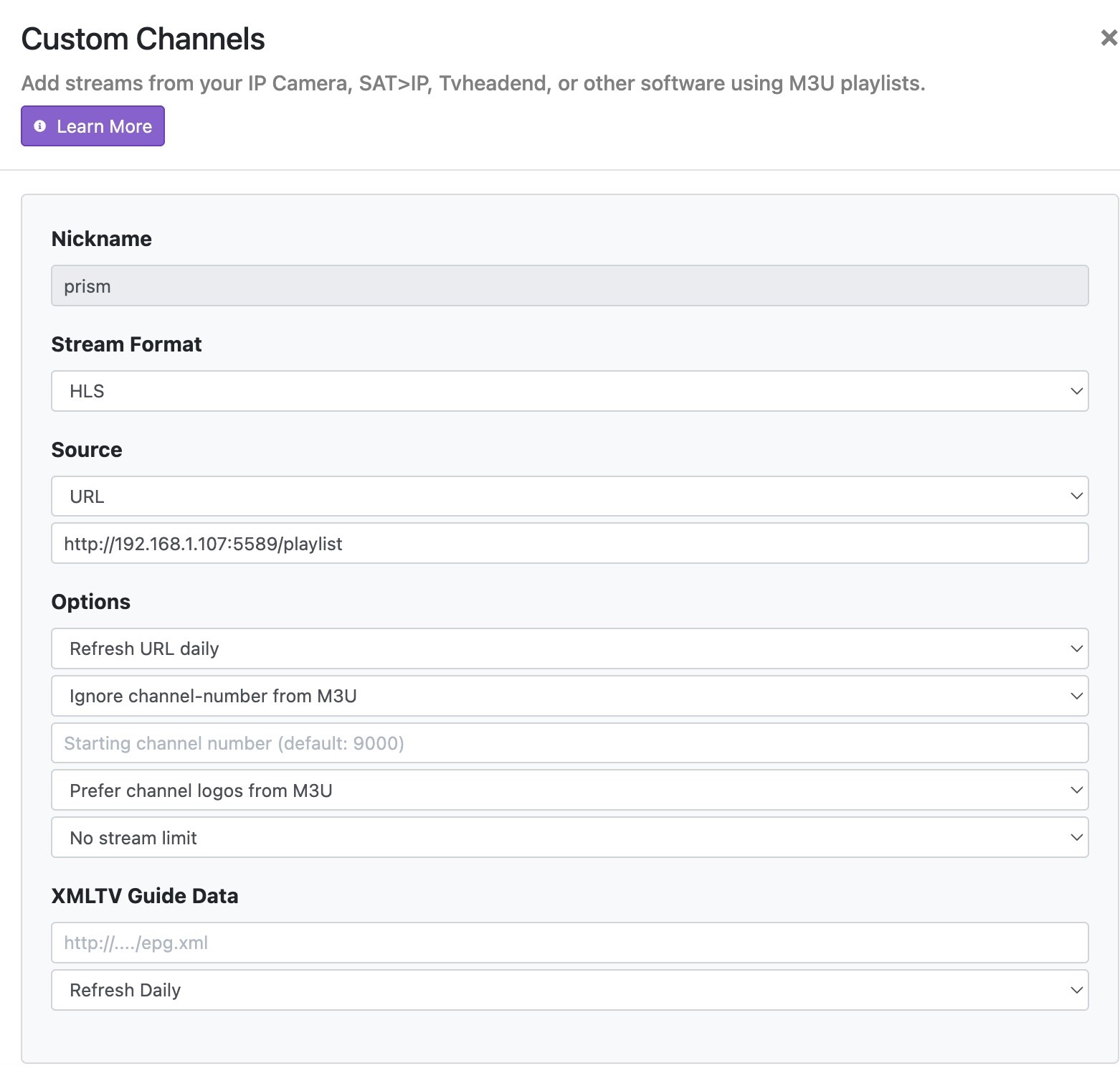
Can you see anything happening in the Chrome that PrismCast uses? Does a new tab open? If so, what can you see happening when PrismCast attempts to go to the Xfinity Stream guide?
Yes.
Yes. When I restart the Prismcast service, it starts an instance of Chrome, opens a few tabs. Then, I go to the Prism admin page channels tab and click on the lightning bolt to start an auth process for Xfinity. The Xfinity login proceeds, and it results in an Xfinity stream guide view, so it looks like I am logged in and I click "done" in the admin tab page
No, I mean when you are actively tuning a channel, and you watch what's happening in that Chrome instance PrismCast controls. What do you see happening?
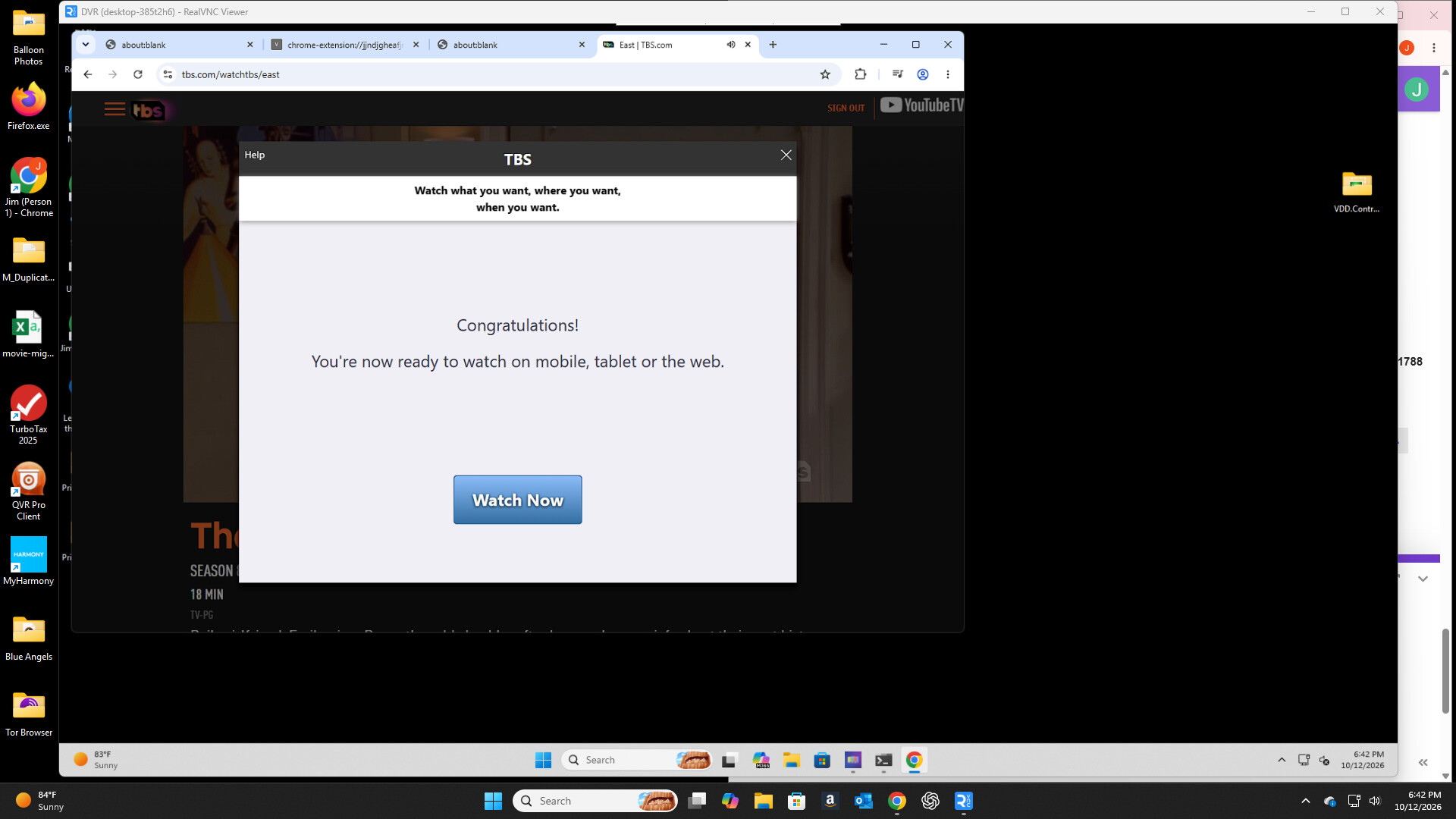
I signed out then back in with Prismcast on Windows 11. No issue.
Blockquote
[2026/10/12 06:41:34.308 PM] Login mode started for https://www.tbs.com/watchtbs/east.
[2026/10/12 06:43:57.955 PM] Login tab was closed. Ending login mode.
[2026/10/12 06:43:58.121 PM] Login mode ended.
Blockquote
Hmm. My Mac Mini uses my Sony Bravia as its monitor so I cannot see that. I will remote into it from my Macbook and see what it's doing, more when I get home, thanks,
I suggest signing on a tablet or other pc (mac) just to verify it works before trying Prismcast. This will verify your credentials are good. YTTV has a very aggressive bot detector. I had to create a new user recently. Also, I am sure you remember, you need to see the sign on page on the same pc prismcast is on or via Prismcast's own VNC.
Who are you replying to? The person just above is using Xfinity Stream.
Thanks all. I am sure my creds are right and good and can log into Xfinity everywhere no problem from my network on all machines including the server. I even turned off two factor for Xfinity to make sure that wasn't tripping anything up.
Opps....I was answering someone earlier about YTTV and missed he is Xfinity.
I admin the server from the server, and it is my udertsanding Prismcast spawns its own Chrome session, and I am being careful to use that instance to also bring up the Prismcast web admin page and log into individual channels?
That's good, as PrismCast opens the login for you. So if you don't see that, you're in the wrong place.
However, I'm asking you to monitor the tuning itself, which is in that same Chrome that's controlled be PrismCast. What are you seeing as it attempts to tune in that Chrome?
EDIT: Just to clarify, you do not need to use that Prismacast controlled instance (nor should you) to interact with the PrismCast WebUI. It's only to be used for logins and related, or to monitor what's happening with the tuning process, when it's failing and you're not sure why.
Hi. I watched the server via a Screen Sharing remote session. As soon as I clicked CNN in the Channels guide, it looks like Prismcast opens its Chrome window, a new tab, and is trying to load something, but it is just a black background, just what I am seeing when CNN (or any other Prismcast-sourced channel) tries to load in the ChannelsDVR UI
If you have "Channel Lineup Precaching" selected for Xfinity Stream, try deselecting that and then tune through Channels while monitoring. You should see the Xfinity Stream Guide, followed by PrismCast looking for the channel on that webpage -- and then selecting it.
I had spent the last few months testing a ZapperBox, but it was so ungodly slow that I decided to go back to Channels. At the same time, I migrated from a Docker container for PrismCast to installing it locally via HomeBrew on the same Channels DVR server because I had been having some reliability issues with the streams and I wanted native hardware acceleration from Apple Silicon.
I had been about to give up on Channels due to the slow death of TV Everywhere, but this setup is awesome: HDHomeRun for locals + Channels DVR and PrismCast running locally on a Mac. PrismCast has definitely rekindled my desire to maintain a Channels DVR server.
1 Like
Looking at the server action remotely, from what I can see, Prismcast is opening a tab in its Chromecast and trying to authenticate with Xfinity stream, but all I see is this wait graphic with progress dots and it just reloads endlessly. (I can log into Xfinity just fine otherwise from this machine or anywhere else.) Sigh.