LinkPi encoder family

Just to let everyone know...I had been using the linkpi for over a month with my current settings. All I tried to do was enable HDMI 4 after hooking up the ATV. Then I unhooked it when EVERYTHING would no longer stream.

Following this I both soft rebooted and power cycled everything on the network...Router, LinkPi, Computers, Media Streamers. Still NOTHING would stream.

Finally I said what the hell and reset the LinkPi to factory and reentered all my information again.
Now with the ATV also plugged in EVERYTHING is streaming again! Including the ATV.

IT'S MAGIC! LOL

As I have documented in other posts I have had problems like you when I have adjusted settings in the Mix Feed including some mix names changing to Chinese language and not being able to change them back and loosing the Mix Feed and having to reset the LinkPi to Factory Default.
Another thing is I always got errors if I tried to turn off DHCP in the system settings while using the classic view...I changed to the standard view and it let me disable it and save...then changed back to Classic view and it stayed disabled...lol...go figure...

I love these devices for the power/price.
But...
It gets really frustrating when it stops working when you simply try to enable another input and then you are forced to RESET/REENTER everything AGAIN!

...End Rant... :grin:

Now hopefully I can get the ATV to "tune" Spectrum channels without having to spin up a HomeAssistant docker.

2 Likes

By "factory" do you mean the reset hard button, or in the GUI?

1 Like

@hancox

Probably bad wording on my part...
In this Case...
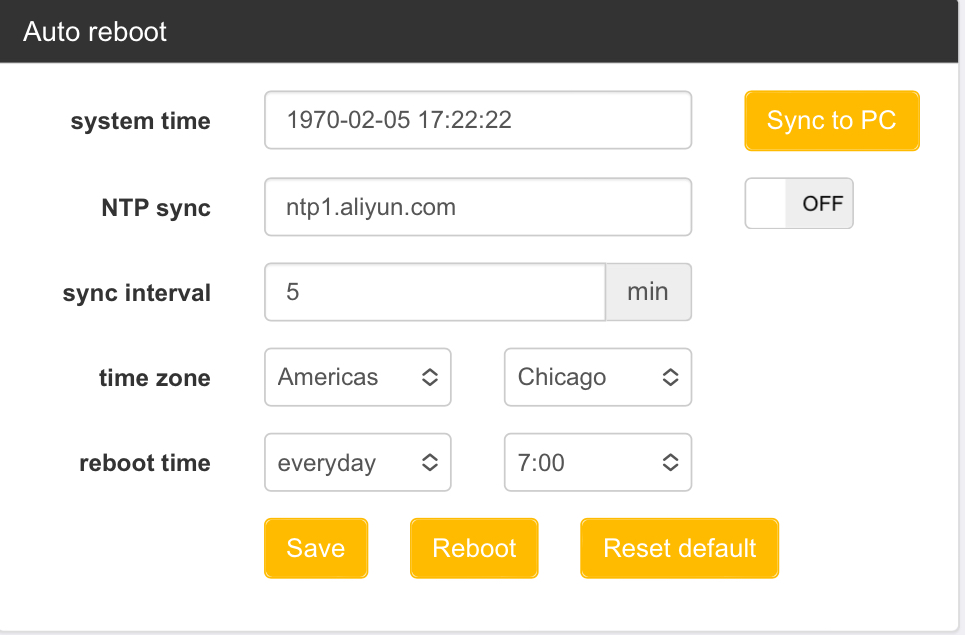
Using the Classic View...Options - System - Under Auto Reboot Section - Reset Default Option

With the earlier issues I did use the DEF reset button on the back. This time I only used the UI and it seems to be working.

I probaly need to change the UI to use Standard instead of Classic...I have noticed at times something can be changed in Standard that errors out in Classic. When I got it it booted into Classic and I like the layout better...but I should probaly just get used to Standard UI.

1 Like

Odd - was hoping the opposite, as GUI reset didn't work for me. My next step was to try hard reset (with the annoyance of default IP, etc)

1 Like

I feel your pain.
I probably hard reset mine (using the button) half a dozen times when I first got it trying to get everything working.
Don't remember what your using but I also stick to x264-Main for encoding...always seemed to have issues at some point with the others

Feeling discouraged. Hard and soft resets don't appear to help, and the support guys are asking very basic questions. Not a good sign on any front here.

hey @ChannelSam - 2 stupid questions

  1. Are you on the 3.0.0 build 20240131 sys version?
  2. If so, did your failure only start happening after upgrading?

Question not for me, but I am running 3x encoders on 3.0.0 build 20240131. No problems. Glad to share info if needed.

Yeah - mine ran a while on 20240131 fine, as well - it just up and died at some point, and i haven't been able to recover

1 Like

I assume you did the usual, power cycle, restore to original and enter everything again.

@hancox
Is your unit still in the return window? Or is that not an option?
I saw them telling you to check with Charles...Did he get back with you?

My unit is a LinkPi ENC5-V2

Current version:

App version: 3.0.0 build 20240131_1931

SDK version: 3.0.0 build 20240131_28419

Sys version: 3.0.0 build 20240131

Ordered on Amazon at end of December and delivered Jan 10.

I remember pretty much updating the firmware using the system page as soon as I had it hooked up. I worked with the 20231229 firmware to start with and then updated within a few days of 20240131 coming out.

So all of my beginning issues getting things up and running was with the 20231229 firmware. Addmittedly some of these "issues" were self-inflicted. One example was I set the frame rate on encode to -1. This had no noticable affect on encoding but it screwed with the mix specifically. Others are software issues...trying to resave a premade video mix layout sample and it changing only that name to Chinese and no way to change it back.

I am sure you have been to the github matiaspl LinkPi site that others have mentioned on here. This is a link to the firmware section:

That section also points you to the gittee firmware download site. I highlight some of the Chinese and tell google chrome to translate entire page.

Even though we are both running the newest firmware I would see if you can install an older version and reupgrade. Or see if it will completely reinstall the newest.

I would also try very plain settings to start Here is my encode. I only use H264-Main because I had problems with others. I am using these same settings with 2 Onn4K, 1 ATV Gen4, and a cheap Roku. I use HTTP stream and have EVERYTHING else disabled.

I would also set my time server to something like this...but for your timezone.

Link_Pi_7

Hopefully this helps

1 Like

I tried this just before you posted (reverted to earlier firmware fully). Still no change. Sigh

1 Like

As another data pint, back in December others and myself noticed that soft rebooting reliably hung the system. So I had disabled it permanently to “never”, and have been running months with no hangs.

Curiously enough, the latest firmware update changed my settings for auto reboot to this:

For reference I have the single channel unit and my firmware is up to date. Slightly different build versions, but that could be due to your unit being the multi.

Now i havent been playing with the unit enough since upgrading the firmware, about a week ago. Ill try capturing something contiguous to channels to see if i get the same hanging you are seeing…

1 Like

I just wanted to add that you would have to use the procedure discussed on that website to reinstall the firmware I believe. NOT the web portal because those are the complete firmware updates...NOT the upgrades.

The upgrades are located at:

The firmware flashing ones:

Firmware Flash instructions from LinkPI:

EDIT:
I just saw your reply...which one did you try to go back to?
Did you have any luck with Charles?

1 Like

Tried to go back to end of December release. Downgrade was successful using same site you posted.

No change in HTTP behavior though.

Is it still returnable?

Like you...not sure what else to try.
Maybe someone who knows more than me could log in through ssh and monitor what is happening.
Maybe try firmware from 4 or 5 revision back.
More and More I am with you and think it is hardware problem..
.
No Matter What...IT SHOULDN'T BE THIS HARD TO MAKE THEM WORK!!!

Are you comfortable with SSH? You could download Putty, SSH into the box and run

netstat -tunlp

This will show you if port 8090 is listening. Looks like something like this:

tcp 0 0 :::8090

Are you using a static IP? Maybe try DHCP? Are you sure you don't have a conflict?

Maybe your firewall is being silly on your desktop, blocking this traffic?

1 Like

i think this may be deeper than just 8090. Screenshot below - unless I'm doing something wrong, this should work, i would think (trying opening an rtsp network stream):

1 Like

WOOHOO - I got it back.

I flashed back to the oldest possible firmware version ( 2.1.0 build 20230426 )
I did nothing but disable the ex-HTTP streaming, assign network values / turn on DHCP, and change the default password. I won't even fiddle with the time sync - don't think i care.

Boom. Works right away.

I may try to update firmware after communicating with the support guys, but at least I'm back in business for now.

2 Likes

aaaaaand I was able to immediately break it, doing nothing but changing the encode settings (i.e. to AVBR 59.94fps etc).

Good news - I backed up the post-refresh working config, restored that on top of the broken state, rebooted, and was back in business. So this absolutely looks like a software issue only!

UPDATE - good news!!!!

Another great finding - i can flip this from broken to working by setting fps to 59.94 (broken) to 30 or 60. This makes sense given i was trying to "fix" my screen redraws earlier.

The bitrate and rate control settings don't appear to be an issue. I can change those without worry.