
I picked up another enc1-v3 for $129 on amazon. Sept 2 delivery
What I learned after buying three of those is to just buy an ENC5 V2.
1 Like
Well you wont sell me (for real cheap) one of your spare enc1-v3s, so they cant all be that bad

Sorry, I want to keep them just in case something breaks and I need a backup until I can get either repaired or replaced.
I actually have had luck getting pretty good deals on AliExpress on these too.
1 Like
No need to apologize, thanks for all the valuable tips!
AliExpress has a coupon for the LinkPi Enc8 bringing the price down to $382.77.
Link Pi ENC8 4K-HDMI Video Codec 8-channel HDMI Encoder 4K Decoder SRT NDI vMix RTSP/RTMP/HTTP/HLS Multi-protocol Live Streaming
2 Likes
5.3.1 is out. I don't really know what it does, because the changelog is the same. I have a feeling it fixes a memory leak, because the previous two builds have had a massive memory leak that has only gotten worse. So I'm hoping that's what it was there to solve. My encoder that's been up for a few weeks now was at 87% memory usage. So that's obviously not normal or good.
Moving this here as I believe this isn't a ADBTuner problem but either a LinkPi problem or a problem with all 5 of my various generation ONN devices:
Gearing up for college sports and noticed that my ADBTuner source is showing a new "wrinkle". I have 5 ADBTuners setup using 5 ONN devices and a 5 Port LinkPi device feeding my devices.
I see both under NBC Sports using the YTTV app as well as ESPN based sources using the ESPN app that I am getiing "micros" stuttering. What I mean by that is that every 1 second, i'll see a micro stutter. It's like for every 200 frames, about 10-20 are skipped so I get about 9/10ths of smooth playback and then a micros jump. It's not so bad that I would abandon ADBTuner as a source, but the OCD in me says there has to be a fix. It's happening on all 5 ONN devices (different generations of ONN devices).
I'm using Wifi for the devices, but they are withing 3-4 feet of the router (synology router, and rarely do I have more than 1-2 devices running concurrently, so I can't imagine it's a wifi bandiwtch issue.). I don't recall this being an issue previously, but last year most of my sources were fed by non-ADBtuners, so it may have been persistent and I just didn't notice.
Thanks for any input, fortunately these early games are not "must see", so happy to work through this over the first 2 weeks of the season.
Thanks for any suggestions on how to trouble shoot.
Since 5 different variations of ONN devices are showing the same behaviour and they are different generations and different APPs have been tested, this leads me to think it's the LinkPI. Here's the current version I am on (updated a few weeks ago, that may be the culprit):
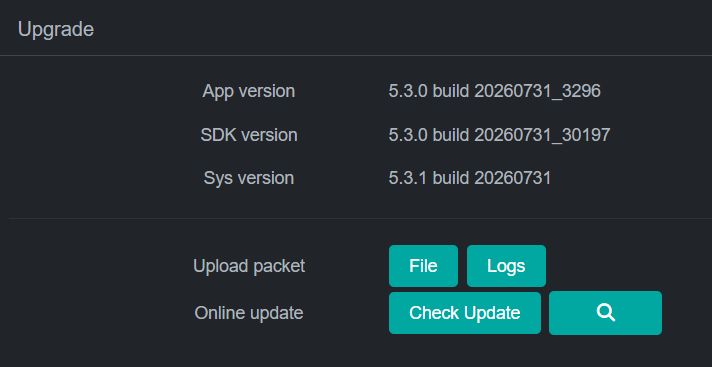
I did reboot the device and still seeing the same symptoms.
In the past I recall the suggestion was to use AVBR as opposed to VBR. I bet you are using VBR for a reason... Care to share your findings?
1 Like
Just the opposite in fact:
Check out the 2025 edit in this post. Also, H.265 is fine to use in ah4c, and also in ADBTuner now.
Thank you for the quick response, I have updated my settings. I have not had any issues to date using ADBTuner but I am about to add 5 more inputs so I wanted to see what the latest was.
I currently have a HDHomeRun Connect 4K, and was looking at setting up Channels with that as well as a LinkPi for cable channels from DirecTV Stream.
I’d rather not pay the $300-$400 upfront for the ENC5/ENC8 (particularly since I’m not sure how long I’ll use this and do have 4 OTA tuners), so I’m wondering about using the ENC1 with 2 Ospreys (or other input devices).
From what I understand, it has 1 HDMI port and one USB, which can take a USB capture card. Is there a good capture card for this setup that doesn’t cost too much? I saw some mention the Elgato CamLink, though that is more than half the cost of the ENC1…
I don't remember which one I bought, but it was one of the USB 3 under $20 from Amazon. The cheap ones are all about the same. Make sure you have a small fan on it as they tend to run a bit hot. One of the larger ones may be able to stay cool with a larger surface area.
I have a single LinkPi ENC3 that I use for ch4c. It doesn't get a ton of use, but it's worked OK with this Capture Card: Amazon.com: Audio Express AXHDCAP 4K HDMI Video Capture Card, Cam Link Card Game Audio Adapter HDMI to USB 2.0 Record Capture Device for Streaming, Live Broadcasting, Video Conference, Teaching, Gaming : Electronics
Interestingly, quite a few people I know (including me  ) have bought single port encoders initially (with reasons not dissimilar to yours), but have ultimately ended up with multi-port units. The irony, of course, being it would have been cheaper to buy a multi-port unit from the start.
The USB Capture Card addition does give a serviceable second port, but I would not consider it equivalent. Heat could potentially be an issue, as is getting 1080p60 on both ports.
I'm using these on both my youyeetoo enc1v3's and saved a few bucks on a used/returned ones  over a year of use and their rock solid for ~250 and 4 tuners. i personally don't care about 50hz vs 60hz I've actually been putting the usb encoders first for most of the year, just to kinda stress test them and I've never had a problem (with this encoding part of the setup) and the room frequently was 85deg every afternoon all summer.
1 Like
The Monster USB 3.0 capture cards sold at Walmart are MS232, I think... Regardless, they can do 1080p 60 Hz over USB 3 and 1080p 50 Hz over USB 2. I actually, tried to hack the firmware on one and successfully got it to display 1080p 60 hertz over USB 2. but it just wasn't enough bandwidth. It ended up leading to just video corruption weirdness.
I suppose they would be a good option if you have an ENC5 V2 unit, because those have onboard USB 3.0.
In general, though, my opinion is to stay away from the capture cards if possible and just get a larger encoder if money allows, because they really do kind of tend to lock up on these LinkPi units. I've had nothing but issues with the USB cam part of these devices, but the actual encoder itself is fine.
I also can confirm that the Elgato Camlink 4K does work with the ENC1 1080p 60fps does enumerate, however, it will lock up if you put your device to sleep, and then you have to reboot or replug the USB dongle. It's like almost not even worth it because it's just going to lead to failed tunes. I don't have my units anymore because I sold them on eBay, but if I did, I would test on my ENC5 units to see if it's any better over USB 3.
This has been my experience as well. From what I can tell, using just the HDMI inputs on a LinkPi device (mine is an ENC5-V2) pretty much maxes out its encoding capability. Adding another source to the USB input seems to put it over the top, leading to a host of problems. I have abandoned the LinkPi USB port as a video input source.
I ran into a problem with the ENC1 Pro where when I plugged a Google TV Streamer 4K into it I would get this horrible ticking sound. It didn't happen with the ENC1 I have. After talking to support, they told me changing the audio settings in the Google TV from Auto to PCM would fix it, and it did. I asked if they could fix the firmware so it negotiated properly and I got test firmware today that fixes the issue. They say the fix should be in the next firmware release.
5 Likes
I was having some weirdness and i ended up just downgrading my firmware to the last from 2025 and my ENC5-V2 is working so much better now. Honestly, these LinkPi units are great, but their firmware can be really buggy.
Just wanted to update. I spoke with YouYeeToo support and they were able to confirm to me that there are some issues with the July firmware and to flash back to the May firmware, and that did resolve the weird HDMI handshaking stuff I was running into.
Will it resolve the memory leaks I was seeing? That's still to be determined, but I'm going to keep an eye on that. So far, it's tuning really nicely in ah4c.