Multichannel view, an alternative approach

This is a nice approach, especially for those that have one or more sets of channels they'd like to view together on an ongoing basis. Also, having each of the audio tracks available through the client is a great touch.

I've containerized this for use in the amd64 world, and have tested it with Intel Quicksync hardware acceleration. Unfortunately, in the Apple world, hardware acceleration is not available for Docker containers. Apple users are best off installing this project as a Python app.

I'll add this to Project One-Click as well, with support for creating an initial set of 4 multiview channels. You should be able to create many tetrads each with their own channel number.

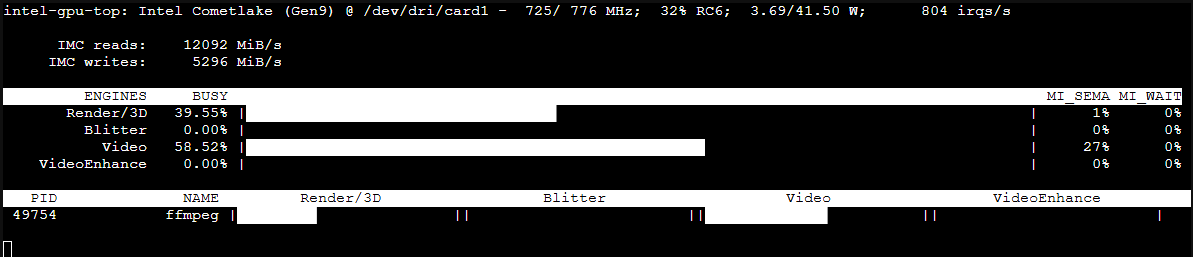
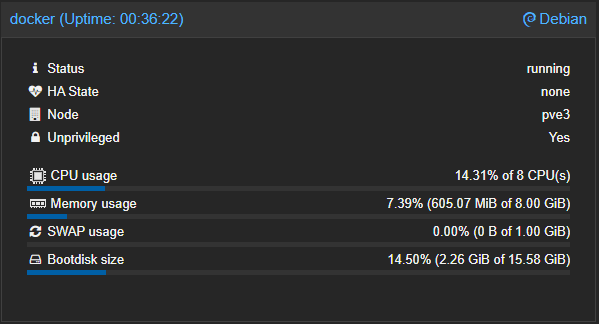
CPU usage is moderate when Quicksync is employed:

CPU:
screenshot-pve3_8006-2025_07_01-10_28_52

GPU:

I did my testing on a 10th generation i7 running Proxmox, with Docker running in an LXC with 8 vCPUs and 8GB of RAM.

Here's my current recommended Docker compose:

version: '3.9'
services:
  multichannelview:
    # 2025.07.01
    # Github home for this project: https://github.com/bnhf/multichannelview.
    # Docker container home for this project: https://hub.docker.com/r/bnhf/multichannelview.
    image: bnhf/multichannelview:${TAG} # Add the tag like latest or test to the environment variables below.
    container_name: multichannelview
    #devices:
      #- /dev/dri:/dev/dri # Uncomment this and the line above to use Intel Quicksync hardware acceleration. Plus use h26_qsv as the codec.
    ports:
      - ${HOST_PORT}:5001 # Use the same port number the container is using, or optionally change it if the port is already in use on your host.
    environment:
      - CDVR_HOST=${CDVR_HOST} # Hostname/IP of Channels DVR server.
      - CDVR_PORT=${CDVR_PORT} # Port of Channels DVR server.
      - CODEC=${CODEC} # Use h264_qsv (hardware) or libx264 (software)
    restart: unless-stopped

And some sample env vars:

TAG=latest
HOST_PORT=5001
CDVR_HOST=media-server8
CDVR_PORT=8089
CODEC=libx264

Would using CODEC=h264_nvenc work for an NVIDIA graphics card?

Not at the moment, as the container doesn't have support in it, but I'd like to add it. Would you be willing to help? I don't have any systems with NVIDIA installed. Not sure if it can be all-in-one, or if we'd need a separate tag...

All of mine are Intel. I was just wondering if it would work. Sorry.

No worries. Someone will probably turn up that wants to use this with an NVIDIA card.

1 Like

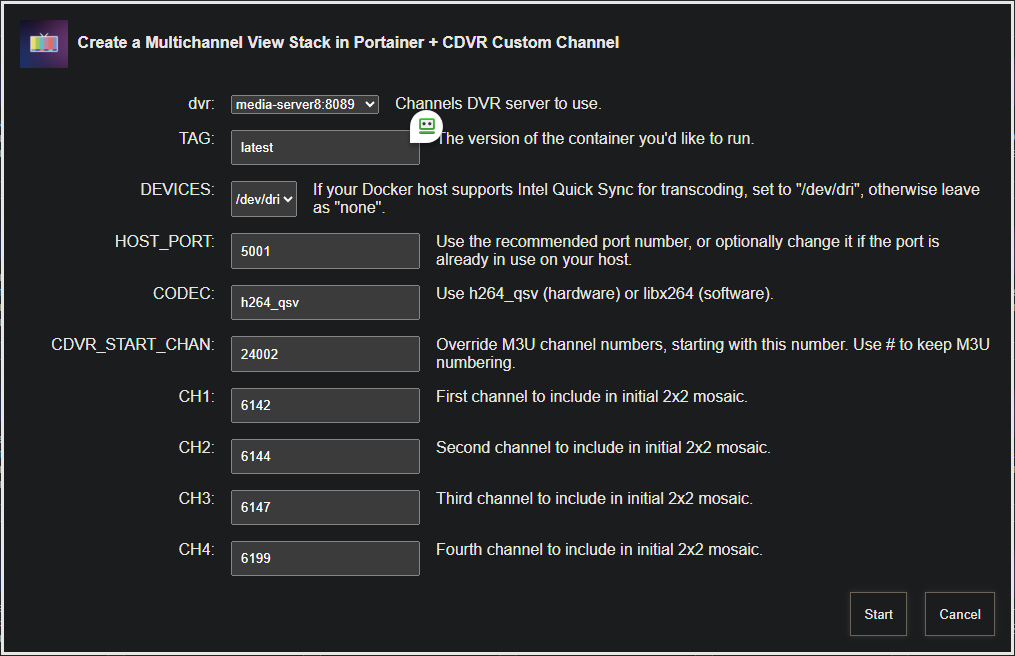
This is now done and pushed as bnhf/olivetin:latest (aka bnhf/olivetin:2025.07.01):

screenshot-docker_1337-2025_07_01-18_37_42

Be sure to add an initial set of 4 channels, and then you can expand the available sets of channels in CDVR Sources under the Multichannel View Custom Channels. Each tetrad can have it's own guid description, similar to what was done in Multi4Channels. Here's a sample M3U from that project, which you can use as inspiration for this project:

#EXTM3U

#EXTINF:0 channel-id="M4C" tvg-id="24001" tvg-chno="24001" tvc-guide-placeholders="7200" tvc-guide-title="Start a Stream At htpc6:9799." tvc-guide-description="Visit Multi4Channels Web Page to Start a Stream (htpc6:9799)." tvc-guide-art="https://i.postimg.cc/xCy2v22X/IMG-3254.png" tvg-logo="https://i.postimg.cc/xCy2v22X/IMG-3254.png" tvc-guide-stationid="" tvg-name="Multi4Channels" group-title="HD",M4C
udp://0.0.0.0:4444

Kudos to @hal9000 for developing this well crafted Python script. It's working very well in a Docker container, especially when Intel Quicksync is available on reasonable kit.

1 Like

I just tried this on a $100 Beelink with about 50% CPU load using h264_vaapi combining 4 1280x720 tiles, just like the Mac version.

Hardware used:

Intel(R) Celeron(R) J4125 CPU @ 2.00GHz / UHD Graphics 600

The code https://pastebin.com/HD5WGTZe

2 Likes

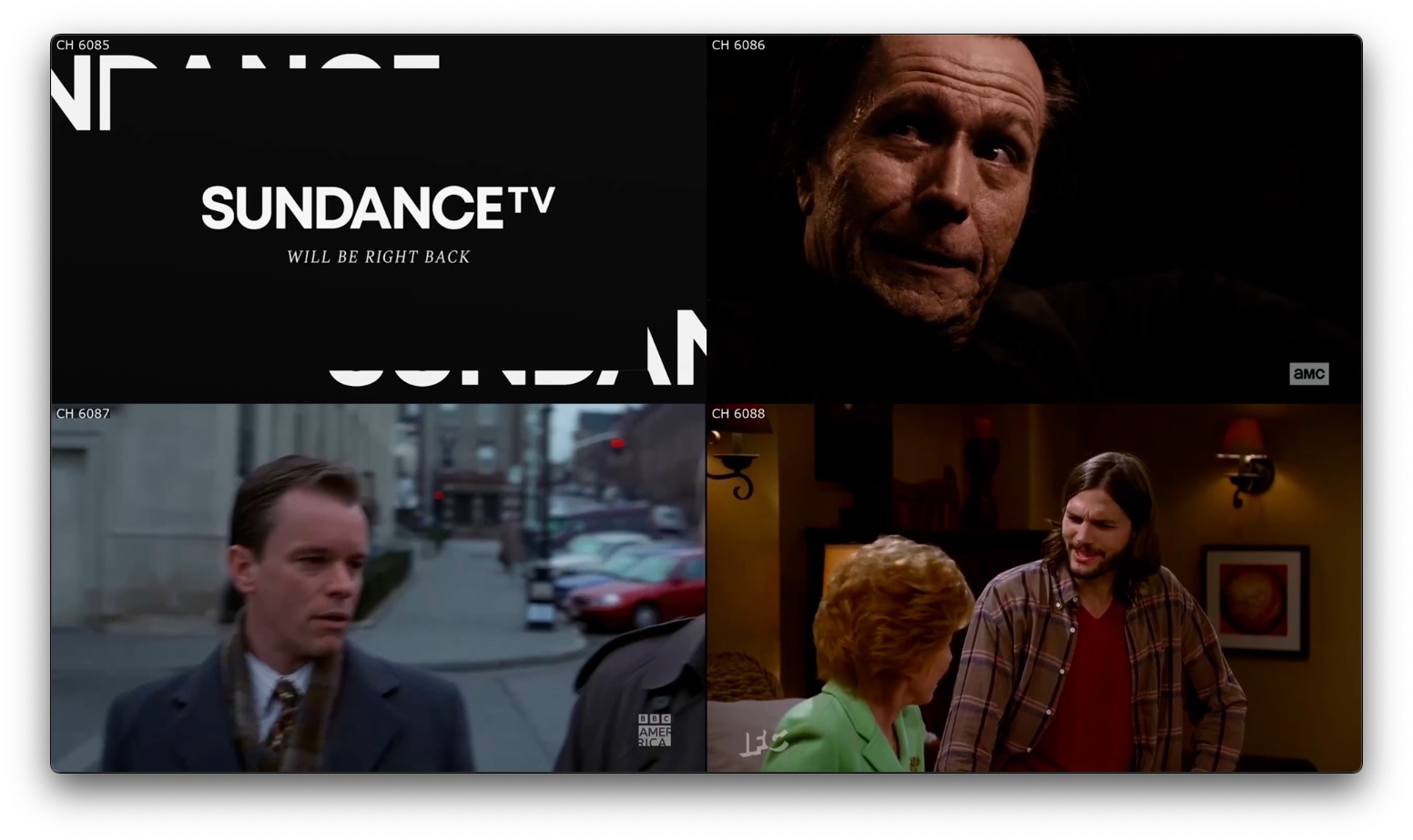
@hal9000 Any chance of adding a small channel number overlay to each stream in the mosaic? Also, could a more descriptive name be attached to each audio track . I'm seeing Track 1, Track 2, Track 3 and English.

If a channel number overlay can be added, then that number would be a good reference. Something like Track 6199, or failing that, maybe Track Upper Left and so on?

1 Like

I don't think audio tracks can be labelled with random labels. Added overlay 'CH 6088' in upper left corner.

https://pastebin.com/sEvcPa9Q

2 Likes

Since not all arm64 users are running Apple hardware, I built bnhf/multiview:latest (aka bnhf/multiview:2025.07.02) for both amd64 and arm64. Tested on my Mac-Mini-M2 and it runs fine with the software codec. CPU usage was mostly in the 400-500% range (so 4-5 cores).

Still best for Apple users to install this directly (with the hardware codec) for regular use, but for occasional multiview use on Apple, or for arm64 use on other platforms (with reasonably powerful processors) the container works well.

This latest build, pushed today, also includes the channel number overlay on each tile in the mosaic. Thanks @hal9000!

I tried the one-click but got the following error:

exit status 1


+ dvr=192.168.150.242:8089
++ basename /config/multichannelview.sh
+ extension=multichannelview.sh
+ extension=multichannelview
+ cp /config/multichannelview.env /tmp
+ envFile=/tmp/multichannelview.env
+ [[ -n 192.168.150.242 ]]
+ extensionURL=192.168.150.242:5002
+ [[ #1 == \# ]]
+ cdvrStartingChannel='#1'
+ [[ -n #1 ]]
+ cdvrIgnoreM3UNumbers=ignore
+ ch1=6001
+ ch2=18423
+ ch3=18424
+ ch4=18421
+ curl -s -o /dev/null http://192.168.150.242:5002
+ envVars=("TAG=$2" "DEVICES=$3" "HOST_PORT=$4" "CDVR_HOST=${dvr%%:*}" "CDVR_PORT=${dvr##*:}" "CODEC=$5")
+ printf '%s\n' TAG=latest DEVICES=# HOST_PORT=5002 CDVR_HOST=192.168.150.242 CDVR_PORT=8089 CODEC=libx264
+ sed -i /=#/d /tmp/multichannelview.env
+ /config/portainerstack.sh multichannelview
+ stackName=multichannelview
+ portainerHost=192.168.150.242
+ portainerToken=ptr_TP3q1aaHghJfhw94AMoa6ulP04EI93wfbogZlsKSb3c=
+ [[ -n 9443 ]]
+ portainerPort=9443
+ yamlCopied=
++ curl -s -k -H 'X-API-Key: ptr_TP3q1aaHghJfhw94AMoa6ulP04EI93wfbogZlsKSb3c=' http://192.168.150.242:9000/api/endpoints
++ jq '.[] | select(.Name=="local") | .Id'
jq: error (at <stdin>:1): Cannot index string with string "Name"
+ portainerEnv=
+ curl -s -o /dev/null http://192.168.150.242:9000
+ portainerURL='http://192.168.150.242:9000/api/stacks/create/standalone/string?endpointId='
+ [[ '' != \t\r\u\e ]]
+ cp /config/multichannelview.yaml /tmp
+ stackFile=/tmp/multichannelview.yaml
+ envFile=/tmp/multichannelview.env
+ dirsFile=/tmp/multichannelview.dirs
++ grep DVR_SHARE= /tmp/multichannelview.env
++ grep -v /
++ awk -F= '{print $2}'
+ dockerVolume=
++ grep VOL_EXTERNAL= /tmp/multichannelview.env
++ grep -v '#'
++ awk -F= '{print $2}'
+ volumeExternal=
++ grep VOL_NAME= /tmp/multichannelview.env
++ grep -v '#'
++ awk -F= '{print $2}'
+ volumeName=
++ grep NETWORK_MODE= /tmp/multichannelview.env
++ grep -v '#'
++ awk -F= '{print $2}'
+ networkMode=
++ grep DEVICES= /tmp/multichannelview.env
++ grep -v '#'
++ awk -F= '{print $2}'
+ transcoderDevice=
++ grep CDVR_CONTAINER= /tmp/multichannelview.env
++ grep -v '#'
++ awk -F= '{print $2}'
+ stackNumber=
+ [[ -n '' ]]
+ [[ -n '' ]]
+ [[ -n '' ]]
+ [[ -n '' ]]
++ sed 's/\\/\\\\/g' /tmp/multichannelview.yaml
++ sed 's/"/\\"/g'
++ awk '{printf "%s\\n", $0}'
+ stackContent='version: '\''3.9'\''\nservices:\n  multichannelview:\n    # 2025.07.01\n    # Github home for this project: https://github.com/bnhf/multichannelview.\n    # Docker container home for this project: https://hub.docker.com/r/bnhf/multichannelview.\n    image: bnhf/multichannelview:${TAG} # Add the tag like latest or test to the environment variables below.\n    container_name: multichannelview\n    #devices:\n      #- /dev/dri:/dev/dri # Uncomment this and the line above to use Intel Quicksync hardware acceleration. Plus use h26_qsv as the codec.\n    ports:\n      - ${HOST_PORT}:5001 # Use the same port number the container is using, or optionally change it if the port is already in use on your host.\n    environment:\n      - CDVR_HOST=${CDVR_HOST} # Hostname/IP of Channels DVR server.\n      - CDVR_PORT=${CDVR_PORT} # Port of Channels DVR server.\n      - CODEC=${CODEC} # Use h264_qsv (hardware) or libx264 (software).\n    restart: unless-stopped\n'
+ stackEnvVars='['
+ IFS=
+ read -r line
+ key=TAG
+ value=latest
+ stackEnvVars='[{"name": "TAG", "value": "latest"},'
+ IFS=
+ read -r line
+ key=HOST_PORT
+ value=5002
+ stackEnvVars='[{"name": "TAG", "value": "latest"},{"name": "HOST_PORT", "value": "5002"},'
+ IFS=
+ read -r line
+ key=CDVR_HOST
+ value=192.168.150.242
+ stackEnvVars='[{"name": "TAG", "value": "latest"},{"name": "HOST_PORT", "value": "5002"},{"name": "CDVR_HOST", "value": "192.168.150.242"},'
+ IFS=
+ read -r line
+ key=CDVR_PORT
+ value=8089
+ stackEnvVars='[{"name": "TAG", "value": "latest"},{"name": "HOST_PORT", "value": "5002"},{"name": "CDVR_HOST", "value": "192.168.150.242"},{"name": "CDVR_PORT", "value": "8089"},'
+ IFS=
+ read -r line
+ key=CODEC
+ value=libx264
+ stackEnvVars='[{"name": "TAG", "value": "latest"},{"name": "HOST_PORT", "value": "5002"},{"name": "CDVR_HOST", "value": "192.168.150.242"},{"name": "CDVR_PORT", "value": "8089"},{"name": "CODEC", "value": "libx264"},'
+ IFS=
+ read -r line
+ stackEnvVars='[{"name": "TAG", "value": "latest"},{"name": "HOST_PORT", "value": "5002"},{"name": "CDVR_HOST", "value": "192.168.150.242"},{"name": "CDVR_PORT", "value": "8089"},{"name": "CODEC", "value": "libx264"}]'
++ cat
+ stackJSON='{
  "Name": "multichannelview",
  "SwarmID": "",
  "StackFileContent": "version: '\''3.9'\''\nservices:\n  multichannelview:\n    # 2025.07.01\n    # Github home for this project: https://github.com/bnhf/multichannelview.\n    # Docker container home for this project: https://hub.docker.com/r/bnhf/multichannelview.\n    image: bnhf/multichannelview:${TAG} # Add the tag like latest or test to the environment variables below.\n    container_name: multichannelview\n    #devices:\n      #- /dev/dri:/dev/dri # Uncomment this and the line above to use Intel Quicksync hardware acceleration. Plus use h26_qsv as the codec.\n    ports:\n      - ${HOST_PORT}:5001 # Use the same port number the container is using, or optionally change it if the port is already in use on your host.\n    environment:\n      - CDVR_HOST=${CDVR_HOST} # Hostname/IP of Channels DVR server.\n      - CDVR_PORT=${CDVR_PORT} # Port of Channels DVR server.\n      - CODEC=${CODEC} # Use h264_qsv (hardware) or libx264 (software).\n    restart: unless-stopped\n",
  "Env": [{"name": "TAG", "value": "latest"},{"name": "HOST_PORT", "value": "5002"},{"name": "CDVR_HOST", "value": "192.168.150.242"},{"name": "CDVR_PORT", "value": "8089"},{"name": "CODEC", "value": "libx264"}]
}'
+ echo 'JSON response from http://192.168.150.242:9000/api/stacks/create/standalone/string?endpointId=:'
++ curl -k -X POST -H 'Content-Type: application/json' -H 'X-API-Key: ptr_TP3q1aaHghJfhw94AMoa6ulP04EI93wfbogZlsKSb3c=' -d '{
  "Name": "multichannelview",
  "SwarmID": "",
  "StackFileContent": "version: '\''3.9'\''\nservices:\n  multichannelview:\n    # 2025.07.01\n    # Github home for this project: https://github.com/bnhf/multichannelview.\n    # Docker container home for this project: https://hub.docker.com/r/bnhf/multichannelview.\n    image: bnhf/multichannelview:${TAG} # Add the tag like latest or test to the environment variables below.\n    container_name: multichannelview\n    #devices:\n      #- /dev/dri:/dev/dri # Uncomment this and the line above to use Intel Quicksync hardware acceleration. Plus use h26_qsv as the codec.\n    ports:\n      - ${HOST_PORT}:5001 # Use the same port number the container is using, or optionally change it if the port is already in use on your host.\n    environment:\n      - CDVR_HOST=${CDVR_HOST} # Hostname/IP of Channels DVR server.\n      - CDVR_PORT=${CDVR_PORT} # Port of Channels DVR server.\n      - CODEC=${CODEC} # Use h264_qsv (hardware) or libx264 (software).\n    restart: unless-stopped\n",
  "Env": [{"name": "TAG", "value": "latest"},{"name": "HOST_PORT", "value": "5002"},{"name": "CDVR_HOST", "value": "192.168.150.242"},{"name": "CDVR_PORT", "value": "8089"},{"name": "CODEC", "value": "libx264"}]
}' 'http://192.168.150.242:9000/api/stacks/create/standalone/string?endpointId='
  % Total    % Received % Xferd  Average Speed   Time    Time     Time  Current
                                 Dload  Upload   Total   Spent    Left  Speed

  0     0    0     0    0     0      0      0 --:--:-- --:--:-- --:--:--     0
100  1263  100    19  100  1244  19000  1214k --:--:-- --:--:-- --:--:-- 1233k
+ portainerResponse='404 page not found'
+ [[ -z 404 page not found ]]
+ echo 404 page not found
+ echo '404 page not found'
+ jq -e '.Id != null'
jq: error (at <stdin>:1): Cannot index number with string "Id"
parse error: Invalid numeric literal at line 1, column 9
+ exit 1
+ [[ 1 == 1 ]]
+ exit 1

This should either a # for CDVR to choose the channel number, or a 1 if you want to start numbering multiview channels at 1 -- not both combined.

This is the bigger problem though, as there's something up with your OliveTin installation. Please run the OliveTin Post-Install Healthcheck, and post the results in the Project One-Click thread:

1 Like

@hal9000 This app is working well with Quicksync on my 10th gen i7, however it fails on a 12th gen i3 and a 14th gen i9, both with the same error:

[h264_qsv @ 0x60177c396340] Error initializing an internal MFX session: unsupported (-3)

Error initializing output stream 0:4 -- Error while opening encoder for output stream #0:4 - maybe incorrect parameters such as bit_rate, rate, width or height

172.19.0.1 - - [02/Jul/2025 21:20:34] "GET /combine?ch=6142&ch=6144&ch=6147&ch=6199 HTTP/1.1" 200 -

The Intel UHD architecture changed with gen 12, so I believe this may be the cause. Any thoughts on whether this can be addressed through the script?

I didn't do anything with quicksync, it was your thing. Have you tried vaapi from post #9?

Chatgpt suggests trying this script https://pastebin.com/45kqyNCH to resolve any quicksync issues.

Different error with the h264_vaapi codec:

Impossible to convert between the formats supported by the filter 'Parsed_xstack_12' and the filter 'auto_scale_0'

Error reinitializing filters!

Failed to inject frame into filter network: Function not implemented

Error while processing the decoded data for stream #3:0

172.19.0.1 - - [02/Jul/2025 23:52:11] "GET /combine?ch=6142&ch=6144&ch=6147&ch=6199 HTTP/1.1" 200 -

Am I interpreting this correctly, that you're not interested in getting this to work with various generations of Intel GPUs? I figured since you tested this on a low end Intel processor, you had some motivation, but if not -- no worries.

I've been trying to get quick sync to work on Linux with a 12th gen CPU all day and nothing seems to work. Windows does not seem to have this issue. I am starting to think it is a issue with the Linux driver. Somewhere between ffmpeg and the VA-API library interaction is not working in newer Intel.

On Windows it works like a champ.

We are duplicating the work already done by the CDVR team. They can use hardware encoding on newer Intels CPUs. I would just take a look at how ffmpeg is invoked during encoding and just copy the important parameters.

Could it be as simple as just using their custom version of ffmpeg? I already download that when building OliveTin, so I'll give it a try.

I don't think it is a simple fix as this is a more complex process than usual. VA-API is having to do a back and forth with the video between the CPU and GPU. I could be wrong, but I think this is where the issue is happening at. It's well above my pay grade though.

I doubt anything special is being done with h264 in the special version of ffmpeg. CDVR is probably maintaining a list of parameters for each gen of CPU. Just start an encoding session from the client and see how ffmpeg is invoked. I used to drop a script in place to log all the parameters it gets called with and then call the real ffmpeg.

#!/bin/bash
LOGFILE="/tmp/ffmpeg_wrapper.log"
REAL_FFMPEG="$0.org"

echo "[$(date)] $0 $@" >> "$LOGFILE"

exec "$REAL_FFMPEG" "$@"