
No joy. Got to head out. Will review again this afternoon. Thanks for the help
What method did you use to install Portainer? If it was an online guide, can you post the link?
It may make sense for us to put Portainer and OliveTin on the same Docker subnet -- as a workaround for all these roadblocks QNAP is throwing up. I want to review the installation process you used for Portainer first though...
Got install instructions from Qnap--note I changed port 8000 to 8001 due to a conflict.
docker volume create portainer_data
docker run -d -p 8001:8000 -p 9443:9443 --name portainer --restart=always -v portainer_data:/data -v /var/run/docker.sock:/var/run/docker.sock portainer/portainer-ce:latest
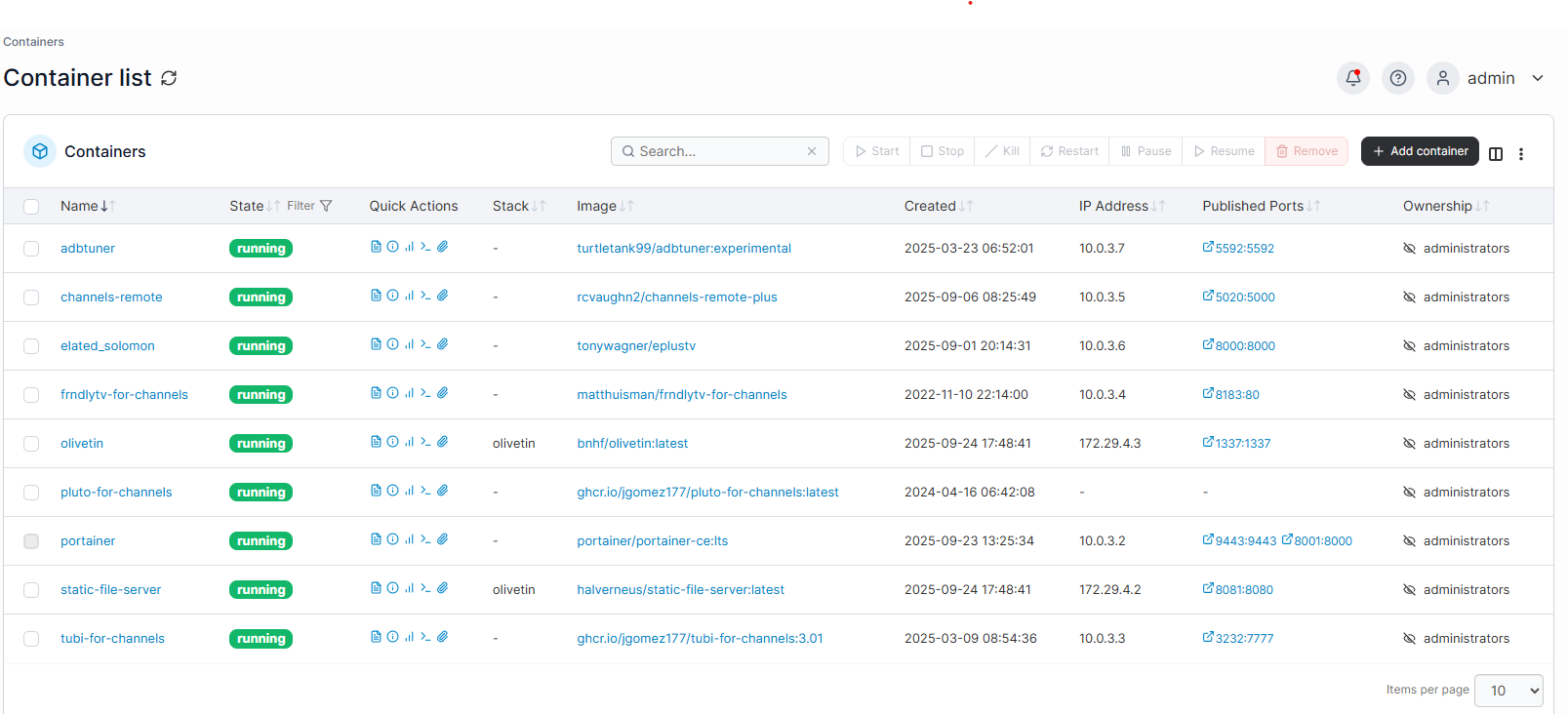
Here are the containers and IP addresses being used.
What we're going to do is stop portainer, and put it on its own subnet, and then we'll stop olivetin and put it on that subnet too. Also, we don't need port 8000 for what we're doing, but I do want port 9000. Here are the steps:
docker stop portainer

docker rm portainer

docker network create portainer_default

docker run -d -p 9000:9000 -p 9443:9443 --name portainer \
    --restart=always \
    -v /var/run/docker.sock:/var/run/docker.sock \
    -v portainer_data:/data \
    --network portainer_default \
    portainer/portainer-ce:latest
Assuming that starts back up OK, open your browser and go to your portainer URL. In Portainer-Stacks, stop the olivetin stack, followed by going into the editor and replace your current compose with this one:
services:
  olivetin: # This docker-compose typically requires no editing. Use the Environment variables section of Portainer to set your values.
    # 2025.08.25
    # GitHub home for this project: https://github.com/bnhf/OliveTin.
    # Docker container home for this project with setup instructions: https://hub.docker.com/r/bnhf/olivetin.
    image: bnhf/olivetin:${TAG:-latest} # Add the tag like latest or test to the environment variables below.
    container_name: ${OLIVETIN_NAME:-olivetin}${EZ_START}
    hostname: ${OLIVETIN_NAME:-olivetin}${EZ_START}
    dns_search: ${DOMAIN:+${DOMAIN}} # For Tailscale users using Magic DNS, add your Tailnet (tailxxxxx.ts.net) to use hostnames for remote nodes, otherwise use your local domain name.
    ports:
      - ${HOST_PORT:-1337}:1337
    environment:
      - OLIVETIN_COMPOSE=2025.08.25${EZ_START} # Do not change this value.
      - CHANNELS_DVR=${CHANNELS_DVR_HOST}:${CHANNELS_DVR_PORT:-8089} # Add your Channels DVR server in the form CHANNELS_DVR_HOST=<hostname or ip> and CHANNELS_DVR_PORT=<port>.
      - CHANNELS_DVR_ALTERNATES=${CHANNELS_DVR2_HOST:+${CHANNELS_DVR2_HOST}:${CHANNELS_DVR2_PORT}}${CHANNELS_DVR3_HOST:+ ${CHANNELS_DVR3_HOST}:${CHANNELS_DVR3_PORT}} # Space separated list of alternate Channels DVR servers to choose from in the form hostname:port or ip:port.
      - CHANNELS_CLIENTS=${CHANNELS_CLIENTS} # Space separated list of Channels DVR clients you'd like notifications sent to in the form hostname or IP.
      - ALERT_SMTP_SERVER=${ALERT_SMTP_SERVER} # SMTP server to use for sending alert e-mails. smtp.gmail.com:587 for example.
      - ALERT_EMAIL_FROM=${ALERT_EMAIL_FROM} # Sender address for alert e-mails.
      - ALERT_EMAIL_PASS=${ALERT_EMAIL_PASS} # SMTP "app" password established through GMail or Yahoo Mail. Do not use your everyday e-mail address.
      - ALERT_EMAIL_TO=${ALERT_EMAIL_TO} # Recipient address for alert e-mails.
      - UPDATE_YAMLS=${UPDATE_YAMLS:-true} # Set this to true to update config.yaml.
      - UPDATE_SCRIPTS=${UPDATE_SCRIPTS:-true} # Set this to true to update all included scripts.
      - TZ=${TZ} # Add your local timezone in standard linux format. E.G. US/Eastern, US/Central, US/Mountain, US/Pacific, etc.
      - PORTAINER_TOKEN=${PORTAINER_TOKEN} # Generate via <username> dropdown (upper right of WebUI), "My account", API tokens.
      - PORTAINER_HOST=${PORTAINER_HOST:-$CHANNELS_DVR_HOST} # Hostname or IP of the Docker host you're running Portainer on.
      - PORTAINER_PORT=${PORTAINER_PORT:-9443} # https port you're running Portainer on. 9443 is the default.
      - PORTAINER_ENV=${PORTAINER_ENV:-2} # Set this is if you're using an alternate Portainer Environment for some reason. 2 is the default.
      - PERSISTENT_LOGS=${PERSISTENT_LOGS:-false} # For supported Actions, log files are retained on an ongoing basis. false is the default.
    volumes:
      - ${HOST_DIR:-/unused}${HOST_DIR:+/olivetin:/config} # Add the parent directory on your Docker host you'd like to use.
      - ${DVR_SHARE:-/unused}${DVR_SHARE:+:/mnt/${CHANNELS_DVR_HOST}-${CHANNELS_DVR_PORT}} # This can either be a Docker volume or a host directory that's connected via Samba or NFS to your Channels DVR network share.
      - ${LOGS_SHARE:-/unused}${LOGS_SHARE:+:/mnt/${CHANNELS_DVR_HOST}-${CHANNELS_DVR_PORT}_logs} # This can either be a Docker volume or a host directory that's connected via Samba or NFS to your Channels DVR logs network share.
      - ${TUBEARCHIVIST_SHARE:-/unused}${TUBEARCHIVIST_SHARE:+:/mnt/${CHANNELS_DVR_HOST}-${CHANNELS_DVR_PORT}_ta} # This can either be a Docker volume or a host directory that's connected via Samba or NFS to your TubeArchivist videos network share.
      - ${DVR2_SHARE:-/unused}${DVR2_SHARE:+:/mnt/${CHANNELS_DVR2_HOST}-${CHANNELS_DVR2_PORT}} # Note that these volume mounts should always be to /mnt/hostname-port or /mnt/ip-port (dash rather than a colon between).
      - ${LOGS2_SHARE:-/unused}${LOGS2_SHARE:+:/mnt/${CHANNELS_DVR2_HOST}-${CHANNELS_DVR2_PORT}_logs} # This can either be a Docker volume or a host directory that's connected via Samba or NFS to your Channels DVR logs network share.
      - ${TUBEARCHIVIST2_SHARE:-/unused}${TUBEARCHIVIST2_SHARE:+:/mnt/${CHANNELS_DVR2_HOST}-${CHANNELS_DVR2_PORT}_ta} # This can either be a Docker volume or a host directory that's connected via Samba or NFS to your TubeArchivist videos network share.
      - ${DVR3_SHARE:-/unused}${DVR3_SHARE:+:/mnt/${CHANNELS_DVR3_HOST}-${CHANNELS_DVR3_PORT}} # Note that these volume mounts should always be to /mnt/hostname-port or /mnt/ip-port (dash rather than a colon between).
      - ${LOGS3_SHARE:-/unused}${LOGS3_SHARE:+:/mnt/${CHANNELS_DVR3_HOST}-${CHANNELS_DVR3_PORT}_logs} # This can either be a Docker volume or a host directory that's connected via Samba or NFS to your Channels DVR logs network share.
      - ${TUBEARCHIVIST3_SHARE:-/unused}${TUBEARCHIVIST3_SHARE:+:/mnt/${CHANNELS_DVR3_HOST}-${CHANNELS_DVR3_PORT}_ta} # This can either be a Docker volume or a host directory that's connected via Samba or NFS to your TubeArchivist videos network share.
      - /var/run/docker.sock:/var/run/docker.sock
    networks:
      - portainer_default
    restart: unless-stopped

  static-file-server:
    image: halverneus/static-file-server:latest
    container_name: ${SFS_NAME:-static-file-server}${EZ_START}
    dns_search: ${DOMAIN}
    ports:
      - ${HOST_SFS_PORT:-0}:8080
    environment:
      - FOLDER=${FOLDER:-/web}
    volumes:
      - ${HOST_DIR:-/unused}${HOST_DIR:+/olivetin/data:${FOLDER:-/web}}
    networks:
      - portainer_default
    restart: unless-stopped

#0#volumes: # Remove the #x# to enable. Use this section if you've setup a docker volume named channels-dvr, with CIFS or NFS, to bind to /mnt/dvr inside the container. Set ${DVR_SHARE} to channels-dvr (DVR_SHARE=channels_dvr) in that example.
  #1#channels-dvr:
    #1#external: true
  #2#channels-dvr-logs:
    #2#external: true
  #3#tubearchivist:
    #3#external: true
  #4#channels-dvr2:
    #4#external: true
  #5#channels-dvr2-logs:
    #5#external: true
  #6#tubearchivist2:
    #6#external: true
  #7#channels-dvr3:
    #7#external: true
  #8#channels-dvr3-logs:
    #8#external: true
  #9#tubearchivist3:
    #9#external: true

networks:
  portainer_default:
    external: true
Before you click Update the stack, change the value of PORTAINER_HOST to PORTAINER_HOST=portainer
Let me know how it goes, and post a screenshot of Portainer-Networks if there are any issues.
You want me to delete?
docker: Error response from daemon: Conflict. The container name "/portainer" is already in use by container "c643515d4aae7d83f2b94f264084b468be367c7c9f0cc16ce1ad5811996758d0". You have to remove (or rename) that container to be able to reuse that name.
Looks like you missed this step from above...
You were correct. I
But still couldn't deploy--
Failed to deploy a stack: failed to create compose project: failed to load the compose file : validating /data/compose/5/docker-compose.yml: (root) Additional property sservices is not allowed
The extra s in services tells me this is a copy-and-paste fail. The compose I posted only has one s. 
I think it looks good!
Checking your OliveTin-for-Channels installation...
(extended_check=false)

OliveTin Container Version 2025.09.21
OliveTin Docker Compose Version 2025.08.25

----------------------------------------

Checking that your selected Channels DVR server (192.168.1.62:8089) is reachable by URL:
HTTP Status: 200 indicates success...

  % Total    % Received % Xferd  Average Speed   Time    Time     Time  Current
                                 Dload  Upload   Total   Spent    Left  Speed

  0     0    0     0    0     0      0      0 --:--:-- --:--:-- --:--:--     0
100  1276  100  1276    0     0   311k      0 --:--:-- --:--:-- --:--:--  311k
HTTP Status: 200
Effective URL: http://192.168.1.62:8089/

----------------------------------------

Checking that your selected Channels DVR server's data files (/mnt/192.168.1.62-8089) are accessible:
Folders with the names Database, Images, Imports, Logs, Movies, Streaming and TV should be visible...

total 8
drwxrwxrwx 2 root root 4096 Sep 20 04:00 .
drwxr-xr-x 1 root root 4096 Sep 24 18:49 ..
drwxrwxrwx 2 root root    0 Sep 24 07:15 Database
drwxrwxrwx 2 root root    0 Sep 24 09:01 Images
drwxrwxrwx 2 root root    0 Oct 14  2023 Imports
drwxrwxrwx 2 root root    0 Mar  2  2025 Logs
drwxrwxrwx 2 root root    0 Sep 24 09:00 Metadata
drwxrwxrwx 2 root root    0 Sep  1 10:16 Movies
drwxrwxrwx 2 root root    0 Sep  1 10:16 Streaming
drwxrwxrwx 2 root root    0 Sep  6 17:00 TV

Docker reports your current DVR_SHARE setting as...
/share/channels-dvr

If the listed folders are NOT visible, AND you have your Channels DVR and Docker on the same system:

Channels reports this path as...
D:\DVR

When using WSL with a Linux distro and Docker Desktop, it's recommended to use...
/mnt/d/DVR

----------------------------------------

Checking that your selected Channels DVR server's log files (/mnt/192.168.1.62-8089_logs) are accessible:
Folders with the names data and latest should be visible...

total 12
drwxrwxrwx 2 root root 4096 Sep 24 04:00 .
drwxr-xr-x 1 root root 4096 Sep 24 18:49 ..
drwxrwxrwx 2 root root    0 Sep  8 04:00 2025.09.08.0201
drwxrwxrwx 2 root root    0 Sep 11 04:00 2025.09.10.2024
drwxrwxrwx 2 root root    0 Sep 13 04:00 2025.09.12.1628
drwxrwxrwx 2 root root    0 Sep 17 04:00 2025.09.17.0514
drwxrwxrwx 2 root root    0 Sep 18 04:00 2025.09.18.0418
drwxrwxrwx 2 root root    0 Sep 20 04:00 2025.09.19.2234
-rwxrwxrwx 1 root root  829 Sep 24 04:00 Channels DVR Server.lnk
drwxrwxrwx 2 root root    0 Sep 24 15:26 data
drwxrwxrwx 2 root root    0 Sep 24 04:00 latest

Docker reports your current LOGS_SHARE setting as...
/share/channels-dvr-logs

If the listed folders are NOT visible, AND you have your Channels DVR and Docker on the same system:

Channels reports this path as...
C:\ProgramData\ChannelsDVR

When using WSL with a Linux distro and Docker Desktop, it's recommended to use...
/mnt/c/ProgramData/ChannelsDVR

----------------------------------------

Checking if your Portainer token is working on ports 9000 and/or 9443:

Portainer http response on port 9000 reports version 2.33.1
Portainer Environment ID for local is 3
Portainer https response on port 9443 reports version 2.33.1
Portainer Environment ID for local is 3

----------------------------------------

Here's a list of your current OliveTin-related settings:

HOSTNAME=olivetin
CHANNELS_DVR=192.168.1.62:8089
CHANNELS_DVR_ALTERNATES=
CHANNELS_CLIENTS=
ALERT_SMTP_SERVER=
ALERT_EMAIL_FROM=[Redacted]@
ALERT_EMAIL_PASS=[Redacted]
ALERT_EMAIL_TO=[Redacted]@
UPDATE_YAMLS=true
UPDATE_SCRIPTS=true
PORTAINER_TOKEN=[Redacted]
PORTAINER_HOST=portainer
PORTAINER_PORT=9443
PORTAINER_ENV=2

----------------------------------------

Here's the contents of /etc/resolv.conf from inside the container:

# Generated by Docker Engine.
# This file can be edited; Docker Engine will not make further changes once it
# has been modified.

nameserver 127.0.0.11
search JIM_OFFICE
options ndots:0

# Based on host file: '/etc/resolv.conf' (internal resolver)
# ExtServers: [10.0.3.1]
# Overrides: [nameservers search]
# Option ndots from: internal

----------------------------------------

Here's the contents of /etc/hosts from inside the container:

127.0.0.1	localhost
::1	localhost ip6-localhost ip6-loopback
fe00::0	ip6-localnet
ff00::0	ip6-mcastprefix
ff02::1	ip6-allnodes
ff02::2	ip6-allrouters
172.29.8.4	olivetin
It does!
We can circle back later to add a couple more env var values, but for now, why don't ahead use whatever in OliveTin and get familiar with it. Most everything will work with the values you've already entered.
Hopefully, the next QNAP user that wants to install OliveTin-for-Channels will find this thread.
Starting now on playing...but may take a break. Too much screen time. I did notice this but haven't dug around. Wanted to clean up and save files...templates...etc.
Thanks again!
Create Channels List in CSV Format
Standard Output
Using Channels DVR server at: http://192.168.1.62:8089

Getting the details of all the sources from Channels DVR...
Got 16 sources.

Writing the channel information to the CSV file...
Channel information available in channels_dvr_channel_list_20250924_192332.csv
Standard Error
+ dvr=192.168.1.62:8089
++ echo 192.168.1.62:8089
++ awk -F: '{print $1}'
+ channelsHost=192.168.1.62
++ echo 192.168.1.62:8089
++ awk -F: '{print $2}'
+ channelsPort=8089
+ python3 /config/channels_to_csv.py -i 192.168.1.62 -p 8089
++ ls channels_dvr_channel_list_20250924_192332.csv
+ currentFilename=channels_dvr_channel_list_20250924_192332.csv
+ tr -d '\r'
+ mv channels_dvr_channel_list_20250924_192332.csv /config
The idea with OliveTin-for-Channels is to leave Standard Output open, but keep Standard Error closed, unless there appears to be an issue. What you're seeing there in Standard Error is just debug output. There are no errors indicated.
The .csv file you created should be found in HOST_DIR/olivetin, where HOST_DIR is the value you specified for the parent directory on your QNAP.
Found the file but didn't grasp the Error Output. Again thanks.
Built WeatherStar. Works perfectly but One-Click keeps the icon grayed out. Thought I would ask before restarting.
Try refreshing the browser window.
Duh.... Thanks.
Trying to move to CC4C...but failed. I thinking another Qnap mystery. Sending this just in case you see my failure. I am also looking....
Create a cc4c Stack in Portainer + CDVR Custom Channels
Standard Output
JSON response from http://portainer:9000/api/stacks/create/standalone/string?endpointId=3:
{"message":"failed to deploy a stack: compose up operation failed: invalid volume name or ID: value is empty","details":"Failed to deploy a stack: compose up operation failed: invalid volume name or ID: value is empty"}
false
Standard Error
signal: killed
- dvr=192.168.1.62:8089
++ basename /config/cc4c.sh - extension=cc4c.sh
- extension=cc4c
- cp /config/cc4c.env /tmp
- envFile=/tmp/cc4c.env
- [[ -n portainer ]]
- extensionURL=portainer:5589
- [[ # == # ]]
- cdvrStartingChannel=
- [[ -n '' ]]
- cdvrIgnoreM3UNumbers=
- [[ # == \n\o\n\e ]]
- m3uFile='#'
- curl -s -o /dev/null http://portainer:5589
- envVars=("TAG=$2" "HOST_PORT=$3" "CC4C_PORT=$4" "HOST_VNC_PORT=$5" "VIDEO_BITRATE=$6" "AUDIO_BITRATE=$7" "FRAMERATE=$8" "VIDEO_WIDTH=$9" "VIDEO_HEIGHT=${10}" "VIDEO_CODEC=${11}" "AUDIO_CODEC=${12}" "TZ=${13}" "DEVICES=${14}")
- [[ -n # ]]
++ awk 'NR > 2' /config/cc4c_#.m3u
++ sed ':a;N;$!ba;s/\n/\n/g'
awk: fatal: cannot open file `/config/cc4c_#.m3u' for reading: No such file or directory
++ sed s/localhost:5589/portainer:5589/g - textM3U=
- printf '%s\n' TAG=latest HOST_PORT=5589 CC4C_PORT=5589 HOST_VNC_PORT=5900 VIDEO_BITRATE=6000000 AUDIO_BITRATE=256000 FRAMERATE=30 VIDEO_WIDTH=1920 VIDEO_HEIGHT=1080 VIDEO_CODEC=h264_amf AUDIO_CODEC=aac TZ=US/Mountain DEVICES=//share/CACHEDEV1_DATA/Public/cc4c_chromedata
- sed -i /=#/d /tmp/cc4c.env
- /config/portainerstack.sh cc4c
- [[ 1 == 1 ]]
- exit 1
Can you send me a screenshot of the values you're trying to use in the cc4c Project One-Click Action? I think there's a logic problem in my script with the value set you're using...