
Hi, everyone! I'm using Channels with the HDHomeRun on my desktop computer system for all my OTA TV viewing. I'm having trouble finding information about getting captions for my recorded television files. I'm using MPC-HC as a media player. If anyone could point me in the right direction as far as where and what I need to adjust to enable this, I'd sure appreciate it. Thanks!
You will have to use a channels client. For example Android TV or Apple TV.
Or VLC or another media player that supports OTA broadcast Closed Captions playback.
And if you're recording ATSC 3.0 broadcasts, stick with the Channels DVR or HDHR clients.
Thank you, but I have to admit that I don't yet understand the 'client' concept, although I have a gut feeling I wouldn't want it to be either of those two, if I already have a default client.
Thanks! I didn't mention it since I didn't want to talk too much, as I have a habit of doing that, but VLC would definitely be an option. Am I looking to change settings in Channels itself, VLC, or both?
Closing in on midnight here, so I'm going to hit the hay and check back tomorrow morning.
Thank you for your responses!
The clients I mentioned attach to your TV. You add to Channels DVR app to them. Watch a YouTube video that compares them and the various Android TV options
Every media player is going to have a different way to select closed captions.
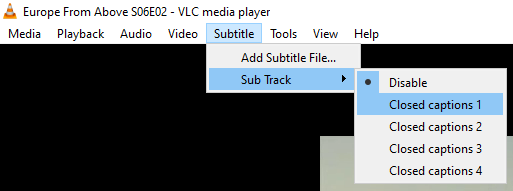
For VLC you select them from the Subtitle menu
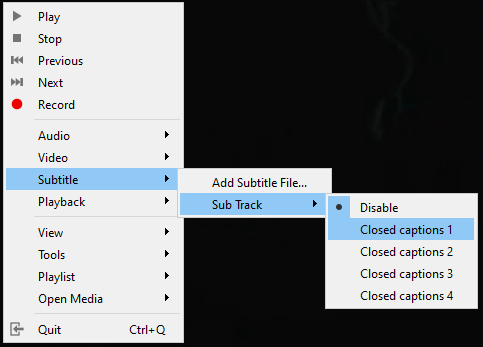
or right click in the video
Channels clients Channels — Apps for TV, Tablets, and Phones
The web player isn't a proper client. It is basically for diagnostic purposes and not something you should rely on for viewing your content. You'd be better served by getting a client like Android tv (Walmart Onn devices are really cheap and do quite well) or appleTV which will give the best experience.
But I don't have a "TV". And if I did it sure as heck wouldn't be a 'smart' one. 
You could install an Android emulator on your PC and then install the Channels Android client in the emulator.
Okay, still fuzzy on the whole client concept, but isn't the web player something that's used for live TV? I just want to get closed captions when I use a standard media player to play the mpg files that Channels has recorded for me.
The web player is not a full client yet you can watch content using it. The developers have been asked to make it a full client yet they have stated that they are not going to do this. I don't recall a reason.
Thanks! I think I previously tried the standard approaches for turning on subtitles/closed captions in MPC and VLC, but I'll give it another shot. I wanted to make sure there wasn't some setting in Channels that needed to be a certain way in order for the sub track to be recorded in the first place.
Channels DVR records whatever the source sends, so if it sends closed captions they will be recorded in the file.
Pretty sure these Windows apps also support closed captions.
Media Player
Movies & TV
There is also an optional integration that allows you to play live tv and recordings from the Channels DVR web UI using VLC. Settings > Advanced > Integrations > VLC links
Show VLC links in the web UI. Requires installation of vlc-protocol helpers.
It will be interesting to see how Channels DVR handles Closed Captions as things evolve over the next year or three as ATSC3.0/DRM takes over.
Take a look here
Pick up a supported client and connect it to your TV via HDMI. Closed captions will work beautifully and you will have the best experience. Drop the web player idea, you are asking for nothing but frustration. Sure there are hacks to get it to work with VLC but the easiest thing to do is get a supported client and sit back and enjoy your content
Think you missed his earlier post
You could buy a supported client and attach it to an HDMI switch attached to a PC monitor, but why?
Ahh gotcha sorry. Better add a TV to the shopping list as well lol
That is unless his monitor has a free HDMI port and speakers. Then he can use it as a TV