
Yep, back working again. Another 5 months...

just replied. Glad to help. For anyone else on here my PBS solution is pretty slick and I actually respond in a timely manner when someone reaches out 
Nice!
How do I update? I don't use Compose or Portainer. Would a version of the below work (a batch file I was given to update FastChannels):
docker container stop --timeout 30 fastchannels
docker container rm fastchannels
docker image rm ghcr.io/kineticman/fastchannels
docker run -d --name fastchannels --restart unless-stopped -p 5523:5523 -v fastchannels_data:/data ghcr.io/kineticman/fastchannels:latest
Would this work:
docker container stop --timeout 30 vlc-bridge-pbs
docker container rm vlc-bridge-pbs
docker image rm registry.gitlab.com/miibeez/vlc-bridge-pbs
docker run -d --restart unless-stopped --name VLC_Bridge_PBS -p 7777:7777 registry.gitlab.com/miibeez/vlc-bridge-pbs:latest
After doing this, do I have to re-do the various setups I've done in Channels to set location, map IDs to channels in the lineup, etc.?
I checked those instructions, and they seem to be linux-specific, not something I can do as a Windows user. So is the Docker container on the source site updated?
Since I don't use portainer or compose (don't understand them), I only work with docker run commands. I'm thinking of trying to port instructions I was given for updating FastChannels to work with this, but haven't tried it yet - hoping someone more knowledgeable can help.
Yeah that should work except you need to make sure the name of the container matches in all the docker statements. Your docker run statement does not have the same container name.
Ah, I see that I have hyphens in two places and underscores in the third. I'll have to check the official names to make sure I have the correct ones. But does the rest look correct? Are the names case-sensitive?
What about the configuration in Channels - will I have to re-do it from scratch or will it carry over?
1 Like
Indeed. Its always nice to have another option on hand and combining everything with SLM makes stuff seamless AF if something goes awry
Generic instructions for upgrading any Docker container can be found here.
You don't need to do any changes in Channels or anywhere else; only the backend parsing of the streams within the Container has changed.
Also you can use dockwatch to update. Thats a lot easier than snooping the forums looking for any changes @SageLois
Yep, Dockwatch is recommended in the link above, too.
1 Like
Hmm... I'll need more time to study Dockwatch - looks scary :). Looking over the screen shots, my impression is that it could streamline things for people who already know their way around Docker, but for those who don't, it just adds a further Docker thing to try to make sense of.
Turned out that the container had some auto-generated name, instead of a meaningful name, and that caused my cobbled-together batch file not to work. I did find the instructions @babsonnexus pointed to useful in getting it sorted out, though.
1 Like
I've looked around at SLM and am not clear on what it does. It seems that it's linking in material you already have locally, plus whatever streaming services you subscribe to, but that it's only for providing an interface for watching the content through Channels, vs. recording. Is that correct?
I primarily use Channels only for recording, and auto-import recordings into Sage which is my watching-interface (and where I do most of my OTA and cable recording). For me, Channels is used to fill in gaps.
Am I missing something that is particularly useful for PBS here?
I believe in this case @Jean0987654321 is focusing on the Playlist Manager side of Streaming Library Manager, not the Stream Link/File Manager component. The linked Wiki has all the details, videos, etc... to answer your questions and then some. Like with what happened here with PBS, I didn't have to care because PLM manages several layers of backup station versions:
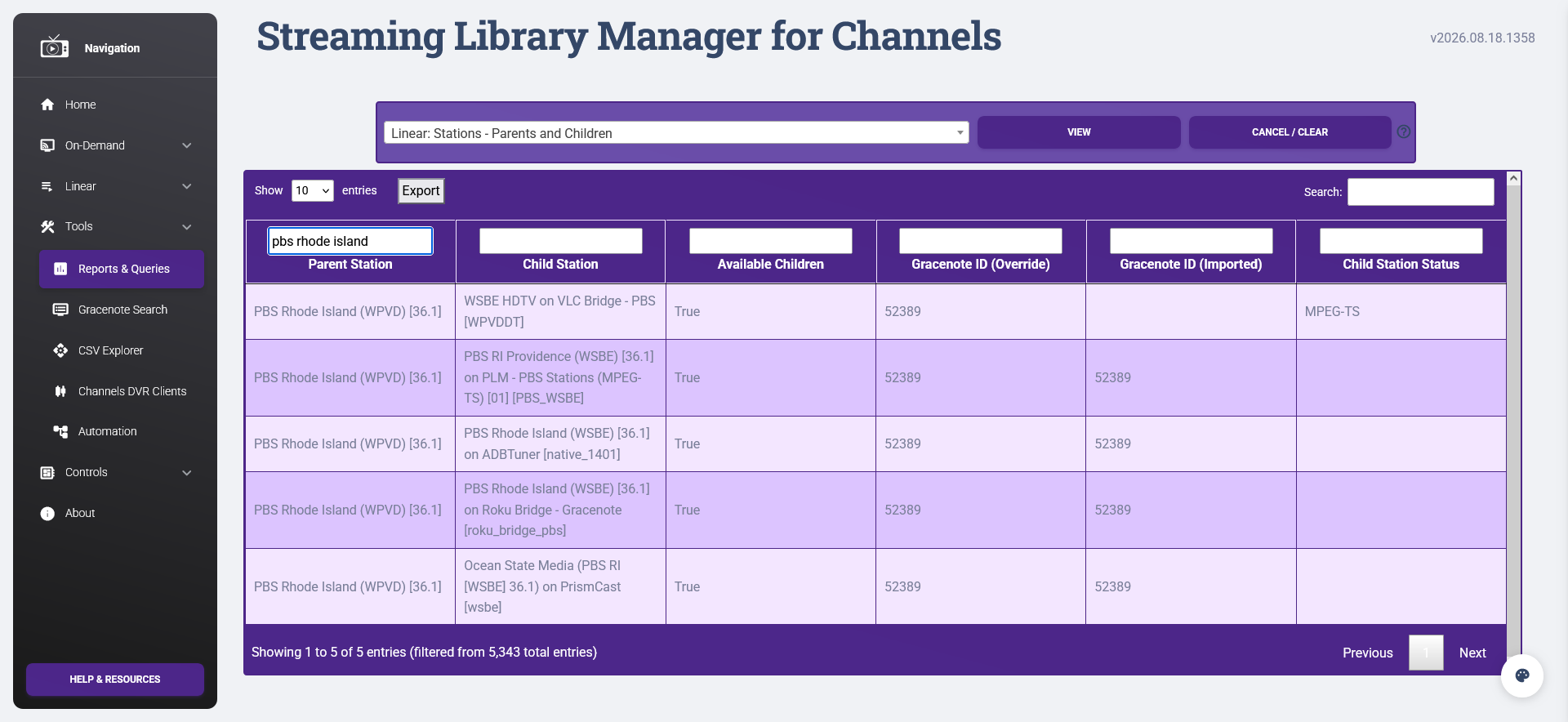
VLC Bridge goes down? No problem, ADBTuner kicks in. ABDTuner is busy? No problem, Roku Bridge takes over. That's not available either? Again, not an issue, PrismCast is there as the last line of defense. And actually, I'm going to be putting some FastChannel bridge stuff in that chain in the near future when that's a little more mature, so I'll have even more layers of protection against disruptions. And at this point, thanks to the fallback feed feature, I literally have a single station in Channels that represents all of these options. No more babysitting for me!
2 Likes
Yep if any TVE Channels gets sacrificed to the DRM Gods, then the next option takes over. The fallback feature has been a godsend for me
Definitely need to study this. I did look at your wiki and there looks like there will be a learning curve with it. Not that that's a problem - just something I'll have to make some time to look at. I'm still pretty new at Channels itself, having used (and continue to use) SageTV since 2009.
I still don't understand the first step to get my PBS stations can someone make a YouTube video or actually explain
Here (as best as I can put together from my notes when I set it up) are the steps I followed:
- Install the docker container:
docker run -d --restart unless-stopped --name VLC_Bridge_PBS -p 7777:7777 registry.gitlab.com/miibeez/vlc-bridge-pbs:latest
- Go to http://localhost:7777 in a browser
If your server is on a different machine than the one you're using to browse, substitute your server's IP address (e.g. 192.168.1.100) for localhost. If you used a different port number in place of 7777, replace 7777 with that number.
This should display a full playlist link. Mine looks like this:
http://192.168.2.160:7777/pbs/playlist.m3u
Yours will vary based on your server's IP address and selected port
Copy the playlist link.
-
Create a new "custom channel" using stream format mpeg-ts, the playlist URL you copied as the URL for the source, and your choice for the remaining options.
-
(This is what tripped me up initially!!)
In the setup screen for the new custom channel, click "set provider" and pick something that makes sense for your location. You will probably want something like "USA...." -
In Channels, Sources, edit the lineup and match each station shown to an actual station, which you can find by searching under "all lineups." This is what will get you EPG listings for each channel. An excerpt of what you should set:

- Reload M3U and download EPG
(BTW, another good source for PBS has recently been added to FastChannels. I am currently using both and have a nice collection of PBS stations - in and out of my area - available to me now!