
That would be quite a time consuming task to verify the station Id's
Ehh...its been a while and I usually use SLM to map the gracenote ids for the channels I care about from Pluto nowadays...
I can take a look when I have time but I don't think anything has changed from those ids

I would still use your login credentials. That will make it future proof.  Unless there is nasty DRM added later on.
1 Like
Trying to follow along as best I can. I got the (original) Docker image going along with the update. To check, I went to http://my-ip:7777. It shows "Pluto for Channels.NET API is running". So far so good (I assume).
The part that's tripping me up is "Then hit http://MY IP:7777 for the status page with your M3U and EPG links". Could someone kindly explain where/how I find "M3U and EPG links" for this?
That would be the Pluto Windows app you are running, not the docker version. Here is the link for that project Pluto-Windows_4C Released You are also on an older version. You will find the dashboard in the task bar by right clicking the Pluto Windows icon. You will need to right click that icon and stop the server before you install the latest version. Make sure you wait a minute between stopping the old and starting the new.
If you are trying to install the docker one, the port 7777 is occupied by the Windows version. You would either need to adjust your port in the docker version to an open port or stop the Windows version if you do not want it installed. Stoping it in the task bar icon will completely remove it as it is a portable exe and is self contained.
I see. Thank you very much.
Still using your Windows version (the very first single stream version). I really like it. Just trying to stretch myself a bit with the kineticman docker.
I know with some of your (multiple stream) updates, there were issues with commercial breaks. Trying to go through all various threads to see if there were any more recent updates/fixes out since last I checked.
Thanks
If using mpeg-ts with version 1.1.3, I have had 0 issues with it and the stream seems to be better quality. If you do update to the latest version, make sure you stop the one running and wait a minute so Windows will release the port. Windows likes to hold a released port for a few seconds and it will appear as in use by the script until it is fully released by Windows.
Ok. Not sure if I'm using mpeg-ts. But I'll look it up & give it a go. Thanks for the reply. Much appreciated!
Not sure if this is specific to the m3u aggregator I use (Dispatcharr), but when I import the M3U from this docker, I get the following:
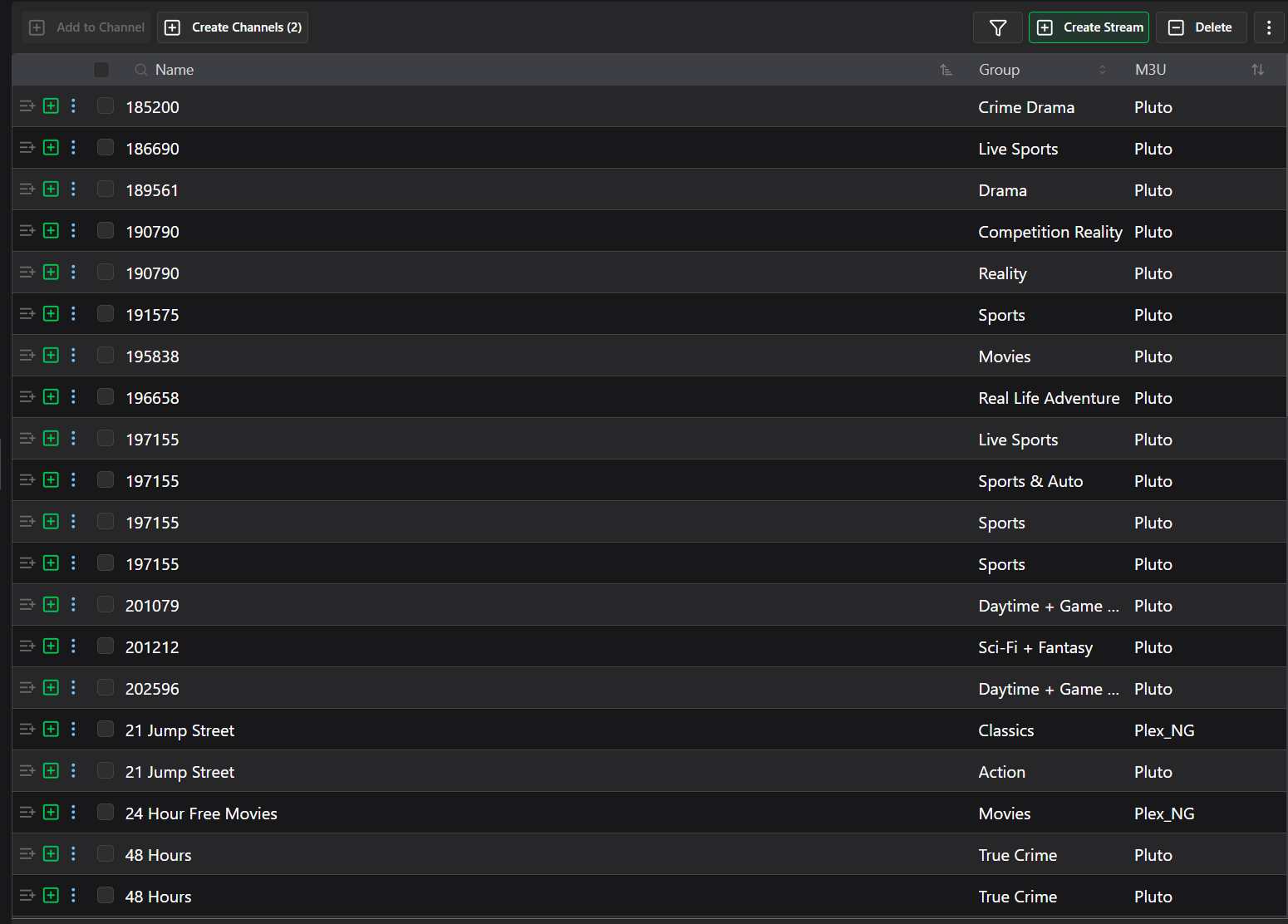
It's not all the channels, but about 300+ of them. I looked up and the channels that are doing this have the following:
#EXTINF:-1 channel-id="ironside-gb" tvg-id="6900997e043e3df1897d017f" tvg-chno="7208" group-title="Crime Drama" tvg-logo="https://images.pluto.tv/channels/6900997e043e3df1897d017f/colorLogoPNG_1761664014410.png" tvg-name="185200" tvc-guide-title="Ironside" tvc-guide-description="A paralyzed police veteran becomes a special consultant to the force.",Ironside
http://192.168.0.5:7777/pluto/all/watch/6900997e043e3df1897d017f
vs those that don't:
#EXTINF:-1 channel-id="48-hours-gb" tvg-id="6299e5afdd5833000727e795" tvg-chno="7361" group-title="True Crime" tvg-logo="https://images.pluto.tv/channels/6299e5afdd5833000727e795/colorLogoPNG.png" tvc-guide-title="48 Hours" tvc-guide-description="Pluto TV 48 Hours brings viewers behind the scenes of the most intriguing murders. Follow the investigators, meet the accused, and review the evidence in the original true crime docuseries, with stories of obsession, revenge, and crimes of passion.",48 Hours
http://192.168.0.5:7777/pluto/all/watch/6299e5afdd5833000727e795
Basically it looks like the absence of [tvg-name=] causes Dispatcharr to fall back to [tvc-guide-title=] which in my case is the desired state since [tvg-name=] is a number and not the channel name. Is there a future that may include an m3u option that doesn't include [tvg-name=] or at least defaults to [tvg-name=] to the channel name and not the number?
Thanks.
1 Like
That's most likely the case as SLM doesn't have this issue. You'll have to bring this up to the Dispatcharr devs
Thanks, posted a issue on his site. Although, I wouldn't think it's expected that tvg-name= should have numeric values, I would think it would be "ESPN", "WGAL", HGTV", etc. But I also know I am only a user and not a programmer and what may make sense to a layperson may not align with the coding perspective.
I will say all other imported sources I've used doesn't have this issue (PrismCast, SamsungTV, Plex, ADBTuner, Tubi), but as you said, it's not an issue with other solutions so let's see who may step forward with a solution.
Have this running successfully in a docker container on my Synlolgy NAS. Above you mentioned that we could up the simultaneous streams from the default of 10 by changing one line in the pluto.py file and rebuilding. To change that file, would I have to ssh into my synology NAS and locate that pluto.py file as I do not see it in the container path (/volume1/docker/pluto_tv).
Any insight would be greatly appreciated
Tks
@KineticMan it would easier for folks that want to change from 10 to just have it as an environment variable. Line 20:
STREAM_POOL_SIZE = 10
Replacing with this should add it as an env variable defaulting to 10:
STREAM_POOL_SIZE = int(os.getenv("STREAM_POOL_SIZE", "10")) # configurable via env var
agreed - i'll add that. Honestly, I thought no one would ever need more than 5 concurrent streams, let alone 10 ... ya'll got a lot of Tvs!
Pushed update v1.25 to make it easier to add more concurrent streams -- simple from command line.
docker run -d --restart unless-stopped --network=host -e PLUTO_PORT=[your_port_number_here] -e PLUTO_USERNAME='your_username' -e PLUTO_PASSWORD='your_password' -e PLUTO_STREAM_POOL_SIZE=15 --name pluto-for-channels kineticman/pluto-for-channels:main
TY for the update and changing the date. I also like the new layout too!
@KineticMan Can you verify the new upload for me... I've tried twice and this is the logs...
[INFO] Initializing Scheduler
⇨ http server started on [::]:7777
[INFO] Running EPG Scheduler
(None, 'Error Exception type: ConnectionError')
(None, 'Error Exception type: ConnectionError')
(None, 'Error Exception type: ConnectionError')
(None, 'Error Exception type: ConnectionError')
Error running initial task: 'NoneType' object is not subscriptable
Container stopped
Container started
[INFO] Initializing Scheduler
⇨ http server started on [::]:7777
[INFO] Running EPG Scheduler
(None, 'Error Exception type: ConnectionError')
(None, 'Error Exception type: ConnectionError')
(None, 'Error Exception type: ConnectionError')
(None, 'Error Exception type: ConnectionError')
The new dash page does load but I can't access any of the files...