
Disney basically disabled their TVE feeds (including the entire ESPN complex) last week. Nice of them, eh?
Channels 6984 - 6991 which are all of the ABC national feeds have stopped working for me. I don't know when this started, but I have used them in past. I tried rescanning the Spectrum TVE source, but they still show up as valid. They all get a 404 error in the log when I try to watch one:
2026/02/09 16:11:25.910427 [HLS] Couldn't generate stream playlist for ch6985-dANY-ip192.168.3.125: TVE: Could not fetch playlist from content.uplynk.com: GET: https://content.uplynk.com/channel/ext/2118d9222a87420ab69223af9cfa0a0f/kabc_24x7_news.m3u8?ad._v=2&ad.preroll=1&ad.fill_slate=1&ad.ametr=1&ad.vid=otv-11316941&rays=ihgfedc: 404 Not Found
2026/02/09 16:11:25.910775 [HLS] Stopping transcoder session ch6985-dANY-ip192.168.3.125 (out=0s finished=false first_seq=0 last_seq=-1)
They don’t work for anyone. Disney DRM’d them. Update to prerelease and all the drm channels will be removed so you can’t try to authenticate the drm channels . This is not a Spectrum issue, it’s a Disney issue and has been beaten like a dead horse all over the forums. ABC, Disney,ESPN, and all the rest of the Disney owned channels don’t work in channels dvr via TVE anymore.
Are Weathernation and Aljazeera down too? I never watch them but was just trying all stations to see what still worked and found these two as non-working.
I've tried several times across different weeks to get Spectrum configured and get the same "no login form" error each time. The error includes an apparent screenshot of the Spectrum login waiting for me to hit "Continue" confirming it's me. There's no obvious setting in the Spectrum account for MFA or any other thing that might be blocking login.
Using Synology NAS, both beta and stable release. Trying to add in Spectrum TVE, when adding source I get a Spectrum error message "blocked by bot detection". Any fix? Thanks
Same but for uverse . Will have to manually grab
I have been having this same problem for a few weeks now. Spectrum as a TV Everywhere source is completely disabled for me. I have tried to use other browsers, connecting to the Channels DVR Server, same result. I was using TV Everywhere as a source in Channels for years, always worked great. Recently, I started losing access to certain channels such as IFC, TNT, and others. So I tried removing the source and re-adding it. Now I can't get anything to work with the TV Everywhere source.
I’m in that boat with ya. If I didn’t have HD OTA, the Channels DVR would now be useless.
First thing y'all need to do is make sure you are on the latest pre release of Channels DVR, they had an update to help with the Spectrum bot detection
v2026.10.19.0609
• IMPROVED: Spectrum login will not retry for 10 minutes after bot detection
You should not delete the source as that will make the DVR have to try and reload all the channels and will trip the bot detection from Spectrum. You should go to the Source and click Manage Channels. You would need to then rescan only the channels that are not working. If you do too many, too fast, you will trigger the bot detection again and have to wait a day or so for it to clear.
Thank you. I’ll try this version, but I don’t have much hope. I got an email from tech support last week saying they haven’t figured out a way to fix it.
The advise of “don’t delete the source” is a bit too late. That horse done left the barn. 
What if the source was already deleted????? How do we get it back? It just gives the BOT error 4000 everytime.
Maybe Channels DVR can be set to only get connected first without trying to connect with any channels on Spectrum. Then we lowly users can go in and try to connect to the ones we think will work a few at a time.
Awesome! I had just about given up on ever getting Spectrum TV Everywhere to work again as a source. Followed your suggestion, and installed the latest Pre Release of Channels DVR. With this version, adding the TV Everywhere Spectrum source was quick and easy. All the channels I previously had were re-authorized. It even remembered which ones I had marked as Favorites! Great job by the Channels DVR team for getting this to work again.
Unfortunately, this didn’t work for me. I got the 10.20.1845 prerelease as I didn’t get an option to pick the version specified above. Trying to add Spectrum still generates the bot detection error.
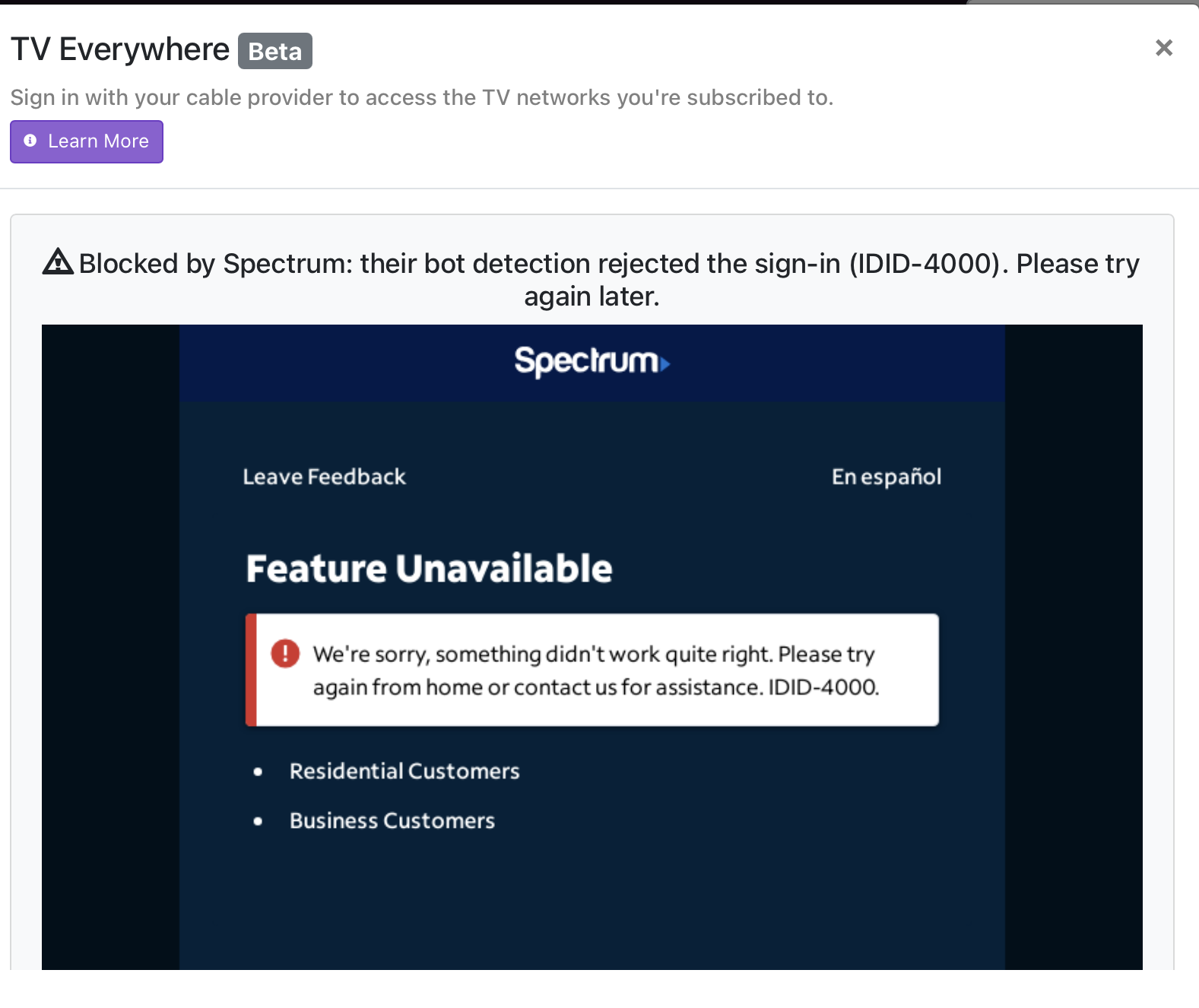
Perhaps this will work for you. It did for me. I found I could get Spectrum to fully authorize all my non-DRM channels was to follow this pattern.:
- Install a clean new version of Channels DVR.
- Update to latest Pre-Release.
- Clear all caches.
- Make sure the Spectrum user and passwords are updated.
- Then add Spectrum as a souce.
You will have to re-import your personal media and set up all your recording passes again.
Once this was completed. Spectrum authorized 104 channels in about two minutes. No warnings or BOTS. I did not have to go back and authorize 1 at a time. Now I even have my local Fox affiliate working which did not work before.
My server is running on TrueNas Scale, but I also tested this process on a stand alone Desktop Windows version and had the same results.
Good luck.
It’s worth a shot
I just did an experiment adding spectrum. I got the bot detection error on my linux Channels server, but it worked great on my MacOS Channels server. I can't say if it's the platform, or maybe just having a different web signature.