
If your preference is to use USB Capture Cards to create a virtual encoder, as opposed to a network encoder, and have Channels DVR installed in a Proxmox LXC, read on:
Plug your capture card into a USB port (USB3 port for a USB3 device), and from the Proxmox shell, make sure v4l-utils is installed:
root@pve6:~# apt update
Hit:1 http://deb.debian.org/debian trixie InRelease
Get:2 http://security.debian.org/debian-security trixie-security InRelease [43.4 kB]
Hit:3 http://deb.debian.org/debian trixie-updates InRelease
Get:4 http://security.debian.org/debian-security trixie-security/main amd64 Packages [252 kB]
Get:5 https://pkgs.tailscale.com/stable/debian trixie InRelease
Get:6 http://download.proxmox.com/debian/pve trixie InRelease [4,357 B]
Fetched 306 kB in 0s (1,825 kB/s)
All packages are up to date.
root@pve6:~# apt install v4l-utils
v4l-utils is already the newest version (1.30.1-1).
The following packages were automatically installed and are no longer required:
  proxmox-kernel-7.0.12-1-pve-signed   proxmox-kernel-7.0.14-3-pve-signed  proxmox-kernel-7.0.14-6-pve-signed
  proxmox-kernel-7.0.14-12-pve-signed  proxmox-kernel-7.0.14-4-pve-signed  proxmox-kernel-7.0.6-2-pve-signed
Use 'apt autoremove' to remove them.

Summary:
  Upgrading: 0, Installing: 0, Removing: 0, Not Upgrading: 0
Then identify your capture card. I've already installed one that was assigned video0, and now I'm going to add a second card:
root@pve6:~# v4l2-ctl --list-devices
USB3.0 Video: USB3.0 Video (usb-0000:00:14.0-3):
        /dev/video2
        /dev/video3
        /dev/media1

USB3.0 Video: USB3.0 Video (usb-0000:00:14.0-4):
        /dev/video0
        /dev/video1
        /dev/media0
The second card's top line device is /dev/video2, so that's the device we'll pass through for video. Next we need to identify the sound devices associated with this card in /dev/snd:
root@pve6:~# ls -la /dev/snd
total 0
drwxr-xr-x  4 root root      420 Sep  7 13:15 .
drwxr-xr-x 22 root root     4920 Sep  7 13:15 ..
drwxr-xr-x  2 root root       80 Sep  7 13:15 by-id
drwxr-xr-x  2 root root      140 Sep  7 13:15 by-path
crw-rw----  1 root audio 116, 12 Aug  1 06:02 controlC0
crw-rw----  1 root audio 116, 14 Sep  7 09:30 controlC1
crw-rw----  1 root audio 116, 16 Sep  7 13:15 controlC2
crw-rw----  1 root audio 116, 10 Aug  1 06:02 hwC0D0
crw-rw----  1 root audio 116, 11 Aug  1 06:02 hwC0D2
crw-rw----  1 root audio 116,  3 Aug  1 06:02 pcmC0D0c
crw-rw----  1 root audio 116,  2 Aug  1 06:02 pcmC0D0p
crw-rw----  1 root audio 116,  4 Aug  1 06:02 pcmC0D1p
crw-rw----  1 root audio 116,  5 Aug  1 06:02 pcmC0D2c
crw-rw----  1 root audio 116,  6 Aug  1 06:02 pcmC0D3p
crw-rw----  1 root audio 116,  7 Aug  1 06:02 pcmC0D7p
crw-rw----  1 root audio 116,  8 Aug  1 06:02 pcmC0D8p
crw-rw----  1 root audio 116,  9 Aug  1 06:02 pcmC0D9p
crw-rw----  1 root audio 116, 13 Sep  7 09:30 pcmC1D0c
crw-rw----  1 root audio 116, 15 Sep  7 13:15 pcmC2D0c
crw-rw----  1 root audio 116,  1 Aug  1 06:02 seq
crw-rw----  1 root audio 116, 33 Aug  1 06:02 timer
Our previous devices were pcmC1D0c (stands for card 1, device 0), and controlC1 (as in control card1). The latest dates and times correspond to when I plugged-in the new device, so that's a good cross-check. Our new capture card audio is pcmC2D0c (card 2, device0), and controlC2 (control card 2).
Excellent, now we have what we need to pass specific devices through to our LXC. In the screenshot, you can see we're already passing through the 3 devices from earlier:
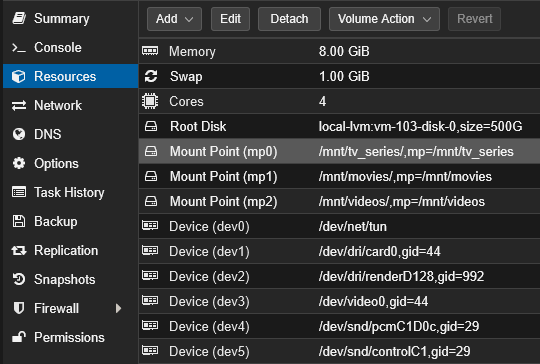
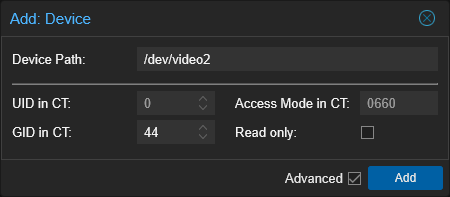
I know from doing a cat /etc/group earlier in my LXC, the video group is 44 and the audio group is 29, so I'll add the devices using those group IDs:
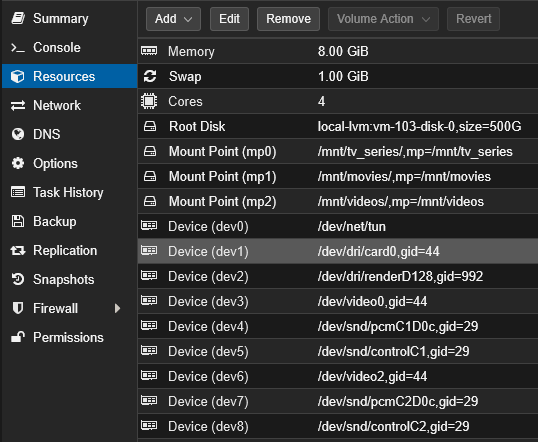
And when all 3 new devices are added:
Then, inside the Channels DVR LXC, we can confirm our devices are present:
root@channels:~# ls -la /dev/video*
crw-rw---- 1 root video 81, 0 Sep  7 09:41 /dev/video0
crw-rw---- 1 root video 81, 2 Sep  7 14:01 /dev/video2
root@channels:~# ls -la /dev/snd
total 0
drwxr-xr-x 2 root root      120 Sep  7 14:02 .
drwxr-xr-x 9 root root      580 Sep  7 14:01 ..
crw-rw---- 1 root audio 116, 14 Sep  7 09:41 controlC1
crw-rw---- 1 root audio 116, 16 Sep  7 14:02 controlC2
crw-rw---- 1 root audio 116, 13 Sep  7 11:27 pcmC1D0c
crw-rw---- 1 root audio 116, 15 Sep  7 14:02 pcmC2D0c
One more detail here, is that we need to find the name of the audio device associated with the new card. This is the same process I used with first card. We'll use another utility package for this, the alsa-utils.
root@channels:~# apt update
Hit:1 http://deb.debian.org/debian trixie InRelease
Get:2 http://security.debian.org trixie-security InRelease [43.4 kB]
Get:3 http://deb.debian.org/debian trixie-updates InRelease [47.3 kB]
Get:4 http://security.debian.org trixie-security/main amd64 Packages [252 kB]
Get:5 http://security.debian.org trixie-security/main Translation-en [154 kB]
Get:6 https://pkgs.tailscale.com/stable/debian trixie InRelease
Get:7 https://dl.google.com/linux/chrome-stable/deb stable InRelease [2548 B]
Get:8 https://dl.google.com/linux/chrome-stable/deb stable/main amd64 Packages [1403 B]
Fetched 507 kB in 1s (694 kB/s)
1 package can be upgraded. Run 'apt list --upgradable' to see it.
root@channels:~# apt install alsa-utils
alsa-utils is already the newest version (1.2.14-1).
Summary:
  Upgrading: 0, Installing: 0, Removing: 0, Not Upgrading: 1
And then list the available audio devices:
root@channels:~# arecord -l
**** List of CAPTURE Hardware Devices ****
card 1: Video [USB3.0 Video], device 0: USB Audio [USB Audio]
  Subdevices: 0/1
  Subdevice #0: subdevice #0
card 2: Video_1 [USB3.0 Video], device 0: USB Audio [USB Audio]
  Subdevices: 0/1
  Subdevice #0: subdevice #0
We used hw:Video,0 previously, so our new device is defined with:
hw:Video_1,0
Now, from the Channels WebUI, we'll have a look at our Custom Channels Source I set up for the first capture card, and we'll add a second. This source, plus your capture card(s) are what create your virtual encoder:
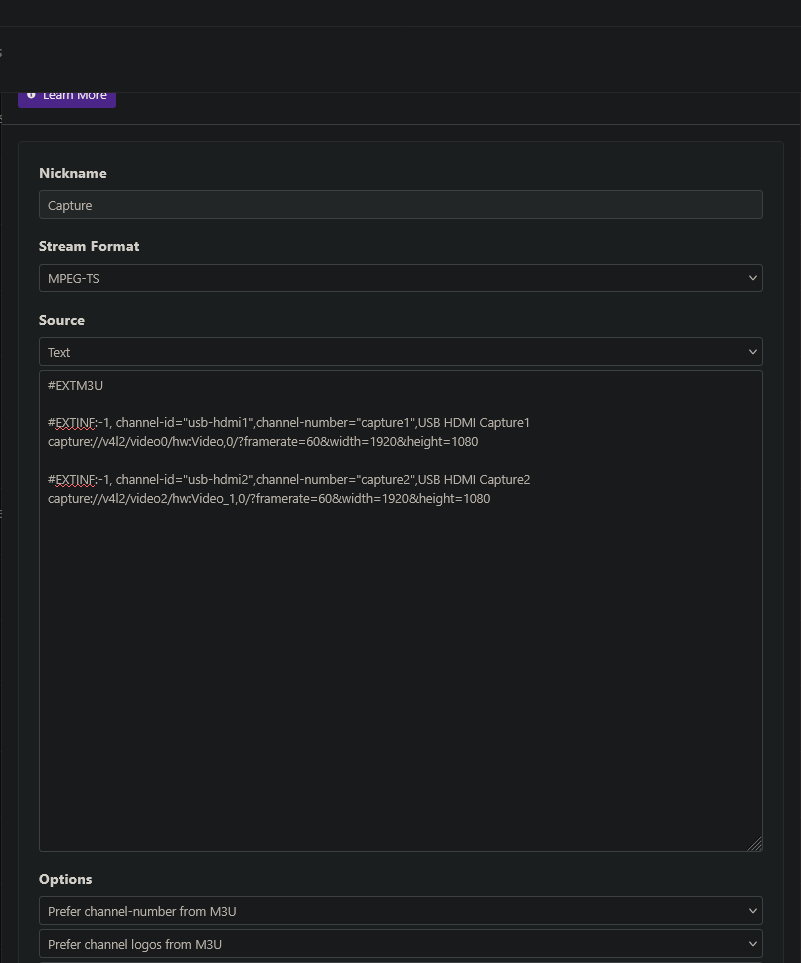
And the text:
#EXTM3U

#EXTINF:-1, channel-id="usb-hdmi1",channel-number="capture1",USB HDMI Capture1
capture://v4l2/video0/hw:Video,0/?framerate=60&width=1920&height=1080

#EXTINF:-1, channel-id="usb-hdmi2",channel-number="capture2",USB HDMI Capture2
capture://v4l2/video2/hw:Video_1,0/?framerate=60&width=1920&height=1080
Save it, and once guide data has refreshed, you can go to the "Capture" source in your EPG and test that each allows you to view your streaming stick. The channel numbers that Channels assigns, get plugged in to your new virtual encoder URL -- which looks like this:
http://channels:8089/devices/M3U-Capture/channels/90474/stream.mpg?format=ts&codec=copy
The "channel number" to be used in each URL can be viewed in the EPG, and would replace 90474. Replace "channels" with your LAN IP address or hostname (if you know it resolves). "M3U-Capture" is correct if your source was named "Capture".
These virtual encoder URLs can now be used in ah4c, along with their attached streaming sticks!
And here's what the transcoding workload looks like on my iGPU, with both Capture Cards in use:
intel-gpu-top: Intel Raptorlake_s (Gen12) @ /dev/dri/card0 -  797/1301 MHz;  25% RC6;  1.04/69.02 W;      355 irqs/s

         ENGINES     BUSY                                                                                                                                          MI_SEMA MI_WAIT
       Render/3D   20.45% |███████████████████████████▌                                                                                                          |      0%      0%
         Blitter    0.00% |                                                                                                                                      |      0%      0%
           Video    8.35% |███████████▎                                                                                                                          |      0%      0%
    VideoEnhance   11.05% |██████████████▉                                                                                                                       |      0%      0%

    PID      MEM      RSS              Render/3D                            Blitter                              Video                            VideoEnhance             NAME
  53400   99492K   88604K |███▋                              ||                                  ||█▌                                ||█▉                                | ffmpeg
  52413     150M  140976K |███▍                              ||                                  ||█▌                                ||██                                | ffmpeg
1101969   25024K   25024K |                                  ||                                  ||                                  ||                                  | ah4c