
@Rice I'm just working on passing a Capture Card through to a Proxmox LXC running Channels DVR. What was the final capture:// command you ended up using?
I found it depends on the actual card and if YUYV or MJPEG is needed. The cheaper cards will advertise they can do 1920x1080@60fps but they don’t mention it can only do that by using MJPEG, if you try to use that card in the mode that channels ffmpeg uses they can top out at 5fps at 1920. Basically you don’t really know what you’re going to get from a card before you buy because they don’t specify supported resolutions for both YUYV or MJPEG. So your card may very for required capture command.
For the card listed in post number one I use the following. This card I had disable power management for it to behave in Linux. This is used for YUYV source type card ffmpeg encode
capture://v4l2/video2/hw:Video,0/?framerate=60&width=1920&height=1080
My other card was $6 and while it behaves nicely in Linux it requires a different command because it needs to use mjpeg to get more than 5fps. This card supports up to 1920x1080@60fps with mjpeg but whatever version of ffmpeg channels uses limits encoding to 720@60fps or 1080@30fps when source stream is mjpeg. This card uses this command for 720@60. This card requires using source as MJPEG instead of YUYV.
capture://v4l2/video0/hw:MS2109,0/?framerate=60&video_size=1280x720&pixel_format=mjpeg
You could also change the above for 1080@30 by changing the resolution and framerate entries.
You can check supported card resolutions by running this substituting you particular /video0, /video2 ect. First running this to see what /video# has been assigned to the card.
v4l2-ctl --list-devices
Then to see supported resolution(substitute/video0 with video/ from above command)
v4l2-ctl -d /dev/video0 --list-formats-ext
2 Likes
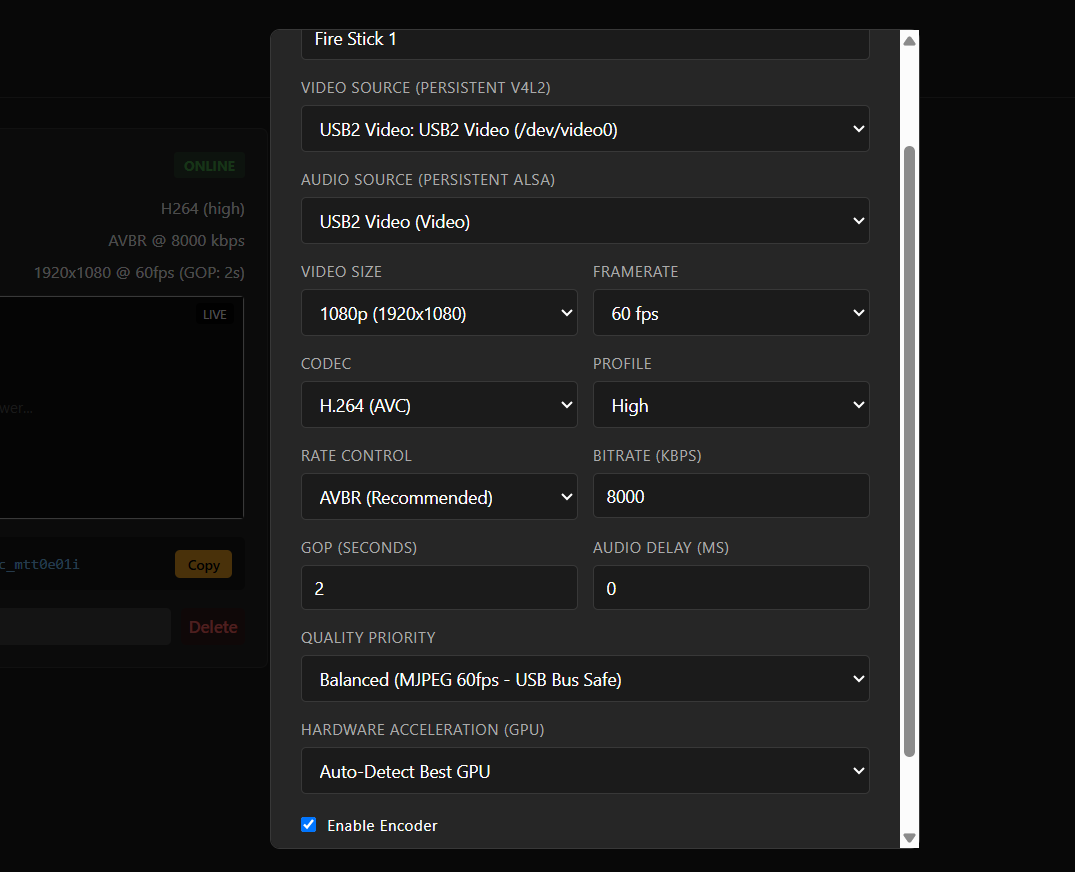
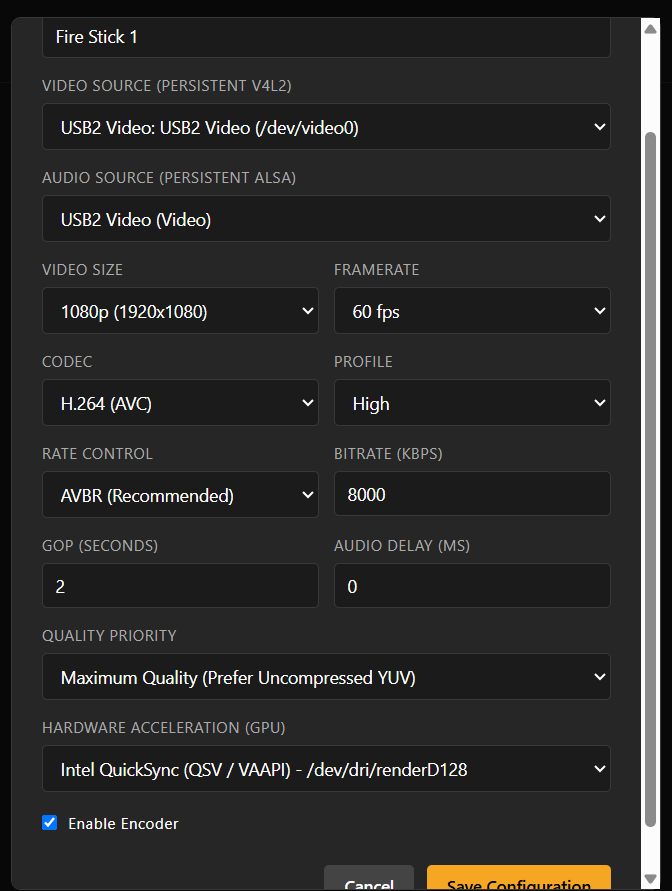
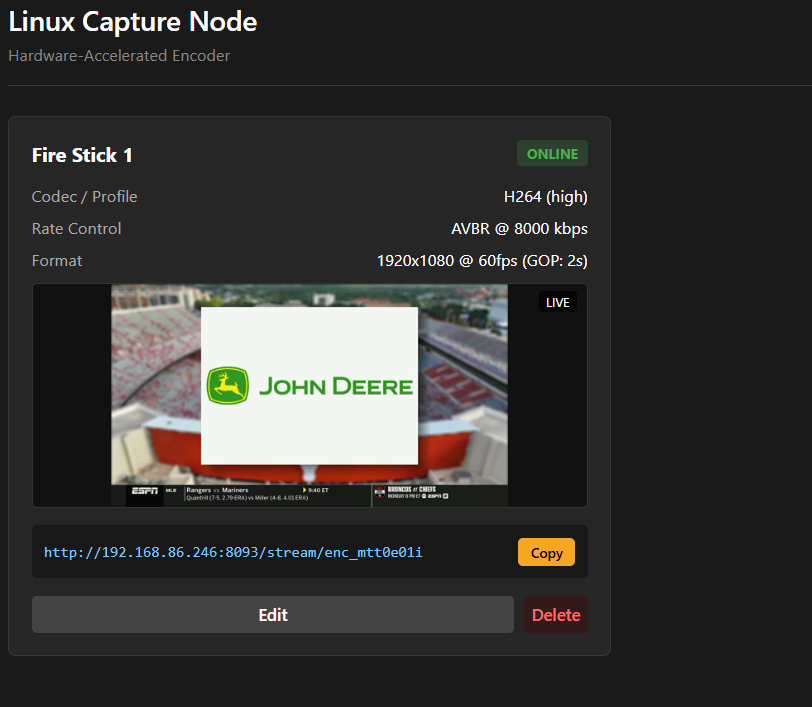
I am working on a Linux (Deb) app that will act like a LinkPi for attached HDMI to USB Capture Cards. Here is a list of what it can do now:
- Smart Port Assignment: On its first launch, it scans for an open network port (starting at 8090) and permanently saves it so your stream URLs never change.
- Persistent Hardware Locking: It identifies USB video and audio capture cards by their unique hardware IDs, ensuring sources never get mixed up if the server reboots or devices are unplugged.
- Universal GPU Detection: It automatically scans the system for Intel, NVIDIA, or AMD graphics processors and unlocks the correct hardware acceleration options.
- Built-in Web Dashboard: It hosts its own configuration page where you can pair capture cards, tune encoding settings (like Bitrate, Codec, and Rate Control), and copy stream URLs.
- On-Demand Encoding: It runs silently using almost no resources until a stream is requested. It then instantly launches an optimized FFmpeg process to deliver live video, and kills the process the exact second the viewer disconnects.
-
Appliance-Level Stability: It installs as a native background service (
systemd), meaning it automatically starts up when the server boots and will automatically revive itself if a crash occurs.
Once I get it working better, I will release it and start working on a Windows app. This should simplify using the Capture dongles. Remember, the better the dongle, the better the results. A YUYV422 or NV12 uncompressed stream will provide better quality. The cheap dongles can't produce decent framerates for uncompressed video and have to use MJPEG. These will be configurable in the Dashboard.
6 Likes
If this could be made for docker also it would be amazing 
Just a heads-up, MANY of these devices share serial numbers so you cannot reliably use them for identification. You have to use their location on the bus (which breaks if they get plugged into different ports) or ask users to patch the firmware of the device to give them unique IDs (not reasonable). It's a small annoyance, but something to keep in mind.
I've been working on something like this for MacOS on and off for the past year and 90% of my time has been spent dealing with the fact that these devices are cheap for a reason lol. Most of the effort has gone into automatically recovering from the variety of failure states these devices get themselves into. It's getting there though lol.
They can be a PITA for sure. The cheap ones are not even worth using. None of them that I have seen can produce an uncompressed stream anywhere near 30fps, much less 60. I've had good luck with some in the $20 plus range.
1 Like
I will probably switch to the physical position on the usb bus to avoid issues. As long as they use the same USB port of that device, it "should" work.
Yeah. Some in the $15-$20 range are decent. I've had good luck with MS2130S based devices. They are often branded as "USB3 PLUS Video". There really are only a few variants of these devices, they are just sold under different brands with different designs.
This worked well for me. It's the only option unfortunately. I have 3 of them that identify as the same exact device lol. I did serial number and then usb bus as a fallback to assign a unique key to each device. That way if someone does buy multiple devices with different serials then they can still switch them around without the app getting confused and assigning them to the wrong stream URL.
So, I have a Guermok 4K USB-HDMI adapter, and was trying to set this up as a source for Channels. I'm getting the same hwupload error that TerryD reported last year, and wondering if there is a fix. Channels is installed on a Windows 11 PC. I read thru this thread, and went back and forth with AI last night trying to find a solution. I tried several pixel formats in my M3U, nv12, yuyv422, and all ended with this hwupload error. AI seemed to think there was an issue with how Channels was passing the USB stream to my nVidia GPU. After trying many M3U iterations, AI directed me to create a script to have ffmpeg process the stream outside of Channels first, and that did work. But, seems like there should be a way to do this within Channels and not have a separate ffmepg script always running on the side.
I also pulled the nVidia GPU and forced Channels to use an Intel GPU, and I was able to get the USB source working entirely within Channels, so this seems to be a nVidia specific issue? I would perfer to keep my nVidia GPU since Prismcast is working very well with it. But, Channels seems coded to use the nVidia GPU no matter what, when it's in the system.
Here's the first custom channel text I tried, and the hwupload error it generated.
Any help would be appreciated, as I'm a bit out of my element with this. I was hoping to try the FastChannels bridge option to control a Firestick thru this USB interface.
#EXTM3U
#EXTINF:-1 channel-id="hdmi-guermok-1080p60" tvg-name="HDMI 1080p60", HDMI NV12 Ingest
capture://dshow/Guermok USB3 Video/Digital Audio Interface (Guermok USB3 Audio)/?video_size=1920x1080&framerate=60&pixel_format=nv12
2026/09/10 20:09:52.813817 [TNR] Opened connection to M3U-GuermokHDMI for ch8000 HDMI NV12 Ingest
2026/09/10 20:09:52.813817 [HLS] Starting live stream for channel 8000 from 127.0.0.1
2026/09/10 20:09:53.462710 [HLS] ffmpeg: capture-hdmi-guermok-1080p60: [aist#0:1/pcm_s16le @ 00000229c5979700] Guessed Channel Layout: stereo
2026/09/10 20:09:53.462710 [HLS] ffmpeg: capture-hdmi-guermok-1080p60: [vost#0:0/h264_nvenc @ 00000229c581c640] -enc_time_base -1 is deprecated, use -enc_timebase demux
2026/09/10 20:09:53.522220 [HLS] ffmpeg: capture-hdmi-guermok-1080p60: [aost#0:1/aac @ 00000229d3bfc8c0] -enc_time_base -1 is deprecated, use -enc_timebase demux
2026/09/10 20:09:53.523762 [HLS] ffmpeg: capture-hdmi-guermok-1080p60: Failed to negotiate pixel format between 'graph 0 input from stream 0:0' and 'auto_scale_0':
2026/09/10 20:09:53.523762 [HLS] ffmpeg: capture-hdmi-guermok-1080p60: graph 0 input from stream 0:0 (buffer)
2026/09/10 20:09:53.523762 [HLS] ffmpeg: capture-hdmi-guermok-1080p60: ↓ nv12
2026/09/10 20:09:53.523762 [HLS] ffmpeg: capture-hdmi-guermok-1080p60: ↑ nv12
2026/09/10 20:09:53.523762 [HLS] ffmpeg: capture-hdmi-guermok-1080p60: auto_scale_0 (scale)
2026/09/10 20:09:53.523762 [HLS] ffmpeg: capture-hdmi-guermok-1080p60: ↓ yuv420p, yuyv422, rgb24 (+183 more)
2026/09/10 20:09:53.523762 [HLS] ffmpeg: capture-hdmi-guermok-1080p60: ⚠️ hwupload needed ⚠️
2026/09/10 20:09:53.523762 [HLS] ffmpeg: capture-hdmi-guermok-1080p60: ↑ cuda
2026/09/10 20:09:53.523762 [HLS] ffmpeg: capture-hdmi-guermok-1080p60: Parsed_scale_cuda_0 (scale_cuda) [requires cuda]
2026/09/10 20:09:53.523762 [HLS] ffmpeg: capture-hdmi-guermok-1080p60: ↓ cuda
2026/09/10 20:09:53.523762 [HLS] ffmpeg: capture-hdmi-guermok-1080p60: ↑ yuv420p, nv12, p010le (+13 more)
2026/09/10 20:09:53.523762 [HLS] ffmpeg: capture-hdmi-guermok-1080p60: format
2026/09/10 20:09:53.523762 [HLS] ffmpeg: capture-hdmi-guermok-1080p60: ↓ yuv420p, nv12, p010le (+13 more)
2026/09/10 20:09:53.523762 [HLS] ffmpeg: capture-hdmi-guermok-1080p60: ↑ yuv420p, yuyv422, rgb24 (+227 more)
2026/09/10 20:09:53.523762 [HLS] ffmpeg: capture-hdmi-guermok-1080p60: out_0_0 (buffersink)
2026/09/10 20:09:53.523762 [HLS] ffmpeg: capture-hdmi-guermok-1080p60: Impossible to convert between the formats supported by the filter 'graph 0 input from stream 0:0' and the filter 'auto_scale_0'
2026/09/10 20:09:53.524285 [HLS] ffmpeg: capture-hdmi-guermok-1080p60: [vf#0:0 @ 00000229c595e400] Error reinitializing filters!
2026/09/10 20:09:53.524285 [HLS] ffmpeg: capture-hdmi-guermok-1080p60: Failed to inject frame into filter network: Function not implemented
2026/09/10 20:09:53.524285 [HLS] ffmpeg: capture-hdmi-guermok-1080p60: Error while filtering: Function not implemented
2026/09/10 20:09:53.525312 [HLS] ffmpeg: capture-hdmi-guermok-1080p60: [out#0/mpegts @ 00000229c52ff6c0] Nothing was written into output file, because at least one of its streams received no packets.
2026/09/10 20:09:53.569951 [ERR] Error during stream M3U-GuermokHDMI ch8000 HDMI NV12 Ingest: exit status 0xffffffd8
2026/09/10 20:09:53.569951 [TNR] Closed connection to M3U-GuermokHDMI for ch8000 HDMI NV12 Ingest
Does it work with transcoding set to software?
I toggled between those settings, hardware and software, and it did not seem to make a difference.
Is it just teh ONN stick, or do all streaming sticks reset adb regularly? Mine does at least once a day, then needs to approve on the screen, all over again. Arrgghhh.....
I recently set up a couple of the ONN 4K Streaming Sticks (2026) with Capture Cards, using FastChannels and ah4c. ADB authorizations have been persistent across streaming stick, FastChannels and ah4c restarts.
I was actually expecting issues, as someone else reported needing to reauthorize after every stick reboot, but that has not been the case for me. What are the particulars of your setup? What project are you using HDMI Capture with?
Running AH4C. I have one of the less expensive modes, the ONN Full HD. Works great until is doesn't lol I feed that into a HDCP IP Encoder. Maybe I need to get one of the 4k ONN models?!?
The new Bridge->Healthcheck in FastChannels is very handy for seeing if it needs attention.
Are you having to re-authorize for FastChannels only? I.E., ah4c Devices shows your stick(s) connected, but FastChannels doesn't?
Both. It’s like the debugging was never turned on and neither app was ever authorized.
I just asked AI, and it says that the Full HD runs on android 11, while the 4k runs on android 12 or 14. Could be the reason.
Seems if it is idle for a certain period of time, the OS disables ADB. Would a periodic keepalive FC Player possibly resolve this?
How is this project going? May have missed it, but haven't been able to find a followup post. Would be interested in trying it out. Thanks!
I built the Linux app for it and it works but still needs some love. Windows does not want to play well with the idea.
USB Capture Cards have been working fine for me in Proxmox 9 (based on Debian 13), passing them through to a Channels DVR LXC. I detailed both, which may be of some help to you in other Linux variants: