
Might be a good idea for a Discourse Wiki post?
Post #2 in this thread has been updated to show an example of the process to create a virtual NAS to use with Channels DVR. In this example, I'm creating a Windows VM, adding DrivePool to allow for pooling disks into a single large drive, and sharing that drive via Samba. Later I'll add Veeam Backup and Replication to create a centralized backup server for automated Windows and Linux client backups:
2 Likes
@bnhf Thanks for this post! But especially thanks for the tip on Helper Scripts site. I was poking around the site and lo & behold, there's a Channels script. I was curious, so ran it and yup, it builds an LXC w/ Debian, Docker, & Channels in one fell swoop!
I'm really just getting started w/ Proxmox and still wrapping my head around things, so this site is just what I needed.
1 Like
Ditto. Really appreciate the detailed instructions. I'm about to fire up a Proxmox server so I can P2V some old windows laptops and recycle them as ChromeOS machines. I'll probably also spin up a TrueNAS Scale VM to provide a NAS and retire an old QNAP NAS (which runs my back up Channels server).
Once I get that done, I might consider migrating Channels to a Proxmox VM although I'm probably more comfortable keeping a physical machine assigned to that duty. Perhaps a Channels DVR Proxmox VM would be a back up?
1 Like
So, the more I learn/play with PVE, the more I love it. I've been using the Channels LXC from that site, gave it 3 CPUs, 1GB RAM and haven't had any issues. (PVE host is i5-1235u for ref).
I played w/ TrueNAS and it was fine, but it seemed like overkill in my case since I'm running PVE on a UGREEN NAS. I actually ended up following this and setting up mountpoints for the various LXCs I'm running. Proxmox Homelab Series I only followed it up to the mountpoint info, as I'm not running any of the ARR stuff. I also didn't do any of the Hardware passthru stuff as it seems to work for me by default.
So far, I'm really liking the overall setup, it's lightweight and spinning up extra CDVR LXCs is as easy as running the helper script again.
A bit of an usual sort of NAS for running Proxmox -- portable, quiet and fast. I just received the N95 version too, which I'm planning to use with Proxmox Backup Server:
RE: Proxmox-for-Channels: Step-by-Step for Virtualizing Everything
@bnhf I know this is an older thread but I am just starting to play/investigate Proxmox.
The first LXC you make called Channels is this to run Channels from or the dockers/portainer projects from and the win11 VM is where channels will run?
Then how difficult is it to passthrough an exsisting Win11 (NVMe) disk to the VM or would a new install be the better way to go?
The Channels LXC I created was to run everything Channels-related, except for Channels. I wanted to continue to run Channels DVR under Windows 11, including DrivePool.
It is possible to passthrough a boot Disk from another Windows 11 machine, using PCIe passthrough. In fact this is what I did with my first build. This gave me a dual boot machine which served as a safety net when I was I still figuring Proxmox out.
This however turned out to be unnecessary, plus it prevented the passthrough of the iGPU. So when I transitioned to Proxmox 8, I built from scratch without the extra complication of a PCIe passthrough. My Windows 11 boot disk is virtual, and I passed through my DrivePool data drives:
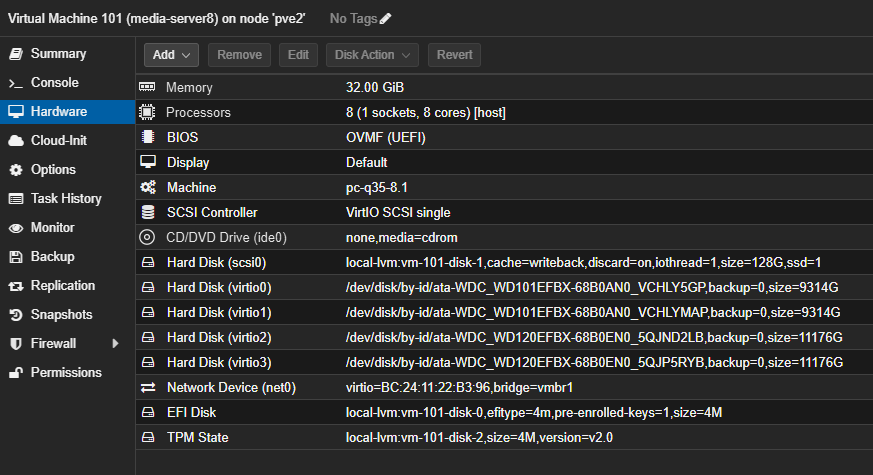
When I built my parent's system, I didn't do a PCIe passthrough, but I did use the boot disk from their previous Windows-based server. This worked fine too, and is much easier than a PCIe passthrough. I simply added their disk through as a SATA device, and made it the boot device for the VM.
So lots of options, depending on how you'd like to attack it. When making the transition to Proxmox, my main recommendation, is to spend some time getting familiar with the concepts -- which it sounds like you're doing. You can do almost everything from the WebUI, but don't hesitate to reach out if you have future questions.
It's incredibly transformative once you get over the initial period of familiarization. Being able to spin-up a CT or VM to try something out without touching any of my production virtualizations is just fantastic.
Well this is on the same machine and already have the DVR and drivepool setup on the Win11 boot drive which is why I asked about passing through. AMD 5700u with onboard graphics which I'll need to figure out for transcoding.
Have it maxed out at 64GB of RAM no HDDs installed I moved the two 12TB drives to an 8 bay DAS.
If you passthrough an iGPU to a VM -- it's dedicated to that VM. If you do the same with a CT, it can be shared with other CTs and Proxmox itself. You'd need to have multiple GPUs in order to have one available for the Proxmox console.
One approach you might consider is to have your Windows 11 VM as a Samba server using DrivePool, and install Channels DVR directly in a CT (with Chrome not Chromium for best tve compatibility). That way you can get the transcoding you're after, while still sharing the GPU with other CTs and the hypervisor.
Installing Channels in a Debian or Ubuntu CT is basically the same as installing it using either of those on bare metal.
The specs look good for use as a Proxmox system. You'll have 24 vCPUs, 64GB of RAM, and can dedicate one LAN port for administration and the other for virtualizations. I'd suggest one NVMe for your Windows VM, and use the other (4TB if possible) as your Proxmox boot drive.
Problem with the VM and LAN connectivity: VM to LAN shares work as expected. LAN to VM no connection to share or by way of RDP even using tailscale for fails, any ideas would be helpful or I may have to nuke the VM and start over.
1 Like
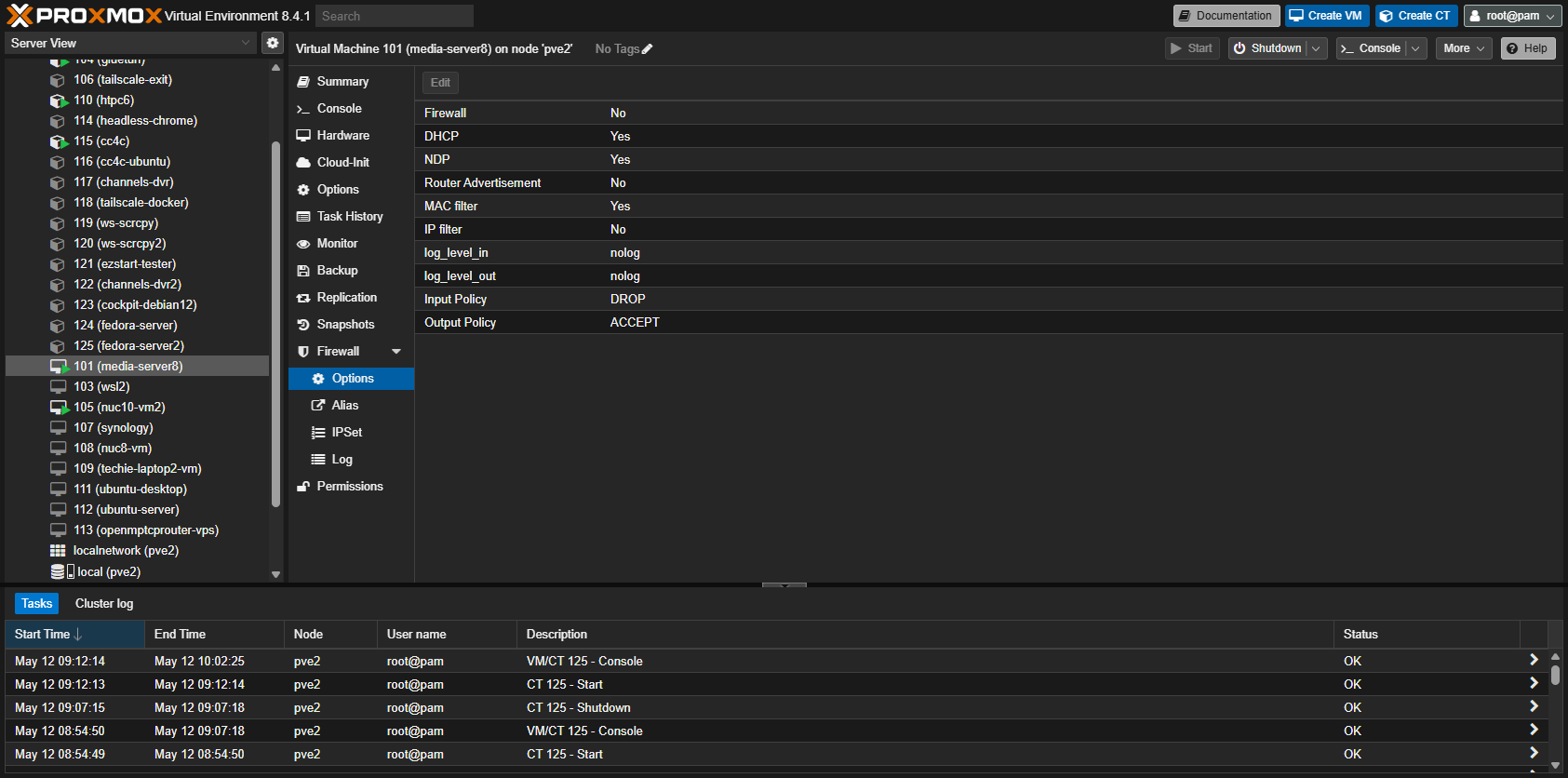
Have you checked to be sure your Windows 11 VM Ethernet connection is set to a network type of "Private"? Also, in the Proxmox WebUI, make sure your Windows 11 VM doesn't have a Proxmox firewall enabled -- that's an easy one to miss when you're provisioning a VM or CT:
I just got it working...went into control panel > programs and feature > turn windows features on > enabled .NET framework 3.5. Only because it was enabled on my main Win11 PC and surprisingly that at least got the VM share showing in the network. Was still unable to connect 
 So I ened up adding another user on the VM with a local account...had to use a different user name but it works now RDP and shares can be connected to
I did check Proxmox and VM firewall settings and various other setting buttons etc. most of the day. Just crazy I had internet on VM and VM to LAN share connections just no LAN to VM connections and sometimes the VM share would not even show in the network.
I'm glad you got it working. I find myself wondering if you still have some underlying network setup issue though. With the two network interfaces you have, do you have them setup like this:
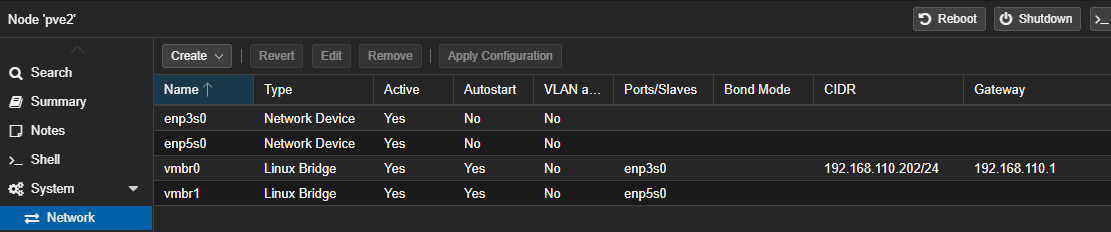
Each on its own bridge with only your admin bridge having a CIDR and Gateway assignment? In my case all of my virtualizations are assigned to vmbr1, as that's my 10GbE port. But even with two identical ports, reserving vmbr0 for admin related, and any other interfaces for virtualizations is typical.
Here's what mine looks like.

Also I've setup an LXC for channels-dvr but can't get it to see the Database backups.
To pass network shares to an LXC you should follow this post I did on the Proxmox forum:
The last part regarding mount points (mp0, mp1, mp3) in the LXC, you can do from the WebUI now.
Though the post talks about doing this to make the shares available in Docker running in an LXC, the same applies to the LXC alone.
F me that was so easy and smooth after fighting with it in the wee hours (3:00 AM ish). 
2 Likes
Bit of a side discussion here, but were the hardware specs of the system you were running Proxmox on equivalent to the Mac Mini? Also, I'm an everyday Proxmox user, and I'd suggest Docker is at its very best running in an LXC rather than a VM.
My main Proxmox cluster is running on Intel 12th gen i5-12400 procs. I agree that running as LXC container directly on Proxmox would give very good performance. I did not do that because I have a 3 node hyper-converged cluster using ceph storage. The setup gives me a very reliable and maintainable environment but it costs in performance running a hyper-converged cluster. Ceph is the real killer in performance but it is a fantastic setup for reliability and maintainability. I can live migrate my Portainer and other vm's around to take down a node for maintenance without my wife even noticing 
If running a single Proxmox server then LXC containers are very efficient to work with.
Edit: I apologize for hijacking this thread on more extraneous topics.
1 Like