[RELEASE] Stream Link/File Manager for Channels [Streaming Library Manager Extension]

I don't know if there is a setting in HBO Max for ASL that might have been activated or something because it seems off that they'd have specific versions of the show with that, but I suppose anything is possible (Disney+/Hulu keeps creating separate versions of English dubbed content instead of just having another audio / CC track).

Verify on HBO Max's website if the deep links are the same or different, then verify on JustWatch what they are using. If there is a gap, follow the directions in Troubleshooting / FAQ:

Hey babs- I had an unfortunate event happen and I likely lost my config for SLM. Not end of world for me but annoying …

Any good practices for backing up config in the future?

Probably set up a cron script for something like that. Maybe copy the configs to a rclone mounted cloud storage folder?

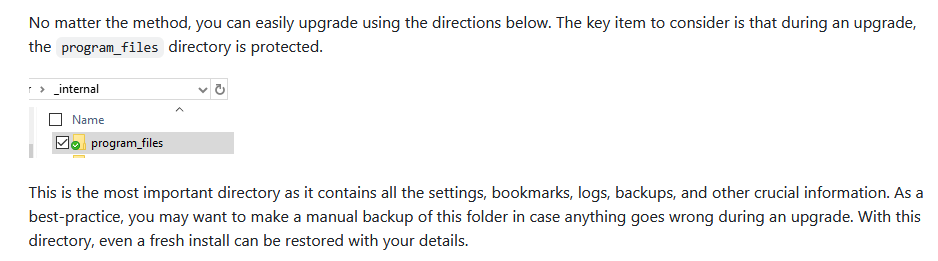
So long as your program_files directory is backed up somewhere, you'll be safe:

I have the directory exposed on my Windows-side so OneDrive just picks it up naturally for me.

1 Like

Sorry to resurrect an old question, but I just ran into the "Recording Corrupted" error trying to watch a YouTube video on CDVR on an Apple TV. Is the issue on Apple TV just with YouTube or with all streaming channels? Just wanted to confirm before trying and failing.

Thanks for all your work with this tool!

No change, there is a bug in the Channels Apple clients that the devs have not fixed. It's not an Apple TV issue, it's a Channels App on Apple TV issue. Infuse on Apple TV works perfectly fine.

Start here for an overview and a workaround:

1 Like

Remind me again what to do when Streamlink says "Update available"? And should I do the update on any regular schedule? Thanks.

I think he would tell you to read the Wiki.
Did you?

I'm a long time Channels DVR user who just actually discovered that Stream Links were even a thing...and only discovered them because of SLM. This is absolutely fantastic and I'm jumping in head first. It's a lot to absorb so apologies if there are simple answers somewhere to two questions I have.

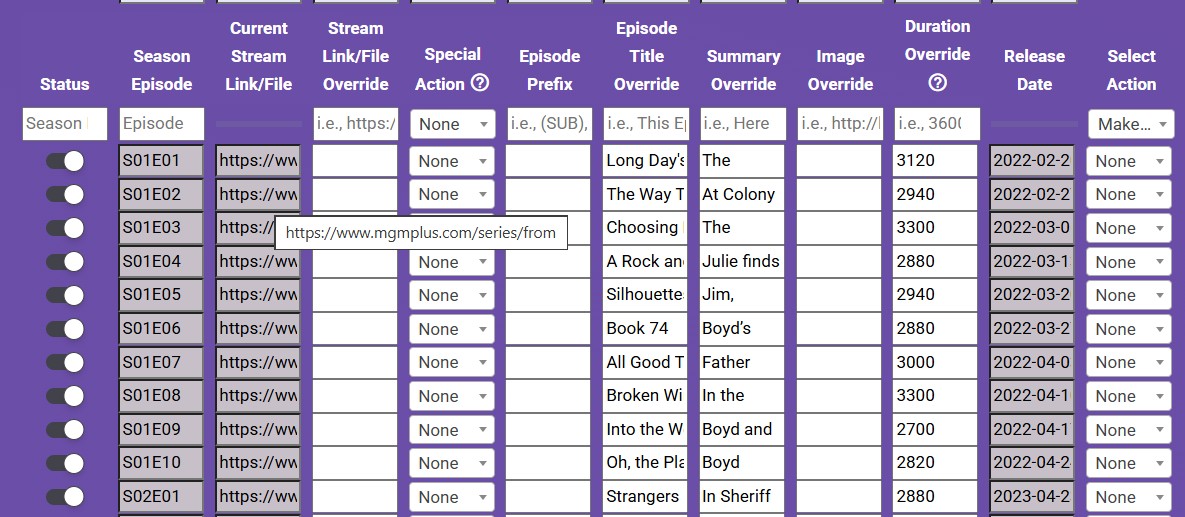
  1. My first attempt at using SLM and Stream Links was to add a show called FROM on MGM+. That seemed to work. I used the option to import the metadata and create stream links. I got 30 episodes appearing in Channels. So far so good. Using Channels in my web browser, if I click for example S1E1, the generic web page for episodes opens in my browser and I have to manually click the episode to start it. I can live with that if needed, however, when I do the same action in Channels on the Apple TV app, nothing happens. I have the MGM+ app on Apple TV installed and logged in. I'm not sure how to make "play" work on the Apple TV app. Opening to the specific episode would be great, but opening at all even to the generic page would be fine. I think this has something to do with modifying the Stream Link URL, I'm just not sure what it should be.

  2. Thinking I'd start over, I deleted the show in Channels (Trash All) just as I would for any other Channels content. Was that a mistake, or do I need to delete the imported show through SLM? When I open the program manager in SLM, it looks like it has remembered that the show was added. Will there be any issue in adding it again through SLM?

Thank you!

Be sure to read through the Wiki, especially Troubleshooting and FAQ as these items are covered there.

If you are looking for specific help around what changes/mapping to the deep links MGM+ might need to work on Apple TV, that would be a fair question that someone else may be able to answer. I did a quick AI-assisted search to give you some promising avenues to explore:

Yes it was; when you trash something in Channels, the next time you import updates from there to SLM, those programs will be marked as "watched". Again, see details in the Wiki.

Hi all, I am bit late to the party using SLM and it has been working great! I am however having issues with Fandango At Home purchased Movies/TV shows not loading on the app and rather using a web browser. There was some discussion of this in the thread but I didn’t see a solution. Anyone know how to set this up to open app vs web browser? On the Apple TV it doesn’t action anything. I am guessing since there is no web browser to utilize it just doesn’t do anything. Here is an example of one of my links:

https://athome.fandango.com/content/browse/details/ItstheGreatPumpkinCharlieBrown/133980?cid=share&scid=ios&kwid=133980

I've come to the conclusion that some apps on some devices simply don't launch via a valid Stream Link file. If you don't find a solution, my workaround has been to take advantage of Channels tracking what I want to watch and launching the app manually via a button on my remote or simply navigating to it. After watching I delete the Stream Link from channels. It's still great to be able to keep track of all your content in one place.

I have been using this for YouTube live channels, and it was working great until a few days ago. Updated SLM, ChannelsDVR, multiple reboots, still not working. Any other ideas? [Using OliveTin to Host YouTube Live Channel URLs Based on the Kister Method - #126 by chDVRuser]

@lute7000
I'm doing something similar, so I have 35 live streams configured in SLM...


Have you tried to play/load that m3u URL into something like VLC to see if the streams play?
A few weeks ago, Youtube did some config change and it killed my ability to play the live streams, but the SLM dev worked his magic and fixed it... check the closed issues in the Github SLM page and you should be able to find the write up...
Anyway, as I said, I am currently playing the live streams via VLC and a few other iptv players...
Oh, and check to see if maybe the link to the web cam changed...although you've probably already did this...
This will hopefully narrow down to whether it's and incoming issue (from YT), or outgoing to the player...

Yes, I applied that fix a few weeks ago, and it had been working great. Unfortunately, it appears to be broken again. My current links no longer work in VLC either. I am using chDVRuser's recommendations as shown in this link: Using OliveTin to Host YouTube Live Channel URLs Based on the Kister Method - #126 by chDVRuser Here is an example from that post:

They're still working for me with SLM.

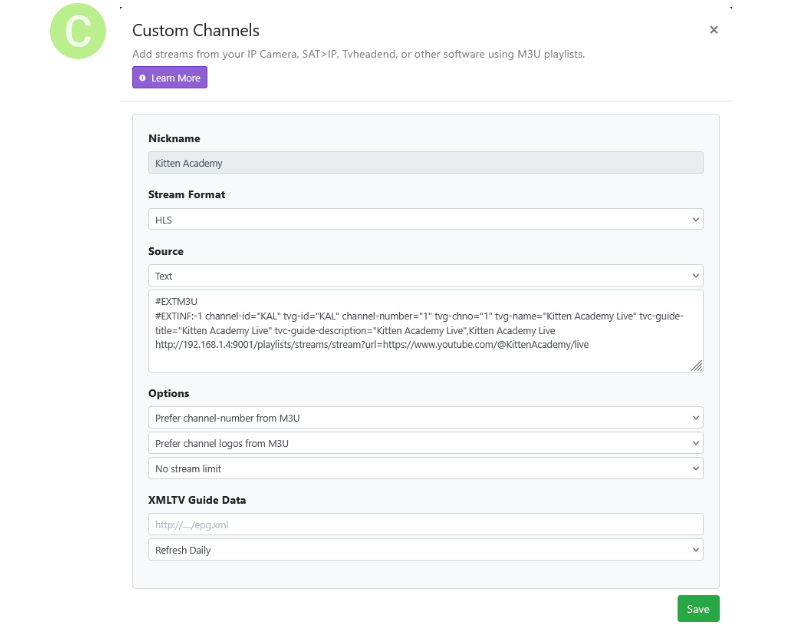
#EXTM3U
#EXTINF:-1 channel-id="KAL1" tvg-id="KAL1" channel-number="1" tvg-chno="1" tvg-name="Kitten Academy Live 1" tvc-guide-title="Kitten Academy Live 1" tvc-guide-description="Kitten Academy Live 1",Kitten Academy Live 1
http://192.168.1.4:9001/playlists/streams/stream?url=https://www.youtube.com/@KittenAcademy/live
#EXTINF:-1 channel-id="KAL2" tvg-id="KAL2" channel-number="2" tvg-chno="2" tvg-name="Kitten Academy Live 2" tvc-guide-title="Kitten Academy Live 2" tvc-guide-description="Kitten Academy Live 2",Kitten Academy Live 2
http://192.168.1.4:9001/playlists/streams/youtubelive?url=https://www.youtube.com/@KittenAcademy/live

Maybe you're talking about other YouTube Live channels that we're not using.
Did you check the YouTube page to see if the Live stream works and if there's more than one Live?
Are you using the @Name in the url?

Without knowing the url's you're using, your settings and the error in the DVR log, we can only give you as general an idea as the info you give us.

1 Like

You should be on v2026.03.17.1101 of SLM by now. If you're not, you're going to have issues with YouTube videos and streams. The past 5 releases have all contained updates to the video streaming sub-tool because this a very active whack-a-mole fight! As such, you need to stay up to date.

Thanks for advising me to check logs in SLM. There is a cookies/authorization issue. I have been researching for a few hours how to fix this, and I am not figuring it out. I use ChannelsDVR and SLM as Docker containers on a NAS with Nvidia Shield. All Youtube live channels were working great last week. Here are the error logs:

Here is one of the channels I am using (no change to code for weeks - was working okay last week):

Looks like their anti-bot detector is playing bad cop now. Will need to find a way around ... @babsonnexus happy to take a shot at it if you want

edit- I did anyway. Of course, that YT link user had issue with worked fine for me without any anti-bot measures. I wonder if it'd be as simple as opening youtube.com on a browser on the same server that SLM is on would then allow user to manually clean anti-bot test? just a theory.

1 Like

Checking is unnecessary, I tested myself earlier. I'm 99.9% convinced either the the user is on the wrong version of SLM or their specific IP address has been banned by YouTube and they need a new one. Otherwise, the error they are showing in their logs has already been corrected.

There is a small chance of something being wrong with Node.js in the Docker version. If others with Docker could open a stream and then get me their SLM logs I can see if something pops up. A success looks like this:

2026-03-20 14:14:45.101242:  INFO: Starting to retrieve manifest for https://www.youtube.com/@KittenAcademy/live.
[debug] Encodings: locale cp1252, fs utf-8, pref cp1252, out missing (logger) (No ANSI), error utf-8, screen missing (logger) (No ANSI)
[debug] yt-dlp version [email protected] from yt-dlp/yt-dlp [04d6974f5] (win_exe) API
[debug] params: {'verbose': True, 'no_warnings': False, 'format': 'all', 'retries': 0, 'fragment_retries': 0, 'logger': <__main__.YTDLLogger object at 0x0000020CF0EE5210>, 'js_runtimes': {'node': {'exe': 'node'}}, 'extractor_args': {'youtube': {'player_client': ['web_safari'], 'formats': ['missing_pot'], 'player_skip': ['configs', 'webpage'], 'skip': ['dash', 'translated_subs']}}, 'remote_components': set(), 'compat_opts': set(), 'http_headers': {'User-Agent': 'Mozilla/5.0 (Windows NT 10.0; Win64; x64) AppleWebKit/537.36 (KHTML, like Gecko) Chrome/140.0.0.0 Safari/537.36', 'Accept': 'text/html,application/xhtml+xml,application/xml;q=0.9,*/*;q=0.8', 'Accept-Language': 'en-us,en;q=0.5', 'Sec-Fetch-Mode': 'navigate'}}
[debug] Lazy loading extractors is disabled
[debug] Python 3.11.5 (CPython AMD64 64bit) - Windows-10-10.0.19045-SP0 (OpenSSL 3.0.9 30 May 2023)
[debug] exe versions: ffmpeg 6.0-full_build-www.gyan.dev (setts), ffprobe 6.0-full_build-www.gyan.dev
[debug] Optional libraries: Cryptodome-3.23.0, brotli-1.2.0, certifi-2026.02.25, curl_cffi-0.14.0, mutagen-1.47.0, requests-2.32.5, sqlite3-3.42.0, urllib3-2.6.3, websockets-16.0, yt_dlp_ejs-0.8.0
[debug] JS runtimes: node-24.13.0
[debug] Proxy map: {}
[debug] Request Handlers: urllib, requests, websockets, curl_cffi
[debug] Plugin directories: none
[debug] Loaded 1864 extractors
2026-03-20 14:14:46.142227:  INFO: Extracting info from https://www.youtube.com/@KittenAcademy/live...
[youtube:tab] Extracting URL: https://www.youtube.com/@KittenAcademy/live
[youtube:tab] @KittenAcademy/live: Downloading webpage
2026-03-20 14:14:47.217288:  INFO: URL redirected to https://www.youtube.com/watch?v=T4XZmMPQ9Kw.
[debug] [youtube] [pot] PO Token Providers: none
[debug] [youtube] [pot] PO Token Cache Providers: memory
[debug] [youtube] [pot] PO Token Cache Spec Providers: webpo
[debug] [youtube] [jsc] JS Challenge Providers: bun (unavailable), deno (unavailable), node, quickjs (unavailable)
[youtube] Extracting URL: https://www.youtube.com/watch?v=T4XZmMPQ9Kw
[youtube] T4XZmMPQ9Kw: Downloading initial data API JSON
[youtube] T4XZmMPQ9Kw: Downloading iframe API JS
[youtube] T4XZmMPQ9Kw: Downloading player 1ebf2aa6-main
[youtube] T4XZmMPQ9Kw: Downloading web safari player API JSON
[youtube] [jsc:node] Solving JS challenges using node
[debug] [youtube] [jsc:node] Using challenge solver lib script v0.8.0 (source: python package, variant: minified)
[debug] [youtube] [jsc:node] Using challenge solver core script v0.8.0 (source: python package, variant: minified)
[debug] [youtube] [jsc:node] Running node: 'C:\Program Files\nodejs\node.EXE' --permission -
[WARNING] [youtube] Unable to fetch GVS PO Token for web_safari client: Missing required Visitor Data. You may need to pass Visitor Data with --extractor-args "youtube:visitor_data=XXX"
[youtube] T4XZmMPQ9Kw: Downloading m3u8 information
2026-03-20 14:14:49.434212:  INFO: Extraction successful for https://www.youtube.com/@KittenAcademy/live.
2026-03-20 14:14:49.434212:  INFO: Found 6 formats.
2026-03-20 14:14:49.435221:  INFO: Best format URL found using m3u8: https://manifest.googlevideo.com/api/manifest/hls_playlist/expire/1774052089/ei/mY69afCECcOb0_wPgc276A4/ip/108.34.174.33/id/T4XZmMPQ9Kw.4/itag/96/source/yt_live_broadcast/requiressl/yes/ratebypass/yes/live/1/sgoap/gir%3Dyes%3Bitag%3D140/sgovp/gir%3Dyes%3Bitag%3D137/rqh/1/hls_chunk_host/rr1---sn-8xgp1vo-cvnd.googlevideo.com/xpc/EgVo2aDSNQ%3D%3D/playlist_duration/30/manifest_duration/30/bui/AVNa5-zl5ZpIzuuuFyTCRHqKjmYs0SbnN9RIL9eCI5qEQpnNxEOtel5emcZMS63SzGkyZmXPQqECyjt9/spc/6dlaFJcr4NbFWNLgRnTXabh9uVoSDbjgTflPrtvKy5QZoaxnd3DacWt51Bc8vh0kKP07Rw/vprv/1/ns/qMqjbRbCaOrXMb8kx8tDZRgT/reg/0/playlist_type/DVR/initcwndbps/4288750/met/1774030490,/mh/8f/mm/44/mn/sn-8xgp1vo-cvnd/ms/lva/mv/m/mvi/1/pl/17/rms/lva,lva/dover/11/pacing/0/keepalive/yes/fexp/51565115,51565681,51791334/n/HdcUpQQDor0GEQ/mt/1774030139/sparams/expire,ei,ip,id,itag,source,requiressl,ratebypass,live,sgoap,sgovp,rqh,xpc,playlist_duration,manifest_duration,bui,spc,vprv,ns,reg,playlist_type/sig/AHEqNM4wRQIgOhvHhbiATeFBqPxnJW6_cYxt51gNSViqie_OH001OrQCIQCqNfX8L-GEhyrBfsBYWnQ0xvOxA-zX0DPrfXPsQ5lqTw%3D%3D/lsparams/hls_chunk_host,initcwndbps,met,mh,mm,mn,ms,mv,mvi,pl,rms/lsig/APaTxxMwRQIgCm-mloqYRS4Y3XtBxO6U5xXDQ_VAt3C5JRCp4aovA2ICIQCMs876CTzQwgCgSP5HF901kfBRr77fFsumulYWvji03w%3D%3D/playlist/index.m3u8
[info | 2026-03-20 14:14:49,437] - 10.255.1.144 - - [20/Mar/2026 14:14:49] "GET /playlists/streams/stream?url=https://www.youtube.com/@KittenAcademy/live HTTP/1.1" 200 -

Anything with a deviation might be an issue.