Using OliveTin to Host YouTube Live Channel URLs Based on the Kister Method

Thank you @chDVRuser and @bnhf. I'm not sure what did it, but after a couple of tries, it is working now. I was able to ping www.youtube.com using the Console in the OliveTin container. I copied the M3U from @bnhf from a few posts up, which added the Big Sky stream to his three. It still didn't work, giving me the same error.

I tried again, this time changing the channel-number in the M3U supplied by @bnhf (there were two with 0.1000). I also added a fifth YouTube stream to the M3U. I then ran the OliveTin action, and now it all works. I'm not sure what the trick was, but happy that it is working. Thanks for this, and thanks for the help!

Good catch!
I didn't notice that. Although I'm not sure that fixed it?
Might want to do a Guide Data Delete and Recreate Database

I believe this is now fixed. I've added a couple of tests, to address two different versions of this issue.

The first test simply checks if www.youtube.com responds, and if it does not, the entire update cycle is skipped. The second test deals with any scenarios where the # yt-source value fails to return a new manifest URL, and in this case the yt-source line is preserved while the stream URL line will be blank.

These changes, as usual, pushed as bnhf/olivetin:latest (aka bnhf/olivetin:2025.01.12).

1 Like

Verified the second test by using a non-Live YouTube video ID

#EXTM3U
#EXTINF:-1 channel-id="YoyokaVideo" channel-number="3" tvg-chno="3" tvc-guide-placeholders="3600",YoyokaVideo-NOT LIVE
https://www.youtube.com/watch?v=nBeG1h1zOtg

After processing by OT4C (OliveTin for Channels)

#EXTM3U
#EXTINF:-1 channel-id="YoyokaVideo" channel-number="3" tvg-chno="3" tvc-guide-placeholders="3600",YoyokaVideo-NOT LIVE
# yt-source=https://www.youtube.com/watch?v=nBeG1h1zOtg

:+1:

Improvement available in bnhf/olivetin:2025.01.20
If OliveTin can't connect to www.youtube.com, it will log that and retry every 60 seconds until connected.
2025-01-20T16:04:19-08:00 www.youtube.com connection failed, retrying in 60 seconds
2025-01-20T16:05:19-08:00 www.youtube.com connection failed, retrying in 60 seconds
It then runs the update cycle instead of skipping it.

Hello Im trying to add the m3u to the $HOST_DIR/olivetin/data/$CHANNELS_HOST-$CHANNELS_PORT
but there is no such directory in my system i have an ubuntu and the docker files are saved in /var/lib/docker but i am not allowed to enter that folder i can not even change the permission with the command sudo chown -R, assuming that is where i am supposed to put my m3u file in, can you help me please?

What value did you use for $HOST_DIR in your Portainer-Stack env vars?

i dont know what value to use because although my porrtainer runs on 192.168.1.69:9000 there is no such file or folder in my system even when i enter that address in my folder browser

Go ahead and post all of the values you used in the Environment variables section of Portainer-Stacks for OliveTin. In Advanced mode you should be able to extract a list that looks similar to this:

TAG=latest
DOMAIN=tailxxxxx.ts.net
HOST_PORT=1337
CHANNELS_DVR_HOST=local-server
CHANNELS_DVR_PORT=8089
CHANNELS_DVR2_HOST=another-server
CHANNELS_DVR2_PORT=8089
CHANNELS_CLIENTS=appletv4k-den firestick-bedroom
ALERT_SMTP_SERVER=smtp.gmail.com:587
[email protected]
ALERT_EMAIL_PASS=xxxxxxxxxxxxxxxx
[email protected]
UPDATE_YAMLS=true
UPDATE_SCRIPTS=true
TZ=US/Mountain
HOST_DIR=/data
DVR_SHARE=/mnt/dvr
LOGS_SHARE=/mnt/channelsdvr
TUBEARCHIVIST_SHARE=/mnt/dvr
HOST_SFS_PORT=8080
FOLDER=/web
PORTAINER_TOKEN=xxxxxxxxxxxxxxxxxxxxxxxxxxxxxxxxxxxxxxxx
PORTAINER_HOST=docker-host
PORTAINER_PORT=9443

TAG=latest
DOMAIN=attlocal.net
HOST_PORT=1337
CHANNELS_DVR_HOST=192.168.1.69
CHANNELS_DVR_PORT=8089
ALERT_SMTP_SERVER=smtp.gmail.com:587
ALERT_EMAIL_FROM=[REDACTED]
ALERT_EMAIL_PASS=[REDACTED]
ALERT_EMAIL_TO=[REDACTED]
UPDATE_YAMLS=true
UPDATE_SCRIPTS=true
TZ=America/New_York
HOST_DIR=/data
DVR_SHARE=/mnt/dvr
LOGS_SHARE=/mnt/channelsdvr
TUBEARCHIVIST_SHARE=/mnt/dvr
HOST_SFS_PORT=8080
FOLDER=/web
PORTAINER_TOKEN=[REDACTED]
PORTAINER_HOST=docker-host
PORTAINER_PORT=9000

So, you used /data for your $HOST_DIR value, and 192.168.1.69 for $CHANNELS_DVR_HOST and 8089 for $CHANNELS_DVR_PORT. Substituting in your env var values, the path on your system would be:

/data/olivetin/data/192.168.1.69-8089

but those folders dont show up on my system and when i type them in the file browser it says "Unable to find"

Are you using Ubuntu Server or Desktop?

i dont know how can i find out?

More importantly, if you can't use /data as a parent directory, you need to choose another directory that is writable. This is where your persistent OliveTin data will be stored.

There are numerous mistakes in the above, starting with using /data as your $HOST_DIR value, if you can't create new directories at the / (root) level -- which could be the case if you're using Ubuntu Desktop.

In addition, the following are likely incorrect:

DVR_SHARE= This is the path to where your Channels DVR recordings and other data are stored.
LOG_SHARE= This is the path to where your CDVR executables reside.
TUBE_ARCHIVIST= For most people this would be the same as your DVR_SHARE value.
PORTAINER_HOST= This is the hostname or IP address of the machine where Docker/Portainer are installed.
PORTAINER_PORT= This allows you to change the Portainer https:// port if necessary, but you definitely don't want to change it to the default Portainer http:// port.

Thank you very much.
This link has been working on a number of threads lately. There was no such problem before. But, overall, it's pretty good. Thank you. We are looking forward to seeing you from Baku, the capital of Azerbaijan.

The last couple of weeks, the YouTube Live Channels are no longer working again. I have done all Channels DVR updates, rebooted several times and am still using the OliveTin refresh feature. Nothing is working. I also tried the YouTube URLs directly on VLC, and they don't work. Is anyone else having this issue and/or have any advice? Thanks.

@bnhf This action should be moved from Actions to Deprecated

YouTube recently made a global change that prevents it from working.

If you install [RELEASE] Streaming Library Manager for Channels you can use the built-in extension [RELEASE] Playlist Manager for Channels [Streaming Library Manager Extension]
Linear Streaming Stations to accomplish the same thing.

You can also install Streaming Library Manager using OliveTin-for-Channels Project One-Click
Screenshot 2026-01-23 at 12-33-34 OliveTin-for-Channels 2026.01.08

I had to change the default SLM_PORT=5000 to 9001 for my installation to avoid a port conflict on my Synology NAS.

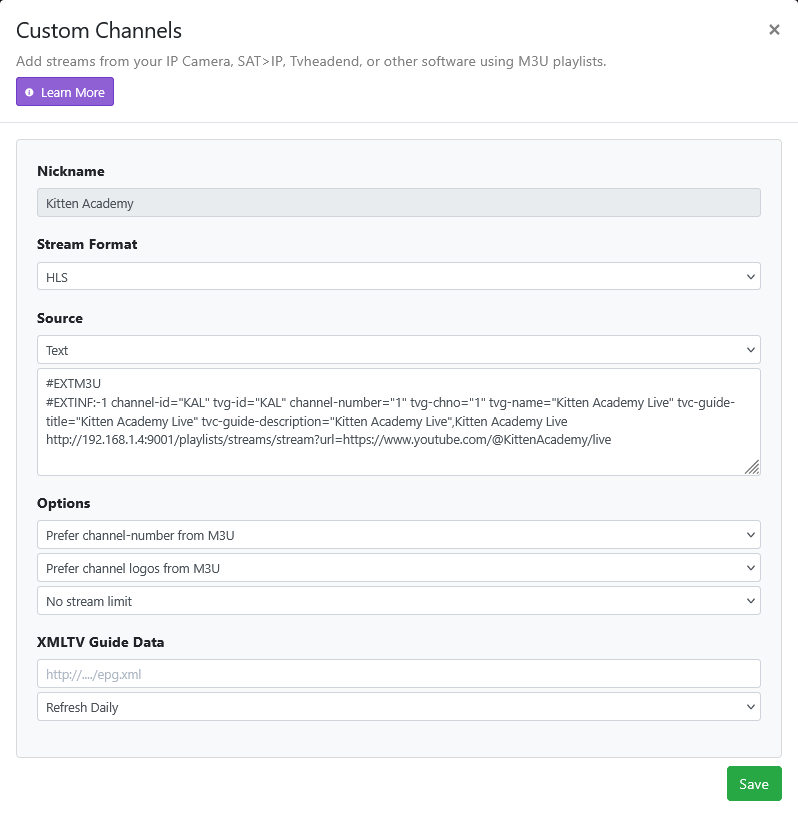
Then change your Channels DVR Server Custom M3U Source settings to use your Streaming Library Manager as a source.

Example for Kitten Academy using my Streaming Library Manager at 192.168.1.4:9001

#EXTM3U
#EXTINF:-1 channel-id="KAL" tvg-id="KAL" channel-number="1" tvg-chno="1" tvg-name="Kitten Academy Live" tvc-guide-title="Kitten Academy Live" tvc-guide-description="Kitten Academy Live",Kitten Academy Live
http://192.168.1.4:9001/playlists/streams/stream?url=https://www.youtube.com/@KittenAcademy/live


:smiley:

Thanks for the quick and detailed response! I will try that.

1 Like