
Works like a charm!!! THANK YOU! The processed files are showing up where they're supposed to!
2 Likes
No problem -- thanks for helping to squash a  .
.
The permanent fix will be included next time I push a new OliveTin container.
2 Likes
It's been two years since I first posted about the possibilities of an OliveTin-for-Channels. In that time, it's grown to include just about every significant script and trick I could find ever posted on this forum.
In addition, Project One-Click has made installing Docker-based projects so quick and easy that I'll routinely add and remove sources on my production CDVR server -- both to answer questions and to make sure One-Click installations are working as they should.
Clearly, plenty of users agree, as OliveTin-for-Channels recently crossed the 30,000 downloads mark -- well beyond any expectations I had for this project two years ago.
Thanks to all that use this tool, and have helped make it better by reporting issues/successes or whatever!
"pull_count":30207
6 Likes
Congratulations 
Now we just need you to create a site map (links to all your OliveTin for Channels Projects).
An OliveTin for Channels projects directory.
I always find myself searching for them since they aren't in one category here.
Is this the complete list? Search results for 'OliveTin @bnhf in:title order:latest' - Channels Community
Nope, gotta select them from Search results for 'OliveTin @bnhf order:latest' - Channels Community
So you're thinking of a single post, with links to the threads that inspired each of the OliveTin-for-Channels Actions?
New bnhf/olivetin:latest (aka bnhf/olivetin:2025.09.03) pushed this morning with Project One-Click support for the new Roku-Channels-Bridge. More details here:
I was thinking of a single (locked) post with links to all of your Olive-Tin for Channels projects.
Like these (I usually have to search, so not sure this is a complete list)
A docker-compose for every Channels-related extension – suitable for Portainer-Stacks!
Comskip Related: A Set of OliveTin-for-Channels Actions with Their Own Dashboard
OliveTin EZ-Start: A New Way to Deploy OliveTin-for-Channels Using Just Two Environment Variables to Get Started!
OliveTin EZ-Start: The Next Generation. Deploy OliveTin-for-Channels from the Command Line without the Need for Portainer to be Installed in Advance!
OliveTin for Channels: An Interface for Misc Channels DVR Scripts & Tricks
Project One-Click: All-in-One Installations of Docker Extensions and CDVR Custom Channels
Using OliveTin to Host YouTube Live Channel URLs Based on the Kister Method
Using OliveTin with TubeArchivist plus CDVR/TA Processing Script
New bnhf/olivetin:latest (aka bnhf/olivetin:2025.09.06) pushed today with Project One-Click support for the nostalgic WeatherStar 4000+ via cc4c. More details here:
1 Like
What would you think about this process becoming an OliveTin Action?
Maybe start with the FileID, then make a backup, followed by remuxing with ffmpeg -- or something along those lines? The Action could make the backup by FileID regardless, and then offer the ffmpeg remux as an option?
Not sure if it would be used enough to warrant an OliveTin Action.
I just use a simple script (Windows cmd file) that runs an ffmpeg remux against the recording (logging the ffmpeg output) and saves it as a .ts file (which is really what CDVR records to), optionally in the same directory as the recording. That way I can check the remux to see if it fixed it, and if so I move it over the original recording, replacing the recorded.mpg.
To do that, I drag and drop the recording on this Windows cmd file which exists on a local drive
ffmpeg_remux.cmd
@ECHO OFF
ECHO ...
IF %1.==. GOTO USAGE
REM Change current working directory to where this command script resides
%~d0
CD %~p0
REM Use your ffmpeg.exe to remux the recording to a new .ts file in the current directory
REM and redirect standard and error output to originalfilename_remux_log.txt
ECHO Remuxing %1
ffmpeg -ignore_unknown -i %1 -map 0 -acodec copy -vcodec copy -scodec copy "%~dp0%~n1.ts" > "%~n1_remux_log.txt" 2>&1
ECHO Remuxed %1
ECHO to file "%~dp0%~n1.ts"
ECHO Press Ctrl-C to keep remuxed file here, or to move it to the original directory
PAUSE
REM Move the remuxed file.ts so as not to overwrite the original.mpg
MOVE /Y "%~dp0%~n1.ts" "%~dp1"
GOTO FINISHED

:USAGE
REM Need the fully qualified filename.mpg to remux
ECHO Drop the file to be remuxed on this command file

:FINISHED
PAUSE
EXIT
2 Likes
did i miss a step?
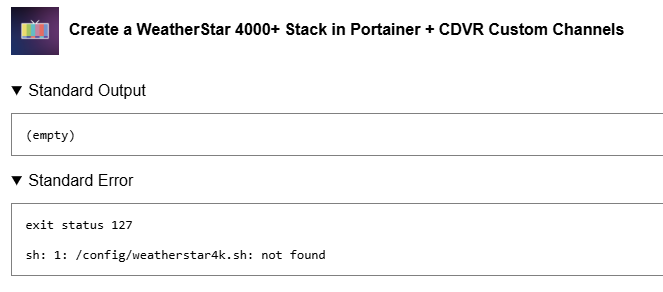
No -- that's a me problem.  I dropped the weatherstar4k files into the wrong build folder. I guess you're the first one to try it in production. I'll have a new version pushed shortly...
EDIT: It's built -- re-pull and redeploy and you should be good.
Thanks!
I still follow the directions to vnc into the server after one click?
Yes.
1 Like
Its been so long but how am I able to update Olivetin for Channels?
New bnhf/olivetin:latest (aka bnhf/olivetin:2025.11.23) pushed today with Project One-Click support for ESPN4cc4c, ESPN4ch4c and ESPN4adbt. All three can be run simultaneously.
More details here:
Stop the olivetin stack, go into the Portainer-Stacks Editor, and look for the Update the stack button. Use the Re-pull and redeploy slider after clicking the button.
Hey, just curious if anyone has a good guide to get this going on Unraid.
I know there are at least a couple of people that have OliveTin-for-Channels running on Unraid, but nobody's written the process up.
Here are a couple of things to keep in mind:
-
OliveTin-for-Channels requires Portainer -- so be sure you're comfortable with getting Portainer installed and running.
-
A fully functioning OliveTin installation requires access to CVDR executables and recordings directories. If both are on the Unraid server, and you know their paths -- you should be good.
Other than that, if you understand at least basic concepts about Docker and Docker Compose it's not overly difficult.
Thanks, yeah, I was able to get it running with Portainer on Unraid!
I didn't realize that Portainer was required now that I know that it was pretty easy to get up and running!! 