
I Believe yes
1 Like
I'll have to check at the conclusion of my tests. I have them running on all three Roku sticks right now. Hopefully, we won't see the prompts at all. 
I'll check my trash to see if I have an old recording I can bring up with the prompt on it. If not, I'll run a new test overnight without the "keep alive" input.
EDIT: I checked, and evidently, I'm pretty compulsive about emptying the trash.
1 Like
Good luck with it. I hope there is a simple solution for it. I pushed another update, but it only has cosmetic changes to the Add Channel dialog box and no changes to function.
One can always hope. Based upon the work others have done before us, the solution may not be there at all. Just in case, I have two DirecTV Osprey streaming boxes being delivered on Friday. If we manage to get this Roku thing figured out, I have 30 days to return the Ospreys.
This could be a pretty good solution in this project, however iirc the OK/Select button pauses playback in the DTV app on Android -- so if this solution works, it may be Roku only.
The other comment I have on this process, is that finding a keycode that has no effect on playback, but prevents the pop-up is obviously the best result. And if it's cross-platform, even better. 
It's not a huge deal to have the pop-up on the screen for say one minute if this is just a watch-it-and-pitch-it recording, but if it's a recording of the Godfather trilogy that's back-to-back on a premium channel it's a different matter. Personally, I tend not keep recordings with flaws like that.
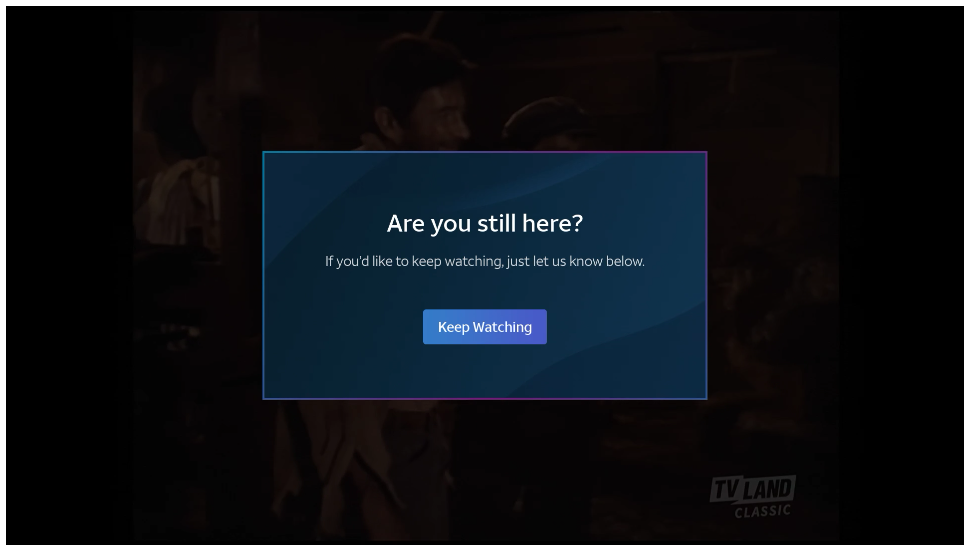
Boy, that is an annoying thing. Why would they make it so intrusive? I hope there is a way to avoid that from happening. Hopefully the Replay command will reset the popup timer before it gets activated.
Here are the results of my overnight testing. I ran three tuners for well over 12 hours last night. Each tuner was continuously recording a separate channel. I set the Keep Alive Function to activate at 235 minutes for all. One with "InstantReplay", another with "Backspace", and the final one with "Enter".
I checked the logs this morning, and all of the keep alive actions were properly sent at the scheduled times over three full rounds of 4 hours for each tuner.
None of the tuners showed the "Are you still here?" prompt at all. The "InstantReplay" action did make a noticeable skip back in the recordings.
Here's the best part! Neither of the "Backspace" or the "Enter" commands showed any interruption in the recordings! You did it, @Bobby_Vaughn ! YAAAHOOO!
So, by this method (only tested on Roku Tuner Bridge), @bnhf , your Godfather Trilogy will be recorded completely clear of even the slightest glitch, skip back, menu overlay or still watching? prompt. 
That's excellent news! I hope it works in ADBTuner as well, but even if this is a Roku only solution -- it's great to have anything as an option.
Pushed test to main repo with latest tag. The changes are included on the GitHub README as well as the Guide site.
That looks really promising and hope it can be port over to other devices.
Could you elaborate on the recordings; i.e.; lengths , channels, tuners, etc.
Do the logs report continuous tuners to specific channel or did some switch? Were any recordings scheduled over 4 hrs?
Another test that could help is just set one channel to live and let it go overnight on a soundless TV. If it’s playing in the morning, you know it’s working.
Bear with me. I’m a retired engineer who is absurdly detail oriented!
Hi James! As a fellow retired engineer, I offer you the following detail:
All three tuners are all Roku Streaming Stick 4k's.
Tuners R1 and R2 were recently acquired and are model 3820R2.
Tuner R3 is a couple years old, model 3820RW.
Tuners are installed on HDMI ports 1,2,3 on a LinkPi ENC5-V2.
Testing specifics:
R1: 9 consecutive recordings on SONYHD / ID:69130, Keep Alive = Backspace @ 235 min
beginning 5:12 pm, through 7:28 am. Program lengths ranging from 00:11 to 02:30 (hh:mm)
R2: 13 consecutive recordings on GFAMHD / ID:82892, Keep Alive = InstantReplay @ 235 min
beginning at 5:13 pm through 7:00 am, Program lengths ranging from 00:31 to 02:02
R3: 13 consecutive recordings on FMC / ID:122068, Keep Alive = Enter @ 235 min
beginning at 5:13 pm through 6:15 am, Program lengths ranging from 00:31 to 02:02
No tuners switched or swapped channels in this test. The longest recording was 02:30
I can set one up to do this tonight. (If I remember before I go to bed...) 
1 Like
I know that feeling. Thanks for the info.
@jagrim , I tuned a single channel overnight, as you suggested. I began live viewing yesterday evening around 07:20 pm. The channel was still playing this morning. The container log shows three keep alive commands of "Enter" at the default interval of 225 minutes.
2025-09-11 02:19:17,485 - INFO - HTTP Request: GET http://192.168.1.161:8090/stream0 "HTTP/1.0 200 OK"
2025-09-11 06:04:17,360 - INFO - [Keep-Alive] Sending sequence ['Enter'] to 192.168.1.165 to prevent timeout.
2025-09-11 09:49:18,411 - INFO - [Keep-Alive] Sending sequence ['Enter'] to 192.168.1.165 to prevent timeout.
2025-09-11 13:34:19,210 - INFO - [Keep-Alive] Sending sequence ['Enter'] to 192.168.1.165 to prevent timeout.
2025-09-11 14:28:05,517 - INFO - HTTP Request: GET http://192.168.1.161:8090/stream0 "HTTP/1.0 200 OK"
That's a great test, IMO.
I'm curious as to why it works on the Roku bridge but not the Adb 'system'. Seems like it should. I may have to pull out my other encoder, spin up a container on my test server, and try again. Unfortunately, I don’t have any Roku devices sitting around to test. We’re an Apple/Android family.
BTW, my current system uses the 5 port LinkPi Encoder with (3) Osprey Boxes. Timing is about 11-13 seconds on initial tune, The Osprey Boxes have a setting to keep the box streaming. It's very stable.
@jagrim , I recently switched from YouTube TV to DirecTV as a cheaper streaming provider. My monthly cost has dropped from $84 on YTTV to $45 on DTV.
I had five onn 4k boxes working exceptionally well with ADBTuner and YTTV. As many of us know, the DTV Android app doesn't play nicely with ADBTuner.
In my struggles to get DTV working as a source to Channels DVR, I came up on the Roku Tuner Bridge as a possible solution. I began testing on the single Roku stick I already owned. As results became promising, I added two more Roku sticks to my setup.
My LinkPi now has the three Roku 4k streaming sticks, and three onn 4k Android boxes. The third onn 4k box is feeding through an inexpensive USB HDMI capture card attached to the LinkPi's USB 3.0 port.
I also have two DTV Osprey boxes being delivered tomorrow. As the Roku's seem to be working out well, I may return the Ospreys.
I do have a problem with video stuttering on all the HDMI inputs on the LinkPi. The box connected to the USB capture device does not seem to have the same issue. I'm wondering if anyone has experienced this stutter, and if it can be resolved by changing the default HDMI encoding settings on the LinkPi.
These are the settings I am currently using. They are the defaults after a hard system restore on the LinkPi.
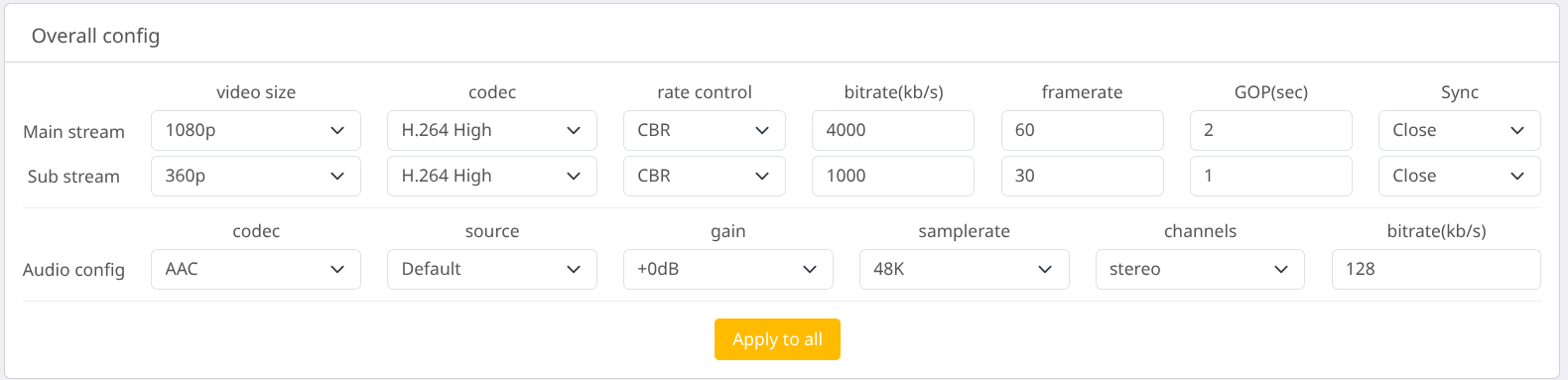
I run mine with a 30 framerate, 12,000 bitrate and have not noticed a stutter.
I just tested with 60 and 12000 and have not seen a stutter. I would think 8000 bitrate at the minimum though.
I think that I used to run at 8000 bitrate. Perhaps the default 4000 is too low. I'll try changing that first. I seem to remember someone suggesting that the rate control setting may make a difference, too. Default is CBR. The suggestion was that VBR or AVBR may be preferable. I can't remember which, or why...
EDIT: I think I figured out why my stuttering video issue began. For YTTV, I was running 5 Android boxes at 1080p, 60 fps and 8000 bitrate. When I switched from YTTV to DTV, I started playing around with different tuner configurations. I added the Rokus into the mix.
Not wanting to abandon all of the onn boxes, I ended up with 6 tuners...three Roku, and three Android. Leaving the settings at the previous resolution, frame rate, and bitrate was more than the poor little LinkPi box could handle.
So, today I experimented with backing down the number of tuners, frame rate, and/or bitrate. It turns out that I can run all six tuners at 1080p, 12000 kbps, and 45fps without stuttering.
I'm actually getting 8 second initial tuning consistently from the Roku Sticks and Roku Tuner Bridge. That's hard to beat. The only thing faster is tuning the TVE channels. Those are more like 2 to 6 seconds.
To be honest, I'm surprised it is working as well as it is. I've been using it for a few weeks and very happy with the results. There is always room for improvement and this is a very young project, but I'm glad it is a viable option.