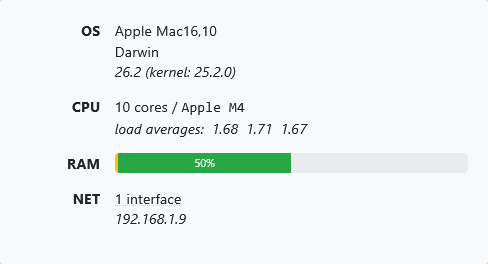
Mac Mini M4, Apple Silicon, darwin-arm64.
Can I run multiple Channels DVR Servers (different executable directories and different ports) natively on Mac OS? If yes, how?
It appears that your Mac OS installer doesn't support that option.

Mac Mini M4, Apple Silicon, darwin-arm64.
Can I run multiple Channels DVR Servers (different executable directories and different ports) natively on Mac OS? If yes, how?
It appears that your Mac OS installer doesn't support that option.
The easiest way to run multiple docker instances, If you have multiple pcs or macs, you can run the instances.
It is possible but would have to be set up manually.
The installer adds launchd plist which you can copy and make more versions of.
Thanks Aman.
I'm a newbie at macOS, so have some studying to do before setting this up.
Does it install as a system-level or user agent/daemon?
In which directory?
~/Library/LaunchAgents
/Library/LaunchAgents
/Library/LaunchDaemons
/System/Library/LaunchAgents
/System/Library/LaunchDaemons
As user by default in the first folder
I'm not sure if I understand this relationship between hardware transcoding support and system vs. user daemon.
In order to use hardware transcoding I need to run Channels DVR Server as a User Agent under a User?
So it won't run until that User logs in? That doesn't seem right.
Why doesn't hardware transcoding work when run as a Global or System Daemon?
Can I not have Channels DVR Server launched as a Global or System Daemon /Library/LaunchDaemons or /System/Library/LaunchDaemons and run as my UserName?
I had planned to have multiple standard users setup, one of them (chDVRuser) just for running Channels DVR.
Appears macOS has a learning curve.
Would be better to have one user which does auto-login. And set up DVRs in separate folders.
Apple does not allow system daemons to access the GPU due to some security reason. Or maybe the daemon required is not running until a user logs in.
Thanks, was planning on that.
Darn. OK
Since I'm not buying this device just to run Channels DVR, can I have that one user auto-login on boot to start the DVR, but still have other user accounts?
Would I always have to leave that user logged in to keep Channels DVR running, or does it just need to login to start the daemon in the background?
It has to stay logged in to that user.
Huh? So I can't setup and use other user accounts on it while Channels DVR is running?
I thought macOS allowed multiple user accounts.
I'll have to do some more research, but I read somewhere that you could switch user accounts without logging the existing user out. Something about using the Lock Screen?
I think it was this one I read 7 ways to switch to a different user account on Mac
I'm sure I'll figure this out myself, once I get the Mac mini and set it up.
So this brings up a couple more questions (sorry, newbie to the Mac eco-system).
Does Channels DVR Server have to be installed on an Admin User account?
Do most macOS users just install it on the admin account created when they setup their device and then set that admin user to auto-login with no password just to start Channels DVR and use that same admin user account to use their Mac for other things?
This all seems counter intuitive to me coming from OS/2, Windows and Synology.
Not sure. Admin acct should not be required, but could be.
Single user autologin is how DVR users set up their Macs.
It the past having a system DVR in background worked, but now it is not able to access GPU transcoding anymore.
Guess I'll just have to try it out next week when I setup the mini.
I probably won't need hardware transcoding, so will try installing both ways (as user and system) to make sure I can use UNC paths with SMB to my Synology.
I currently have a couple issues running just one CDVR server on macOS Tahoe 26.2.
I cannot set the user to autologin since I have File Vault enabled. Guess I'll have to disable File Vault.
I'm getting prompted to authorize local network access for CDVR each time I update CDVR.
Would running it as a system service get around this?
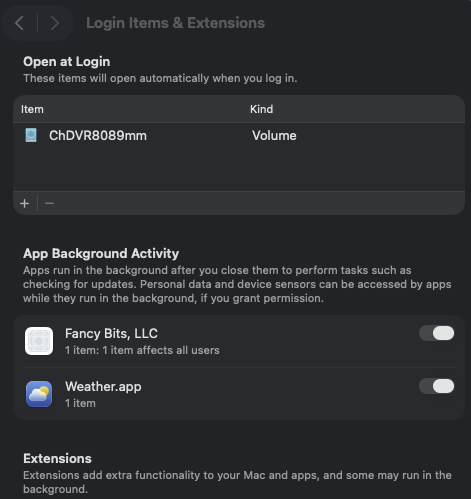
I was going to test running it as a system service instead of a user agent, but I can't figure out how to automount my shared Synology SMB folder (used for DVR recordings) on bootup. I am able to automount it on my user login to /Volumes.
Are you running macOS Sequoia, or Tahoe?
Tahoe 26.2
I turned off File Vault and set my user to autologin
I think I have it working. Time will tell.
I'm not seeing the permission popups for CDVR network access when it updates with CDVR running as a system service.
I have my autologin user mounting my Synology SMB shared folder (that CDVR is writing to) on login.
I have it running as a system daemon and it's allowing hardware transcoding.
Maybe because the user that installed it is logged in?
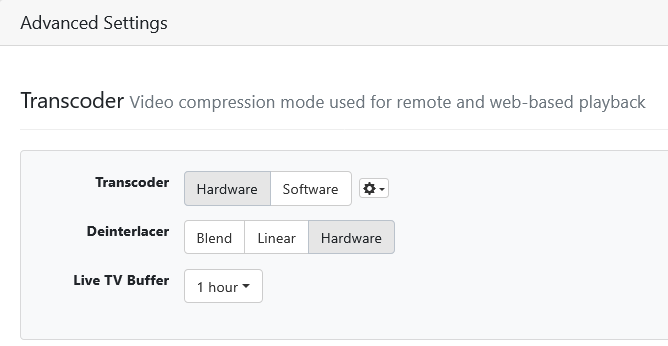
Hardware Transcoder Probe
h264_videotoolbox

[Parsed_testsrc_0 @ 0xa7f00c540] size:1280x720 rate:60/1 duration:-1.000000 sar:1/1
Input #0, lavfi, from 'testsrc=size=1280x720:rate=60':
  Duration: N/A, start: 0.000000, bitrate: N/A
  Stream #0:0: Video: wrapped_avframe, 1 reference frame, rgb24, 1280x720 [SAR 1:1 DAR 16:9], 60 fps, 60 tbr, 60 tbn
[out#0/null @ 0xa7f00c900] No explicit maps, mapping streams automatically...
[vost#0:0/h264_videotoolbox @ 0xa7f03c500] Created video stream from input stream 0:0
Stream mapping:
  Stream #0:0 -> #0:0 (wrapped_avframe (native) -> h264 (h264_videotoolbox))
Press [q] to stop, [?] for help
[graph 0 input from stream 0:0 @ 0xa7f00cf00] w:1280 h:720 pixfmt:rgb24 tb:1/60 fr:60/1 sar:1/1
[auto_scale_0 @ 0xa7f00d200] w:iw h:ih flags:'' interl:0
[format @ 0xa7f00d140] auto-inserting filter 'auto_scale_0' between the filter 'Parsed_null_0' and the filter 'format'
[auto_scale_0 @ 0xa7f00d200] w:1280 h:720 fmt:rgb24 sar:1/1 -> w:1280 h:720 fmt:yuv420p sar:1/1 flags:0x00000004
Output #0, null, to '/dev/null':
  Metadata:
    encoder         : Lavf60.16.100
  Stream #0:0: Video: h264, 1 reference frame, yuv420p(tv, progressive), 1280x720 (0x0) [SAR 1:1 DAR 16:9], q=2-31, 4000 kb/s, 60 fps, 60 tbn
    Metadata:
      encoder         : Lavc60.31.102 h264_videotoolbox
No more output streams to write to, finishing.
[vist#0:0/wrapped_avframe @ 0xa7ec30180] Decoder thread received EOF packet
[vist#0:0/wrapped_avframe @ 0xa7ec30180] Decoder returned EOF, finishing
[vist#0:0/wrapped_avframe @ 0xa7ec30180] Terminating decoder thread
[out#0/null @ 0xa7f00c900] All streams finished
[out#0/null @ 0xa7f00c900] Terminating muxer thread
[out#0/null @ 0xa7f00c900] Output file #0 (/dev/null):
[out#0/null @ 0xa7f00c900]   Output stream #0:0 (video): 60 frames encoded; 60 packets muxed (99853 bytes);
[out#0/null @ 0xa7f00c900]   Total: 60 packets (99853 bytes) muxed
[out#0/null @ 0xa7f00c900] video:98kB audio:0kB subtitle:0kB other streams:0kB global headers:0kB muxing overhead: unknown
frame=   60 fps=0.0 q=-0.0 Lsize=N/A time=00:00:00.98 bitrate=N/A speed=3.48x
[AVIOContext @ 0xa7ec14000] Statistics: 337 bytes written, 0 seeks, 2 writeouts
[in#0/lavfi @ 0xa7ec18000] Terminating demuxer thread
[in#0/lavfi @ 0xa7ec18000] Input file #0 (testsrc=size=1280x720:rate=60):
[in#0/lavfi @ 0xa7ec18000]   Input stream #0:0 (video): 63 packets read (30240 bytes); 61 frames decoded; 0 decode errors;
[in#0/lavfi @ 0xa7ec18000]   Total: 63 packets (30240 bytes) demuxed

success in 595ms
h264_videotoolbox+deint

[Parsed_testsrc_0 @ 0xaacc44180] size:1280x720 rate:60/1 duration:-1.000000 sar:1/1
[auto_scale_0 @ 0xaacc44480] w:iw h:ih flags:'' interl:0
[Parsed_tinterlace_1 @ 0xaacc44240] auto-inserting filter 'auto_scale_0' between the filter 'Parsed_testsrc_0' and the filter 'Parsed_tinterlace_1'
[auto_scale_0 @ 0xaacc44480] w:1280 h:720 fmt:rgb24 sar:1/1 -> w:1280 h:720 fmt:yuv444p sar:1/1 flags:0x00000004
[Parsed_tinterlace_1 @ 0xaacc44240] mode:1 filter:off h:720 -> h:720
Input #0, lavfi, from 'testsrc=size=1280x720:rate=60,tinterlace=mode=1':
  Duration: N/A, start: 0.000000, bitrate: N/A
  Stream #0:0: Video: wrapped_avframe, 1 reference frame, yuv444p, 1280x720 [SAR 1:1 DAR 16:9], 30 fps, 30 tbr, 30 tbn
[out#0/null @ 0xaacc44780] No explicit maps, mapping streams automatically...
[vost#0:0/h264_videotoolbox @ 0xaacc3c500] Created video stream from input stream 0:0
[Parsed_deinterlace_metal_2 @ 0xaacc44a80] Using Metal device: Apple M4
Stream mapping:
  Stream #0:0 -> #0:0 (wrapped_avframe (native) -> h264 (h264_videotoolbox))
Press [q] to stop, [?] for help
[Parsed_deinterlace_metal_2 @ 0xaacc45200] Using Metal device: Apple M4
[graph 0 input from stream 0:0 @ 0xaacc452c0] w:1280 h:720 pixfmt:yuv444p tb:1/30 fr:30/1 sar:1/1
[auto_scale_0 @ 0xaacc455c0] w:iw h:ih flags:'' interl:0
[trim_in_0_0 @ 0xaacc45380] auto-inserting filter 'auto_scale_0' between the filter 'graph 0 input from stream 0:0' and the filter 'trim_in_0_0'
[auto_scale_0 @ 0xaacc455c0] w:1280 h:720 fmt:yuv444p sar:1/1 -> w:1280 h:720 fmt:nv12 sar:1/1 flags:0x00000004
    Last message repeated 3 times
[h264_videotoolbox @ 0xaad034c00] Using input frames context (format videotoolbox_vld) with h264_videotoolbox encoder.
Output #0, null, to '/dev/null':
  Metadata:
    encoder         : Lavf60.16.100
  Stream #0:0: Video: h264, 1 reference frame, videotoolbox_vld(tv, progressive), 1280x720 (0x0) [SAR 1:1 DAR 16:9], q=2-31, 4000 kb/s, 60 fps, 60 tbn
    Metadata:
      encoder         : Lavc60.31.102 h264_videotoolbox
No more output streams to write to, finishing.
[vist#0:0/wrapped_avframe @ 0xaacc58480] Decoder thread received EOF packet
[vist#0:0/wrapped_avframe @ 0xaacc58480] Decoder returned EOF, finishing
[vist#0:0/wrapped_avframe @ 0xaacc58480] Terminating decoder thread
[out#0/null @ 0xaacc44780] All streams finished
[out#0/null @ 0xaacc44780] Terminating muxer thread
[out#0/null @ 0xaacc44780] Output file #0 (/dev/null):
[out#0/null @ 0xaacc44780]   Output stream #0:0 (video): 30 frames encoded; 30 packets muxed (63945 bytes);
[out#0/null @ 0xaacc44780]   Total: 30 packets (63945 bytes) muxed
[out#0/null @ 0xaacc44780] video:62kB audio:0kB subtitle:0kB other streams:0kB global headers:0kB muxing overhead: unknown
frame=   30 fps=0.0 q=-0.0 Lsize=N/A time=00:00:00.96 bitrate=N/A speed=5.27x
[AVIOContext @ 0xaad020000] Statistics: 348 bytes written, 0 seeks, 2 writeouts
[in#0/lavfi @ 0xaad024000] Terminating demuxer thread
[in#0/lavfi @ 0xaad024000] Input file #0 (testsrc=size=1280x720:rate=60,tinterlace=mode=1):
[in#0/lavfi @ 0xaad024000]   Input stream #0:0 (video): 33 packets read (15840 bytes); 31 frames decoded; 0 decode errors;
[in#0/lavfi @ 0xaad024000]   Total: 33 packets (15840 bytes) demuxed

success in 242ms
I installed CDVR as a background Daemon and it was working.
But I'm unable to create another Channels DVR instance running in the background.
Since I wanted to install other instances in differnt directories and using different ports, here's what I did.
Uninstalled the background Channels DVR Launch Daemon.
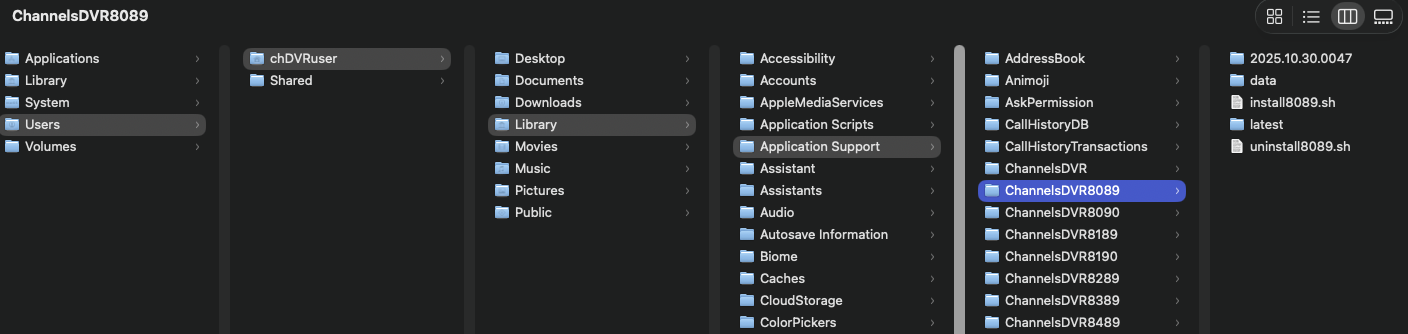
Copied the folder CDVR was running in /Users/chDVRuser/Library/Application Support/ChannelsDVR
to a new folder /Users/chDVRuser/Library/Application Support/ChannelsDVR8089
Renamed and modified the install.sh in the new folder as follows
#!/bin/bash
#/ Channels DVR installer for OSX
#/ Usage: install8089.sh [--system|--wake-helper]
set -e

base_path="$( cd "$( dirname "${BASH_SOURCE[0]}" )" && pwd )"
need_sudo=0

if [ $# -eq 0 ]; then
  dir="$HOME/Library/LaunchAgents"
elif [ "$1" = "--system" ]; then
  dir=/Library/LaunchDaemons
  need_sudo=1
  if [ -f "$HOME/Library/LaunchAgents/com.getchannels.dvr.8089.plist" ]; then
    echo "ERROR: Channels DVR on Port 8089 is already installed as a user-service." >&2
    echo "ERROR: Uninstall it before installing as system-wide service." >&2
    exit 1
  fi
elif [ "$1" = "--wake-helper" ]; then
  if ! sudo -n true >/dev/null 2>&1; then
    echo "NOTE: Your password is required to install the wake-helper."
    echo "NOTE: Please enter it at the prompt below."
  fi

  #if ! sudo grep -q "#includedir /private/etc/sudoers.d" /etc/sudoers; then
  #  echo -e "\n#includedir /private/etc/sudoers.d" | sudo tee -a /etc/sudoers >/dev/null
  #fi

  sudo mkdir -p /etc/sudoers.d
  sudo chown root:wheel /etc/sudoers.d
  cat <<EOF | sudo tee /etc/sudoers.d/channels-dvr > /dev/null
Cmnd_Alias DVR_PMSET_SCHEDULE = /usr/bin/pmset schedule wakeorpoweron * com.getchannels.dvr.8089
Cmnd_Alias DVR_PMSET_CANCEL = /usr/bin/pmset schedule cancel *
Cmnd_Alias DVR_PMSET_CANCELALL = /usr/bin/pmset schedule cancelall
ALL ALL=(root) NOPASSWD: DVR_PMSET_SCHEDULE, DVR_PMSET_CANCEL, DVR_PMSET_CANCELALL
EOF
  sudo chown root:wheel /etc/sudoers.d/channels-dvr
  sudo chmod 440 /etc/sudoers.d/channels-dvr
  echo "SUCCESS: The wake-helper is installed."
  exit 0
else
    echo "ERROR: Unrecognized option: $1" >&2
    exit 1
fi

sudo_path=$(which sudo 2>/dev/null || true)
sudomaybe() {
  if [ $need_sudo -eq 1 ]; then
    $sudo_path "$@"
  else
    "$@"
  fi
}

if [ $need_sudo -eq 1 ]; then
  if ! sudo -n true >/dev/null 2>&1; then
    echo "NOTE: Your password is required to install Channels DVR on Port 8089 as a system-wide service."
    echo "NOTE: Please enter it at the prompt below."
  fi
fi

mkdir -p "$dir"
cat <<EOF | sudomaybe tee "$dir/com.getchannels.dvr.8089.plist" >/dev/null
<?xml version="1.0" encoding="UTF-8"?>
<!DOCTYPE plist PUBLIC "-//Apple//DTD PLIST 1.0//EN" "http://www.apple.com/DTDs/PropertyList-1.0.dtd">
<plist version="1.0">
<dict>
    <key>RunAtLoad</key>
    <true/>
    <key>KeepAlive</key>
    <true/>
    <key>Label</key>
    <string>com.getchannels.dvr.8089</string>
    <key>UserName</key>
    <string>$(id -u -n)</string>
    <key>WorkingDirectory</key>
    <string>$base_path/data</string>
    <key>StandardOutPath</key>
    <string>$base_path/data/channels-dvr.log</string>
    <key>StandardErrorPath</key>
    <string>$base_path/data/channels-dvr.log</string>
    <key>ProgramArguments</key>
    <array>
      <string>$base_path/latest/channels-dvr -port 8089</string>
    </array>
</dict>
</plist>
EOF

sudomaybe launchctl load "$dir/com.getchannels.dvr.8089.plist"
Used terminal in the directory /Users/chDVRuser/Library/Application Support/ChannelsDVR8089 and ran ./install.sh
It ran and created the plist file /Library/LaunchDaemons/com.getchannels.dvr.8089.plist
<?xml version="1.0" encoding="UTF-8"?>
<!DOCTYPE plist PUBLIC "-//Apple//DTD PLIST 1.0//EN" "http://www.apple.com/DTDs/PropertyList-1.0.dtd">
<plist version="1.0">
<dict>
    <key>RunAtLoad</key>
    <true/>
    <key>KeepAlive</key>
    <true/>
    <key>Label</key>
    <string>com.getchannels.dvr.8089</string>
    <key>UserName</key>
    <string>chDVRuser</string>
    <key>WorkingDirectory</key>
    <string>/Users/chDVRuser/Library/Application Support/ChannelsDVR8089/data</string>
    <key>StandardOutPath</key>
    <string>/Users/chDVRuser/Library/Application Support/ChannelsDVR8089/data/channels-dvr.log</string>
    <key>StandardErrorPath</key>
    <string>/Users/chDVRuser/Library/Application Support/ChannelsDVR8089/data/channels-dvr.log</string>
    <key>ProgramArguments</key>
    <array>
      <string>/Users/chDVRuser/Library/Application Support/ChannelsDVR8089/latest/channels-dvr -port 8089</string>
    </array>
</dict>
</plist>
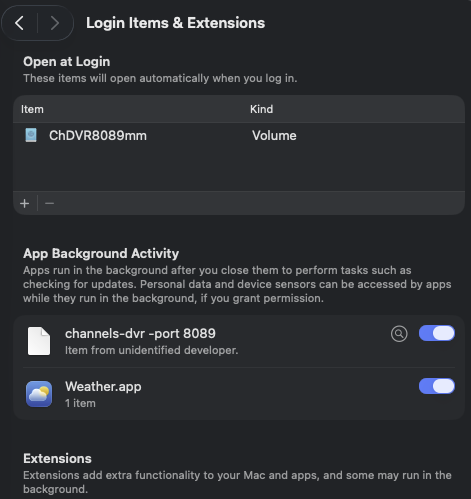
I can't connect to it in a web browser, don't see it in Activity Monitor and there's no log output.
Where did I go wrong?
EDIT: Figured it out.  The PLIST ProgramArguments array needed multiple strings
    <key>ProgramArguments</key>
    <array>
      <string>/Users/chDVRuser/Library/Application Support/ChannelsDVR8089/latest/channels-dvr</string>
      <string>-port</string>
      <string>8089</string>
    </array>
This topic was automatically closed 30 days after the last reply. New replies are no longer allowed.