TV Logo Manager

V1 and V2 use different upload methods. Do you have you Cloudinary account and credentials correct?

  1. Cloudinary Account: You will need a free Cloudinary account.
  • Sign up at cloudinary.com.
  • After signing up, navigate to your Dashboard. You will find your Cloud Name, API Key, and API Secret here. You will need these for the next step.

You can still use V1 from here GitHub - nuken/tv-logo-manager at original

My error. I was using my email address as my Cloud Name. Fixed that and now working. Thanks @Bobby_Vaughn for quick response. I have not done a lot with this yet but it may be something @bnhf would want to add to Olivetin.

In hindsight, I should have created a separate branch for the V2. I did not think about people using Watchtower and having the updated image not work for them. I am sorry for any issues with that. Sometimes I get a little ahead of myself. If anyone runs into an issue with V2 messing up their stored logos, you can add run this to restore the original image and have access to your stored Logos. You will not need to change the volume:

docker run -d --restart unless-stopped --name logo-manager -p 8084:8084 -v tv-logo-data:/app/data rcvaughn2/tv-logo-manager:original

. If you want to run both versions, change the port, name and volume name of one of them so they do not conflict with each other. Example

docker run -d \
 --restart unless-stopped \
 --name logo-manager-v2 \
 -p 8184:8084 \
 -v tv-logo-data-v2:/app/data \
 -e CLOUDINARY_CLOUD_NAME='YOUR_CLOUD_NAME' \
 -e CLOUDINARY_API_KEY='YOUR_API_KEY' \
 -e CLOUDINARY_API_SECRET='YOUR_API_SECRET' \
 rcvaughn2/tv-logo-manager 

Sorry for any issues that may arise.

I am so glad that was all it was. I hope it works well for you. Thanks.

It's working great @Bobby_Vaughn. I'm using V2 but haven't decided which I want to go with in the long run. I have 4 different homes but all of them are tied together with wireguard in a single DNS and IP routable space. Because of that I can do either V1 or V2 from 1 docker instance. What I'm not good at is art work so now I have to go scour the internet for suitable free clipart for my virtual channels.

What do you feel you want to do with the 2 versions going forward? Maybe that will make my choice easier. V2 is nice for being able to use 1 instance from anywhere but it does make you reliant on 1 more free service that you hope stays free. This is the 1st I have heard of Cloudinary so I really don't have any input on them.

@Rockies From everything I can gather on Cloudinary, it seems to be a well established and well funded company. That being said, they could remove or reduce their free tier at anytime. I think I will provide a local backup option to store images if there is a need to move to a different service. I do like the idea of having the images stored on the cloud and handled by CDN. It avoids logos not being available when not on the local network. If issues arise, I will switch to a new cloud provider. Cloudinary has an incredible API that makes this use case extremely easy to implement and maintain. Their free tier offers more storage and bandwidth than a normal user could use in a month, which was the main factor in choosing them over others that have a free tier.

I am working on an update that will make some changes to the docker run. Instead of using environment variables for the credentials from Cloudinary, I am going to use a config file that will allow you to add them after install from the web page. I will add a backup feature to store the images on the local docker install just in case you ever need to pull them from the cloud.

I actually prefer the environment variables. Works well with docker compose in portainer. @bnhf generally likes to set these up with variables in Olivetin. Maybe he will have some thoughts on this.

Any reason you couldn't support both? I.E., if someone specifies env vars you pick those up for your config file -- if not, they can enter them in the WebUI.

1 Like

This is my docker compose stack that I'm using in Portainer. Similar to how @bnhf has a lot of them setup. I'm on a Mac mini so I have 2 different /Volumes setup for either nvme or spinners then just choose which I want to use.

services:
  tv-logo-manager:
    image: rcvaughn2/${CNT_NAME}:${TAG} # generally set to latest unless you want a specific version
    container_name: ${CNT_NAME}
    ports:
      - ${HOST_PORT}:8084
    environment:
      - TZ=${TZ} # Add your local timezone in standard linux format. E.G. US/Eastern, US/Central, US/Mountain, US/Pacific, etc
      - CLOUDINARY_CLOUD_NAME=${CLOUDINARY_CLOUD_NAME}
      - CLOUDINARY_API_KEY=${CLOUDINARY_API_KEY}
      - CLOUDINARY_API_SECRET=${CLOUDINARY_API_SECRET}
    volumes:
      - ${DIR_FAST}/${CNT_NAME}/data:/app/data
    restart: unless-stopped

and for environment variables;

TAG=latest
TZ=US/Eastern
CNT_NAME=tv-logo-manager
DIR_FAST=/Volumes/DockerFast
DIR_TANK=/Volumes/DockerTank
HOST_PORT=8084
CLOUDINARY_CLOUD_NAME=<your cloud name>
CLOUDINARY_API_KEY=<your api key>
CLOUDINARY_API_SECRET=<your api secret>
1 Like

I like that. Best of both worlds.

1 Like

V2.1 has been pushed to GitHub. It includes the discussed changes as well as support for EV or config.

1 Like

@bnhf @Rockies Thanks for the feedback. Community input makes for a better end result. When I build things, I always do it to fit my needs. It's hard to see past that without great ideas from others.

1 Like

Thank you for the handy tool. This make it super simple to add logo's for virtual channels. I just tested V2.1 and upload, delete and the new backup all working.

As a suggestion @Bobby_Vaughn, it would be nice to have the startup log list the version that is loaded and also have the version printed as a header at top right or left of the web page. That would make it easier to know what you are running. Should be something easy to slip into a future update.

1 Like

I just added the version number to the footer. I will change that to the header in the next release. The footer is safe to do without having to test for other issues in formating. I'm tired and don't want to cause display problems tonight.

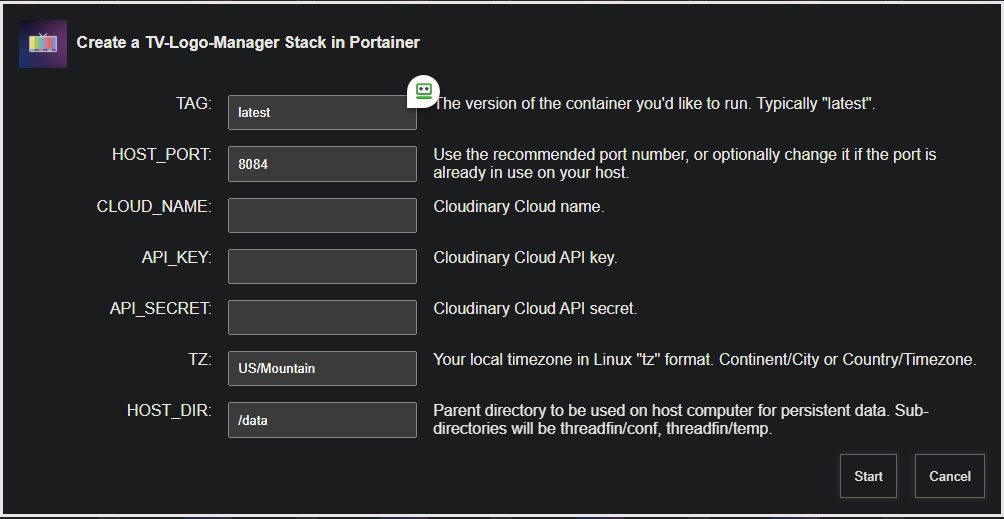
A new bnhf/olivetin:latest (aka bnhf/olivetin:2025.09.13) pushed today with Project One-Click support for this project:

screenshot-htpc6-2025-09-13-16-33-03

As always, projects can be both added and removed through Project One-Click!

There's also a new site map to everything to do with OliveTin-for-Channels, and the Project One-Click Dashboard included with it:

Update 2.1.1 Change Log

  • Version 2.1.1

  • UI Enhancements:

    • The version number was moved from the footer to the top-right of the header for better visibility.
    • A "Clear Image Cache" button was added to the header, allowing you to easily purge locally saved images and fetch fresh copies from Cloudinary.
  • Local Image Caching: To reduce Cloudinary bandwidth usage and speed up the gallery, I implemented a local caching system. Images are now served from a local cache after being downloaded once.

  • Directory Creation Fix: I made the application more robust by adding code to automatically create the necessary data/cache and data/images directories on startup.

  • Version 2.1

  • Version Number Display: I added a __version__ variable to the app.py script and displayed it on the main page for easy reference.

  • Local Backup Feature: I added a /backup route and a "Download Backup" button so you can download a zip file of all your processed logos directly from Cloudinary.

  • Favicon Support: To eliminate the "favicon.ico not found" warnings in the logs, I added a route to serve a favicon and updated the Dockerfile to include a static directory for it.

  • Hybrid Configuration: I created a flexible configuration system. The app now prioritizes Cloudinary credentials set via environment variables but will fall back to using the web-based setup form if they aren't provided.

  • Production WSGI Server: To remove the Flask development server warning and make the application more suitable for continuous use, I switched to the Gunicorn WSGI server.

Latest 2.1.1 is working good. This has been very handy for managing logo's for my virtual channels and movie collections. Thanks for all the work @Bobby_Vaughn

Thank you @Rockies.

Changelog

  • Version 2.1.2
  • Update Python From 3.9 to 3.13 to avoid upcoming deprecation of 3.9.
  • Asynchronous I/O Included gevent to avoid potential timeouts.