
I use lastpass password manager so it's just logging in under the password I created months ago. There's not an olvetin access token.
If it's a throwaway password (i.e. is a password you don't use elsewhere), would you mind sending it to me via PM? I'm virtually certain the password is at the root of this problem now, as it sounds like you've been consistently using it.
If you send it, I'll do an install here myself with your password, and figure out where things are going wrong...
PM sent. Thank you.
For anyone following along on this issue, the cause appears to have been related to password length. The Portainer default minimum password length is 12 characters, so you want to be sure to conform to that requirement when spinning-up Portainer using OliveTin EZ-Start:
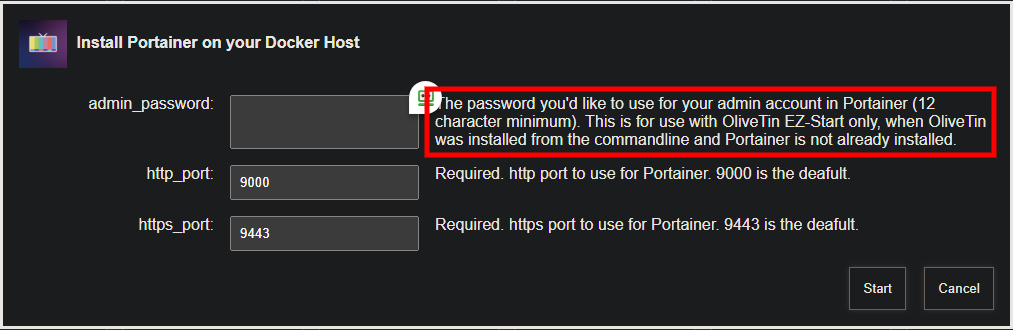
I'll add a check in future versions of OliveTin to confirm a minimum length password is being used.
1 Like
Added in bnhf/olivetin:latest (aka bnhf/olivetin:2025.07.09)
2 Likes
New bnhf/olivetin:latest (aka bnhf/olivetin:2025.09.13) pushed today with support for TV-Logo-Manager. More details here:
This update includes numerous enhancements to ah4c deployments through Project One-Click. Spinning-up an ah4c stack for DirecTV in particular, should be especially quick-and-easy for any of these devices using the STREAMER_APP and M3U_NAME values listed below:
FireTV, ONN or CCwGTV streaming sticks:
STREAMER_APP=scripts/firetv/dtvstreamdeeplinks
CDVR_M3U_NAME=dtvstreamdeeplinks.m3u
Osprey streaming boxes:
STREAMER_APP=scripts/osprey/dtvosprey
CDVR_M3U_NAME=dtvosprey.m3u
Here's what the Action looks like. Data required for each field is described, but in addition to the couple of values above, you'll need the details (IPs or hostnames and URLs) for your streaming devices and encoders:
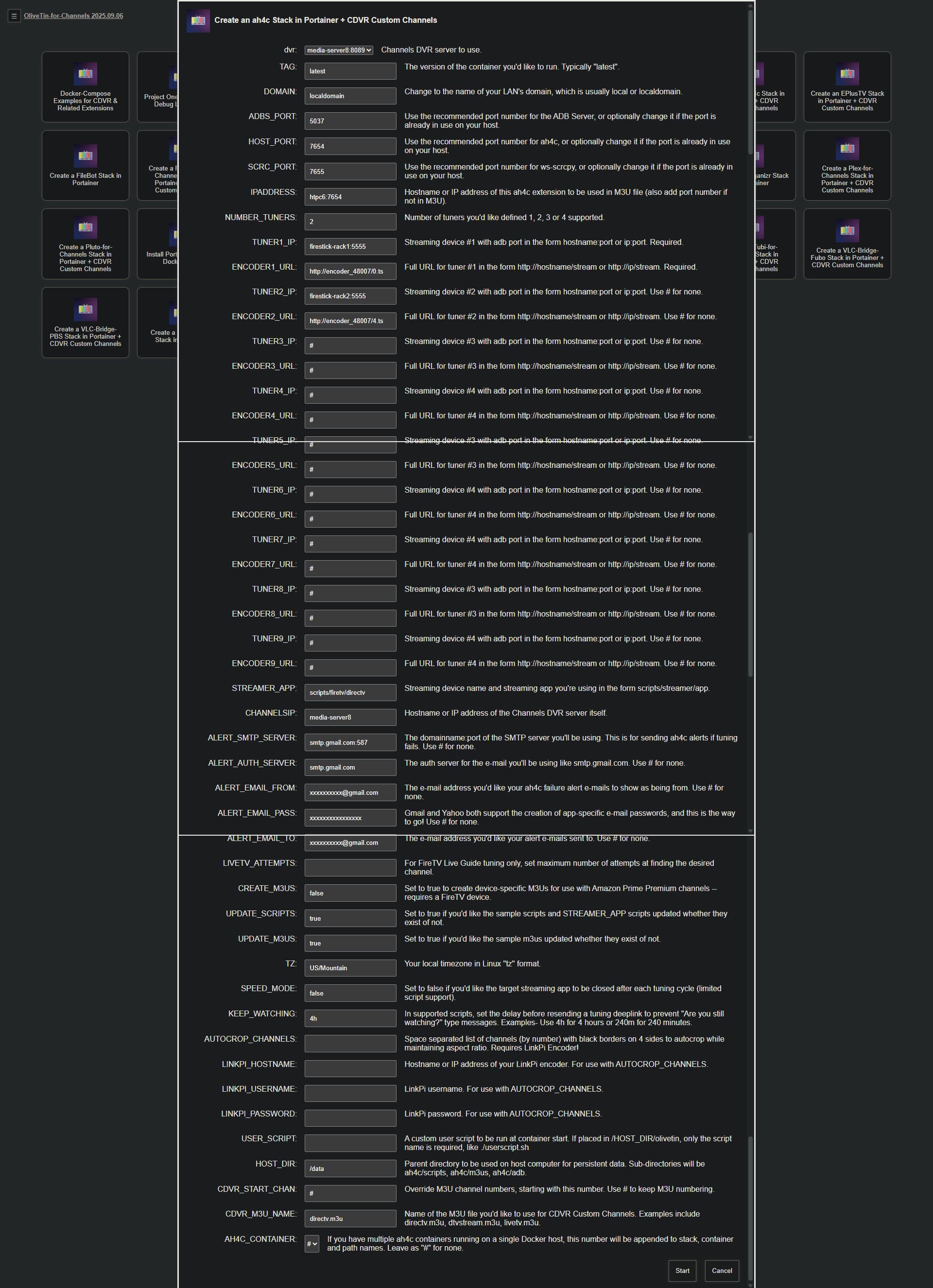
With the proper data entered, this Action will spin-up the stack, and add the Custom Channels Source to your CDVR Server. Assuming you've already activated developer options, and USB debugging on your device, installed the DTV app, and logged in -- approving the ADB connection on each device is about all you should need to do, before you can try to tune to one of the channels in your subscribed package!
19 posts were split to a new topic: Need Help Installing OliveTin on a QNAP NAS with CDVR Running on a Windows PC
failed to load m3u context deadline exceeded? I didn't do anything
I'm not following. What are we talking about here?
All of my custom m3u playlist say that now?
Maybe the LAN IP address of your Docker host has changed?
It hasn't?
Running portainer and everything was setup by your script?
@bnhf Any chance of making one change to your EZ-start?
I'd love to easily install everything BUT the channels DVR server on a PC in my house, to account for MacOS vs Windows + a GPU. I'm hoping this could be accomplished via a single parameter that would change whatever localhost item you use (assumed) to a parameter you could enter. Am I off base?
There are two versions of EZ-Start (3 for Windows). They all use a temporary installation of OliveTin to install everything else.
In each case though, you can choose what you want to install after you get the EZ-Start version of OliveTin running.
You can install Portainer, the full version of OliveTin, and anything supported by Project One-Click -- including CDVR Server. Your choice, once you have Portainer and the full version of OliveTin running.
Thanks! Understood. I guess I (badly) assumed that given the purpose, you would default to a localhost address for the DVR. If not, great!
I'm doing this strictly as a CC4C endpoint to test ESPN+
Big update to Project One-Click, via its parent project OliveTin-for-Channels:
@bnhf .
Here's the post install healthcheck you asked for from our discussion in the PrismCast thread. I'm running Channels in Windows with the server in my C drive and all other DVR folders in my E drive.
ls: cannot access '/mnt/192.168.88.240-8089': No such file or directory
ls: cannot access '/mnt/192.168.88.240-8089_logs': No such file or directory
jq: error (at <stdin>:0): Cannot index string with string "Name"
jq: error (at <stdin>:0): Cannot index string with string "Name"
Checking your OliveTin-for-Channels installation...
(extended_check=false)

OliveTin Container Version 2026.01.27
OliveTin Docker Compose Version 2025.08.25

----------------------------------------

Checking that your selected Channels DVR server (192.168.88.240:8089) is reachable by URL:
HTTP Status: 200 indicates success...

  % Total    % Received % Xferd  Average Speed   Time    Time     Time  Current
                                 Dload  Upload   Total   Spent    Left  Speed
100  1276  100  1276    0     0   416k      0 --:--:-- --:--:-- --:--:--  623k
HTTP Status: 200
Effective URL: http://192.168.88.240:8089/

----------------------------------------

Checking that your selected Channels DVR server's data files (/mnt/192.168.88.240-8089) are accessible:
Folders with the names Database, Images, Imports, Logs, Movies, Streaming and TV should be visible...


Docker reports your current DVR_SHARE setting as...


If the listed folders are NOT visible, AND you have your Channels DVR and Docker on the same system:

Channels reports this path as...
E:\DVR

When using WSL with a Linux distro and Docker Desktop, it's recommended to use...
/mnt/e/DVR

----------------------------------------

Checking that your selected Channels DVR server's log files (/mnt/192.168.88.240-8089_logs) are accessible:
Folders with the names data and latest should be visible...


Docker reports your current LOGS_SHARE setting as...


If the listed folders are NOT visible, AND you have your Channels DVR and Docker on the same system:

Channels reports this path as...
C:\ProgramData\ChannelsDVR

When using WSL with a Linux distro and Docker Desktop, it's recommended to use...
/mnt/c/ProgramData/ChannelsDVR

----------------------------------------

Checking if your Portainer token is working on ports 9000 and/or 9443:

Portainer http response on port 9000 reports version 2.33.6
Portainer Environment ID for local is
Portainer https response on port 9443 reports version 2.33.6
Portainer Environment ID for local is

----------------------------------------

Here's a list of your current OliveTin-related settings:

HOSTNAME=olivetin
CHANNELS_DVR=192.168.88.240:8089
CHANNELS_DVR_ALTERNATES=
CHANNELS_CLIENTS=
ALERT_SMTP_SERVER=
ALERT_EMAIL_FROM=[Redacted]@
ALERT_EMAIL_PASS=[Redacted]
ALERT_EMAIL_TO=[Redacted]@
UPDATE_YAMLS=true
UPDATE_SCRIPTS=true
PORTAINER_TOKEN=[Redacted]
PORTAINER_HOST=192.168.88.240
PORTAINER_PORT=9443
PORTAINER_ENV=2

----------------------------------------

Here's the contents of /etc/resolv.conf from inside the container:

# Generated by Docker Engine.
# This file can be edited; Docker Engine will not make further changes once it
# has been modified.

nameserver 127.0.0.11
options ndots:0

# Based on host file: '/etc/resolv.conf' (internal resolver)
# ExtServers: [host(192.168.65.7)]
# Overrides: []
# Option ndots from: internal

----------------------------------------

Here's the contents of /etc/hosts from inside the container:

127.0.0.1       localhost
::1     localhost ip6-localhost ip6-loopback
fe00::  ip6-localnet
ff00::  ip6-mcastprefix
ff02::1 ip6-allnodes
ff02::2 ip6-allrouters
172.21.0.2      olivetin
This is the part we want to get working first, though there's also a problem with the paths you're using.
Typically, when Portainer versions are reported, but not Environment ID numbers, that means there's a problem with your Portainer Token. I'd suggest going into Portainer, and under the dropdown in the upper-right corner for your Username, go into My Account and delete the existing olivetin token and create a new one. Store it in a safe place.
Stop your olivetin stack, and replace the old token with the new and click Update the stack. Rerun the healthcheck and hopefully you'll see ID #'s where there are none now.
Also, while you're at it, you might try replacing your current values for DVR_SHARE and LOGS_SHARE with the values suggested in the healthcheck. So, it'd be:
DVR_SHARE=/mnt/e/DVR
LOGS_SHARE=/mnt/c/ProgramData/ChannelsDVR
and let's see if that fixes the lack of access to those two directories. Windows can be a bit of a pain when it comes to this whole area of Linux vs Windows paths. But those paths should work on recent versions of Windows 11.
EDIT: Also, please confirm your Portainer environment is named local. People have, on rare occasions, changed that default name -- which is another reason this could be failing.
Well, I'm part way there. PrismCast installed and is working, but access to those folders is still not available. I've tried multiple methods to input those values, but the healthcheck still doesn't show them. The container shows the volumes as /mnt/e/DVR/mnt/- for the DVR Share and /mnt/c/ProgramData/ChannelsDVR/mnt/-_logs for the Logs Share.