How about this older one?
docker pull ghcr.io/rice9797/ws4channels@sha256:0cb8cb9b8fb7917714e13509119ad9ce4023b65e14145c306c19df78b610ab1a

How about this older one?
docker pull ghcr.io/rice9797/ws4channels@sha256:0cb8cb9b8fb7917714e13509119ad9ce4023b65e14145c306c19df78b610ab1a
same lines... i also tried some older versions of WS4KP too.
curious- how does your cropping logic work? wonder if something i updated today changed how your software crops?
I spent about 95 percent of the time it took to build the app on dialing in the cropping. It basically uses x y coordinates. There isn’t anything you can do with the cropping as it’s baked in. @Accustiver was able to roll back after seeing the lines. Mabey he has some tips, if you use portainer you can select the images tab and delete or roll back to an old image. The SHA numbers will be different then the GitHub sha though inside portainer. Portainer shows the local image id.
tnx...
AND -> go figure - i went through a ton of troubleshooting with ChatGPT and didnt get anywhere except after a fresh reset/refresh of the container for the 50th time, it magically worked..
from the robot machine:
So the white sliver was almost certainly a transient viewport/layout artifact (headless Chrome sub-pixel rounding, a scrollbar/margin, or a page state) that disappeared when the browser session was reset by the container recreate.
My apologies...I actually am still getting those white lines even with an older image too. Not sure what else to try other than what @KineticMan suggested from ChatGPT
For anyone who's not aware, ghcr.io/netbymatt/ws4kp works fine with cc4c as well. I tested it today with both the 2.01 version running in a Proxmox LXC, and the previous version using the bnhf/cc4c:latest Docker container.
Here's the ws4kp Docker Compose I'm using in Portainer:
services:
  weatherstar4k:
    # 2025.09.06
    # GitHub home for this project with setup instructions: https://github.com/netbymatt/ws4kp
    # Docker container home for this project: https://ghcr.io/netbymatt/ws4kp
    image: ghcr.io/netbymatt/ws4kp:${TAG}
    container_name: weatherstar4k
    hostname: weatherstar4k
    ports:
      - ${HOST_PORT}:8080
    environment:
      - WSQS_settings-wide-checkbox=${WIDE:-true}
      - WSQS_settings-kiosk-checkbox=${KIOSK:-true}
      - TZ=${TZ}
    restart: unless-stopped
With these env vars in the Environment variables section of the Portainer-Stacks Editor:
TAG=latest
HOST_PORT=8090
TZ=US/Mountain
Setup your Custom Channels Source in CDVR, with a text based M3U along these lines:
#EXTM3U

#EXTINF:-1 channel-id="WS4KP" tvg-logo="https://raw.githubusercontent.com/netbymatt/ws4kp/main/server/images/logos/logo192.png",WeatherStar 4000+
chrome://cc4c2:5589/stream?url=http://htpc6:8090
For the initial tune only, with the container versions, you need to connect up with a VNC client (the same as you'd do to enter credentials for streaming). In the Chrome running in the container, get out of kiosk mode by temporarily removing this part of the URL: &settings-kiosk-checkbox=true and then hit enter.
Now you can specify your City, State, Country, and unmute the speaker icon if you want music. Add the &settings-kiosk-checkbox=true back and then hit enter. You can now close your VNC client.
That's about it!
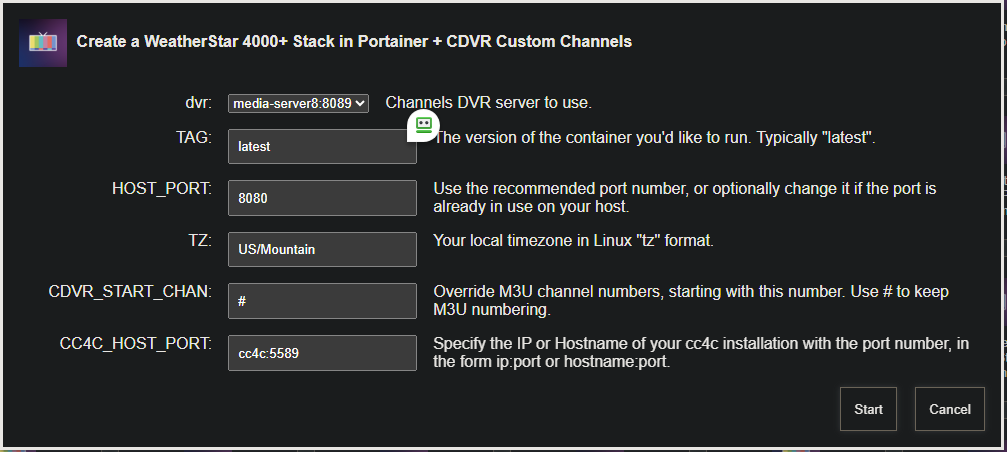
I've added the above to OliveTin-for-Channels' Project One-Click. Fill-in a few fields and click -- the container is downloaded, the Portainer Stack configured and the CDVR Custom Channels Source created!
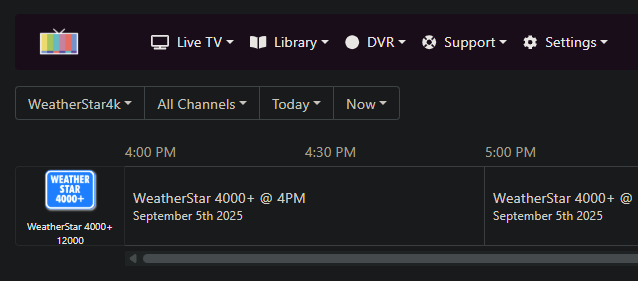
There has been an attempt to correct the white lines by another user. I haven’t tested it yet so If you try it out let me know how it goes. Use the latest tag to get the updated version.
From the PR:
He seems to think it is an issue with the newer versions of ws4kp which explains why I never saw the white boarders. I never updated my ws4kp container.
This fixed it! Finally! Thank you!
worked on first try!
So every now and then my ws4channels container will get hung up and will display the following error messages in the log:
(node:1) MaxListenersExceededWarning: Possible EventEmitter memory leak detected. 11 SIGINT listeners added to [process]. Use emitter.setMaxListeners() to increase limit
(Use node --trace-warnings ... to show where the warning was created)
(node:1) MaxListenersExceededWarning: Possible EventEmitter memory leak detected. 11 SIGTERM listeners added to [process]. Use emitter.setMaxListeners() to increase limit
(node:1) MaxListenersExceededWarning: Possible EventEmitter memory leak detected. 11 exit listeners added to [process]. Use emitter.setMaxListeners() to increase limit
(node:1) MaxListenersExceededWarning: Possible EventEmitter memory leak detected. 11 SIGHUP listeners added to [process]. Use emitter.setMaxListeners() to increase limit
A simple restart of the container fixes this and everything is back to normal. I have my ubuntu server set to automatically reboot at 2am every night, so sometimes when everything boots back up, the ws4channels container will start with the above errors. I have another container that automatically restarts ws4channels at a certain time, but I've since come to notice that even after a restart from that sometimes, these errors still occur. Any idea what might be causing this and what to do to fix it?
Since I know you're already running the docker version of cc4c, I'm curious why you're running this project as well? Given you can setup ws4kp as a virtual channel using cc4c (which only runs when tuned to), it seems like a waste of system resources to run both (I believe @rice would agree with this).
Good point…didn’t even think I could just use cc4c with ws4kp. Although, won’t the dimensions of the display that loads be way off then? I thought that was the purpose of ws4channels to properly create a window that will load with a good look in channels?
More details a few posts up:
Ok…I’ll have to give these instructions a try then. Thanks!
Since I’m running Ubuntu Server, everything is headless for me. I will never see an actual chrome window open on a desktop GUI. Am I still able to do this through CC4C then because you mention removing those kiosk parts and hitting enter and then putting them back in and hitting enter…but of course I’m never seeing an actual chrome window open. I do have a ton of environment variables already specified in the stack compose so maybe that bypasses the whole need to remove part of the link and hit enter? But then is there an env variable you can put in to have it always start with the music playing?
As described in the linked post, you need to temporarily connect to the container using a VNC client to allow you to interact with Chrome running in the container.
This is true for any needed interaction with the container's Chrome instance. For example, if you need to enter credentials to login to a streaming website. This is an important concept to have a grasp on when you're using the Docker version of cc4c.
I do agree, the only reason to run ws4channels is if you desire to have an instantly loading channel and are willing to take the small resource hit since it runs all the time.
@Accustiver I pushed a new latest to try a fix for the issue you’re having. Give it a try if you like. I haven’t tested it as I don’t run the latest ws4kp 6.0+ that uses the different crop.
Pulled your latest version of ws4channels and it seems to be doing fine even after a few restarts of the Ubuntu Server. And looking at stats of my system, this certainly doesn't seem to be taxing things too much. So for now I think I'll continue to use the ws4channels container over the cc4c method as that option seems to be a little more involved with my particular setup. Thanks again!
I’m sure it is user error, but I’m getting a “192.168.7.180:8080 already in use” error, with 192.168.7.180:8080 being what I input for my Channels DVR. If it matters, I did try installing this once previously, and got the package not found error that another user reported, so maybe some remnants are around on my server? But nothing shows up in Portainer.
Standard output:
192.168.7.180:8080 already in use
Standard error:
+ dvr=192.168.7.180:8089
    ++ basename /config/weatherstar4k.sh
    + extension=weatherstar4k.sh
    + extension=weatherstar4k
    + cp /config/weatherstar4k.env /tmp
    + envFile=/tmp/weatherstar4k.env
    + [[ -n 192.168.7.180 ]]
    + extensionURL=192.168.7.180:8080
    + [[ # == \# ]]
    + cdvrStartingChannel=
    + [[ -n '' ]]
    + cdvrIgnoreM3UNumbers=
    + curl -s -o /dev/null http://192.168.7.180:8080
    + echo '192.168.7.180:8080 already in use'
    + exit 0