
Running the latest 20260228-1 from today, ADB defaults are working better with Hulu. Thanks @turtletank @Stuartm @nateg for the info/feedback this morning, I switched from Sling TV so was working the bugs out. Updated my previous comment with updated setup/screenshots from today. 
Hi @turtletank, had another quick question:
I was doing some more testing with Fox One App and wanted to run those channels on a separate ADB tuner, so that the app stays active with another separate tuner.
Was running into some little issues going back and forth between the Hulu App and Fox One App across multiple tuners/fire tv sticks.
Is there a way to run multiple instances of ADB Tuner?
I tried this command:
Update: -p 5593:5592 Fixed the Issue:
"docker run -d --init -p 5593:5592 --name adbtuner2 -v adbtuner2_config:/app/.config turtletank99/adbtuner:development"
So that I created a new "adbtuner2" container and "adbtuner2_config" volume.
It ran without issues on a "adbtuner2_config" volume.
But when I go to start pulling the M3U channels with this new 5593 ADB instance with Channels DVR, I keep getting:
"Steaming to the tuner failed. Press play to try again.
M3U: GET: htttp://192.168.8.167:5593/stream/1:404 Not Found
My HDMI Tuner starts the Fox One channel without issues.
I tried rebuilding the database, restarting my Docker on my Mac mini and rebooting the fire tv sticks.
Trying to figure out whats causing the issue for Channels not to be able to pull in the Fox One channel on the 2nd ADB instance on port 5593?
Any suggestions would be appreciated, thank you
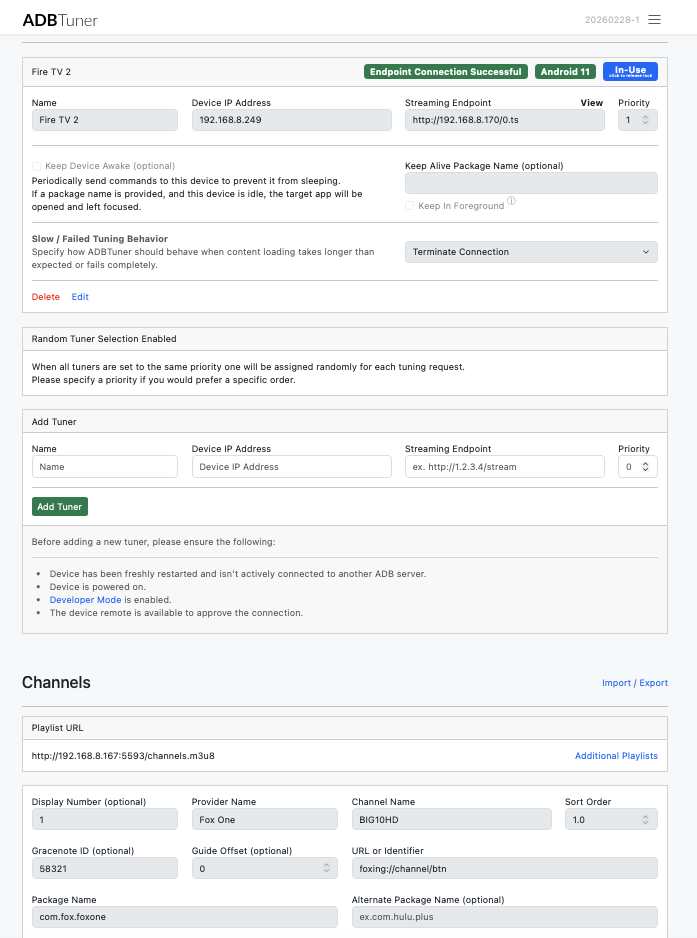

You don't change the port on the container-side, only on the host-side, so it'd be -p 5593:5592.
1 Like
I'm setting up my Osprey stack tomorrow and would love to take a look at any configs or any advice you might have for the Ospreys specifically. I got the newer one with the SKU 60233 if that makes a difference.
In fact I do. Here is my running FAQ/WIKi over in the new Osprey Thread. Feel free to post questions there. Welcome to Team Osprey!
2 Likes
Anyone have or know where to get a json for YTTV Central time? Edit: nevermind, just did it quick with OliveTin.
FWIW, I just installed this myself. After kind of lurking on this thread for several months, what it does and how it works finally clicked and I ordered an encoder and unboxed a gift Chromecast I had lying around. Two things have tripped me up so far:
-
I tried to create a mapped volume, but didn't know how to get the stuff to put it in, and the container startup failed with a bunch of errors. So, I dropped that container and reverted to the command line as written in the instructions and the container started and the UI came up on the port.
-
I didn't see that I needed to enable USB debugging in the documentation, just developer mode. I found a post in this thread from someone who had run into that problem and thankfully posted that solution. Once I did that, I got a tuner up. Perhaps a more prominent mention in the docs is in order?
Now I just need to add channels, and I'm trying to find a list so I don't have to put them all together manually and hand type them in. I think I've seen such, I just have to dig through this thread until I find it again.
What apps do you think you'll be using on your encoder-connected streaming stick(s)?
My main use for this (so far) will be the ESPN channel complex, so I'm thinking either the ESPN app, Disney+ app, or Hulu App or app will work. I saw a post (ADBTuner: A "channel tuning" application for networked Google TV / Android TV devices - #3203 by Brando85) that has the deeplink URLs for Hulu so I was leaning that direction, but not sure if that's the right way to go.
1 Like
Just the ESPN linear channels, or are you after ESPN+ events as well? I promise I'm going somewhere with this. 
I would dearly love to get the ESPN+ events too. I was tres disapointed when Disney shut off the TVE feeds a mere handful of weeks after I got EPLUSTV setup and working. I eventually dropped that container with great sadness.
UPDATE: I see the thread "ESPN+ with Custom Channels via ADBTuner" and I seem to have overlooked this option earlier. Hm... Wondering if I should start smaller, though.
OK, so a couple of choices. You can use the ESPN4cc4c project by @KineticMan, and some Project One-Click Actions I created, to give you a very complete ESPN and ESPN+ solution (including talk shows):
Although, the above project isn't that old, most of us have moved on to his newer project called FruitDeepLinks. This one has ESPN, ESPN+ and loads of other sports events across half-a-dozen apps with live sports. I'd suggest you go with this one, as it's more active than ESPN4cc4c.
Again, Project One-Click is your friend here, as it creates all of the ADBTuner channels you'll need, for whatever apps you choose to use, and will create the CDVR Custom Sources as well. It'll install FruitDeepLinks for you as well.
1 Like
I've seen the mention of Project One-Click, and while it seems convenient, my inclination for avoiding it so far is that it that there's a lot going on under the covers and I think I'd like to understand how the sausage is made. Believe it or not, I'm reasonably technical (though perhaps not as quick as I once was).
I did see ESPN4cc4C, but don't have the hardware to employ CC effectively at the moment, so I thought I'd try the ADBtuner tack instead. FruitDeepLinks does seem the right direction. I'll chase down that rabbit hole for a bit. 
1 Like
@JefferMC @bnhf When the ESPN TVE channels went away with DRM last month, I went back to AH4C then landed with the ADB tuner to get the same experience using SlingTV, then switched to Hulu ESPN Bundle using Hulu Deep Links since ESPN is all I really need, plus the OTA networks with my HD Homerun.
I have (3) HDMI Encoders and (3) FireTv sticks and the multiview with channels works great!
The new feature that lets us keep the app active in the foreground is really great too!
When I tested FruitDeepLinks a few weeks ago I wasn’t able to pull in SportsCenter or PTI, if that’s changed I’ll do some more testing.
What Project One-Click does for you in this situation is handle the drudgery of creating many, many channels in a reliable fashion -- eliminating the inevitable human error.
It'll add channels for app X, delete channels for app Y, update the custom config you're using for 50 or 100 channels -- all without having to slog through it line-by-line. You'll be doing this a fair amount as you dial-in your setup.
Yes you can build a house with a hammer and nails, but a compressor and a selection of air nailers will give you a better, faster, more consistent result. And yes, OliveTin and Project One-Click represent the latter approach. Using the best tool for the job from the start is all I'm trying to point you towards.
I would definitely use Project One-Click. I just spun up Fruit Deep Links & ADBTuner the other night using One-Click.
But you’re gonna need Portainer & Olive Tin installed first. There's plenty of community support to get you up and running.
What system are you putting your container;, I.e., win, Mac, etc."?
2 Likes
@bnhf Project One-Click is amazing! So much great work on that app! I use that now for a lot of testing. 
1 Like
Absolutely, for anyone wanting just the ESPN linear channels, any of streaming services with ADBTuner will work. YouTubeTV, DirecTV, Hulu, Sling, etc... ESPN+ and other event-based sports events are a different matter.
1 Like
I'm running Docker on Debian Linux. I have Docker running, and Portainer is one of the containers running on it, as is Channels, CC4C (not that it can do much on this current hardware) and (as of an hour or so ago) ADBTuner (plus some other stuff, including Stream Link Manager which I have struggled with making useful).
I glanced at the Olive Tin overview, but haven't gone any further than that.
Does Project One Click have readily available "undo buttons"?