@jagrim Did you happen to capture any of the output from the Project One-Click Action?
Decided to go the PrismCast route first. Link Pi will take 6 weeks to get here. I have been wanting to upgrade my media server for a while and get off the DS224+, so this seems like the appropriate time. A new Intel Core i7 Ubuntu computer should be here in a few days to run all my dockers and media content.
So I've tried that on a Fire Stick 4k Max and it will launch the app but won't play the channel, just goes to home screen. Here's the command I'm using:
am start -S -a android.intent.action.VIEW -d sportscenter://x-callback-url/showWatchStream?playChannel=espn com.espn.gtv/com.espn.startup.presentation.StartupActivity
Did anyone get ESPN working with linear channels in ADBTuner?
EDIT: Also tried it on my onn 4k Android TV box, same behavior. Package name is com.espn.score_center there.
Tried multiple channel Ids for playChannel like espn1, espn2, espnu etc. None work, the syntax seems to be wrong in the URL.
I think a bunch of guys in the ESPN4CC4C thread has and probably FruitDeepLinks thread have
Thanks, but I haven't seen anyone that says it's working. And if they do I'd like to see what the actual URL is.
You’re right… we got it work with events, but not the linear channels if i recall.
That is correct and if interested, studio shows marked ‘Live’ (not re-airs) do show up in the adbt guide and tune correctly. Includes Sports Center and NFL Live, for example.
Yeah...the only way linear channels will work is by using @babsonnexus method
https://community.getchannels.com/t/beta-hdmi-encoder-native-apps-say-goodbye-to-drm-restrictions/46526/42
Its possible to use his method with ah4c due to the flexibility of that tool btw
Sorry I'm kind of lost is espn4cc4c the best way to get espn3 and ESPN+ working?
Trying to get up and running. I have both ESPN4CC4C installed and confirmed via inspection of the XML it's pulling info. Also have the ESPN channels added into ADBTuner and the custom configuration setup but not getting the channel to play live, just the episode splash screen:
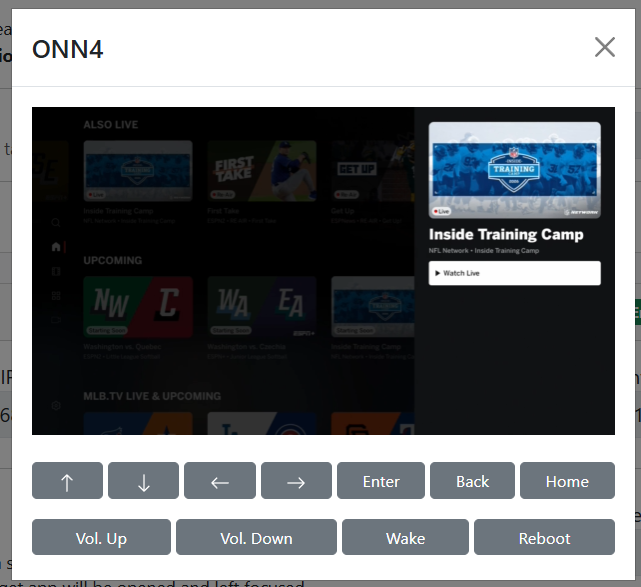
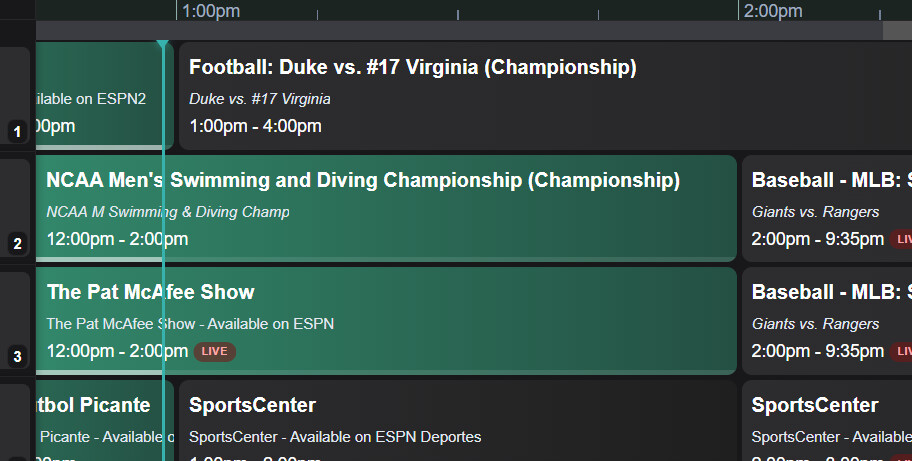
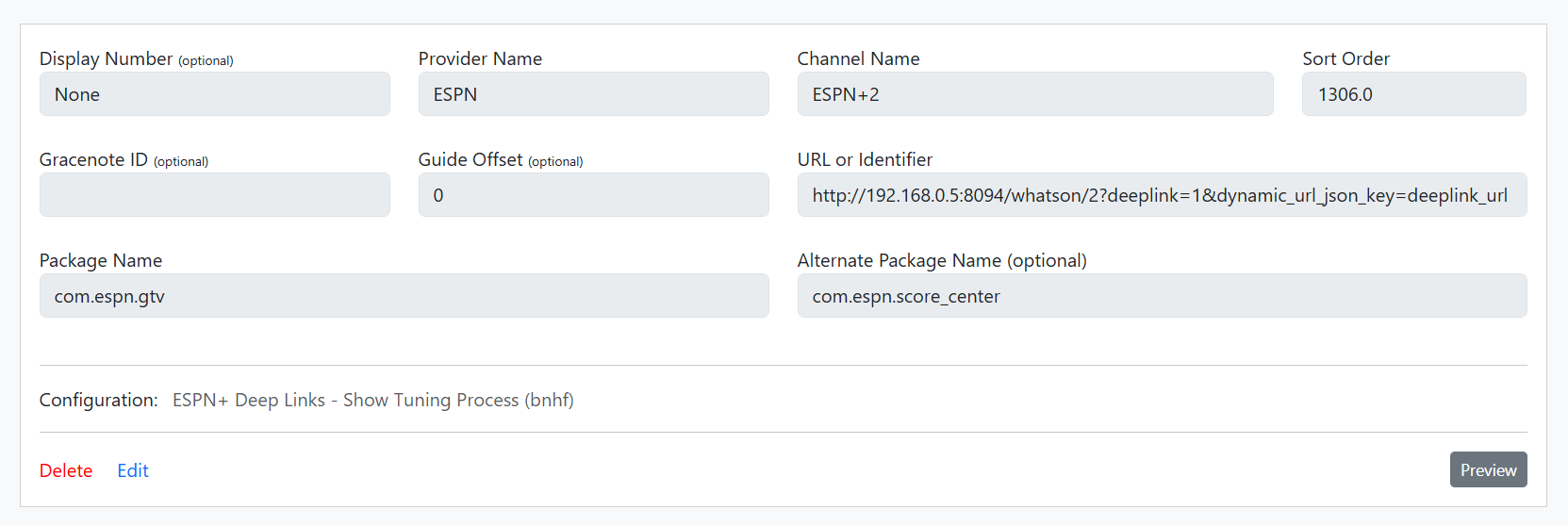
And here's the Portainer Stacks:
ADBTuner:
version: "3.8"

services:
  adbtuner:
    image: turtletank99/adbtuner:stable
    container_name: adbtuner
    init: true
    restart: unless-stopped
    ports:
      - "5592:5592"
    environment:
      # Optional: set container timezone (example shown in project discussion)
      - TZ=America/New_York
    volumes:
      # Persistent config + database + adb keys live here
      - /opt/adbtuner:/app/.config
ESPN4CC4C:
services:
  espn4cc4c:
    image: ghcr.io/kineticman/espn4cc4c:latest
    container_name: espn4cc4c

    ports:
      - "8094:8094"

    extra_hosts:
      - "host.docker.internal:host-gateway"

    dns_search:
      - localdomain
      # Uncomment and replace with your Tailnet if needed
      # - tailxxxxx.ts.net

    environment:
      TZ: America/New_York
      VC_RESOLVER_BASE_URL: http://192.168.0.5:8094
      CC_HOST: 192.168.0.5
      CC_PORT: 5589
      PORT: 8094
      APP_MODULE: bin.vc_resolver:app
      VALID_HOURS: 72
      LANES: 40
      ALIGN: 30
      MIN_GAP_MINS: 30
      M3U_GROUP_TITLE: ESPN+ VC
      VC_M3U_PATH: /app/out/playlist.m3u
      WATCH_API_KEY: [hidden]
    volumes:
      - /opt/espn4cc4c/data:/app/data
      - /opt/espn4cc4c/out:/app/out
      - /opt/espn4cc4c/logs:/app/logs

    healthcheck:
      test: ["CMD", "curl", "-f", "http://localhost:8094/health"]
      interval: 30s
      timeout: 10s
      retries: 3
      start_period: 60s

    restart: unless-stopped
It appears we just need to send a KEYCODE_DPAD_CENTER to get to live.
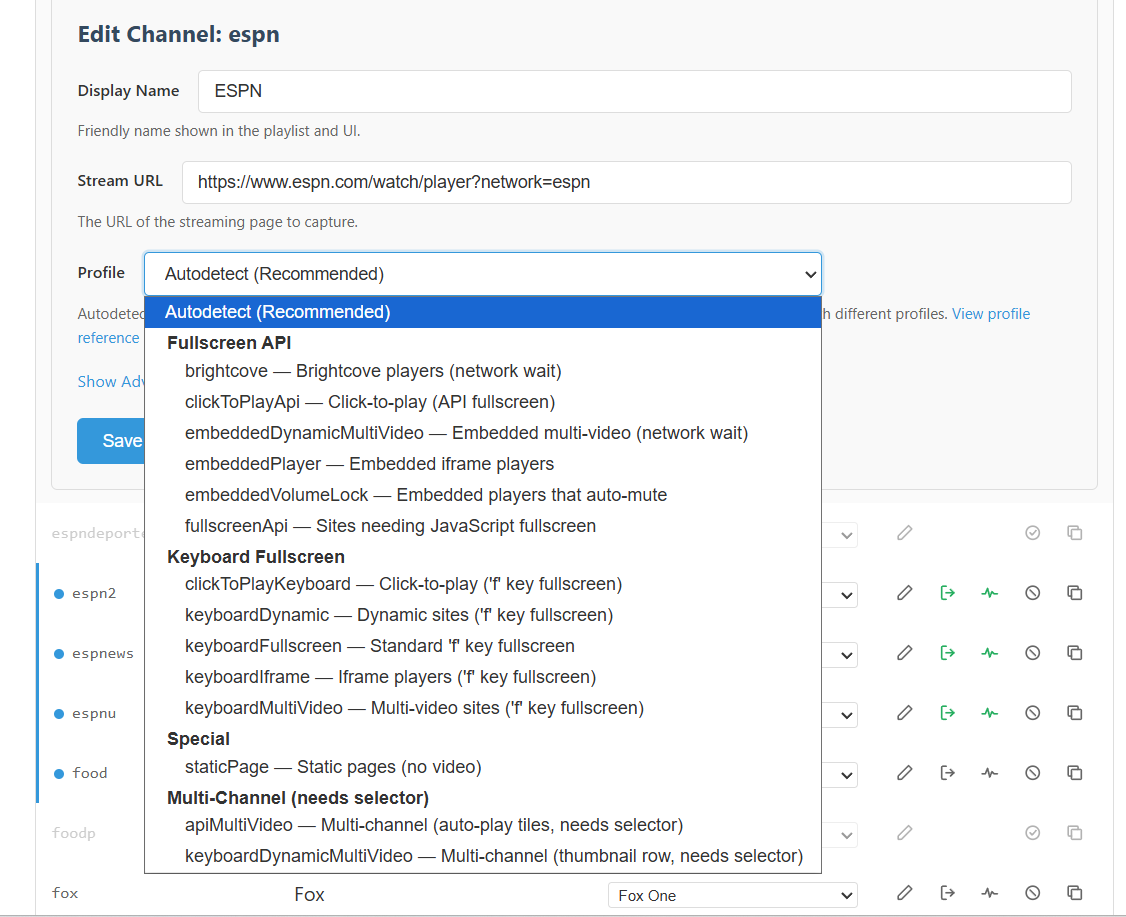
Can you post what the current ADBTuner Custom Configuration you're using looks like (ESPN+ Deep Links - Show Tuning Process (bnhf) specifically)?
Assuming this is what you mean?
{
    "name": "ESPN+ Deep Links - Show Tuning Process",
    "author": "bnhf",
    "version": "1.0",
    "description": "Load content via ESPN+ deep link URLs (where supported). Show tuning process.",
    "uuid": "51af5028-092f-4ddc-b4ea-d5e5fca58cac",
    "global_options": {
        "wait_for_video_playback_detection": false,
        "use_fixed_delay": true,
        "fixed_delay_seconds": 1,
        "check_for_and_clear_whos_watching_prompts": false,
        "wait_after_post_playback_start_commands_seconds": 0
    },
    "pre_tune_commands": [
        "input keyevent KEYCODE_MEDIA_STOP"
    ],
    "tune_commands": [
        "am start -n ||TARGET_PACKAGE_NAME||/com.espn.startup.presentation.StartupActivity -d ||TARGET_URL_OR_IDENTIFIER||"
    ],
    "post_playback_start_commands": [
        "sleep 20",
        "input keyevent KEYCODE_DPAD_DOWN",
        "input keyevent KEYCODE_DPAD_DOWN",
        "input keyevent KEYCODE_DPAD_RIGHT",
        "input keyevent KEYCODE_DPAD_CENTER"
    ],
    "post_tune_commands": [
        "input keyevent KEYCODE_MEDIA_STOP",
        "input keyevent KEYCODE_MEDIA_PAUSE",
        "input keyevent KEYCODE_HOME"
    ]
}
A couple of things that you might try (they work for me currently).
The development version of ADBTuner with the following tuning configuration for these channels:
{
    "name": "ESPN+ Deep Links - Show Tuning Process",
    "author": "bnhf/hancox",
    "version": "1.0",
    "description": "Load content via ESPN+ deep link URLs (where supported). Show tuning process. Modified from original for ONN",
    "uuid": "51af5028-092f-4ddc-b4ea-d5e5fca58cac",
    "global_options": {
        "wait_for_video_playback_detection": false,
        "use_fixed_delay": true,
        "fixed_delay_seconds": 1,
        "check_for_and_clear_whos_watching_prompts": false,
        "wait_after_post_playback_start_commands_seconds": 0
    },
    "pre_tune_commands": [
        "input keyevent KEYCODE_MEDIA_STOP"
    ],
    "tune_commands": [
        "am start -n ||TARGET_PACKAGE_NAME||/com.espn.startup.presentation.StartupActivity -d ||TARGET_URL_OR_IDENTIFIER||"
    ],
    "post_playback_start_commands": [
        "sleep 20",
        "input keyevent KEYCODE_DPAD_DOWN",
        "sleep 1",
        "input keyevent KEYCODE_DPAD_DOWN",
        "sleep 1",
        "input keyevent KEYCODE_DPAD_RIGHT",
        "sleep 1",
        "input keyevent KEYCODE_DPAD_CENTER"
    ],
    "post_tune_commands": [
        "input keyevent KEYCODE_MEDIA_STOP",
        "input keyevent KEYCODE_MEDIA_PAUSE",
        "input keyevent KEYCODE_HOME"
    ]
}
On occasion I have to try the channel a second time to get it to go live but it usually works on the first try. Showing the tuning process is helpful for me to see where it might be misbehaving.
1 Like
@jator I agree with @TJN here, use the developement tagged version of ADBTuner. Try adding those sleep commands too as shown. I believe those are often required for streaming sticks that are slower than the FireStick 4K Max Gen2 I use.
1 Like
Thanks, I'll play with tonight. And some items are tuning to live, while others are tuning to the episode splash screen.
Oh so many questions on this.........
I'm hitting numerous issues when trying to get this stood up. I'll try and give a concise summary of issues. First, posting my Stacks to verify things are setup correctly:
ESPN4cc4c Stack:
services:
  espn4cc4c:
    image: ghcr.io/kineticman/espn4cc4c:latest
    container_name: espn4cc4c

    ports:
      - "8094:8094"

    extra_hosts:
      - "host.docker.internal:host-gateway"

    environment:
      TZ: America/New_York
      VC_RESOLVER_BASE_URL: "http://192.168.0.5:8094"
      CC_HOST: "192.168.0.5"
      CC_PORT: "5589"
      PCAST_SERVER: "192.168.0.5"
      PCAST_PORT: "5589"
      PORT: "8094"
      APP_MODULE: "bin.vc_resolver:app"
      VALID_HOURS: "72"
      LANES: "40"
      ALIGN: "30"
      MIN_GAP_MINS: "30"
      M3U_GROUP_TITLE: "ESPN+ VC"
      VC_M3U_PATH: "/app/out/playlist.m3u"
      WATCH_API_KEY: "[hidden]"

    volumes:
      - /opt/espn4cc4c/data:/app/data
      - /opt/espn4cc4c/out:/app/out
      - /opt/espn4cc4c/logs:/app/logs

    healthcheck:
      test: ["CMD", "curl", "-f", "http://localhost:8094/health"]
      interval: 30s
      timeout: 10s
      retries: 3
      start_period: 60s

    restart: unless-stopped
ESPN4cc4c Environmental Variables:
FILTER_EXCLUDE_NETWORKS=ESPNews,MLB.TV,ESPN2,ESPN Deportes,SEC Network,MLB Network,ESPN,ACCN,ESPNU,NFL Network,ESPN on ABC
FILTER_EXCLUDE_LEAGUES=
FILTER_EXCLUDE_SPORTS=Fishing,Cornhole,Bull Riding,Jai Alai,Dance,Fencing,Bowling
FILTER_EXCLUDE_EVENT_TYPES=
FILTER_EXCLUDE_LANGUAGES=es
FILTER_EXCLUDE_REAIR=true
FILTER_CASE_INSENSITIVE=true
FILTER_PARTIAL_LEAGUE_MATCH=true
FILTER_REQUIRE_ESPN_PLUS=false
ADBTuner Stack:
version: "3.8"

services:
  adbtuner:
    image: turtletank99/adbtuner:development
    container_name: adbtuner
    init: true
    restart: unless-stopped
    ports:
      - "5592:5592"
    environment:
      # Optional: set container timezone (example shown in project discussion)
      - TZ=America/New_York
    volumes:
      # Persistent config + database + adb keys live here
      - /opt/adbtuner:/app/.config
And PrismCast Stack:
version: "3.8"

services:
  prismcast:
    image: ghcr.io/hjdhjd/prismcast:latest
    container_name: prismcast
    hostname: prismcast
    network_mode: host

    dns_search: ${DOMAIN:-localdomain}
    shm_size: ${SHM_SIZE:-2gb}

    devices:
      - /dev/dri:/dev/dri

    environment:
      - PORT=${PORT:-5589}
      - VNC_PORT=${VNC_PORT:-5900}
      - NOVNC_PORT=${NOVNC_PORT:-6080}
      - HDHR_PORT=${HDHR_PORT:-5004}
      - DISPLAY_NUM=${DISPLAY_NUM:-99}
      - SCREEN_WIDTH=${SCREEN_WIDTH:-1920}
      - SCREEN_HEIGHT=${SCREEN_HEIGHT:-1080}
      - SCREEN_DEPTH=${SCREEN_DEPTH:-24}
      - LIBVA_DRIVER_NAME=${LIBVA_DRIVER_NAME:-iHD}

    healthcheck:
      test: ["CMD", "wget", "-q", "--spider", "http://localhost:${PORT:-5589}/health"]
      interval: 30s
      timeout: 10s
      retries: 3
      start_period: 30s

    volumes:
      - /opt/prismcast:/root/.prismcast

    restart: unless-stopped
Issues:
1. ADBTuner based tuning.
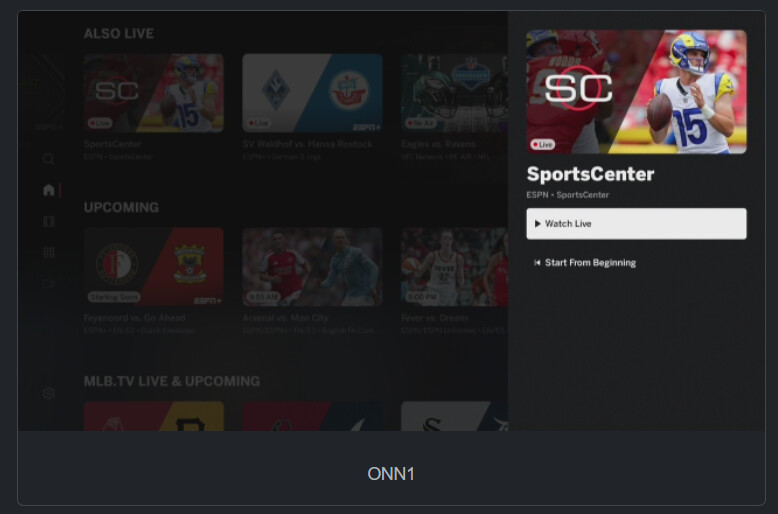
For Channel/Lane 1, it shows Sports Center and I was able to consistently tune it regardless of which of my 5 ONNS I landed on. I could see it navigate through the options in the ESPN app and start Sports Center live. However, for Channel/Lane 3, it shows the Marty & McGhee program and when I click on that, regardless of which ONN device it tries to watch on, I get the following:
2. PrismCast Tuning:
I can tune the channels using PrismCast and get live TV, but it cycles about every 5-7 seconds. What I mean is I'm watching the tuning progress from within a VNC window for Prismcast and the show tunes live as expected, and then 5-7 seconds later that tab closes and relaunches and starts to stream almost immediatly, but it puts in a 1-2 second break between each live session and finally dies after 3 tried I believe. I do have Insecure origins treated as secure enable with the following values: http://192.168.0.5:5523,http://192.168.0.5:8094
Here's the log from Prismcast:
[2026/08/16 12:36:10.644 PM] GET /play?url=http://192.168.0.5:8094/vc/1 from 172.18.0.2 responded 500 in 13513.807 ms.
[2026/08/16 12:36:24.262 PM] [WARN] [0.5-0ty4bd] Video did not reach a playable state within 11000ms.
[2026/08/16 12:36:24.262 PM] [ERROR] [0.5-0ty4bd] Stream setup failed for http://192.168.0.5:8094/vc/1: Waiting failed: 11000ms exceeded.
[2026/08/16 12:36:24.262 PM] [0.5-0ty4bd] Stream ended after 13s (setup failed).
[2026/08/16 12:36:24.263 PM] GET /play?url=http://192.168.0.5:8094/vc/1 from 172.18.0.2 responded 500 in 13240.050 ms.
[2026/08/16 12:36:38.260 PM] [WARN] [0.5-wb7fpp] Video did not reach a playable state within 11000ms.
[2026/08/16 12:36:38.260 PM] [ERROR] [0.5-wb7fpp] Stream setup failed for http://192.168.0.5:8094/vc/1: Waiting failed: 11000ms exceeded.
[2026/08/16 12:36:38.260 PM] [0.5-wb7fpp] Stream ended after 13s (setup failed).
[2026/08/16 12:36:38.261 PM] GET /play?url=http://192.168.0.5:8094/vc/1 from 172.18.0.2 responded 500 in 13362.119 ms.
I never actually see the stream in the client I am testing from (I use Dispatcharr to house all my M3us to organize before sending on to Channels/Emby/Jellyfin/TiviMate).
I was tinkering with co-pilot and verified that both Sports Center tuned through the built in ESPN profile within Prismcast (which does work) and the Sports Center listed on ESPN+ Channel 1 (which cycles every 5-7 seconds) are tunning to the same exact link within Prismcast. Co-pilot wanted me to compare the profiles from within Prismcast, but since ESPN4cc4c is just passing along the link, I don't see how I can do that?
3. Guide Info Mismatch
All testing is being done with Prismcast in this problem due to tuning issues with ADBTuner mentioned above.
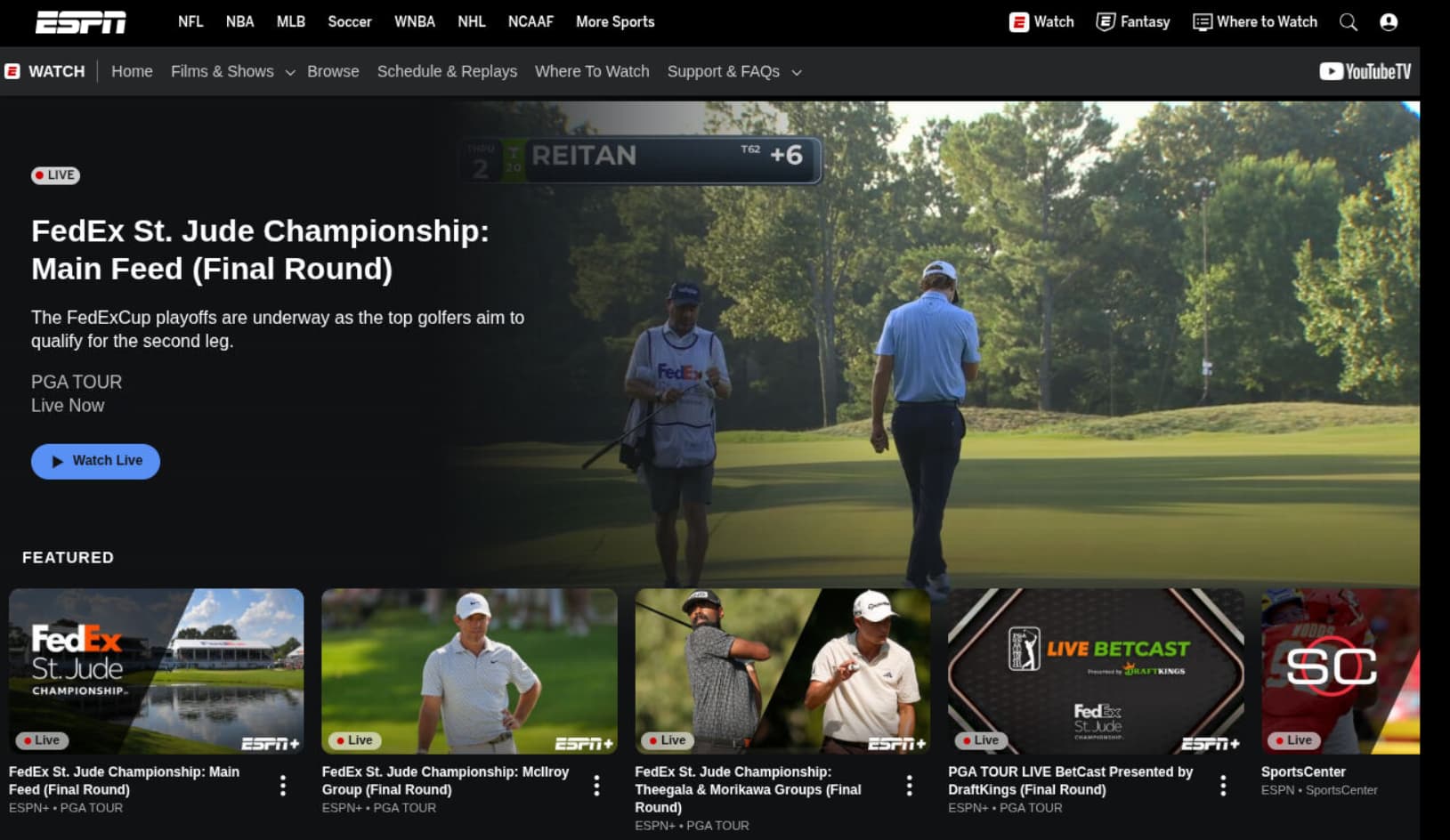
As an exmaple, I'm seeing instances of NFL Replay games in my guide
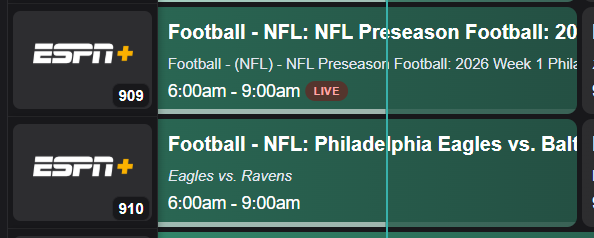
But when I try and tune to it (channel 9 version), I get the following (channel 10 does show the actual game):
4. Filter Issues:
I setup the environmental variables (basically linear based channel content) shared above but am still seeing programming I am looking to suppress in the ESPN+ channels as I have a separate linear channel for that content and want to just display on those items that cannot be found via the linear channels. Here's my JSON file:
{
  "networks": [
    {
      "name": "ESPNews",
      "count": 385
    },
    {
      "name": "MLB.TV",
      "count": 358
    },
    {
      "name": "ESPN2",
      "count": 337
    },
    {
      "name": "ESPN Deportes",
      "count": 331
    },
    {
      "name": "SEC Network",
      "count": 291
    },
    {
      "name": "MLB Network",
      "count": 268
    },
    {
      "name": "ESPN",
      "count": 259
    },
    {
      "name": "ACCN",
      "count": 227
    },
    {
      "name": "ESPNU",
      "count": 178
    },
    {
      "name": "NFL Network",
      "count": 160
    },
    {
      "name": "ESPN Unlimited",
      "count": 54
    },
    {
      "name": "@ESPN",
      "count": 29
    },
    {
      "name": "ACCNX",
      "count": 22
    },
    {
      "name": "SEC Network +",
      "count": 16
    },
    {
      "name": "CW Sports",
      "count": 15
    },
    {
      "name": "ESPN on ABC",
      "count": 10
    }
  ],
  "sports": [
    {
      "name": "Baseball",
      "count": 897
    },
    {
      "name": "Football",
      "count": 766
    },
    {
      "name": "Soccer",
      "count": 478
    },
    {
      "name": "Basketball",
      "count": 97
    },
    {
      "name": "Golf",
      "count": 65
    },
    {
      "name": "Softball",
      "count": 58
    },
    {
      "name": "Action Sports",
      "count": 30
    },
    {
      "name": "Volleyball",
      "count": 18
    },
    {
      "name": "Lacrosse",
      "count": 15
    },
    {
      "name": "Motor Sports",
      "count": 10
    },
    {
      "name": "Surfing",
      "count": 9
    },
    {
      "name": "Polo",
      "count": 9
    },
    {
      "name": "Poker",
      "count": 9
    },
    {
      "name": "Dogs",
      "count": 8
    },
    {
      "name": "Diving",
      "count": 7
    },
    {
      "name": "Hockey",
      "count": 6
    },
    {
      "name": "Gymnastics",
      "count": 6
    },
    {
      "name": "Boxing",
      "count": 6
    },
    {
      "name": "MMA",
      "count": 5
    },
    {
      "name": "Fishing",
      "count": 5
    },
    {
      "name": "Cornhole",
      "count": 5
    },
    {
      "name": "Gaming",
      "count": 4
    },
    {
      "name": "Bull Riding",
      "count": 4
    },
    {
      "name": "Tennis",
      "count": 3
    },
    {
      "name": "Axe Throwing",
      "count": 3
    },
    {
      "name": "Pro Wrestling",
      "count": 2
    },
    {
      "name": "Jai Alai",
      "count": 2
    },
    {
      "name": "Dance",
      "count": 2
    },
    {
      "name": "Fencing",
      "count": 1
    },
    {
      "name": "Bowling",
      "count": 1
    }
  ],
  "leagues": [
    {
      "name": "MLB",
      "count": 704
    },
    {
      "name": "NCAA Football",
      "count": 477
    },
    {
      "name": "NCAAW Soccer",
      "count": 209
    },
    {
      "name": "NFL",
      "count": 196
    },
    {
      "name": "Little League Baseball",
      "count": 99
    },
    {
      "name": "PGA TOUR",
      "count": 63
    },
    {
      "name": "NBA",
      "count": 40
    },
    {
      "name": "WNBA",
      "count": 35
    },
    {
      "name": "Little League Softball",
      "count": 23
    },
    {
      "name": "LALIGA",
      "count": 23
    },
    {
      "name": "USL Championship",
      "count": 22
    },
    {
      "name": "JLB",
      "count": 21
    },
    {
      "name": "XG",
      "count": 20
    },
    {
      "name": "Patriot Games",
      "count": 19
    },
    {
      "name": "SLSOFT",
      "count": 17
    },
    {
      "name": "USL League One",
      "count": 16
    },
    {
      "name": "Eredivisie",
      "count": 16
    },
    {
      "name": "NCAA Women's Volleyball",
      "count": 13
    },
    {
      "name": "WPBL",
      "count": 12
    },
    {
      "name": "ALB",
      "count": 12
    },
    {
      "name": "JLSOFT",
      "count": 11
    },
    {
      "name": "Banana",
      "count": 11
    },
    {
      "name": "SLBASE",
      "count": 10
    },
    {
      "name": "RB",
      "count": 10
    },
    {
      "name": "LALIGA 2",
      "count": 10
    },
    {
      "name": "3. Liga",
      "count": 10
    },
    {
      "name": "World Surf League",
      "count": 9
    },
    {
      "name": "USP",
      "count": 9
    },
    {
      "name": "PLL",
      "count": 9
    },
    {
      "name": "INTERLB",
      "count": 9
    },
    {
      "name": "NECB",
      "count": 8
    },
    {
      "name": "NCAAW",
      "count": 8
    },
    {
      "name": "NCAAM",
      "count": 7
    },
    {
      "name": "NASCAR O'Reilly Auto Parts Series",
      "count": 7
    },
    {
      "name": "Community Shield",
      "count": 7
    },
    {
      "name": "AUSL",
      "count": 6
    },
    {
      "name": "PFL",
      "count": 5
    },
    {
      "name": "CWGYM",
      "count": 5
    },
    {
      "name": "ACL",
      "count": 5
    },
    {
      "name": "USL Cup",
      "count": 4
    },
    {
      "name": "UEL Qualifying",
      "count": 4
    },
    {
      "name": "PBR",
      "count": 4
    },
    {
      "name": "Northern Super League",
      "count": 4
    },
    {
      "name": "NWSL",
      "count": 4
    },
    {
      "name": "Most Valuable Promotions",
      "count": 4
    },
    {
      "name": "College",
      "count": 4
    },
    {
      "name": "WATL",
      "count": 3
    },
    {
      "name": "USAU",
      "count": 3
    },
    {
      "name": "UECL Qualifying",
      "count": 3
    },
    {
      "name": "Sport Fishing Championship",
      "count": 3
    },
    {
      "name": "NCAAW Lacrosse",
      "count": 3
    },
    {
      "name": "NCAAH",
      "count": 3
    },
    {
      "name": "NCAA Baseball",
      "count": 3
    },
    {
      "name": "Mecum Auctions",
      "count": 3
    },
    {
      "name": "HSBASE",
      "count": 3
    },
    {
      "name": "CWHOC",
      "count": 3
    },
    {
      "name": "WWE NXT",
      "count": 2
    },
    {
      "name": "WLL",
      "count": 2
    },
    {
      "name": "UCL Qualifying",
      "count": 2
    },
    {
      "name": "NCAAM Soccer",
      "count": 2
    },
    {
      "name": "Magic City",
      "count": 2
    },
    {
      "name": "IDL",
      "count": 2
    },
    {
      "name": "CWTEN",
      "count": 2
    },
    {
      "name": "CWBV",
      "count": 2
    },
    {
      "name": "AVP",
      "count": 2
    },
    {
      "name": "NZNBL",
      "count": 1
    },
    {
      "name": "NCAA Softball",
      "count": 1
    },
    {
      "name": "NCAA Men's Volleyball",
      "count": 1
    },
    {
      "name": "Men's International Friendly",
      "count": 1
    },
    {
      "name": "CWBWL",
      "count": 1
    },
    {
      "name": "CMTEN",
      "count": 1
    },
    {
      "name": "CMGYM",
      "count": 1
    }
  ],
  "event_types": [
    {
      "name": "UPCOMING",
      "count": 3013
    },
    {
      "name": "OVER",
      "count": 410
    },
    {
      "name": "LIVE",
      "count": 133
    }
  ],
  "packages": [
    {
      "name": "ESPN_PLUS",
      "count": 614
    },
    {
      "name": "MLB_TV",
      "count": 358
    },
    {
      "name": "MLB_NETWORK",
      "count": 268
    },
    {
      "name": "ESPN_PLUS, HULU_BASE",
      "count": 2
    }
  ],
  "total_events": 3556
}
It appears for some reason that the filters are not being honored when the XML and Channels are being created.
Sorry for the long-winded post, trying to provide all the information I have available to reduce the follow-up questions. And I did solve one problem on my own, I was trying to test Prismcast with VLC on my workstation and finally realized the call from ESPN4cc4c to Prismcast uses 127.0.0.1 in the M3U which meant I couldn't do it from my workstation. Only took me like 10 minutes to figure that one out. 
Your ESPN4cc4c stack looks like a bit of a copy-and-paste from different posts. If this were done through Project One-Click, it would look more like this:
services:
  espn4cc4c:
    # 2025.11.23
    # GitHub home for this project with setup instructions: https://github.com/kineticman/ESPN4CC4C
    # Docker container home for this project: https://github.com/kineticman/ESPN4CC4C/pkgs/container/espn4cc4c
    image: ghcr.io/kineticman/espn4cc4c:${TAG:-latest}
    container_name: espn4cc4c
    dns_search: ${DOMAIN:-localdomain} # For Tailscale users using Magic DNS, add your Tailnet (tailxxxxx.ts.net) to use hostnames for remote nodes, otherwise use your local domain name.
    init: true
    ports:
      - ${PORT:-8094}:${PORT:-8094}
    environment:
      - TZ=${TZ:-America/New_York}
      - VC_RESOLVER_BASE_URL=${VC_RESOLVER_BASE_URL:-http://192.168.86.72:8094}
      - CC_HOST=${CC_HOST:-192.168.86.72}
      - CC_PORT=${CC_PORT:-5589}
      - CH4C_HOST=${CH4C_HOST:-127.0.0.1}
      - CH4C_PORT=${CH4C_PORT:-2442}
      - PORT=${PORT:-8094}
      - APP_MODULE=${APP_MODULE:-bin.vc_resolver:app}
      - VALID_HOURS=${VALID_HOURS:-72}
      - LANES=${LANES:-40}
      - ALIGN=${ALIGN:-30}
      - MIN_GAP_MINS=${MIN_GAP_MINS:-30}
      - M3U_GROUP_TITLE=${M3U_GROUP_TITLE:-ESPN+ VC}
      - VC_M3U_PATH=${VC_M3U_PATH:-/app/out/playlist.m3u}
      - WATCH_API_KEY=${WATCH_API_KEY:-0dbf88e8-cc6d-41da-aa83-18b5c630bc5c}
      - FILTER_ENABLED_NETWORKS=${FILTER_ENABLED_NETWORKS:-*}
      - FILTER_EXCLUDE_NETWORKS=${FILTER_EXCLUDE_NETWORKS:-}
      - FILTER_ENABLED_SPORTS=${FILTER_ENABLED_SPORTS:-*}
      - FILTER_EXCLUDE_SPORTS=${FILTER_EXCLUDE_SPORTS:-}
      - FILTER_ENABLED_LEAGUES=${FILTER_ENABLED_LEAGUES:-*}
      - FILTER_EXCLUDE_LEAGUES=${FILTER_EXCLUDE_LEAGUES:-}
      - FILTER_ENABLED_EVENT_TYPES=${FILTER_ENABLED_EVENT_TYPES:-*}
      - FILTER_EXCLUDE_EVENT_TYPES=${FILTER_EXCLUDE_EVENT_TYPES:-}
      - FILTER_ENABLED_LANGUAGES=${FILTER_ENABLED_LANGUAGES:-*}
      - FILTER_EXCLUDE_LANGUAGES=${FILTER_EXCLUDE_LANGUAGES:-}
      - FILTER_REQUIRE_ESPN_PLUS=${FILTER_REQUIRE_ESPN_PLUS:-}
      - FILTER_EXCLUDE_PPV=${FILTER_EXCLUDE_PPV:-false}
      - FILTER_EXCLUDE_REAIR=${FILTER_EXCLUDE_REAIR:-false}
      - FILTER_EXCLUDE_NO_SPORT=${FILTER_EXCLUDE_NO_SPORT:-false}
      - FILTER_CASE_INSENSITIVE=${FILTER_CASE_INSENSITIVE:-true}
      - FILTER_PARTIAL_LEAGUE_MATCH=${FILTER_PARTIAL_LEAGUE_MATCH:-true}
    volumes:
      - ${HOST_DIR:-.}/data:/app/data
      - ${HOST_DIR:-.}/out:/app/out
      - ${HOST_DIR:-.}/logs:/app/logs
    healthcheck:
      test: ["CMD", "curl", "-fsS", "http://localhost:8094/health"]
      interval: 2m
      timeout: 5s
      retries: 2
      start_period: 60s
    restart: unless-stopped
And the env vars I use:
TAG=latest
DOMAIN=localdomain tailxxxxx.ts.net
HOST_PORT=8094
TZ=America/Denver
VC_RESOLVER_BASE_URL=http://htpc6:8094
CC_HOST=cc4c
CC_PORT=5589
CH4C_HOST=ch4c
CH4C_PORT=2442
LANES=40
FILTER_EXCLUDE_REAIR=true
HOST_DIR=/data/espn4cc4c
The using this Action:
I added 40 virtual channels to ADBTuner, and the CDVR Custom Channels Source:

Spot checking half-a-dozen channels they all tuned except for the Red Sox game, as I don't have an MLB.tv subscription.
As far as your issues with PrismCast go, what are the specs on your host system? The Docker version of PrismCast requires significant resources to run.
It is, I've not yet migrated over to using OneClick. I started building a testing environment using it, but that's been only in my spare time.
Specs are:
OS
Intel(R) Client Systems NUC11PAHi7
linux ubuntu
24.04 (kernel: 6.8.0-136-generic)
CPU
8 cores / 11th Gen Intel(R) Core(TM) i7-1165G7 @ 2.80GHz
I use the version that taps into the Intel GPU so I can run 4+ tabs and haven't seen a degredation in performance. In my testing, I'm only running one tab at a time. And since I can run ESPN Linear from within Prismcast using the standard config and confirmed that both the linear channel that tunes fine from within the prismcast pre-defined channel and the ESPN4cc4c link are pointing to the same web address, I don't believe it's an issue of horsepower.
Some additional querying within co-pilot gave me this:
If both the working PrismCast ESPN channel and the failing ESPN4cc4c channel ultimately land on the exact same ESPN player URL, then:

Authentication is working.
The correct event is being selected.
The browser is reaching the same page.
The ESPN video player itself is capable of playing.

That makes me suspect the difference is what PrismCast is seeing before or after it arrives at that page, not the final URL itself.

A few things I'd check:

Compare the stream health in the PrismCast dashboard

When the built-in ESPN channel is playing successfully:

Does PrismCast show bitrate?
Stream health?
Active stream duration?

Then compare that to ESPN4cc4c right before it fails.

Look for errors in the browser console

In the VNC Chrome session:

Press F12 (or open DevTools).
Go to Console.
Tune ESPN4cc4c.
Watch for red errors, particularly:
autoplay
media
MSE
DRM
CORS
player exceptions

The video may be visible while JavaScript is still throwing an exception that prevents PrismCast's playback detector from completing.
When I hit f12 in the chrome tab, it dissapears as soon as the tab closes and then reopens, so not much value there. And for Prismcast dashboard, I'm not aware of anything that produces the type of information co-pilot is asking for.
1 Like
Do you know what profile PrismCast uses when you tune the ESPN linear channel using another method? We may need to force that same profile by adding &profile= to the tuning URL.