FastChannels - FAST Channels aggregator/manager

First of all, thank you for all the work put into making Spectrum work with Fast Channels!
I am a Spectrum user, not coming from COX.
I sometimes get a black screen when tunning one of the Spectrum channels, and have to wait a couple minutes to be able to tune Spectrum channels again.
When I look at the FastChannels log I see the error below.

2026-09-24 17:11:04,613 WARNING app.routes.play: [license-proxy] spectrum channel=64054 upstream returned HTTP 401 (150 bytes): b'{"resultCode":"2076","resultCodeName":"INVALID_TOKEN","resultMessage":"Invalid Token","error":"invalid_request","error_description":"TOKEN_NOT_VALID"}'

Thank you.

1 Like

Which, of course, is circling back to the primary appeal being their lower price point.

This needs a bit fuller explanation though, given hardware transcoding is done by a GPU -- which just like a CPU is not an unlimited resource.

Here's a real world example with two Capture Cards streaming simultaneously, and in this case we're only asking Channels DVR to do the initial transcode, as I'm viewing these streams through VLC. Also, in this example I'm using a 14th Gen i9, which probably represents a bit of a delta from the typical CDVR server. And, as you can see, the transcoding load is not nothing:

intel-gpu-top: Intel Raptorlake_s (Gen12) @ /dev/dri/card0 -  480/ 809 MHz;  30% RC6;  0.70/65.60 W;      363 irqs/s

         ENGINES     BUSY                                                                                                          MI_SEMA MI_WAIT
       Render/3D   29.64% |██████████████████████████████▎                                                                       |      0%      0%
         Blitter    0.00% |                                                                                                      |      0%      0%
           Video   11.26% |███████████▌                                                                                          |      0%      0%
    VideoEnhance   16.24% |████████████████▋                                                                                     |      0%      0%

   PID      MEM      RSS          Render/3D                    Blitter                      Video                    VideoEnhance         NAME    
290022   99492K   88604K |████                      ||                          ||█▌                        ||██▎                       | ffmpeg  
289275     150M  140976K |███▊                      ||                          ||█▌                        ||██▏                       | ffmpeg  

Imagine what this would look like if one were also doing other transcoding at the same time, and the GPU in a more typical user's server were being used.

great report-- found the bug and will fix in next version

so short of this bug, u were able to sign into spectrum??!?

Thank you!

Yes, I was able to sign in with no issues.

I’ll take that win!

Your bug was easy at least! The signin has been brutal

I’m trying to test the drm bridge for Prismcast and Spectrum.

Where can I find the Prismcasr server url?

I tried http://localhost:5589/ but that didn’t work.

Try using the full IP address of your server instead of localhost. For example, mine is:

http://192.168.2.160:5589

Ok that seemed to get me part of the way. The Roku test passed but Spectrum still failed with errors "HTTP 500: Failed to start stream" and "URL Consistency". It doesn't like the public watch url using localhost.

It suggested a fix of "Use the FastChannels host address reachable from PrismCast, or run PrismCast with network_mode: host and keep the loopback watch URL." How do I find this second url?

@KineticMan the biggest question on my mind is.........

Are you still having FUN with this? :wink:

We've been working you ragged, and you keep hanging in there, which is great. Keep having fun, tho!

We all appreciate what you are doing!

3 Likes

Errors 4003/4004 are timeout errors; it means Spectrum thinks you are a bot (because you are one) that is making too many attempts in too short a period of time, and you can try again in 24+ hours. Based upon my current experience, it is tied to a specific session/machine/browser/location combo. For instance, I could still log into Spectrum's website on my machine where Docker is hosted while getting this timeout in individual or both FastChannels and Channels Dockers. And I've also caused it to happen the other way. Meanwhile, I've had the apps working fine. To say Spectrum is a PITA is an understatement.

Given enough spacer time between attempts, I've been able to get all Channels TVE working again (going one-by-one manually, not auto-scan), FastChannels Spectrum scraper happy, and some of FastChannels Spectrum TVE working.

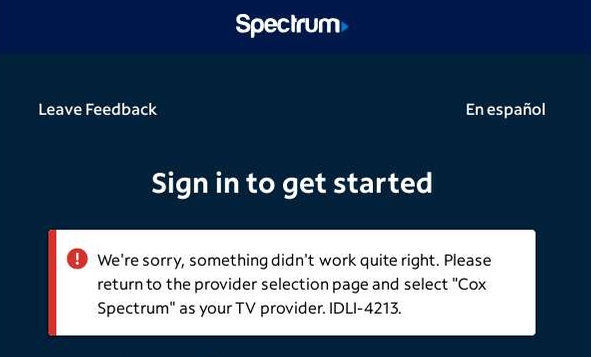
@KineticMan, when you get around to the Spectrum TVE, this is another issue to deal with:
JP_ScreenShot_2026_09_23_14_01_49

I've mentioned this before, but wanted to point out that for us former Cox people, we can't always use the "Spectrum" provider selector, but have to pick "Cox Spectrum", but only for some of the TVE sources. That said, it doesn't matter after that point; everything else is still the regular Spectrum login and return pages.

P.S.

Used FastChannels Spectrum Scraper with the ADBTuner PassThrough function (@turtletank) to make a 4+ hour recording on ESPN the other night. It all went flawlessly, so wanted to drop the kudos all around on that one!

For anyone using the FastChannels Spectrum scraper, be sure to run a Stream Audit to get the massive station list cut down to what is actually available to your account/location.

@daldana7296, this will be especially important for you as it sounds like your situation is similar to mine (TV account exists in a different location from FastChannels/Channels server).

@KineticMan, one of the things I was surprised about with the Spectrum scraper is that the API does not seem to be picking up the geo-location locals (ABC, NBC, CBS, FOX). These are available in Spectrum's web and app and work perfectly playing both.

As you can see, the "home" location one is not available (and the Stream Audit successfully disables it), but the "geo-local" one is available. They do share the same "number", so I could see that as a reason they are not showing up.

P.S.S.

I'm in the middle of a HENA-like implementation for the Spectrum app on ADBTuner and Roku Bridge (another layer of backup), but also something much bigger in PLM to make this and all other station management with HDMI Encoders much easier. I've seen a lot of discussion around DirecTV and there's no reason the same approach I'm taking with Spectrum couldn't be applied there. I'm also now thinking this might open HENA up to AH4C and all the rest, with enough time.

But anyway, because of this, I now have a Gracenote map for all the non-local stations with Spectrum that should be readily available for use by FastChannels soon (Yes, all the Spectrum News stations do have Gracenote IDs!).

2 Likes

Unfortunately, I can't even get the scraper to run much less run an audit. Even when it looks like it takes my TV account login, the Spectrum page says to upgrade my account to watch live tv, so I'm guessing it's still auto logging me in on my internet only account. This is after I've removed any saved creds from the browser. I've also tried different browsers to no avail. I'm stumped.

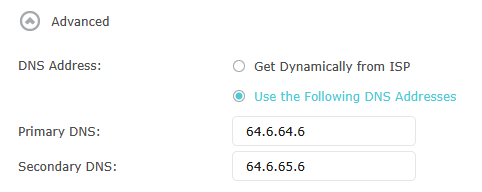
This is a bit of a long shot, but I'm wondering if Spectrum is identifying your local account because traffic is being sent through your router to their DNS provider. If you change it to something like this...

image

... that theoretically would avoid them entirely and give you more of a blank slate to work with. I have FIOS as this location and I had to do that because if I didn't, any wrong address was parsed to their search engine, which I found incredibly annoying.

An interesting tidbit regarding Fast Channels & DirecTV Stream.

I have a Grandfthered Package that only allows (3) streams. I have confirmed that using my (3) Ospreys. When all (3) are being used, I am not able to add that fourth stream- all you get is the message to quit one of the other streams.

Today, I fired up (2) DTVStream's channels thru Fast Channels then added (2) streams thru the Ospreys. All played with no issues or warnings.

Checked the DIRECTV website for requirements. It confirms that grandfathered packages have only (3) concurrent streams but unlimited from 3rd party apps ( Netflix, HBO, etc). That's also why you can record multiple TVE streams in Channels. This would never be an issue with the newer packages since they have 20? in-home streams.

I'll test more when those new sticks arrive.

1 Like

Well, I tried the dns servers you listed, but same issue. I then tried a couple of OpenDNS servers and still the same. On a whim, I tried setting up the Spectrum TVE channels and when I tried to sign in to a single channel, I got the preview window. When I click the sign in button in that window, the browser times out before any login boxes show up.

Are we sure there is nothing in the FC database that could be saving that internet only creds and applying them instead of the entered creds?

i have an idea. not necessarily what you said, but i suspect it's auto-clicking complete too fast and auto-selecting your internet account. i'll try something to help you in next version - but i have no way to test this so might take us some back and forth.

Me and @KineticMan confirmed this the other day. I was able to log in with chrome browser.

For now i have two dedicated ah4c PYATV apple tv tuners giving full access to my TVE channels through my linkPi using the spectrum apple tv app. Some of the cox TVEs are still working in Channels DVR for now, but i cant use the cox credentials with Channels DVR TVE when selecting spectrum as provider.

Yes the merge has been a total MESS.

Hey @KineticMan just a suggestion for the built in ah4c scripts that I always find is a good practice for robustness. I was able to sleep all of my devices which is a button in ah4c's GUI and then was unable to tune with the FC bridge. Changing my prebmitune to this:

#!/bin/bash
# prebmitune.sh for firetv/fastchannels
# 2026.09.06
#
# ah4c "pre" script for FastChannels Player (com.fastchannels.player).
# Generated by FastChannels' "Export ah4c scripts" button — see bmitune.sh for the
# real work; this one just has to be fast, since ah4c runs it before opening the
# encoder connection and it counts against the DVR's ~30s tune budget.
#
# ah4c calls this as: prebmitune.sh <tunerip> <channel>

set -x

TUNERIP="$1"

echo "[STARTING] prebmitune.sh $TUNERIP"

if [[ "$TUNERIP" =~ ^[0-9]+\.[0-9]+\.[0-9]+\.[0-9]+(:[0-9]+)?$ ]]; then
	OUTPUT=$(adb connect "$TUNERIP" 2>&1)
	echo "$OUTPUT"
	if [[ "$OUTPUT" == *"unable to connect"* || "$OUTPUT" == *"failed to connect"* ]]; then
		echo "[ERROR] adb connect $TUNERIP failed"
		exit 1
	fi
fi
adb -s "$TUNERIP" shell input keyevent KEYCODE_WAKEUP
exit 0

I added adb -s "$TUNERIP" shell input keyevent KEYCODE_WAKEUP as a guard for those edge cases just in case to prevent missed tunes, recordings etc worked. I was wondering if you are interested in rolling this into the next release?

If the device is already awake, it's a no-op. If it isn't awake, then it prevents that failure.

if you guys recommend it, i'll add it. these scripts are greek to me!

1 Like

Well, it's in pretty much every script, so I would imagine it would be a good idea. I defer to the man of ah4c for a final suggestion cc @bnhf.

Not sure if you have a suggestion on this or a better way of implementing it. I was just able to reproduce it last night as I was testing these fire sticks out that I bought.

@KineticMan What would you think about grabbing the latest firetv/fastchannels scripts from the sullrich/ah4c repo at FastChannels build? Then @mackid1993 and I can just keep them updated there? It's nice to have the option to download them FastChannels, but now that their part of our repo ah4c users will get them automatically when they're setup to use the FastChannels ah4c bridge.

1 Like