
No, I don't have a Windows computer or VM to dedicate it to. So either it works for me in Docker, or I won't use it at all.
PrismCast validates the capture pipeline on startup with a puppeteer and Chrome health check. Puppeteer isn't about to launch / connect to Chrome correctly for some reason. I assume you have no issues doing similar with CC4C? Our startup paths aren't much different.
Reading through the log. The five errors after the first one are all downstream of a single cause: ERR_BLOCKED_BY_CLIENT on the puppeteer-stream extension URL. That kills the options page load → START_RECORDING never gets injected → the capture probe runs against a chrome-error page where chrome.tabs.query is undefined → synchronous fail on attempt 1, timeouts on 2 and 3.
Are you using the docker image from Package prismcast · GitHub? I presume so. Have you tried blowing away chromedata and double checking the volumes you're using for the container?
1 Like
Native runs on macOS and Linux, it's not a Windows thing. Docker is a suboptimal path IMO.
Not sure what caused it, but after updating from 1.9.0 to 1.10.0 it kept bringing up the Chrome window with only an About tab. Not sure why the second tab (Video Capture extension) that normally appears wasn't there. I had to restart the PrismCast service again (running native on Mac Mini) to get it working.
Yeah, I had to restart twice to see that.
Thanks for raising this...it relates to how much time PrismCast gives Chrome at startup to be ready...I've increased the grace period in the next release.
And now my Local Fox isn't working.
Using the default setup for Local Fox from Fox One.
Restarted the prismcast service multiple times.
It opens a Chrome tab and starts playing the channel, minimizes, opens the tab again and keeps repeating like it doesn't realize the stream is playing.
Ends up repeating these errors.
[2026/05/10 04:15:43.574 PM] [fox-mmnrek] Stream ended after 8s (setup failed).
[2026/05/10 04:15:43.576 PM] GET /hls/fox/stream.m3u8 from 192.168.1.8 responded 502 in 8480.467 ms.
[2026/05/10 04:15:51.266 PM] [fox-man2lf] Stream ended after 8s (setup failed).
[2026/05/10 04:15:51.267 PM] GET /hls/fox/stream.m3u8 from 192.168.1.8 responded 502 in 7672.524 ms.
Appears only my Fox One direct channels are failing.
CBS.com, SlingTV and YTTV channels still work.
UPDATE: Removed all my Fox One channels and re-added, now working 
UPDATE2: Strange. I'm watching my Local Fox from PrismCast and the Prismcast Chrome tab is showing the Fox News channel stream. 
1 Like
Thanks.
Would it be possible to add a setting for troubleshooting that keeps the Chrome window from minimizing so I can see what it's doing?
Currently I have to keep restoring the window every time it minimizes and feel like I'm fighting the app, not to mention doing a lot of clicking 
Based on your post, I did an updated test of the containerized PrismCast 1.10.0 on a reasonably busy Debian LXC running on Proxmox host. It booted fine, and I was able to stream a Sling premium channel remotely:
Boot:
Starting PrismCast with noVNC support...
  Display: :99
  Screen: 1920x1080x24
  VNC Port: 5900
  noVNC Port: 6080
  PrismCast Port: 5589
  Data Directory: /root/.prismcast
  Intel GPU: /dev/dri/renderD128 present (LIBVA_DRIVER_NAME=iHD)
Starting Xvfb...
screen 0 shmid 0
WARNING: Kernel has no file descriptor comparison support: Operation not permitted
Xvfb started successfully (DRI3: -vfbdevice /dev/dri/renderD128).
Starting x11vnc...
Xlib:  extension "DPMS" missing on display ":99".
The VNC desktop is:      prismcast:0

0
x11vnc started successfully.
Starting noVNC...
Warning: could not find self.pem
Using installed websockify at /usr/bin/websockify
Starting webserver and WebSockets proxy on port 6080
WebSocket server settings:
  - Listen on :6080
  - Web server. Web root: /usr/share/novnc
  - No SSL/TLS support (no cert file)
  - proxying from :6080 to localhost:5900
noVNC started successfully.
==============================================
  noVNC available at: http://localhost:6080/vnc.html
  PrismCast UI at:    http://localhost:5589
==============================================
Starting PrismCast...
Navigate to this URL:
    http://prismcast:6080/vnc.html?host=prismcast&port=6080
Press Ctrl-C to exit
[2026/05/11 08:00:41.830 PM] Starting PrismCast v1.10.1 with configuration:
[2026/05/11 08:00:41.830 PM]   Configuration file: /root/.prismcast/config.json
[2026/05/11 08:00:41.830 PM]   Chrome profile: /root/.prismcast/chromedata
[2026/05/11 08:00:41.830 PM]   Server port: 5589
[2026/05/11 08:00:41.830 PM]   Quality preset: 720p-high (1280×720)
[2026/05/11 08:00:41.830 PM]   Capture codecs: h264, hevc
[2026/05/11 08:00:41.830 PM]   Video bitrate: 12000000
[2026/05/11 08:00:41.830 PM]   Max retries: 4
[2026/05/11 08:00:41.830 PM]   Max concurrent streams: 10
[2026/05/11 08:00:41.830 PM]   Circuit breaker threshold: 10 failures in 5 minutes
[2026/05/11 08:00:41.830 PM]   Chrome executable: /usr/local/bin/chrome-no-sandbox
[2026/05/11 08:00:41.830 PM]   HLS segment duration: 2s, max segments: 10
[2026/05/11 08:00:41.830 PM]   HDHomeRun emulation: enabled (port 5004)
[2026/05/11 08:00:41.834 PM] Using FFmpeg at: /usr/lib/node_modules/prismcast/node_modules/ffmpeg-for-homebridge/ffmpeg
[2026/05/11 08:00:41.850 PM] Loaded 1170 channels.
[2026/05/11 08:00:43.285 PM] Chrome ready: Chrome/148.0.7778.96 (GPU: Mesa Intel(R) Graphics (ADL-N)).
[2026/05/11 08:00:46.656 PM] Capture system verified successfully.
[2026/05/11 08:00:46.795 PM] PrismCast is now listening on 0.0.0.0:5589.
[2026/05/11 08:00:46.796 PM] HDHomeRun emulation is now listening on 0.0.0.0:5004 (DeviceID: 2A87050E).
100.xxx.xxx.xxx - - [11/May/2026 20:03:36] code 404, message File not found
100.xxx.xxx.xxx - - [11/May/2026 20:03:48] 100.xxx.xxx.xxx: Plain non-SSL (ws://) WebSocket connection
100.xxx.xxx.xxx - - [11/May/2026 20:03:48] 100.xxx.xxx.xxx: Path: '/websockify'
100.xxx.xxx.xxx - - [11/May/2026 20:03:48] connecting to: localhost:5900
Streaming:
[2026/05/11 08:13:16.635 PM] [indieplex-u1ui6g] Streaming IndiePlex: Sling TV, slingLive, FFmpeg [H264]. Tuned in 4.7s (direct).
Debian LXC (running many other CDVR-related containers) stats while streaming:
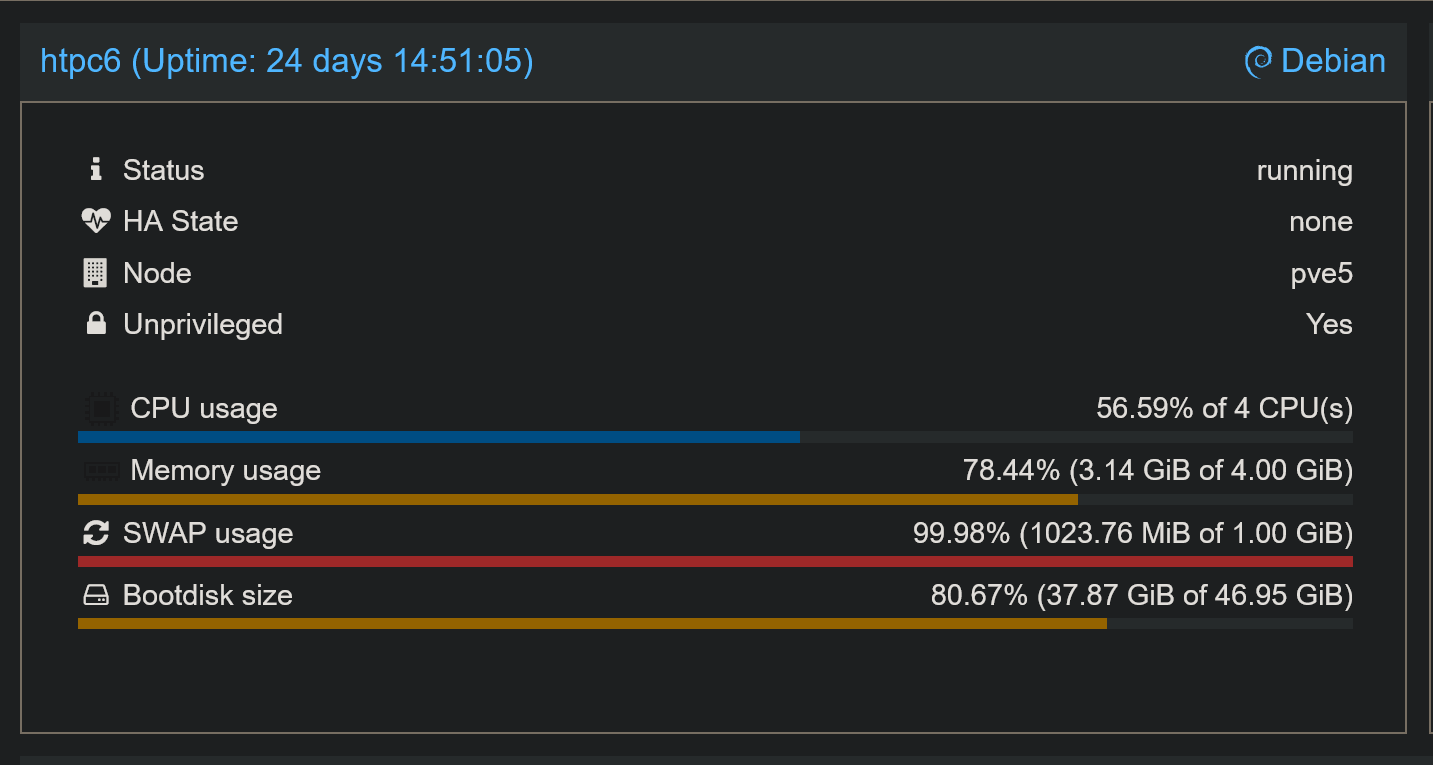
intel_gpu_top while streaming:
intel-gpu-top: Intel Alderlake_n (Gen12) @ /dev/dri/card0 -   64/ 299 MHz;  49% RC6;  0.12/11.48 W;       95 irqs/s

         ENGINES     BUSY                                                                                                MI_SEMA MI_WAIT
       Render/3D   19.75% |██████████████████▎                                                                         |      0%      0%
         Blitter    0.00% |                                                                                            |      0%      0%
           Video    0.00% |                                                                                            |      0%      0%
    VideoEnhance    0.00% |                                                                                            |      0%      0%

   PID              NAME          Render/3D                    Blitter                      Video                    VideoEnhance
517691            chrome |████▊                     ||                          ||                          ||                          |
517543              Xvfb |▊                         ||                          ||                          ||                          |
517628            chrome |                          ||                          ||                          ||                          |
I just wanted to confirm that no issues have crept in recently, at least as far as my Docker platform is concerned.
I'm using the current standard compose from Project One-Click:
services:
  prismcast:
    # 2026.03.16
    # GitHub home for this project with setup instructions: https://github.com/hjdhjd/prismcast.
    # Docker container home for this project: https://github.com/hjdhjd/prismcast/pkgs/container/prismcast.
    image: ghcr.io/hjdhjd/prismcast:${TAG:-latest}
    container_name: prismcast
    hostname: prismcast
    dns_search: ${DOMAIN:-localdomain}
    shm_size: '2gb'
    devices:
      - /dev/dri:/dev/dri
    ports:
      - ${HOST_PORT:-5589}:${PORT:-5589}
      - ${HOST_VNC_PORT:-5900}:${VNC_PORT:-5900}
      - ${HOST_NOVNC_PORT:-6080}:${NOVNC_PORT:-6080}
      - ${HOST_HDHR_PORT:-5004}:${HDHR_PORT:-5004}
    environment:
      - PORT=${PORT:-5589}
      - VNC_PORT=${VNC_PORT:-5900}
      - NOVNC_PORT=${NOVNC_PORT:-6080}
      - HDHR_PORT=${HDHR_PORT:-5004}
      - DISPLAY_NUM=${DISPLAY_NUM:-99}
      - SCREEN_WIDTH=${SCREEN_WIDTH:-1920}
      - SCREEN_HEIGHT=${SCREEN_HEIGHT:-1080}
      - SCREEN_DEPTH=${SCREEN_DEPTH:-24}
      - TZ=${TZ:-America/New_York}
      - LIBVA_DRIVER_NAME=${LIBVA_DRIVER_NAME:-iHD} # Override below with LIBVA_DRIVER_NAME=i965 for older Intel GPUs (pre-Gen 9 aka Skylake).
    healthcheck:
      test: ["CMD", "wget", "-q", "--spider", "http://localhost:${PORT:-5589}/health"]
      interval: 30s
      timeout: 10s
      retries: 3
      start_period: 30s
    volumes:
      - prismcast-data:/root/.prismcast
    restart: unless-stopped
volumes:
  prismcast-data:
With these env var overrides:
TAG=latest
DOMAIN=localdomain tailxxxxx.ts.net
HOST_PORT=5589
HOST_VNC_PORT=5900
HOST_NOVNC_PORT=6080
HOST_HDHR_PORT=5004
DISPLAY_NUM=99
SCREEN_WIDTH=1920
SCREEN_HEIGHT=1080
SCREEN_DEPTH=24
CDVR_STARTING_CHANNEL=13001
TZ=America/Denver
DEVICES=true
LIBVA_DRIVER_NAME=iHD
Anything non-standard about your setup that might give us a clue or two?
Could be related to this
Not sure what that "next release" version number is
here's my yaml:
  prismcast:
    # 2026.03.13
    # GitHub home for this project with setup instructions: https://github.com/hjdhjd/prismcast.
    # Docker container home for this project: https://github.com/hjdhjd/prismcast/pkgs/container/prismcast.
    image: ghcr.io/hjdhjd/prismcast:latest
    container_name: prismcast
    hostname: prismcast
    dns_search: ${DOMAIN:-localdomain}
    shm_size: '2gb'
    devices:
      - /dev/dri:/dev/dri
    ports:
      - 5589 #${HOST_PORT:-5589}:${PORT:-5589}
      - 5903 #${HOST_VNC_PORT:-590}:${VNC_PORT:-5900}
      - 6080 #${HOST_NOVNC_PORT:-6080}:${NOVNC_PORT:-6080}
      - 5004 #${HOST_HDHR_PORT:-5004}:${HDHR_PORT:-5004}
    environment:
      - PORT=5589 #${PORT:-5589}
      - VNC_PORT=5900 #${VNC_PORT:-5900}
      - NOVNC_PORT=6080 #${NOVNC_PORT:-6080}
      - HDHR_PORT=5004 #${HDHR_PORT:-5004}
      - DISPLAY_NUM=99 #${DISPLAY_NUM:-99}
      - SCREEN_WIDTH=1920 #${SCREEN_WIDTH:-1920}
      - SCREEN_HEIGHT=1080 #${SCREEN_HEIGHT:-1080}
      - SCREEN_DEPTH=24 #${SCREEN_DEPTH:-24}
      - LIBVA_DRIVER_NAME=iHD # Override below with LIBVA_DRIVER_NAME=i965 for older Intel GPUs (pre-Gen 9 aka Skylake).
      - QUALITY_PRESET=1080p
    volumes:
      - $SERVICE_ROOT/prismcast:/data
    restart: unless-stopped

It was my ports. They weren't actually mapped.
Rubber duck does it again.
2 Likes
It was my ports. They weren't actually mapped.
Rubber duck does it again.
Happens to the best of us...glad you're up and running!
I'm trying to add a profile for Windy, but says it already exists as built in. But where do I find it?
It seems clear how to use this with providers, but I'm having trouble utilizing it for static web pages.
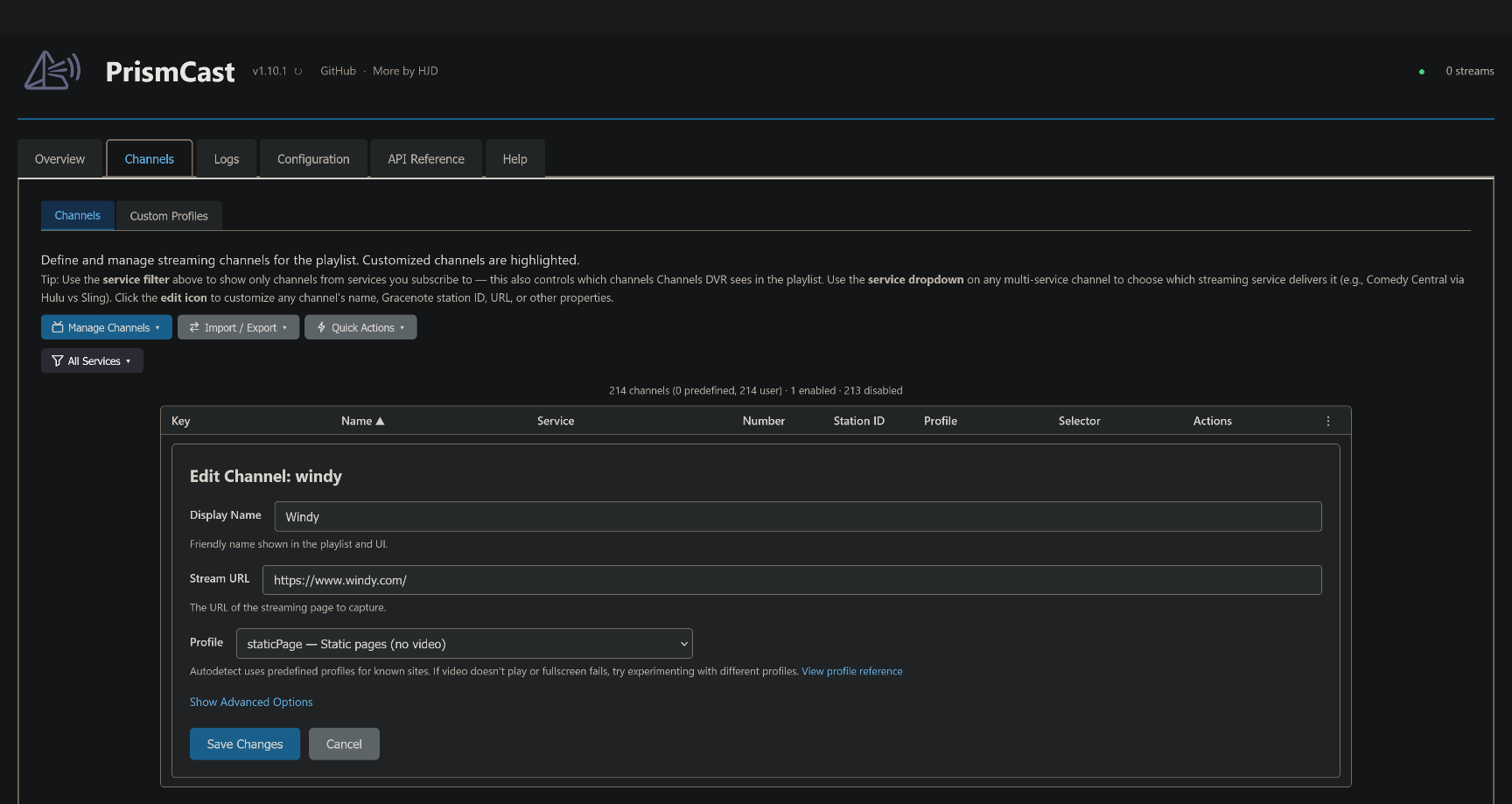
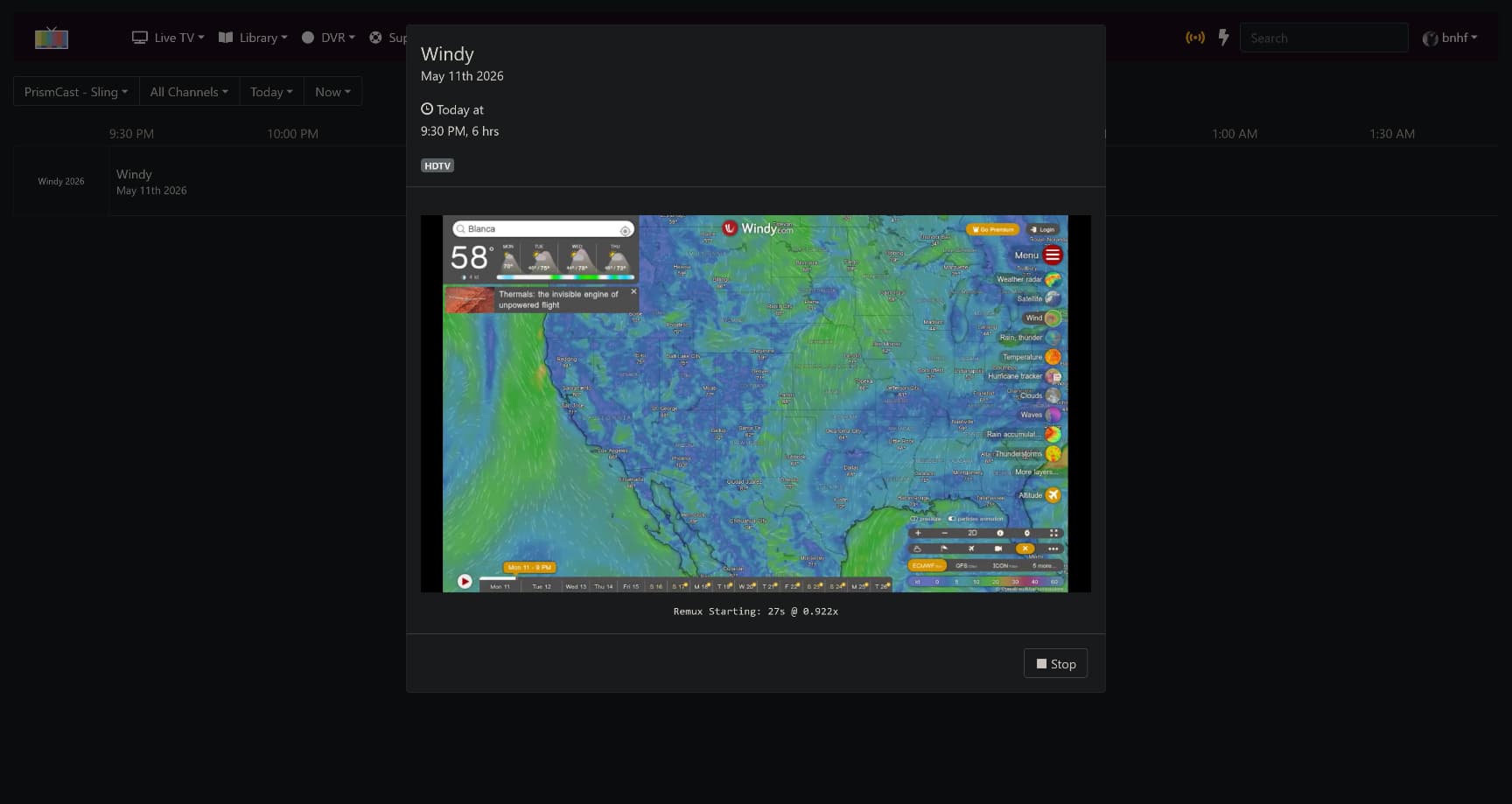
oh I was adding a profile.
Ah, I was confused by the services section at the top of the form. I thought I had to pick one, vs it being helpers.
1 Like
OK boom!
I've got Weatherscan, Windy, and doppler back up and going. Thanks everyone!
3 Likes
I've migrated my system to a new computer, everything is up and running just fine on 1.10.1. only issue is that no matter which service is selected in the dropdown, it is opening up Spectrum in the Chrome window. That's fine if I'm only watching/recording one thing at a time, but if I have multiple things scheduled at the same time, Spectrum gives a too many streams error. For example for National Geographic, it will open the Spectrum link and not the Nat Geo link. I have logged into Nat Geo, so that's not an issue.
EDIT: I want to clarify that doesn't seem to be for all the services as ESPN will open in ESPN.com, but this opens in spectrum

1 Like
It was suggested to me that I should post here with a link to a thread I have regarding PrismCast and HBO Max. This is regarding issues I am having in getting PrismCast to recognize my authentication to HBO Max as well as failing to navigate to the linear channels. Everything worked fine when first setup but when the Mac Mini I have PrismCast installed on was moved from one location to another as a "portable" source for two separate ChannelsDVR servers (identical hardware/image), HBO Max no longer works but yet up to 7 other services work fine.
Any input or assistance would be appreciated. Thanks!
I think the 24/7 channels page for HBO Max has changed with some new feeds like "All the Laughs." The default profile probably needs to be updated.
If you need a quick fix, I would use the individual channels' URLs, such as https://play.hbomax.com/channel/watch/a903ca8a-6d5e-559b-a027-f82997397694/452e5d78-1cca-59a9-8508-21b25d813874 (HBO)