Introducing PrismCast: Browser-based Live TV Capture for Channels DVR and Plex

Can you point me in the right direction for matching Sling channels in the grid guide. Can I use the callsign, or should I be looking for something else? I'm only subscribed to about a dozen premium movie channels...

If you go to the Channels tab in PrismCast and add a user-defined channel and click on the link for profile reference you'll see a good explanation for every profile type and how to figure out what the channel selector should be. For Sling:

slingLive (channel name)

Inspect a channel entry in the guide → find the data-testid attribute starting with channel- → use the portion after that prefix. The name may differ from the logo shown (e.g., "FOX Sports 1" not "FS1"). For local affiliates (ABC, CBS, FOX, NBC), use the network name — PrismCast resolves the local station automatically.

v1.3.1 - In this build all channels appear in the m3u and brought into channels dvr from prismcast -- including all disabled channels.

v1.3.1 - In this build all channels appear in the m3u and brought into channels dvr from prismcast -- including all disabled channels.

I can't reproduce this. Disabled channels show up as disabled in Channels and reappear when enabled when I try. Can you give me a reproducible set of steps so I can see if I can recreate the behavior? Not to ask the obvious...but did you have Channels reload the playlist after enabling/disabling?

I just tried this, and both FS1 and FS2 worked for me both as custom channels (with FS1 and FS2 as "Channel Selectors", respectively) and using the default (preferred). You might try deleting the custom channel your using (that requires a "Channel Selector"), and just use the standard Fox as the source.

I've had this same situation in the earlier versions as well. I stopped trying to disable any channels in prismcast, because they would always come back. I've just disabled all the channels I don't receive in Channels DVR settings instead.

Color me impressed! Everything I've tried so far has worked brilliantly. This is really shaping up to be an amazing tool.

2 Likes

If you curl the playlist, are you seeing a different set of channels than what's showing as enabled in the WebUI?

@hjd,

Great project!

One question, when adding a channel, is there a way to specify the epg source (not a Gracenote entry)? I can add the FruitDeeplink lanes and they play fine, but to get any guide data, I have to add it's xml file in the Custom Channels settings. Doing this kills the guide data for the predefined channels.

Does this make sense?


1h

Color me impressed! Everything I've tried so far has worked brilliantly. This is really shaping up to be an amazing tool.

Glad to hear it. I gave it a good beating from a robustness perspective...enjoy!

Great project!

Glad you're enjoying it.

One question, when adding a channel, is there a way to specify the epg source (not a Gracenote entry)? I can add the FruitDeeplink lanes and they play fine, but to get any guide data, I have to add its xml file in the Custom Channels settings. Doing this kills the guide data for the predefined channels.

Thanks for raising this — I think the friction here comes from how Channels handles guide data versus what PrismCast provides.

PrismCast’s role is to generate and serve the M3U playlist to Channels DVR and to provide access to those channels through the providers that it understands, and provide a way to extend it to new ones.. For most predefined channels, that includes a Gracenote station ID (with the exception of local affiliates, since those vary by region). For user-defined channels, you can assign a Gracenote station ID, leave it blank, or override the ID on any predefined channel.

PrismCast itself doesn’t provide or host EPG data. Guide data is entirely handled by Channels DVR based on the station IDs it receives.

At this point, I have no plans for PrismCast to act as its own EPG provider. PrismCast is a focused effort with a clear mission - tune most TVE/useful sources, most of the time, as easily and reliably as I can make it.

Understood and thanks for the explanation. Once again, great project!

I'm doing clean installs of prismcast and channels dvr when i test. All docker based. Disabled channels in prismcast are in the m3u. I can open the m3u in a m3u player and all channels are there. in the prior release, only the enabled were delivered by the prismcast m3u.

I was getting screenshots to post but now, when I go to prismcast, none of the channels are disabled. All of them are enabled. I know the channels I do not received were disabled. I rebooted the container, it may not have loaded the config correctly. I'll test more but state seems off.

1 Like

3 posts were merged into an existing topic: FruitDeepLinks — Universal Sports Aggregator for Channels DVR

A post was merged into an existing topic: FruitDeepLinks — Universal Sports Aggregator for Channels DVR

I'm doing clean installs of prismcast and channels dvr when i test. All docker based. Disabled channels in prismcast are in the m3u. I can open the m3u in a m3u player and all channels are there. in the prior release, only the enabled were delivered by the prismcast m3u.

I was getting screenshots to post but now, when I go to prismcast, none of the channels are disabled. All of them are enabled. I know the channels I do not received were disabled. I rebooted the container, it may not have loaded the config correctly. I'll test more but state seems off.

Thanks for the details. Based on what you’ve described, this doesn’t appear to be an issue within PrismCast itself.

If you’re doing clean installs between attempts, that would reset your configuration back to defaults each time. That makes it difficult to determine whether the behavior is related to a specific setting or prior state.

You can export and import both your channel list and configuration to preserve your setup between iterations.

If you’re able to provide a clear, reproducible set of steps that consistently triggers the issue, I’ll be better able to investigate further. Screenshots aren't really going to help based on what you described I don't think, but if you think they'll help, go for it.

Edit: and just like that...went scouring and found a bug that can lead to this issue manifesting. Will address it in the next release. Thanks for raising it! For posterity, here's how to recreate the bug, as I discovered it:

  1. Disable a predefined channel → configuration will save correctly.
  2. Change any setting on the Settings or Advanced tab → disabled/enabled channels configuration gets blown away.
  3. Restart PrismCast → you see all channels re-enabled.

Setup & Initial Configuration

  1. Clean Docker Install: Performed a complete removal of all previous PrismCast assets, including images, containers, and volumes, followed by a fresh installation.
  2. Channel Configuration: Enabled and logged into exactly 8 specific channels within the PrismCast interface.
  3. DVR Environment: Set up a new container for Channels DVR and ensured it was updated to the latest version.
  4. Source Integration: Added the PrismCast M3U as a custom channel source in Channels DVR.

Observed Results (Pre-Reboot Issue)

  • Channels DVR: Instead of the 8 selected channels, the entire channel list from PrismCast appeared in the Channels DVR guide.

  • External M3U Player: When pointing a M3U player directly to the PrismCast URL, all channels were visible, confirming that the output was not respecting the "Enabled" filter

  • Observed Behavior: Following a reboot, the setup works correctly, showing only the 8 selected channels in Channels DVR and the M3U player.

  • The Bug: Prior to rebooting the container, Channels DVR displays the entire channel list instead of the filtered selection. This inconsistency suggests a state management bug, as the filtered state is not properly recognized or applied by the external players until a full container restart occurs.

See my prior post above - discovered a path to reproduce the bug. :smile: Will be fixed in the next release. Thanks for doing the legwork here to raise it and reproduce it!
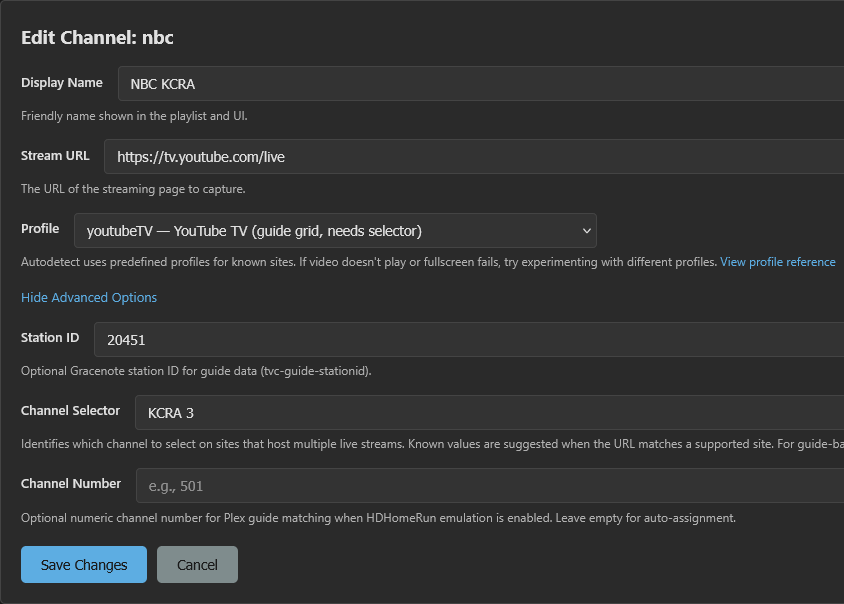
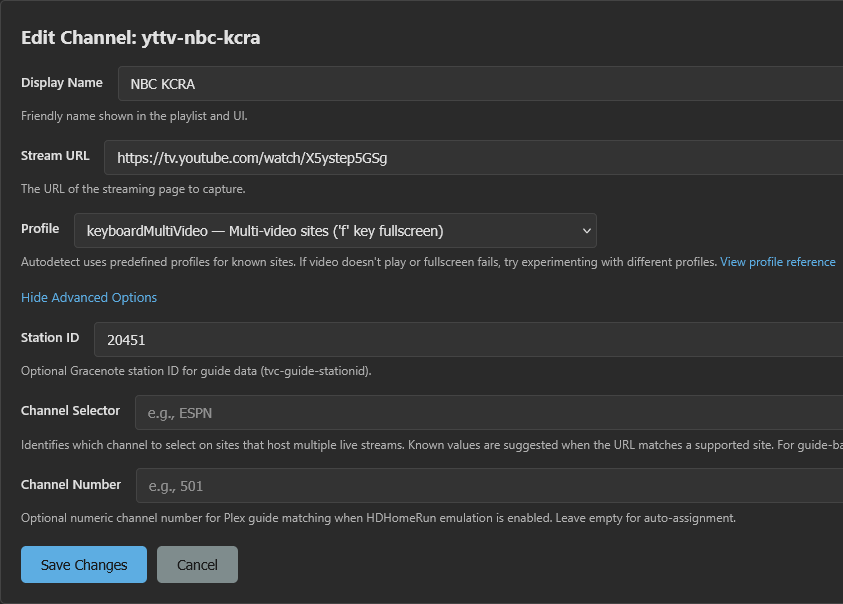
Thanks.
I'm trying v1.3.1 and still can't get it to steam my local NBC at YTTV. Error says it can't find NBC.

[2026/02/14 19:04:24.055] [WARN] [nbc-uru8qy] Channel "NBC" not found in YouTube TV guide. Create a user-defined channel with one of the names below as the Channel Selector and https://tv.youtube.com/live as the URL. Available channels (uncovered (224 of 283)): ... KCRA 3, ...
[2026/02/14 19:04:24.055] [ERROR] [nbc-uru8qy] Stream setup failed for https://tv.youtube.com/live: Channel selection failed: Channel "NBC" not found in YouTube TV guide.
[2026/02/14 19:04:24.056] GET /hls/nbc/stream.m3u8 from 192.168.1.8 responded 500 in 2004.129 ms.

So I created a new channel and tried the selector "KCRA 3" (how it's labeled)
and "KCRA" using both automatic and youtubeTV profiles, I see the yttv site come up twice in chrome and then the tab closes.


Still the same error being logged

[2026/02/14 19:35:41.868] [WARN] [nbc-gsotke] Channel "NBC" not found in YouTube TV guide. Create a user-defined channel with one of the names below as the Channel Selector and https://tv.youtube.com/live as the URL. Available channels (uncovered (224 of 283)): list of channels here.
[2026/02/14 19:35:41.868] [ERROR] [nbc-gsotke] Stream setup failed for https://tv.youtube.com/live: Channel selection failed: Channel "NBC" not found in YouTube TV guide.
[2026/02/14 19:35:41.868] GET /hls/nbc/stream.m3u8 from 192.168.1.8 responded 500 in 2166.164 ms.

I think I'll follow @bnhf lead of using the yttv deep links for now as it seems to work much better.

Thank you, with the latest version this fixes the issue. If you could please let @hjd know that I have acknowledged my issues and I hope he can unblock me (he's ignored all my comments here lately, it's pretty obvious). This code and the channels configuration has improved by leaps and bounds over the original, I really appreciate all the effort that y'all have done. Thanks.

FYI I've noticed much speedier tuning of grid channels like USA with this 1.3.1 update. All of the direct channels on Windows worked great, the only issue I've had is with the grid channels. But that's apparently resolved now.

Thanks.
I'm trying v1.3.1 and still can't get it to steam my local NBC at YTTV. Error says it can't find NBC.

[2026/02/14 19:04:24.055] [WARN] [nbc-uru8qy] Channel "NBC" not found in YouTube TV guide. Create a user-defined channel with one of the names below as the Channel Selector and https://tv.youtube.com/live as the URL. Available channels (uncovered (224 of 283)): ... KCRA 3, ...
[2026/02/14 19:04:24.055] [ERROR] [nbc-uru8qy] Stream setup failed for https://tv.youtube.com/live: Channel selection failed: Channel "NBC" not found in YouTube TV guide.
[2026/02/14 19:04:24.056] GET /hls/nbc/stream.m3u8 from 192.168.1.8 responded 500 in 2004.129 ms.

So I created a new channel and tried the selector "KCRA 3" (how it's labeled)
and "KCRA" using both automatic and youtubeTV profiles, I see the yttv site come up twice in chrome and then the tab closes.

All that is correct...but...

Still the same error being logged

[2026/02/14 19:35:41.868] [WARN] [nbc-gsotke] Channel "NBC" not found in YouTube TV guide. Create a user-defined channel with one of the names below as the Channel Selector and https://tv.youtube.com/live as the URL. Available channels (uncovered (224 of 283)): list of channels here.
[2026/02/14 19:35:41.868] [ERROR] [nbc-gsotke] Stream setup failed for https://tv.youtube.com/live: Channel selection failed: Channel "NBC" not found in YouTube TV guide.
[2026/02/14 19:35:41.868] GET /hls/nbc/stream.m3u8 from 192.168.1.8 responded 500 in 2166.164 ms.

The "NBC" is the tell...can you confirm that you set the channel to use your custom channel instead of the predefined one in the dropdown? The log message indicates you're hitting the predefined channel, not the override you created. Mind checking and reporting back?

I think I'll follow @bnhf lead of using the yttv deep links for now as it seems to work much better.

Totally your call. If you’re thinking about the medium- to long-term direction with PrismCast, though, I’d still recommend sticking with the provider approach PrismCast is built around. Going a different route will likely create breakage as PrismCast evolves.

That said, I do move pretty quickly with deprecations and new features and don’t keep older approaches around for long — but PrismCast is designed with flexibility in mind, so there’s more than one way to make it work.