
Yes, Let me try this. I have an IMAC M3.
Working fine on my M4 Mac Mini (base model)
Just asking for opinions ..... Im running on n I5-8500 with 48gb Ram and 500gb ssd also using the built in intel hd630 graphics card
If i added a 4gb dedicated graphics card say a rx550 Low profile card (using SFF case) would i see any solid bump in the channel loading time ?? I'm around 10 seconds now So im asking since im running natively in Windows via Node,exe etc so I have full gpu services available to Chrome
Just wondering thats all
PrsimCast looks great, will be installing and testing soon. I thought others here might be interested in this idea for a channel to integrate:
A bit of an update to those of you interested in iGPU-based hardware acceleration for the Docker version of PrismCast.
First, thanks to @ajvolin for his efforts, which brought an old path of exploration back into view. Drilling down on a somewhat complicated container image (produced by the folks at linuxserver.io -- which is what @ajvolin's test/dev image is based on), it turns out enhancements to their custom version of Xvfb is what's behind all this.
This is great news, as we can take our existing container with some additional drivers added, and use this customized version of Xvfb. I've done this, and have completed some basic testing -- but I'm feeling the need for a limited "alpha" on this before we make a more general "beta" available.
So, if you're willing and able to test a PrismCast container with Intel-based GPU acceleration, respond here or PM me, and I'll send you the Docker Compose to use. Keep in mind, this really only applies to people with Linux-derivative hosts. If you're on MacOS or Windows, and want GPU hardware acceleration, install PrismCast natively.
I'd prefer Portainer users, and you'll definitely need to be able to provide before and after comparisons of system resource usage. Also, you'll need to be able/willing to install intel-gpu-tools on your host computer, in order to capture intel_gpu_top results.
3 Likes
Is there any way to get a listing of the channels that are currently enabled, showing the same information that appears on the Channels tab?
I can copy/paste the info from the browser page, but that doesn't copy Provider if there's a dropdown for a channel.
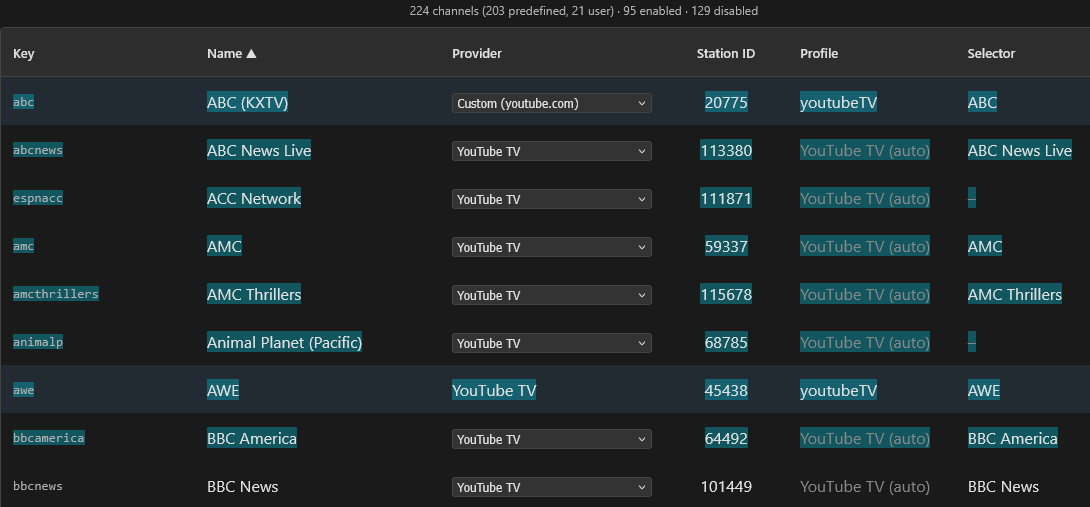
I looked at the /channels API json, but it's showing the wrong url for some of my channels.
example
"enabled": true,
"key": "amc",
"name": "AMC",
"source": "predefined",
"url": "https://watch.sling.com/dashboard/grid_guide/grid_guide_a_z",
"channelSelector": "AMC",
"stationId": "59337"
Those showing enabled with the wrong url don't appear in the /config/channels/export API
  "abc": {
    "name": "ABC (KXTV)",
    "url": "https://tv.youtube.com/live",
    "channelSelector": "ABC",
    "profile": "youtubeTV",
    "stationId": "20775"
  },
  "awe": {
    "name": "AWE",
    "url": "https://tv.youtube.com/live",
    "profile": "youtubeTV",
    "stationId": "45438",
    "channelSelector": "AWE"
  },
  "cbs": {
    "name": "CBS (KOVR)",
    "url": "https://tv.youtube.com/live",
    "channelSelector": "CBS",
    "stationId": "21214"
  },
I have to say I’ve not been able to reproduce the error in the last couple of days, not even after reboots. Maybe it was fixed in the latest update?
I'd be interested in testing to see if it perhaps resolves the stuttering I was experiencing. I've been using Portainer on Unraid for your other projects, so I'd be happy to test in that environment. And I also have QuickSync working in other containers, so it shouldn't be an issue for my case.
I would be able to test Prismcast with Intel GPU acceleration - I already have other dockers working in Unraid with the Intel GPU and intel_gpu_top is already installed
Doubtful. But there will be some additional resiliency in a future release that tries to catch edge cases like yours where the connection is a bit slower than what PrismCast typically waits for.
Is this supposed to be displaying only current streams?
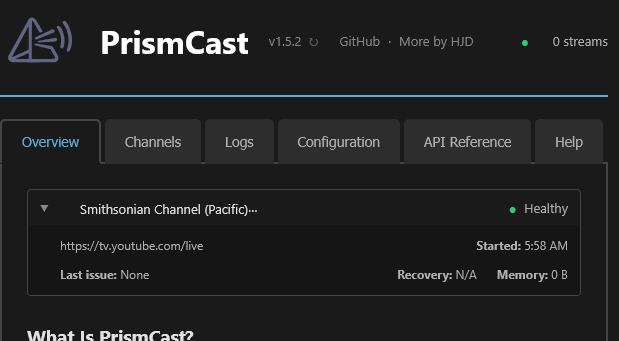
Reason I'm asking is that stream ended over an hour ago. Even refreshed the browser page.
[2026/03/06 05:59:02.710] [smithsonianp-0o96it] Streaming Smithsonian Channel (Pacific) (youtubeTV, FFmpeg). Tuned in 2.7s (direct).
[2026/03/06 13:01:44.209] [smithsonianp-0o96it] Stream ended after 7h 2m.
[2026/03/06 13:06:54.089] Restarting browser for scheduled maintenance (uptime: 9h 31m).
[2026/03/06 13:06:54.770] Chrome ready: Chrome/145.0.7632.160.
[2026/03/06 13:06:54.975] Browser restart complete. Fresh instance is ready.
[2026/03/06 13:06:59.771] Starting channel lineup precaching for 1 provider.
[2026/03/06 13:07:03.430] Precached YouTube TV: 139 channels (3.7s).
[2026/03/06 13:07:03.711] Channel lineup precaching complete: 1 provider cached in 3.9s.
And tried another browser.
Appreciated. This was super helpful in letting me track down this bug. Will be fixed in the next release. Thanks!
PS: one request - I genuinely have a difficult time understanding some of your posts - the way they're written are hard for me to follow and feel like they jump from point to point. I'd appreciate it if you could simplify it a bit and/or present them in a more organized way, so I can better address them.
1 Like
Thanks.
Point to one and I'll see what I can do to simplify it.
1 Like
If you look at the top right, it shows 0 streams. You might need to clear the cache or similar...but it always only displays active streams. Or should. 
OK, looks the same opening the page in another browser, so I assume it's some PrismCast cache you're talking about?
This one: Introducing PrismCast: Browser-based Live TV Capture for Channels DVR and Plex - #898 by chDVRuser
I spent a few minutes trying to understand it. I got there eventually, but for me to be able to follow along, I need a clear problem statement, (ideally) a way to recreate the issue, and any supporting data/telemetry to go along with it.
Replied on top of replies are hard enough as well...so ideally, they're self-contained and self-referencing.
Nope, now that's on me to see if there's something going on. Stay tuned. Thanks for raising it.
OK.
I thought I was clear in asking
I'm trying to figure out what data I need to backup in order to remove & reinstall or move PrismCast to another directory or device and restore that backed up data so I don't need to reconfigure anything.
I'm trying to figure out what data I need to backup in order to remove & reinstall or move PrismCast to another directory or device and restore that backed up data so I don't need to reconfigure anything.
This is the problem statement.
You need to backup (ideally) the entire contents of the PrismCast data directory, which should be ~/.prismcast on most installations. If it's not there, you can find where it is in the startup logs:
[2026/03/06 14:19:00.702]   Configuration file: /Users/someuser/.prismcast/config.json
[2026/03/06 14:19:00.702]   Chrome profile: /Users/someuser/.prismcast/chromedata
Finally, there are backup/restore options under Configuration|Backup in the webUI. You'll also find a reference to where configuration files are located on that tab. If you don't backup your chormedata directory, you're going to need to re-login when you move across devices as you won't be taking your Chrome profile with you.
Thank You.
Mine (running as a service) is in /System/Volumes/Data/private/var/root/.prismcast/
I'll have to figure out how to backup the .prismcast/chromedata directory owned by root with 700 perms