I see 1920x1080 at 59.94. This is a native HLS stream. Running NPM
Just FYI.

I see 1920x1080 at 59.94. This is a native HLS stream. Running NPM
Just FYI.
Yes, thank you. PrismCast is capturing at 720p and when I check the Youtube capture window it is 720p60.
Thanks, Jim. What hardware are you running on? Is Chrome using hardware acceleration (Quicksync)?
I'll check it next time I restart that system. Just to confirm, with PrismCast already installed and running on this machine, do I just run the service installer per the github instructions when PrismCast isn't already running?
Running it on a cheap BeeLink PC on Win 11. It is not Intel so not getting GPU benefits.
I appreciate the side-by-side comparison approach. Let me walk through what you're seeing:
The short version: You're comparing three fundamentally different signal paths - screen capture (PrismCast via YTTV), a native TVE stream, and a broadcast tuner. They use different container formats, different encoding pipelines, and different delivery mechanisms. The differences you found are inherent to those different paths, not bugs.
PCR and frame rate differences: When PrismCast uses screen capture (e.g. YTTV), Chrome's encoder produces the video. Chrome doesn't guarantee fixed frame timing, which is why you're seeing variable frame rate detection and why I presume comskip struggles with it. The PCR difference is simply a container format difference between screen capture output and native streams. None of this is something PrismCast can change - it's how Chrome's capture pipeline works.
For providers that deliver non-DRM streams, PrismCast's native HLS mode bypasses screen capture entirely and delivers the provider's original stream with proper fixed frame rates. The best way to get CBS is going to be through CBS.com, if it's available to you, since PrismCast can pull it via native streaming.
The comskip issue: Out of scope for any support I provide...so you're on your own here.
Bottom line: Screen capture will always look different from a native stream or a broadcast tuner in a metadata comparison. That's expected. The question that matters is: does the video look good when you watch it? If the answer is yes, the metadata differences are academic.
What's your source and provider? In other words is it CBS on YTTV, etc.
I can't recall a channel that I got 60 FPS at 1080p on, but I'm sure it's possible If you have the right source and provider.
Thanks. I'm already getting all my available TVE streams from Channels DVR TVE.
I was just using CBS as an example because I can get it three different ways.
Thanks for acknowledging that. I'll move on.
I wasn't reporting a comskip issue. I was just pointing out that its use of ffmpeg in reading every frame was showing timestamp and framerate variations in the TS stream.
Fox One …. YTTV is the provider.
This is a fantastic project - thank you for all of your work on this. I was able to get my Hulu Live channels working perfectly, but I also subscribe to FanDuel on Fubo and have had trouble getting it to work setting up a custom Provider. I trialed and errored with different settings for hours, with no luck. Has anyone had any success setting up channels with Fubo?
In that case it's Yttv that's delivering 1080p at 60, Fox is natively 720p at 60.
For all the channels that I've seen upscaled in Chrome, I never get more than 30 FPS. And when I've streamed NBC, golf channel, etc which are natively 1080 they're also 30.
if you copy it into AI, it will correct it. It has a / thing if I remember correctly. I just dropped it into Chat...
Streaming Fox (foxLive, native HLS). Tuned in 3.4s (direct). It shows 720 at 59.94
OTA is 720 at 59.94
Fox Business (foxLive, native HLS). Tuned in 5.5s.it shows 1080 at 59.94
Fox News Streaming Fox (foxLive, native HLS). Tuned in 3.4s (direct) 1080 at 59.94
I assume the Fox One feeds are directly from their encoders at their native resolution.
I had to make a configuration change for CBS:
Navigation Timeout —30 seconds
↻
Timeout for page navigation. Increase for slow networks or heavy pages.
Default: 10 seconds
It was taking 20+ seconds to compete setup. Was hoping it was HLS…but no.
Thanks for great code!
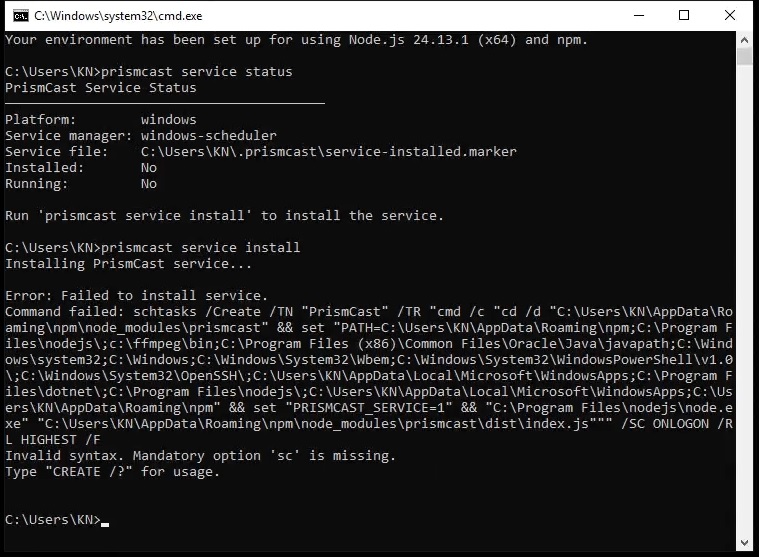
The developer needs to update it to use different quote marks or escape double quotes.
    ==> Spaces in file paths can be used by using two sets of quotes, one
        set for CMD.EXE and one for SchTasks.exe.  The outer quotes for CMD
        need to be double quotes("); the inner quotes can be single quotes(') or
        escaped double quotes(\"):
        SCHTASKS /Create
           /tr "'c:\program files\internet explorer\iexplorer.exe'
           \"c:\log data\today.xml\"" ...
Refer to Windows schtasks /Create /?
I can't get FS1 and 2 to stream at all now, channels reports connection to tuner lost.
Here's the prism log:
[2026/03/17 18:33:12.139] [WARN] [fs1-j6av1t] Window resize failed after 3 attempts: expected 1934×1225, got 1935×1226.
[2026/03/17 18:33:14.404] [fs1-j6av1t] Streaming FS1 (fullscreenApi, native HLS). Tuned in 7.4s (direct).
[2026/03/17 18:33:51.110] [fs1-j6av1t] Stream ended after 44s.
[2026/03/17 18:33:53.555] [WARN] [fs2-u40tmj] Attempt 1 failed for page navigation for https://www.foxsports.com/live/fs2: Operation timed out after 20000ms
[2026/03/17 18:33:59.276] [WARN] [fs2-u40tmj] Window resize failed after 3 attempts: expected 1934×1225, got 1935×1226.
[2026/03/17 18:34:00.066] [fs2-u40tmj] Streaming FS2 (fullscreenApi, native HLS). Tuned in 26.7s (direct).
[2026/03/17 18:34:41.123] [fs2-u40tmj] Stream ended after 1m 8s
Here's the channels log:
2026/03/17 18:33:16.041686 [TNR] Opened connection to M3U-Prismcast for ch7078 FS1
2026/03/17 18:33:19.042905 [SNR] Rewriter statistics for 192.168.4.35 (Apple TV) for ch7078 FS1: discontinuity_detected=0 transport_errors=0 saw_pcr=false saw_pmt=true highest_pts=6.228656
2026/03/17 18:33:19.042905 [SNR] Buffer statistics for 192.168.4.35 (Apple TV) for ch7078 FS1: buf=0% drop=0%
2026/03/17 18:33:19.043571 [SNR] Streaming statistics for 192.168.4.35 (Apple TV) for ch7078 FS1: timeouts=0 segment_timeouts=0 playlist_timeouts=0
2026/03/17 18:33:19.043571 [TNR] Closed connection to M3U-Prismcast for ch7078 FS1
**2026/03/17 18:33:19.043571 [TNR] Retrying live stream for ch7078 FS1: Transcoder Reset: Playlist skipped to a higher sequence (3 -> 14):** http://localhost:5589/hls/fs1/stream.m3u8
2026/03/17 18:33:19.047912 [TNR] Opened connection to M3U-Prismcast for ch7078 FS1
2026/03/17 18:33:19.563102 [SNR] Buffer statistics for 192.168.4.35 (Apple TV) for ch7078 FS1: buf=0% drop=0%
2026/03/17 18:33:19.563102 [SNR] Streaming statistics for 192.168.4.35 (Apple TV) for ch7078 FS1: timeouts=0 segment_timeouts=0 playlist_timeouts=0
2026/03/17 18:33:19.563616 [TNR] Closed connection to M3U-Prismcast for ch7078 FS1
**2026/03/17 18:33:19.563616 [TNR] Error during live stream for ch7078 FS1: mp4 to mpegts converter: decode box at position 1254: decode B�% pos 1254: read box body length 1700076 does not match expected length 1195381001**
2026/03/17 18:33:42.322681 [TNR] Opened connection to M3U-Prismcast for ch7079 FS2
2026/03/17 18:34:01.327814 [SNR] Rewriter statistics for 192.168.4.35 (Apple TV) for ch7079 FS2: discontinuity_detected=0 transport_errors=0 saw_pcr=false saw_pmt=true highest_pts=22.228656
2026/03/17 18:34:01.327814 [SNR] Buffer statistics for 192.168.4.35 (Apple TV) for ch7079 FS2: buf=0% drop=0%
2026/03/17 18:34:01.327814 [SNR] Streaming statistics for 192.168.4.35 (Apple TV) for ch7079 FS2: timeouts=0 segment_timeouts=0 playlist_timeouts=0
2026/03/17 18:34:01.328336 [TNR] Closed connection to M3U-Prismcast for ch7079 FS2
2026/03/17 18:34:01.328336 [TNR] Retrying live stream for ch7079 FS2: Transcoder Reset: Playlist skipped to a higher sequence (11 -> 13): http://localhost:5589/hls/fs2/stream.m3u8
2026/03/17 18:34:01.342245 [TNR] Opened connection to M3U-Prismcast for ch7079 FS2
2026/03/17 18:34:01.850941 [SNR] Buffer statistics for 192.168.4.35 (Apple TV) for ch7079 FS2: buf=0% drop=0%
2026/03/17 18:34:01.850941 [SNR] Streaming statistics for 192.168.4.35 (Apple TV) for ch7079 FS2: timeouts=0 segment_timeouts=0 playlist_timeouts=0
2026/03/17 18:34:01.851472 [TNR] Closed connection to M3U-Prismcast for ch7079 FS2
2026/03/17 18:34:01.851472 [TNR] Error during live stream for ch7079 FS2: mp4 to mpegts converter: decode box at position 1254: decode B�% pos 1254: read box body length 439912 does not match expected length 1195381001
Looks like something's broken in the HLS streaming?
Both of these used to work before 1.6.0.
Both work fine…
PrismCast log:
2026/03/17 18:58:13.905] [fs1-26luju] Streaming FS1 (foxLive, native HLS). Tuned in 6.1s.
CDVR LOG:
2026/03/17 18:58:20.635593 [TNR] Opened connection to M3U-Prism for ch60051 FS1
2026/03/17 18:58:20.635593 [HLS] Starting live stream for channel 60051 from 192.168.1.15
2026/03/17 18:58:21.200731 [HLS] Session ch60051-dANY-ip192.168.1.15 started in 565.1382ms
2026/03/17 18:58:21.295395 [HLS] Probed live stream in 658.3948ms: h264 1920x1080 progressive 3886968bps
Check PrismCast and verify you are logged in.
Try a configuration change with PrismCast:
Under advanced:
Iframe Init Delay 5seconds
↻
Delay for iframe content to initialize before searching for video elements.
Default: 1.5 seconds
Navigation Timeout 30 seconds
↻
Timeout for page navigation. Increase for slow networks or heavy pages.
Default: 10 seconds
Looks like bumping up the iFrame timer might have helped, might not have because the logs show that prism is getting the stream directly from Fox for FS1 and 2. That stream is 720p/60 so I don't know what Chrome would provide.