I was able to get my local ABC to work after I noticed a time discrepancy on the abc website via noVNC.
try adding your time zone as an enviromental varaiable it worked for me:
environment:
  - TZ=America/New_York
I was able to get my local ABC to work after I noticed a time discrepancy on the abc website via noVNC.
try adding your time zone as an enviromental varaiable it worked for me:
environment:
- TZ=America/New_YorkMay work for you running it in a docker container, but he's running it native on a Mac Mini
Worked for me! Thank you!
I have the same issue. I haven’t tried multiview, but if I try to change between channels that are both set up with DirecTV as the source, it takes a few attempts (pressing play again after initial failure) to tune the new channel.
Thankfully that isn’t something I do very often.
Good morning. Is there a way to get around the Pkill error when installing via NPM on a Windows PC?
This will be comprehensively addressed in the next release of PrismCast. Stay tuned.
When using DirecTV Stream as the provider for channels, only one such channel may be tuned at a time. If I try to view multiple DirecTV Stream channels at the same time (in my case on multiview, but probably on separate devices and recording as well), the second channel refuses to tune, with DirecTV giving an error that only one tab can stream at the same time. Is there any way around this aside from using a different provider for the channel? The DirecTV Stream provider option seems to have the best quality/framerate for many channels, and has less issues aside from this one…
This isn't a PrismCast constraint. It's DirecTV not letting you stream more than one channel at a time, I'm afraid. Depending on your package, there are constraints and it enforces them.
The documentation suggests I just have to log in once for the channel-based sources to work (and the login indicator on the channels page makes it look like this is the case by appearing on all channels after authenticating one). However, I find I have to log in at least for each channel group (ESPN, FOX, etc). Is there something I’m doing wrong here, or is DirecTV Stream different from most providers?
You're not doing anything wrong — this is expected behavior for the setup you're using, and it's not specific to DirecTV Stream.
It sounds like you're using the canonical channel entries (espn, fox, nbc, etc.), which route to each network's own website (espn.com, fox.com, nbc.com). Each of those sites manages its own TV provider authentication independently - even though you're selecting DirecTV as your provider on each one, ESPN.com doesn't know you already authenticated on Fox.com. So yes, you need to log in once per network site. This is the same for any TV provider, not just DirecTV.
The login indicator turning green for all channels after one login is misleading in this case - I'll look at improving that. It's tracking at the provider level, and canonical channels share a generic tag, so one success lights them all up even though the underlying site sessions are separate. It's still early days for PrismCast. 
The good news: there's a better approach for DirecTV Stream subscribers. PrismCast has DirecTV Stream-specific channel variants that all route through directv.com. Since they all use the same domain, you truly only need to log in once. You can either:
The ABC channel using the ABC source shows ABC News Live, not my local ABC affiliate. Is this link incorrect, or does it only work with owned and operated ABC channels?
Your mileage is going to vary. You can look at the history of this thread...ABC is flaky for locals, it may work for you, it may not. Unfortunately there's not much more I can do there.
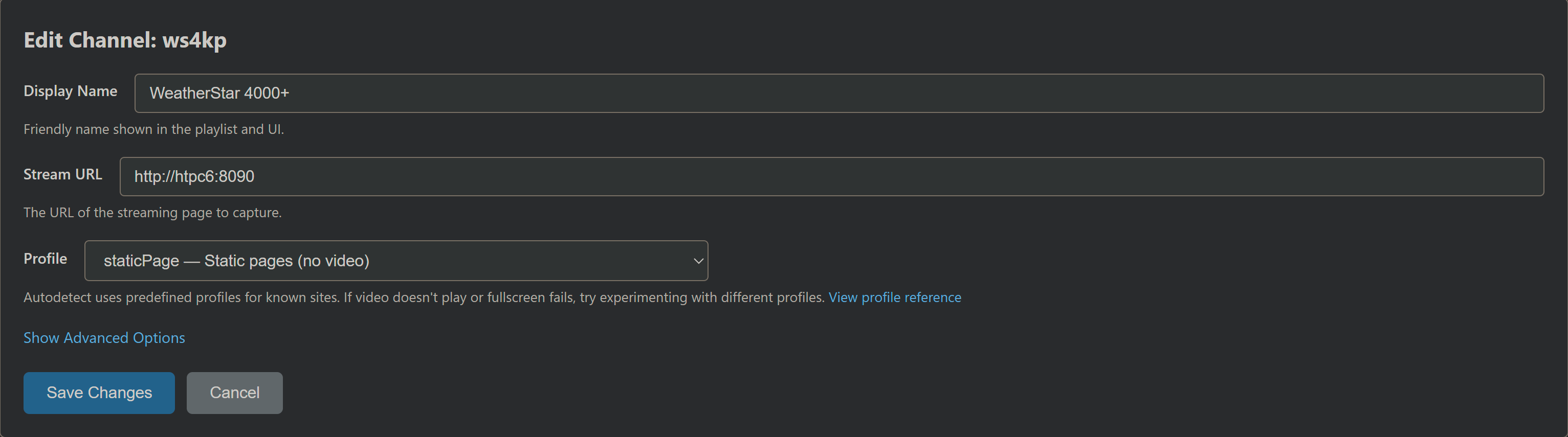
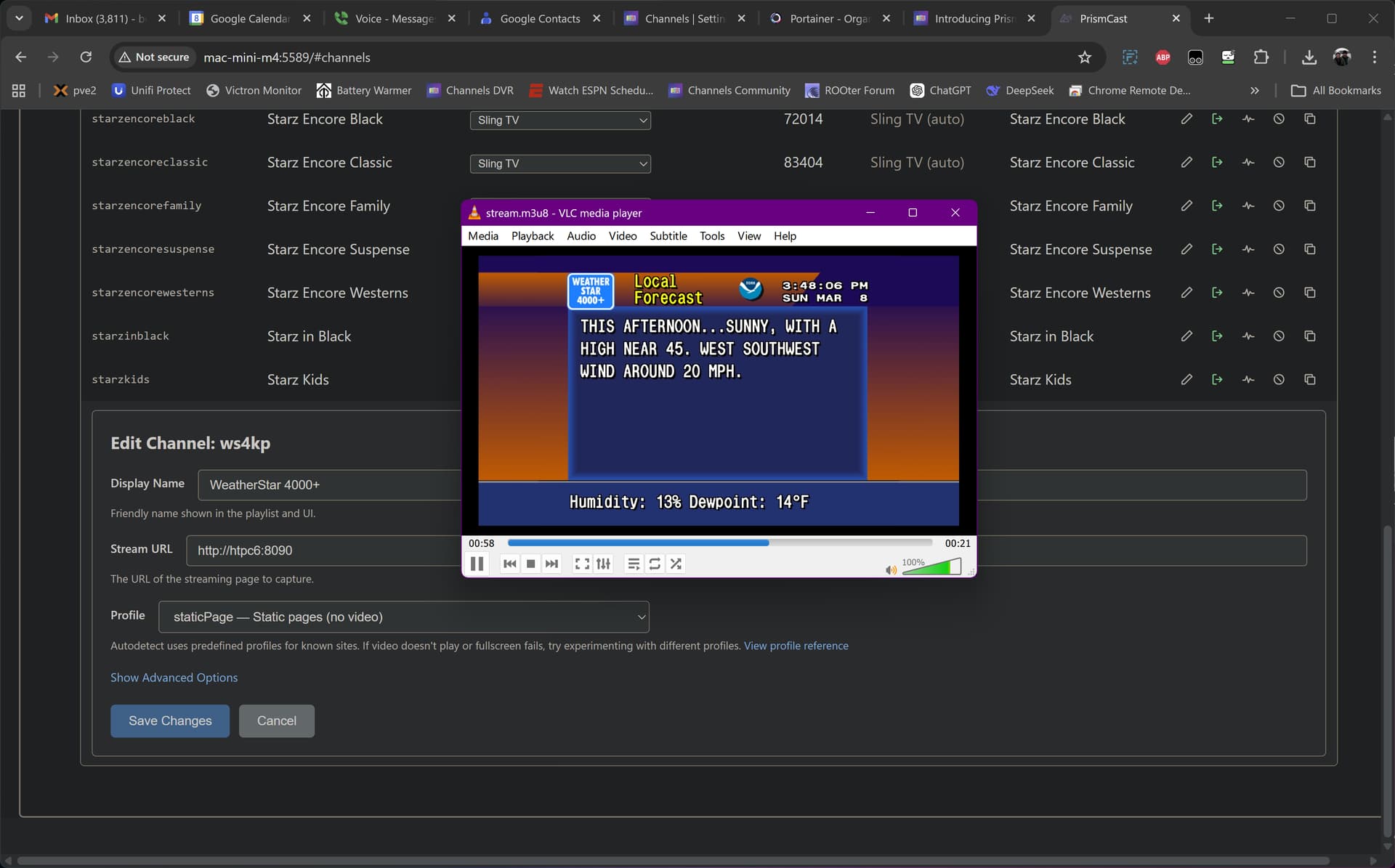
Has anyone been able to stream WeatherStar 4000 with PrismCast. I’ve been using CC4C. My goal is to move all over to PrismCast which has a better interface.
Thanks
Good to know, thanks. I'll adjust my sources.
And thanks for Prismcast! It's been a godsend since I managed to irreparably break my CC4C installation when trying to fix a full screen issue several months ago.
Where are you setting the time zone environment variable?
I am using Docker desktop for windows and added the environmental variable via portainer's docker compose for PrismCast.
When using novnc the abc site program schedule time was off several hours late showing what appeared to be GMT time... and would not load my local 6ABC before I made the change? I hope that helps
I added it to my compose file:
services:
prismcast:
image: ghcr.io/hjdhjd/prismcast:${TAG:-latest}
container_name: prismcast
hostname: prismcast
dns_search: ${DOMAIN:-localdomain}
shm_size: '1gb'
ports:
- ${HOST_PORT:-5589}:5589
- ${HOST_VNC_PORT:-5900}:5900
- ${HOST_NOVNC_PORT:-6080}:6080
- ${HOST_HDHR_PORT:-5004}:5004
environment:
- DISPLAY_NUM=${DISPLAY_NUM:-99}
- SCREEN_WIDTH=${SCREEN_WIDTH:-1920}
- SCREEN_HEIGHT=${SCREEN_HEIGHT:-1080}
- SCREEN_DEPTH=${SCREEN_DEPTH:-24}
- TZ=America/New_York
healthcheck:
test: ["CMD", "wget", "-q", "--spider", "http://localhost:5589/health"]
interval: 30s
timeout: 10s
retries: 3
start_period: 30s
volumes:
- /mnt/user/appdata/prismcast:/root/.prismcast
devices:
- "/dev/dri:/dev/dri"
restart: unless-stopped
Thanks, I figured it was docker specific, don't think that's an option for running native on Windows.
Pretty much the same as doing it with cc4c.
PrismCast custom channel:
Then the "login" step is basically just to tell ws4kp where you are:
&settings-kiosk-checkbox=true from the redirect URL to expose settingsFrom that point, whenever you stream that channel, it'll show the weather for the location you set.
Moments after setting it up  :
:
Just in case you didn't use Project One-Click to set up your ws4kp stack, it should look like this:
services:
  weatherstar4k:
    # 2025.09.06
    # GitHub home for this project with setup instructions: https://github.com/netbymatt/ws4kp
    # Docker container home for this project: https://ghcr.io/netbymatt/ws4kp
    image: ghcr.io/netbymatt/ws4kp:${TAG}
    container_name: weatherstar4k
    hostname: weatherstar4k
    ports:
      - ${HOST_PORT}:8080
    environment:
      - WSQS_settings-wide-checkbox=${WIDE:-true}
      - WSQS_settings-kiosk-checkbox=${KIOSK:-true}
      - TZ=${TZ}
    restart: unless-stopped
Sample env var overrides:
TAG=latest
HOST_PORT=8090
TZ=US/Mountain
just saying thanks in advance as we know this was clearly labeled as MAC 1st etc etc...so the fact you are taking a shot at fixing up us windows users gets u a much deserved thankyou
I for 1 prefer the running native mode as Ive seen a definite bump in overall smoothness etc vs Docker also updates are easier in my limited dock experience.
Added this and it appears in PrismCast as added. I can hit the authenticate icon and it launches in Chrome as expected. It doesn’t show up as a channel in CDVR. I added Wearherscan and it worked as expected. Otherwise PrismCast rocks!
Agree, very happy that Windows changes are being supported. I think this is a great product and I applaud the developer for supporting this.
@hjd awesome work! I DM'd you about using my Xfinity login if you'd like to setup that provider.
@dravenst love the work you're doing on CH4C. I wonder if there is a way to integrate some of what PrismCast seems to handle very nicely - Chrome gymnastics, login handling, and channel management UI.
Or alternatively, PrismCast could integrate a "External Encoder" flag. That would basically mean having PrismCast do all its Chrome navigation magic but returning the URL of a connected LinkPi encoder stream instead of the local HLS. And leaving the Chrome browser full screen and visible, instead of minimizing.
Did some digging. If left in automatic, it appears in Channels but throws a transcoder error and won’t play. If you edit to “static” it plays until the channel disappears from PrismCast and Channels. It will stay in Channels for several hours after doing the edit.
Hope this is helpful.
@dravenst love the work you're doing on CH4C . I wonder if there is a way to integrate some of what PrismCast seems to handle very nicely - Chrome gymnastics, login handling, and channel management UI.
Thanks @Parkside, interesting ideas. In CH4C, I recently added a login manager, UI for managing channels, and more instant recording capabilities. Your original idea to use the external encoder for this was great and I'm still able to run both CH4C and Channels DVR together on a low power Celeron PC.
I haven't had a chance to try PrismCast yet, but it looks impressive!