Project One-Click: All-in-One Installations of Docker Extensions and CDVR Custom Channels

I understand your frustration, but among the issues that come up on this forum, functional problems with Portainer are very rare. It's a solid piece of software, and once you get things on track, I think you'll find it a pleasure to use.

Obviously up to you though...

1 Like

I would like to keep moving, but the update just removed Portainer from my Docker completely. Then, I tried the olivetin and portainer install instructions on terminal and get zsh: command not found. It must be a user error but I'm copying everything exactly and entering the correct IP address

OK, some success. I've got portainer back by following the steps on the EZ start plus add portainer setting but then get stuck at Create an Olivetin stack in Portainer and get the following error:

JSON response from http://192.168.150.242:9000/api/stacks/create/standalone/string?endpointId=:{"message":"Invalid JWT token","details":"Unauthorized"}false

I now have an olivetin container in Docker but it won't startup and I see the EZstart container in Portainer

I'm not using that container, but I'm sure it will work.
Easy enough to inspect a container and see if the environment variables are correct.
I was thinking more about the environment variables for OT4C, since there are so many of them.

compose
services:
  olivetin: # This docker-compose typically requires no editing. Use the Environment variables section of Portainer to set your values.
    container_name: ${OLIVETIN_NAME:-olivetin}
    dns_search: ${DOMAIN:+${DOMAIN}} # For Tailscale users using Magic DNS, add your Tailnet (tailxxxxx.ts.net) to use hostnames for remote nodes, otherwise use your local domain name.
    hostname: ${OLIVETIN_NAME:-olivetin}
    image: bnhf/olivetin:${TAG:-latest} # Add the tag like latest or test to the environment variables below.
    ports:
      - ${HOST_PORT:-1337}:1337
    environment:
      - ALERT_EMAIL_FROM=${ALERT_EMAIL_FROM} # Sender address for alert e-mails.
      - ALERT_EMAIL_PASS=${ALERT_EMAIL_PASS} # SMTP "app" password established through GMail or Yahoo Mail. Do not use your everyday e-mail address.
      - ALERT_EMAIL_TO=${ALERT_EMAIL_TO} # Recipient address for alert e-mails.
      - ALERT_SMTP_SERVER=${ALERT_SMTP_SERVER} # SMTP server to use for sending alert e-mails. smtp.gmail.com:587 for example.
      - CHANNELS_CLIENTS=${CHANNELS_CLIENTS} # Space separated list of Channels DVR clients you'd like notifications sent to in the form hostname or IP.
      - CHANNELS_DVR=${CHANNELS_DVR1_HOST}:${CHANNELS_DVR1_PORT} # Add your Channels DVR server in the form CHANNELS_DVR_HOST=<hostname or ip> and CHANNELS_DVR_PORT=<port>.
      - CHANNELS_DVR_ALTERNATES=${CHANNELS_DVR_ALTERNATES} # Space separated list of alternate Channels DVR servers to choose from in the form hostname:port or ip:port.
      - OLIVETIN_COMPOSE=2025.03.26 # Do not change this value.
      - PERSISTENT_LOGS=${PERSISTENT_LOGS} # Set this to true to keep log contents between restarts.
      - PORTAINER_ENV=${PORTAINER_ENV:-2} # Set this is if you're using an alternate Portainer Environment for some reason. 2 is the default.
      - PORTAINER_HOST=${PORTAINER_HOST:-$CHANNELS_DVR1_HOST} # Hostname or IP of the Docker host you're running Portainer on.
      - PORTAINER_PORT=${PORTAINER_PORT:-9443} # https port you're running Portainer on. 9443 is the default.
      - PORTAINER_TOKEN=${PORTAINER_TOKEN} # Generate via <username> dropdown (upper right of WebUI), "My account", API tokens.
      - TZ=${TZ} # Add your local timezone in standard linux format. E.G. US/Eastern, US/Central, US/Mountain, US/Pacific, etc.
      - UPDATE_SCRIPTS=${UPDATE_SCRIPTS:-true} # Set this to true to update all included scripts.
      - UPDATE_YAMLS=${UPDATE_YAMLS:-true} # Set this to true to update config.yaml.
    volumes:
      - ${DVR1_SHARE}:/mnt/${CHANNELS_DVR1_HOST}-${CHANNELS_DVR1_PORT}
      - ${DVR2_SHARE}:/mnt/${CHANNELS_DVR2_HOST}-${CHANNELS_DVR2_PORT}
      - ${DVR3_SHARE}:/mnt/${CHANNELS_DVR3_HOST}-${CHANNELS_DVR3_PORT}
      - ${DVR4_SHARE}:/mnt/${CHANNELS_DVR4_HOST}-${CHANNELS_DVR4_PORT}
      - ${DVR5_SHARE}:/mnt/${CHANNELS_DVR5_HOST}-${CHANNELS_DVR5_PORT}
      - ${DVR6_SHARE}:/mnt/${CHANNELS_DVR6_HOST}-${CHANNELS_DVR6_PORT}
      - ${DVR7_SHARE}:/mnt/${CHANNELS_DVR7_HOST}-${CHANNELS_DVR7_PORT}
      - ${HOST_DIR}/olivetin:/config                                                 # Add the parent directory on your Docker you'd like to use.
      - ${LOGS1_SHARE}:/mnt/${CHANNELS_DVR1_HOST}-${CHANNELS_DVR1_PORT}_logs
      - ${LOGS2_SHARE}:/mnt/${CHANNELS_DVR2_HOST}-${CHANNELS_DVR2_PORT}_logs
      - ${LOGS3_SHARE}:/mnt/${CHANNELS_DVR3_HOST}-${CHANNELS_DVR3_PORT}_logs
      - ${LOGS4_SHARE}:/mnt/${CHANNELS_DVR4_HOST}-${CHANNELS_DVR4_PORT}_logs
      - ${LOGS5_SHARE}:/mnt/${CHANNELS_DVR5_HOST}-${CHANNELS_DVR5_PORT}_logs
      - ${LOGS6_SHARE}:/mnt/${CHANNELS_DVR6_HOST}-${CHANNELS_DVR6_PORT}_logs
      - ${LOGS7_SHARE}:/mnt/${CHANNELS_DVR7_HOST}-${CHANNELS_DVR7_PORT}_logs
      #- ${TUBEARCHIVIST1_SHARE}:/mnt/${CHANNELS_DVR1_HOST}-${CHANNELS_DVR1_PORT}_ta
      #- ${TUBEARCHIVIST2_SHARE}:/mnt/${CHANNELS_DVR2_HOST}-${CHANNELS_DVR2_PORT}_ta
      - /var/run/docker.sock:/var/run/docker.sock
    restart: unless-stopped

  static-file-server:
    container_name: static-file-server
    dns_search: ${DOMAIN}
    image: halverneus/static-file-server:latest
    ports:
      - ${HOST_SFS_PORT}:8080
    environment:
      - DEBUG=false
      - FOLDER=${FOLDER}
      - TZ=${TZ} # Add your local timezone in standard linux format. E.G. US/Eastern, US/Central, US/Mountain, US/Pacific, etc.
    volumes:
      - ${HOST_DIR}/olivetin/data:${FOLDER}
    restart: unless-stopped
environment variables
[email protected]
ALERT_EMAIL_PASS=Monkey123!
[email protected]
ALERT_SMTP_SERVER=smtp.provider.tld:587
CHANNELS_CLIENTS=
CHANNELS_DVR1_HOST=192.168.1.4
CHANNELS_DVR1_PORT=8489
CHANNELS_DVR2_HOST=192.168.1.4
CHANNELS_DVR2_PORT=8089
CHANNELS_DVR3_HOST=192.168.1.4
CHANNELS_DVR3_PORT=8189
CHANNELS_DVR4_HOST=192.168.1.4
CHANNELS_DVR4_PORT=8190
CHANNELS_DVR5_HOST=192.168.1.4
CHANNELS_DVR5_PORT=8289
CHANNELS_DVR6_HOST=192.168.1.4
CHANNELS_DVR6_PORT=8389
CHANNELS_DVR7_HOST=192.168.1.4
CHANNELS_DVR7_PORT=8090
CHANNELS_DVR_ALTERNATES=192.168.1.4:8089 192.168.1.4:8189 192.168.1.4:8190 192.168.1.4:8289 192.168.1.4:8389 192.168.1.4:8090
DOMAIN=local
DVR1_SHARE=/volume1/ChDVR8489
DVR2_SHARE=/volume1/ChDVR8089
DVR3_SHARE=/volume1/ChDVR8189
DVR4_SHARE=/volume1/ChDVR8190
DVR5_SHARE=/volume1/ChDVR8289
DVR6_SHARE=/volume1/ChDVR8389
DVR7_SHARE=/volume1/ChDVR8090
FOLDER=/web
HOST_DIR=/volume1/docker
HOST_PORT=1337
HOST_SFS_PORT=8088
LOGS1_SHARE=/volume1/docker/channels-dvr-8489
LOGS2_SHARE=/volume1/docker/channels-dvr-8089
LOGS3_SHARE=/volume1/docker/channels-dvr-8189
LOGS4_SHARE=/volume1/docker/channels-dvr-8190
LOGS5_SHARE=/volume1/docker/channels-dvr-8289
LOGS6_SHARE=/volume1/docker/channels-dvr-8389
LOGS7_SHARE=/volume1/docker/channels-dvr-8090
PERSISTENT_LOGS=true
PORTAINER_ENV=2
PORTAINER_HOST=192.168.1.4
PORTAINER_PORT=9443
TAG=latest
TUBEARCHIVIST1_SHARE=
TUBEARCHIVIST2_SHARE=
TZ=America/Los_Angeles
UPDATE_SCRIPTS=true
UPDATE_YAMLS=true
1 Like

I've got portainer and olivetin back up through EZstart. However, I get this error when trying to add multiview:

> JSON response from http://192.168.150.242:9000/api/stacks/create/standalone/string?endpointId=:
> {"message":"A valid authorization token is missing","details":"Unauthorized"}
> false
1 Like

In the interest of making sure no issues have crept into the OliveTin EZ-Start process on a Mac -- I stepped through it this morning -- and everything worked as expected.

I also had Portainer and OliveTin previously installed on this system, and here are the steps I followed -- so you can compare them to what you did.

In Portainer, I stopped the OliveTin stack, followed by removing the OliveTin Stack.

Next, for good measure, I deleted the OliveTin image in Portainer.

And, from the Mac Terminal, I stopped Portainer and then removed Portainer:

slayer@mac-mini-m2 ~ % docker stop portainer
portainer
slayer@mac-mini-m2 ~ % docker rm portainer
portainer

Finally, I deleted the Portainer data volume:

slayer@mac-mini-m2 ~ % docker volume rm portainer_data
portainer_data

From there, I followed the steps as detailed here, making sure to check for successful execution of each. When configuring the OliveTin env vars, I used the defaults, with these exceptions specific to the Mac:

HOST_DIR=/Users/slayer/data
DVR_SHARE=/Users/slayer/channels-data
LOGS_SHARE=/Users/slayer/Library/Application Support/ChannelsDVR

With Portainer and OliveTin reinstalled from scratch, I successfully added Pluto and Multichannel View to test Project One-Click.

I'm not seeing anything wrong with the processes, either EZ-Start or Project One-Click.

1 Like

Thank you. I'll try all of that and post the results. I likely won't be able to get to it until Wednesday, though.

I followed the steps to the letter and got all of the way to Create an Olivin Stack but got the following:

> JSON response from http://192.168.150.242:9000/api/stacks/create/standalone/string?endpointId=:
> {"message":"Invalid JWT token","details":"Unauthorized"}
false

I confirmed prior to starting the Portainer and Olivetin install process that Portainer was removed following the steps you gave me. I also entered the three envir variables you gave me using my local directory.

1 Like

I believe the issue has to be with the password you're choosing when installing Portainer through EZ-Start. If you're willing to hang with me, this is something I'd really like to get to the bottom of, both for your benefit and potentially future users.

If you try to access Portainer, does it accept the password you used in EZ-Start process, or is it asking you to create a password? If it does accept the password you used, and you look under the admin-My account dropdown, do see an Access token named olivetin?

I use lastpass password manager so it's just logging in under the password I created months ago. There's not an olvetin access token.

If it's a throwaway password (i.e. is a password you don't use elsewhere), would you mind sending it to me via PM? I'm virtually certain the password is at the root of this problem now, as it sounds like you've been consistently using it.

If you send it, I'll do an install here myself with your password, and figure out where things are going wrong...

PM sent. Thank you.

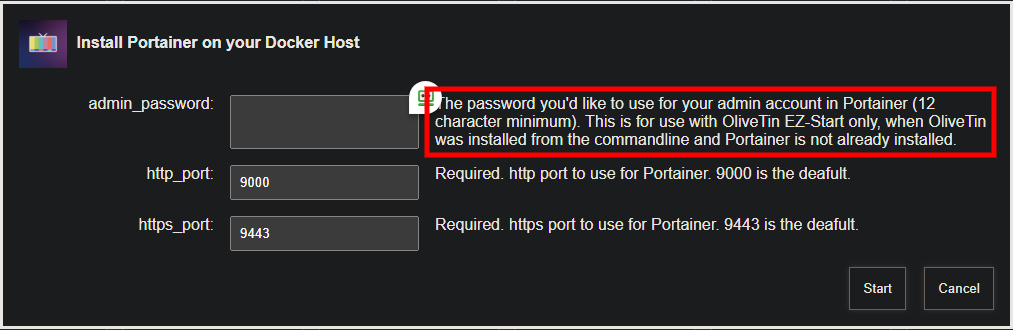
For anyone following along on this issue, the cause appears to have been related to password length. The Portainer default minimum password length is 12 characters, so you want to be sure to conform to that requirement when spinning-up Portainer using OliveTin EZ-Start:

I'll add a check in future versions of OliveTin to confirm a minimum length password is being used.

1 Like

Added in bnhf/olivetin:latest (aka bnhf/olivetin:2025.07.09)

2 Likes

New bnhf/olivetin:latest (aka bnhf/olivetin:2025.09.13) pushed today with support for TV-Logo-Manager. More details here:

This update includes numerous enhancements to ah4c deployments through Project One-Click. Spinning-up an ah4c stack for DirecTV in particular, should be especially quick-and-easy for any of these devices using the STREAMER_APP and M3U_NAME values listed below:

FireTV, ONN or CCwGTV streaming sticks:

STREAMER_APP=scripts/firetv/dtvstreamdeeplinks
CDVR_M3U_NAME=dtvstreamdeeplinks.m3u

Osprey streaming boxes:

STREAMER_APP=scripts/osprey/dtvosprey
CDVR_M3U_NAME=dtvosprey.m3u

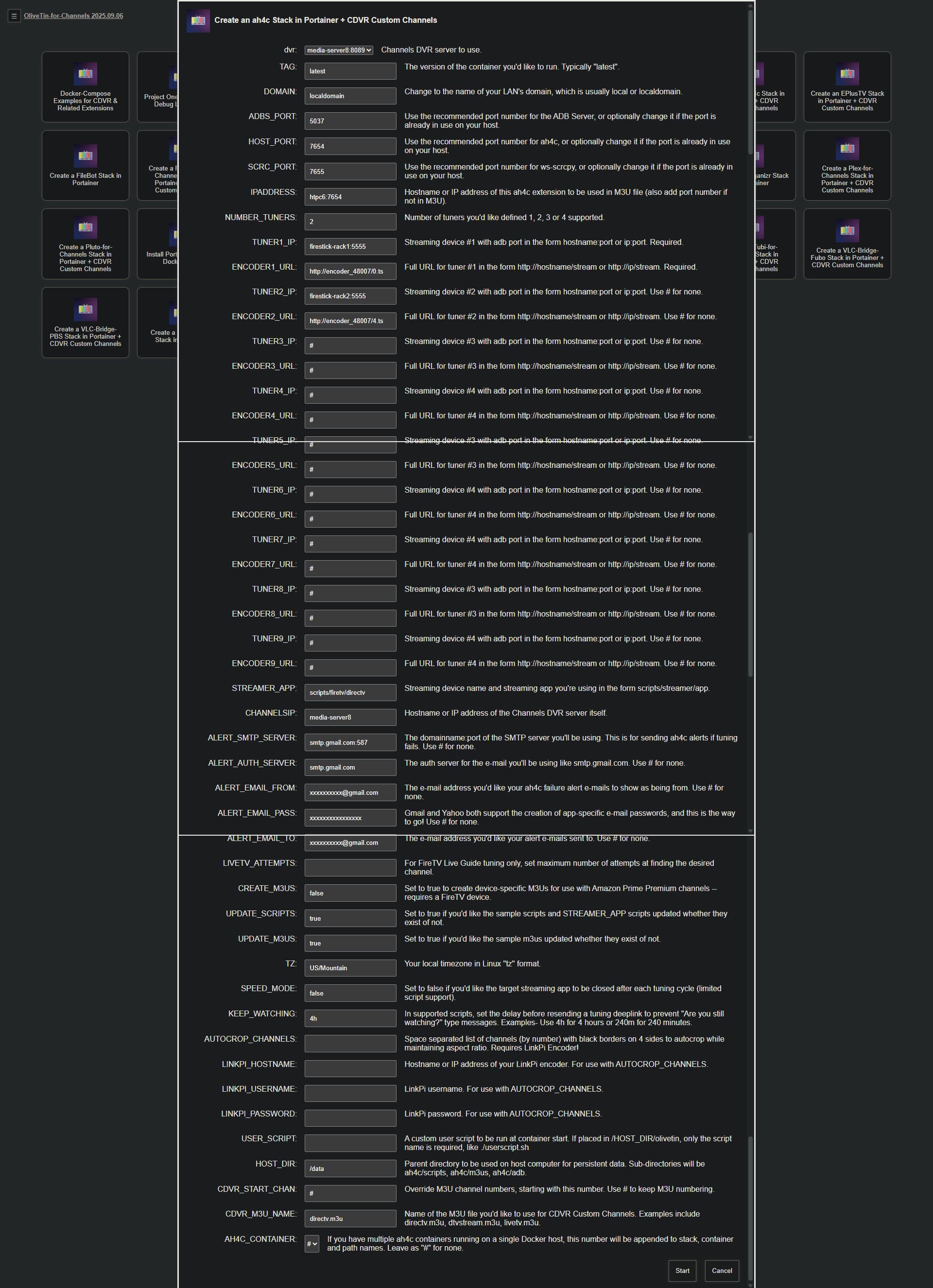
Here's what the Action looks like. Data required for each field is described, but in addition to the couple of values above, you'll need the details (IPs or hostnames and URLs) for your streaming devices and encoders:

With the proper data entered, this Action will spin-up the stack, and add the Custom Channels Source to your CDVR Server. Assuming you've already activated developer options, and USB debugging on your device, installed the DTV app, and logged in -- approving the ADB connection on each device is about all you should need to do, before you can try to tune to one of the channels in your subscribed package!

19 posts were split to a new topic: Need Help Installing OliveTin on a QNAP NAS with CDVR Running on a Windows PC

failed to load m3u context deadline exceeded? I didn't do anything

I'm not following. What are we talking about here?

All of my custom m3u playlist say that now?

Maybe the LAN IP address of your Docker host has changed?