
Looking into it.
this works fine for me.
speed test crashes everytime
while navigating the guide and trying to reach the sidebar navigation (back button) it first tries to go to the top of the guide. sometimes this glitches out and fails to actually move the guide, but a down arrow will move to the 2nd channel and repaint the guide. other times it will simply crash out.
most of the time it seems to work as it should. although it would be nice if we could simply arrow left to reach the sidebar navigation instead of using the back button.
I know you don't want to do any new features currently, but you may want to consider removing the "Install DVR Server App" and "Install Alpha App" from the support menu since they probably shouldn't be used.
thought I'd let you know I have NOT ran into this again, although superbowl sunday combined with Olympics was an unusually high number of long program blocks.
while the refocusing on long blocks is slightly annoying, I understand the challenges they pose
So far I have not caught any glitching, and overall i think it's snappier! 
1 Like
I have not been able to participate in beta testing as I would like because the current and past several beta versions have a glitch which interferes with my normal use of the client app. Previously, I had been jumping back and forth between the beta and stable versions so that I can test the new guide features without dealing with the TV series sequence problem.
Here is a link to my other topic which explains the problem I am having. If we can get this fixed, I will be happy to join the beta community again.
Should be fixed in the latest pre-release:
1 Like
bummer, I knew i shoulda kept my mouth shut.. 
caught it again. it was while navigating around the "SIGN OFF" block for TVE fox. think the picture is the 3rd time I made it happen in a row.
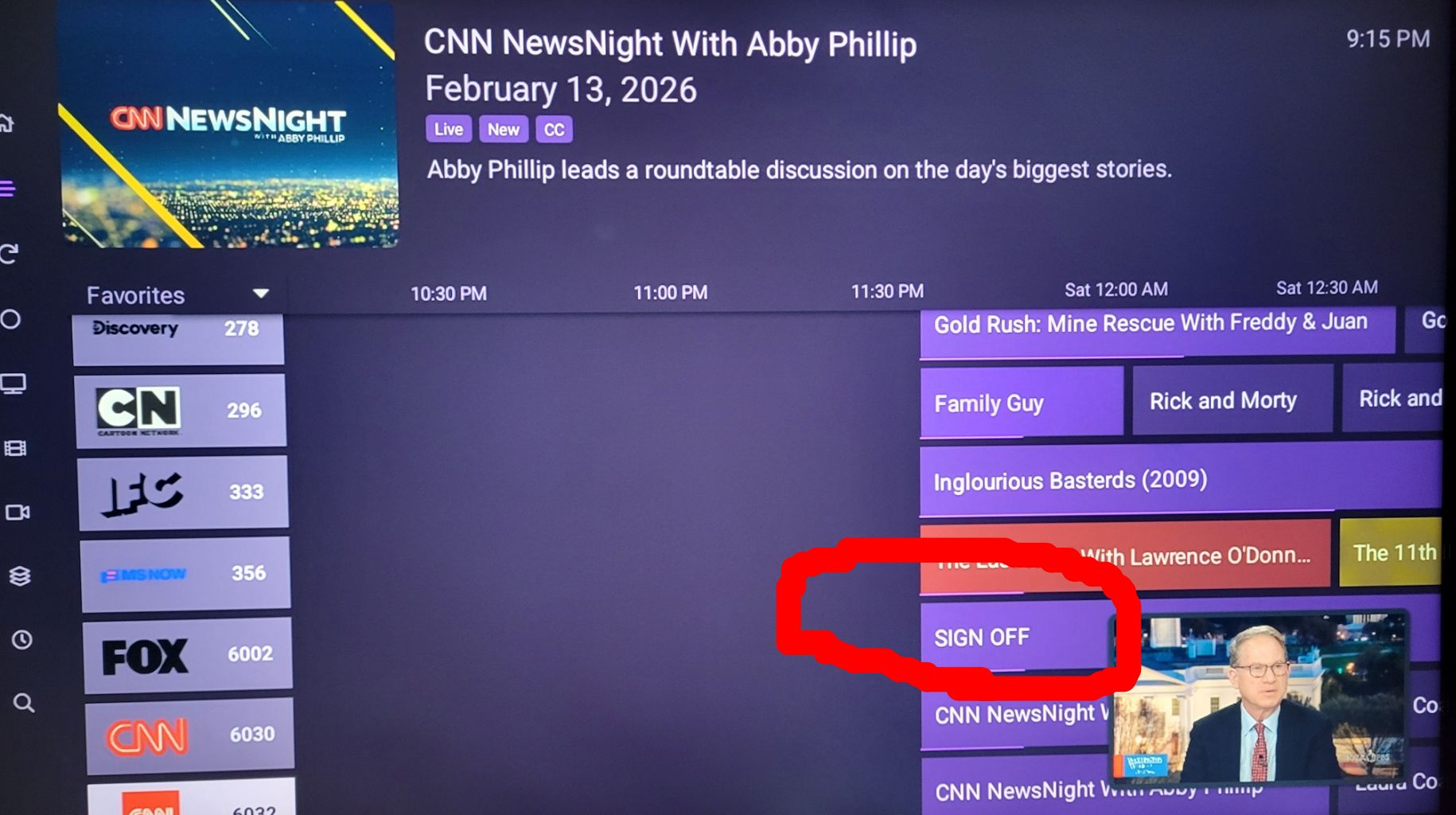
also while trying to get to settings to submit diag, I could not get to the sidebar navigation, and ended up at the streamer4k home screen. I don't think cdvr beta crashed, as it launched as if it never did. (finally used F1 to get to Recordings screen, then sidebar-settings)
seems to only be a problem on the guide, all other screens i've tried (Up Next, Recordings, ect..) all allow access to the sidebar navigation, with a subtle differences.
the screens; TV Shows and Movies (I have no 'videos') require the back button to reach the sidebar if a show or movie is highlighted. other fields on these screens and all the other screens will bring up the sidebar with a simple navigation left.
I can understand the initial logic that may have factored into the programming, however it seems unnecessary to deny access with the left button when the minimized sidebar is visible to the left.
hope that makes sense, and also I may have sent diag twice on accident. 
just noticed there was an update today? anway
editl
yes its still happening with sever ver. 2026-02-13 220106
So this is not a criticism at all. This is more of just an ease of use functionality question.
I noticed it's really hard to sometimes select the collections menu where you choose favorites HD or custom collections for example. Like I have a custom collection for my DirecTV channels and for my OTA channels.
Perhaps an approach like on tvOS where it's a sidebar menu might be better? That might be easier to navigate in a future release before the experimental guide becomes the default guide. It would also make the clients visually more similar between the two platforms. I really do like this experimental guide by the way. I think it's much nicer than the older one. It's definitely much more reliable. The page up and down buttons on my Sofabaton U2 work perfectly. It's super easy to navigate.
I really do love the TLC that the Android client has been getting over the past few months so I'm very happy to be using Android again.
I noticed that we got a flurry of new features for Android and then suddenly not so many. So I have a feeling something's baking but I figured I'd mention this while that baking might be occurring.
1 Like
I would very much like to participate in beta testing and explore/enjoy some of the new features. Unfortunately, the issue I previously reported still has not been addressed.
I have reported this problem several times dating as far back as August of 2024. It seems to me that this issue involves basic functionality of the program, and should be resolved with expedience.
From 2024:
As I often watch television series in order, I cannot use the beta version of the app. Having to navigate back to the correct episode in the sequence every single time is rather frustrating.
Maybe email support with that.
They were pretty responsive in terms of fixing a bug I found. If you send a pretty detailed report of what you're experiencing and they can reproduce it, they'll probably put out a patch. It's really easy for things to get lost in a community forum.
@jsfullam so I just loaded up a show that I have just sitting on my server not anything I've recorded just files I have lying around. I watched an episode I fast forwarded to the end and I have it set to autoplay the next episode and it did. It played the next episode in the series not like two episodes ahead. I had it on season five episode one and it went right to season five episode two in the latest beta.
Maybe it's specific to DVR recordings? I don't know.
Yeah, I have tried that, and it seems to play the next episode correctly. That's a helpful work-around. Although, as I look deeper into that option, it doesn't work as it should. I need it to prompt me before going to the next episode. That way, I can choose to proceed with viewing, or not. A prompt also prevents autoplay form running through several episodes if someone falls asleep with the remote.
Enabling the prompt only works through the individual series options, which override the global setting. The global prompt setting can be enabled either on an individual client, or pushed by the server to all clients under the client settings in the GUI. Neither one of those methods work.
Oh for me it just shows like hey we're playing the next episode in three seconds 3 2 1 play.
I think that's how it was intended to work.
Almost like there's a user guide (for some things)
And it's not like I don't always look to the user guide for answers first, and search through the community forum second, to see if anyone else has experienced the same issue.
The problem is that sometimes, neither of those go-to's have the answer. For instance, directly from the link/page you posted: This doesn't work as described in the user guide! 

My previous comment explains that selecting the option individually within the client, or globally in the server GUI, does not function correctly.
In fact, as I jumped over to test the beta version, even enabling "Prompt" from the series options does not work. The prompt comes up at the end of the episode. If you do not select it, it just goes ahead and plays the next in the series, rather than "If you do nothing, your current episode will end as usual" as quoted from the above.
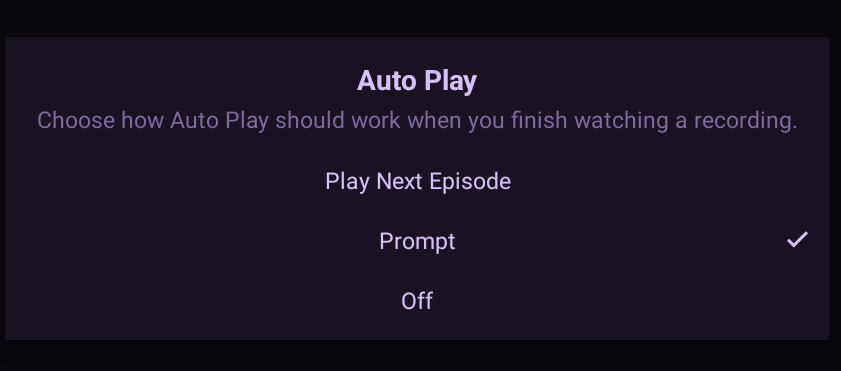
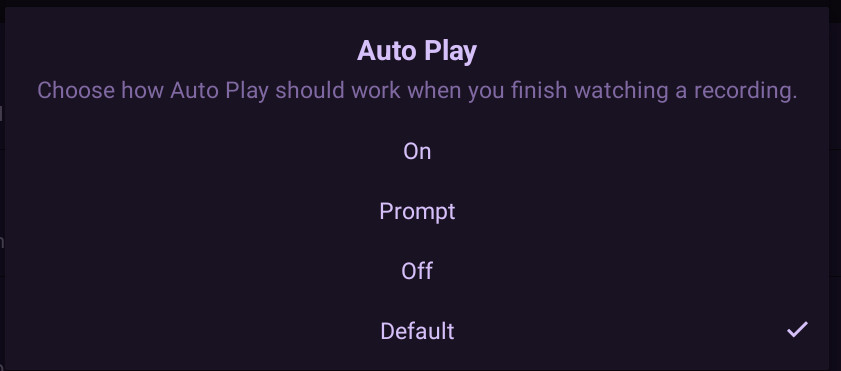
In fact, the options are different depending on where you go to select them.
From the client playback settings:
From the TV series "more" show options:
From the CDVR server GUI client options:
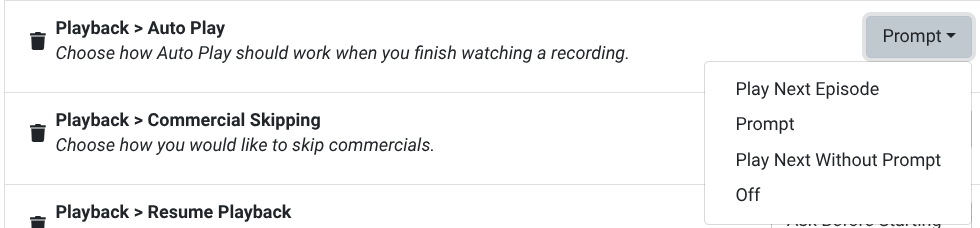
One of the options has a countdown and then just goes to the next episode. Another one doesn't, and is supposed to wait for your input. Without input, it is supposed to end the current episode, and go back to the series guide.
I was just pointing out they documented how it's supposed to work.
If it doesn't, they need to fix the bug or update the documentation.
Not sure what's easiest.
@jsfullam The best thing to do is to email support and give a detailed description of what you're seeing.
Ideally, if you can record your TV screen and send it to them, that's the best way to get help because then they can really see what's happening.
I appreciate your helpful suggestions. I'm beat just from figuring out what is wrong. Properly documenting and soliciting customer support will have to wait for another day.
1 Like