Building Your Own CDVR Docker Image with Chrome (not Chromium) for YTTV TVE Support (amd64 processors only)

A number of people have reported issues using the Docker version of CDVR-TVE with YTTV credentials. I've suspected this was related to the use of Chromium (open source), versus Chrome (based on Chromium, but proprietary).

After building a custom CDVR container today with Chrome, this does appear to be the case, as I had no issues with TVE authentication using YTTV (family account with no 2FA). The Linux version of Chrome is available for amd64 processors only, so this solution is limited to platforms using a compatible CPU.

Portainer makes it very simple to build an image for local use, so I'll detail what's required here:

First, on the system where you're running the Portainer WebUI, you'll need to create a file called run.sh containing this code (be sure to use an editor that supports Linux-standard linefeed only line endings):

#!/bin/sh
set -e
if [ ! -x /channels-dvr/latest/channels-dvr ]; then
  echo Installing Channels DVR..
  curl -f -s https://getchannels.com/dvr/setup.sh | DOWNLOAD_ONLY=1 sh
fi

ARGS="-dir /channels-dvr/data"
if [ -n "$CHANNELS_HOST" ]; then
  ARGS="$ARGS -host $CHANNELS_HOST"
fi
if [ -n "$CHANNELS_PORT" ]; then
  ARGS="$ARGS -port $CHANNELS_PORT"
fi


cd /channels-dvr/data
echo Running Channels DVR..
exec ../latest/channels-dvr $ARGS

Next, in Portainer, go to Images and select Build a new image. I'd suggest channels-dvr-local:tve for a name:

In the Web editor, paste in the following Dockerfile:

FROM debian:bookworm-slim

# Install dependencies
RUN apt-get update && apt-get install -y --no-install-recommends \
    curl \
    ca-certificates \
    gnupg \
    libglib2.0-0 \
    libnss3 \
    libx11-xcb1 \
    libxcomposite1 \
    libxdamage1 \
    libxrandr2 \
    libu2f-udev \
    libvulkan1 \
    libasound2 \
    libatk-bridge2.0-0 \
    libatk1.0-0 \
    libcups2 \
    libdbus-1-3 \
    libdrm2 \
    libgtk-3-0 \
    libxshmfence1 \
    fonts-liberation \
    xdg-utils \
    wget \
    unzip \
    && rm -rf /var/lib/apt/lists/*

# Add Google Chrome's official GPG key and repo
RUN curl -fsSL https://dl.google.com/linux/linux_signing_key.pub | gpg --dearmor -o /etc/apt/trusted.gpg.d/google.gpg && \
    echo "deb [arch=amd64] http://dl.google.com/linux/chrome/deb/ stable main" > /etc/apt/sources.list.d/google-chrome.list

# Install Google Chrome
RUN apt-get update && apt-get install -y --no-install-recommends \
    google-chrome-stable \
    && rm -rf /var/lib/apt/lists/*

# Expose default web port and streaming port
EXPOSE 8089

ADD run.sh .

RUN chmod +x run.sh

# Run the DVR server
CMD ["/run.sh"]

And then, under Upload, select the run.sh file you created on your local system:
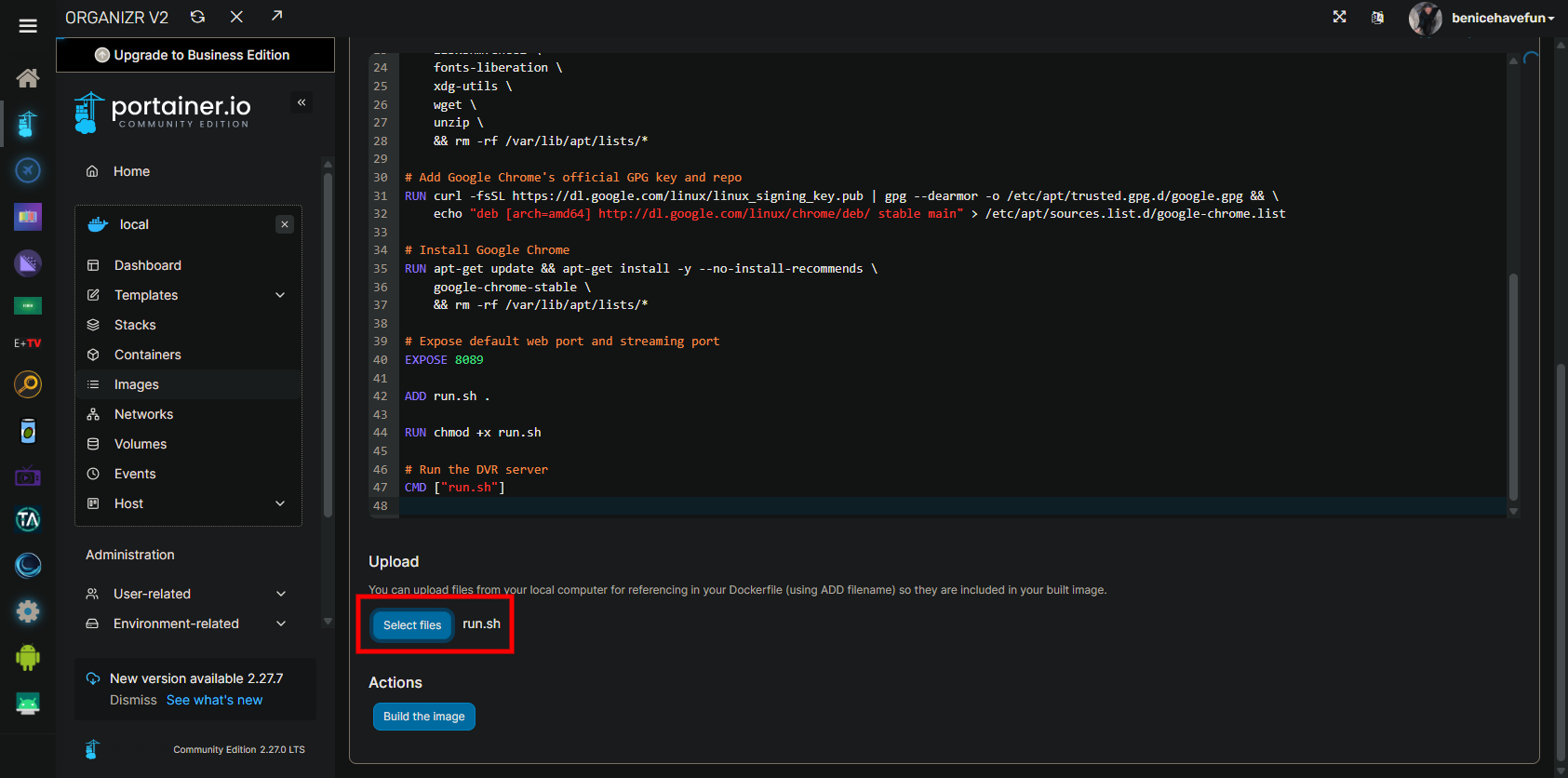
Finally, click Build the image under Actions.

If everything goes according to plan, you should see output like this:

Step 1/8 : FROM debian:bookworm-slim


 ---> 6ba4ddadd113

Step 2/8 : RUN apt-get update && apt-get install -y --no-install-recommends     curl     ca-certificates     gnupg     libglib2.0-0     libnss3     libx11-xcb1     libxcomposite1     libxdamage1     libxrandr2     libu2f-udev     libvulkan1     libasound2     libatk-bridge2.0-0     libatk1.0-0     libcups2     libdbus-1-3     libdrm2     libgtk-3-0     libxshmfence1     fonts-liberation     xdg-utils     wget     unzip     && rm -rf /var/lib/apt/lists/*


 ---> Using cache

 ---> 53b3b4daa5b8

Step 3/8 : RUN curl -fsSL https://dl.google.com/linux/linux_signing_key.pub | gpg --dearmor -o /etc/apt/trusted.gpg.d/google.gpg &&     echo "deb [arch=amd64] http://dl.google.com/linux/chrome/deb/ stable main" > /etc/apt/sources.list.d/google-chrome.list


 ---> Using cache

 ---> 003a26b56132

Step 4/8 : RUN apt-get update && apt-get install -y --no-install-recommends     google-chrome-stable     && rm -rf /var/lib/apt/lists/*


 ---> Using cache

 ---> fba0b47ca738

Step 5/8 : EXPOSE 8089


 ---> Using cache

 ---> 2bd3d1a53aa1

Step 6/8 : ADD run.sh .


 ---> Using cache

 ---> 58e790b406ca

Step 7/8 : RUN chmod +x run.sh


 ---> Using cache

 ---> feae921f466e

Step 8/8 : CMD ["run.sh"]


 ---> Running in 39aa11b3f439

 ---> Removed intermediate container 39aa11b3f439

 ---> 0a7299aad012

Successfully built 0a7299aad012

Successfully tagged channels-dvr-local:tve

Look good? If so, you now have a custom built local CDVR image containing Chrome.

Next, you need spin-up this container in Portainer-Stacks. The Docker compose should look similar to this:

version: '3.9'
services:
  # 2025.06.20
  # Docker Hub home for this project: https://hub.docker.com/r/fancybits/channels-dvr
  channels-dvr:
    image: channels-dvr-local:${TAG}
    container_name: channels-dvr-local
    devices:
      - /dev/dri:/dev/dri
    ports:
      - ${HOST_PORT}:${CHANNELS_PORT}
    environment:
      - CHANNELS_PORT=${CHANNELS_PORT}
      - TZ=${TZ}
    volumes:
      - ${HOST_DIR}/channels-dvr-local:/channels-dvr
      - ${DVR_SHARE}:${DVR_CONTAINER_DIR}
    network_mode: host
    restart: unless-stopped
#volumes: # use this section if you've setup a docker volume named channels-dvr, with CIFS or NFS, to bind to /channels-dvr inside the container
  #channels-dvr:
    #external: ${VOL_EXTERNAL}
    #name: ${VOL_NAME}

And here are the env vars I used, but yours will vary based on where you want your channels-dvr and channels-data directories to reside:

TAG=tve
HOST_PORT=8089
CHANNELS_PORT=8089
TZ=US/Mountain
HOST_DIR=/data
DVR_SHARE=/data/channels-data-local
DVR_CONTAINER_DIR=/data/channels-data-local

This should function very much like the standard channels-dvr:tve container. Channels will update itself as per usual, however if you wish to update Chrome (in a manner that will survive reboots), you'll need to rebuild the container.

Hopefully someone will be willing to confirm this solution, and once that's done, I'll likely make this process Project One-Click compatible -- both for building a new image, and deploying it.

Just gave it a try and got this error when trying to deploy the stack. It seems like it is not happy trying to run run.sh. Maybe it needs the full path for the shell cmd like bin/sh/run.sh?

Deployment error
Failed to deploy a stack: Container channels-dvr-local Creating Container channels-dvr-local Created Container channels-dvr-local Starting Error response from daemon: failed to create task for container: failed to create shim task: OCI runtime create failed: runc create failed: unable to start container process: exec: "run.sh": executable file not found in $PATH: unknown

Does the run.sh file you created have line feed line termination?
Might fail if the lines are terminated with carriage return, line feed.

Hmmm I was on my Mac and used textedit, I'll try creating the script file with notepad++ on my windows machine to see if that makes a difference

I'm not a developer and have never built a docker image, but it sounds like the run.sh file isn't in whatever the current directory is and isn't in the path.

A quick search says use CMD or ENTRYPOINT.
And I suppose you need to know which directory the run.sh file is located at in the container created.

The error message suggests that, but it's almost certainly what you posted earlier regarding there being <CR><LF> line endings in run.sh. When those are present in a script Linux acts like the file doesn't exist.

I just followed your directions and get the same error when using Portainer to compose up the container.
Either the build isn't putting it in the right directory, or the RUN command isn't specifying the right directory.
Have you tried building it so it doesn't try to run the run.sh and seeing what the current directory in the container is and where the run.sh file is?

@chDVRuser @slampman

My apologies. I did a bit of cleanup before my last test build, including removing the / from CMD ["/run.sh"], then proceeded to build using the image name channels-dvr-local:tve (which seemed more appropriate). However, when I spun-up the container, I forgot to change the tag to tve. :frowning: -- so I was running the previous build.

I've fixed that now in post #1, along with suggesting an image name of channels-dvr-local:tve, and adjusted the env vars that go along with the Docker compose to use the tve tag.

Tested it all again moments ago, this time with no other versions lurking about. We should be good now...

2 Likes

Amazing what a missing slash can do. Working now with CMD ["/run.sh"] in the build.
Of course, I can't test it with YTTV, but at least the image builds and the container is created.

Doing an exec into the container shows run.sh in the root directory with perms 0711

root@DS1019PLUS:/# pwd
/
root@DS1019PLUS:/# ls -l
total 60
lrwxrwxrwx   1 root root     7 Jun  9 17:00 bin -> usr/bin
drwxr-xr-x   2 root root  4096 May  9 07:50 boot
drwxr-xr-x   4 1026 users 4096 Jun 21 09:28 channels-dvr
drwxr-xr-x   6 root root   360 Jun 21 09:28 dev
drwxr-xr-x  63 root root  4096 Jun 21 09:28 etc
drwxr-xr-x   2 root root  4096 May  9 07:50 home
lrwxrwxrwx   1 root root     7 Jun  9 17:00 lib -> usr/lib
lrwxrwxrwx   1 root root     9 Jun  9 17:00 lib64 -> usr/lib64
drwxr-xr-x   2 root root  4096 Jun  9 17:00 media
drwxr-xr-x   2 root root  4096 Jun  9 17:00 mnt
drwxr-xr-x   3 root root  4096 Jun 21 09:24 opt
dr-xr-xr-x 382 root root     0 Jun 21 09:28 proc
drwx------   3 root root  4096 Jun 21 09:23 root
drwxr-xr-x   9 root root  4096 Jun 21 09:24 run
-rwx--x--x   1 root root   435 Dec 31  1969 run.sh
lrwxrwxrwx   1 root root     8 Jun  9 17:00 sbin -> usr/sbin
drwxr-xr-x   2 root root  4096 Jun  9 17:00 srv
dr-xr-xr-x  12 root root     0 Mar  3 10:24 sys
drwxrwxrwt   2 root root  4096 Jun 21 09:24 tmp
drwxr-xr-x  21 root root  4096 Jun 21 09:25 usr
drwxr-xr-x  17 root root  4096 Jun 21 09:24 var
drwxr-xr-x   3 root root  4096 Jun 21 09:28 volume1
1 Like

Let me know if you see anything that's functionally different than the fancybits container. This container is based on Debian Slim rather than Alpine, for Chrome support, but otherwise the idea is to have matching structure and functionality.

I'll try adding Xfinity TVE as a source and will let you know.
Failed three times in a row.
Tries Discovery (it's not in my package) and then CSPAN (in my package) and fails.
Here's the tve_error_screenshot.png

Curious if anyone else gets it to work.

1 Like

So TVE works with the fancybits container, but not this one?

Yes, I have Xfinity TVE working with the fancybits TVE container on another DVR server running in a container (on the same Synology NAS). And the Channels DVR Troubleshooting is showing all green checkmarks for your container and showing Chrome is up to date TV Everywhere Chrome version up to date: 137.0.7151.119

The fancybits TVE container shows TV Everywhere Chrome version up to date: 132.0.6834.83

Interesting, basically the opposite results -- works with Chromium, but not with Chrome. Hopefully @slampman will post back regarding YTTV.

No go unfortunately. I cant get the container out of a restart loop

exec /run.sh: no such file or directory

from the build log:

Processing triggers for libc-bin (2.36-9+deb12u10) ...

 ---> Removed intermediate container 043550cc98b1

 ---> 6df2f275923d

Step 5/8 : EXPOSE 8089


 ---> Running in 5b586b11c683

 ---> Removed intermediate container 5b586b11c683

 ---> a430560135a1

Step 6/8 : ADD run.sh .


 ---> d1a556b2e07a

Step 7/8 : RUN chmod +x run.sh


 ---> Running in 5131e80ff2a0

 ---> Removed intermediate container 5131e80ff2a0

 ---> 98369ebf5109

Step 8/8 : CMD ["/run.sh"]


 ---> Running in 6e873c6f25f1

 ---> Removed intermediate container 6e873c6f25f1

 ---> 4cc6ddf43ccf

Successfully built 4cc6ddf43ccf

Successfully tagged channels-dvr-local:tve

Ok so doing better... I did the run.sh script in Notepad++ but i forgot to do edit > eol conversion > unix

Update, works as is for YTTV!!!

1 Like

I went ahead and pushed the container I built to my Docker hub. Just add bnhf/ in front of the image name in the Docker Compose above, and you should be able to pull it rather than using your locally built version.

Like this:

    image: bnhf/channels-dvr-local:${TAG}

As you can tell, I'm very curious to know if this works for you too. Apparently it's a bust with Xfinity, but it worked for me with YTTV.

Glad to hear it! Weird that it failed for Xfinity -- but it's kind of a niche fix, and those that really want to use YTTV credentials in a Docker container will probably be happy to have a working option.

@eric It looks like we have a fix/workaround for using YTTV in Docker by using Chrome rather than Chromium. I'm happy to maintain this niche fix, but I'm wondering if you'd be willing to post the Dockerfile you use to build fancybits/channels-dvr:tve?

I'd like to confirm I'm including all needed components, and eliminate anything I'm adding that's not required.

1 Like

Just for grins...
I was able to add a TVE source using my free SlingTV Freestream account.
Of course it only added the 68 FAST channels 6700-6993, but it did add the source and streaming works.
It just doesn't like Xfinity for some reason.

2 Likes