Color me impressed! Everything I've tried so far has worked brilliantly. This is really shaping up to be an amazing tool.
Glad to hear it. I gave it a good beating from a robustness perspective...enjoy!

Color me impressed! Everything I've tried so far has worked brilliantly. This is really shaping up to be an amazing tool.
Glad to hear it. I gave it a good beating from a robustness perspective...enjoy!
Great project!
Glad you're enjoying it.
One question, when adding a channel, is there a way to specify the epg source (not a Gracenote entry)? I can add the FruitDeeplink lanes and they play fine, but to get any guide data, I have to add its xml file in the Custom Channels settings. Doing this kills the guide data for the predefined channels.
Thanks for raising this — I think the friction here comes from how Channels handles guide data versus what PrismCast provides.
PrismCast’s role is to generate and serve the M3U playlist to Channels DVR and to provide access to those channels through the providers that it understands, and provide a way to extend it to new ones.. For most predefined channels, that includes a Gracenote station ID (with the exception of local affiliates, since those vary by region). For user-defined channels, you can assign a Gracenote station ID, leave it blank, or override the ID on any predefined channel.
PrismCast itself doesn’t provide or host EPG data. Guide data is entirely handled by Channels DVR based on the station IDs it receives.
At this point, I have no plans for PrismCast to act as its own EPG provider. PrismCast is a focused effort with a clear mission - tune most TVE/useful sources, most of the time, as easily and reliably as I can make it.
Understood and thanks for the explanation. Once again, great project!
I'm doing clean installs of prismcast and channels dvr when i test. All docker based. Disabled channels in prismcast are in the m3u. I can open the m3u in a m3u player and all channels are there. in the prior release, only the enabled were delivered by the prismcast m3u.
I was getting screenshots to post but now, when I go to prismcast, none of the channels are disabled. All of them are enabled. I know the channels I do not received were disabled. I rebooted the container, it may not have loaded the config correctly. I'll test more but state seems off.
3 posts were merged into an existing topic: FruitDeepLinks — Universal Sports Aggregator for Channels DVR
A post was merged into an existing topic: FruitDeepLinks — Universal Sports Aggregator for Channels DVR
I'm doing clean installs of prismcast and channels dvr when i test. All docker based. Disabled channels in prismcast are in the m3u. I can open the m3u in a m3u player and all channels are there. in the prior release, only the enabled were delivered by the prismcast m3u.
I was getting screenshots to post but now, when I go to prismcast, none of the channels are disabled. All of them are enabled. I know the channels I do not received were disabled. I rebooted the container, it may not have loaded the config correctly. I'll test more but state seems off.
Thanks for the details. Based on what you’ve described, this doesn’t appear to be an issue within PrismCast itself.
If you’re doing clean installs between attempts, that would reset your configuration back to defaults each time. That makes it difficult to determine whether the behavior is related to a specific setting or prior state.
You can export and import both your channel list and configuration to preserve your setup between iterations.
If you’re able to provide a clear, reproducible set of steps that consistently triggers the issue, I’ll be better able to investigate further. Screenshots aren't really going to help based on what you described I don't think, but if you think they'll help, go for it.
Edit: and just like that...went scouring and found a bug that can lead to this issue manifesting. Will address it in the next release. Thanks for raising it! For posterity, here's how to recreate the bug, as I discovered it:
Setup & Initial Configuration
Observed Results (Pre-Reboot Issue)
Channels DVR: Instead of the 8 selected channels, the entire channel list from PrismCast appeared in the Channels DVR guide.
External M3U Player: When pointing a M3U player directly to the PrismCast URL, all channels were visible, confirming that the output was not respecting the "Enabled" filter
Observed Behavior: Following a reboot, the setup works correctly, showing only the 8 selected channels in Channels DVR and the M3U player.
The Bug: Prior to rebooting the container, Channels DVR displays the entire channel list instead of the filtered selection. This inconsistency suggests a state management bug, as the filtered state is not properly recognized or applied by the external players until a full container restart occurs.
See my prior post above - discovered a path to reproduce the bug.  Will be fixed in the next release. Thanks for doing the legwork here to raise it and reproduce it!
Thanks.
I'm trying v1.3.1 and still can't get it to steam my local NBC at YTTV. Error says it can't find NBC.
[2026/02/14 19:04:24.055] [WARN] [nbc-uru8qy] Channel "NBC" not found in YouTube TV guide. Create a user-defined channel with one of the names below as the Channel Selector and https://tv.youtube.com/live as the URL. Available channels (uncovered (224 of 283)): ... KCRA 3, ...
[2026/02/14 19:04:24.055] [ERROR] [nbc-uru8qy] Stream setup failed for https://tv.youtube.com/live: Channel selection failed: Channel "NBC" not found in YouTube TV guide.
[2026/02/14 19:04:24.056] GET /hls/nbc/stream.m3u8 from 192.168.1.8 responded 500 in 2004.129 ms.
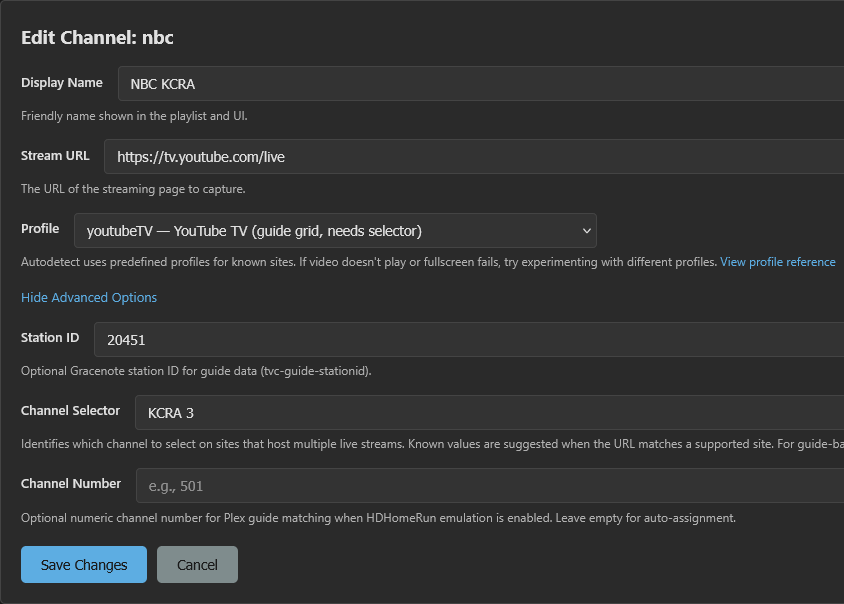
So I created a new channel and tried the selector "KCRA 3" (how it's labeled)
and "KCRA" using both automatic and youtubeTV profiles, I see the yttv site come up twice in chrome and then the tab closes.
[2026/02/14 19:35:41.868] [WARN] [nbc-gsotke] Channel "NBC" not found in YouTube TV guide. Create a user-defined channel with one of the names below as the Channel Selector and https://tv.youtube.com/live as the URL. Available channels (uncovered (224 of 283)): list of channels here.
[2026/02/14 19:35:41.868] [ERROR] [nbc-gsotke] Stream setup failed for https://tv.youtube.com/live: Channel selection failed: Channel "NBC" not found in YouTube TV guide.
[2026/02/14 19:35:41.868] GET /hls/nbc/stream.m3u8 from 192.168.1.8 responded 500 in 2166.164 ms.
I think I'll follow @bnhf lead of using the yttv deep links for now as it seems to work much better.
Thank you, with the latest version this fixes the issue. If you could please let @hjd know that I have acknowledged my issues and I hope he can unblock me (he's ignored all my comments here lately, it's pretty obvious). This code and the channels configuration has improved by leaps and bounds over the original, I really appreciate all the effort that y'all have done. Thanks.
FYI I've noticed much speedier tuning of grid channels like USA with this 1.3.1 update. All of the direct channels on Windows worked great, the only issue I've had is with the grid channels. But that's apparently resolved now.
Thanks.
I'm trying v1.3.1 and still can't get it to steam my local NBC at YTTV. Error says it can't find NBC.
[2026/02/14 19:04:24.055] [WARN] [nbc-uru8qy] Channel "NBC" not found in YouTube TV guide. Create a user-defined channel with one of the names below as the Channel Selector and https://tv.youtube.com/live as the URL. Available channels (uncovered (224 of 283)): ... KCRA 3, ...
[2026/02/14 19:04:24.055] [ERROR] [nbc-uru8qy] Stream setup failed for https://tv.youtube.com/live: Channel selection failed: Channel "NBC" not found in YouTube TV guide.
[2026/02/14 19:04:24.056] GET /hls/nbc/stream.m3u8 from 192.168.1.8 responded 500 in 2004.129 ms.
So I created a new channel and tried the selector "KCRA 3" (how it's labeled)
and "KCRA" using both automatic and youtubeTV profiles, I see the yttv site come up twice in chrome and then the tab closes.
All that is correct...but...
Still the same error being logged
[2026/02/14 19:35:41.868] [WARN] [nbc-gsotke] Channel "NBC" not found in YouTube TV guide. Create a user-defined channel with one of the names below as the Channel Selector and https://tv.youtube.com/live as the URL. Available channels (uncovered (224 of 283)): list of channels here.
[2026/02/14 19:35:41.868] [ERROR] [nbc-gsotke] Stream setup failed for https://tv.youtube.com/live: Channel selection failed: Channel "NBC" not found in YouTube TV guide.
[2026/02/14 19:35:41.868] GET /hls/nbc/stream.m3u8 from 192.168.1.8 responded 500 in 2166.164 ms.
The "NBC" is the tell...can you confirm that you set the channel to use your custom channel instead of the predefined one in the dropdown? The log message indicates you're hitting the predefined channel, not the override you created. Mind checking and reporting back?
I think I'll follow @bnhf lead of using the yttv deep links for now as it seems to work much better.
Totally your call. If you’re thinking about the medium- to long-term direction with PrismCast, though, I’d still recommend sticking with the provider approach PrismCast is built around. Going a different route will likely create breakage as PrismCast evolves.
That said, I do move pretty quickly with deprecations and new features and don’t keep older approaches around for long — but PrismCast is designed with flexibility in mind, so there’s more than one way to make it work.
I was just trying this myself, and found that if you use nbc as your key, the Channel Selector value appears to be overridden by the value NBC.
So I created a new channel with the key kusa, and with everything else the same, it tuned fine with a Channel Selector value of 9 News -- which is what I've been trying to use.
[2026/02/14 21:02:11.521] [ERROR] [nbc-siskdm] Stream setup failed for https://tv.youtube.com/live: Channel selection failed: Channel "NBC" not found in YouTube TV guide.
[2026/02/14 21:02:11.523] GET /hls/nbc/stream.m3u8 from 100.[Redacted] responded 500 in 1886.305 ms.
[2026/02/14 21:02:14.875] [WARN] [nbc-9d18qi] Channel "NBC" not found in YouTube TV guide. Create a user-defined channel with one of the names below as the Channel Selector and https://tv.youtube.com/live as the URL. Available channels (uncovered (223 of 279)): 9 News, ABC News Live, AMC Thrillers, AMC+, AWE, All Reality We TV, Alpha ETC Punjabi, Antena 3 Internacional HD, BBC America, BBC News, BET Her, BTN, Baby TV Español, Bandamax, Billiard TV, Bloomberg Originals, Bloomberg TV+, Bloomberg TV+ 4K, Bounce, CBS Sports Network, CHARGE!, CMT, CNN en Español, Cartoon Network, Cheddar, Cine Mexicano, Cine Sony Television, Cinelatino, Cinemax Action West, Cinemax Classics HD, Cinemax East, Cinemax Hits West, Cinemax Latino, Cinemax West, Colorado's Own, Comedy.TV, Comet TV, Court TV, Cozi, DE PELÍCULA (HD), Dabl, De Película Clásico, Denver 7, Discovery Familia, Discovery Turbo, Discovery en Español, ESPN Deportes, Estrella TV, FOX SOUL, FOX Soccer Plus, FOX Sports 4K, FOX Sports Plus 4K, FOX Weather, FanDuel Racing, FanDuel TV, Fight Network, Foro TV HD, Fox Deportes, Freeform, GET, GFAM, GLIV, GMA Life TV, GMA News TV, GMA Pinoy TV, Galavision, Game Show Network, HBO Comedy West, HBO Drama West, HBO Hits West, HBO Latino West, HBO Max 2, HBO Movies West, HBO West, HSN, Hallmark Family, Here TV, Hogar de HGTV, Huntstream, IMPACT Wrestling Channel, ION, JusticeCentral.TV, KCEC, KTFD, Law & Crime, LiveNOW from FOX, Local Now, Localish, MGM+ Drive-In, MGM+ Hits, MGM+ Marquee, MGM+ West, MLF-Bass Channel, MTV, MTV Classic, MTV2, NBA TV in 4K, NBC News NOW, NBC Sports Network, NBCSN Extra, NEWSMAX, NFL Network, NTN24 Nuestra Tele Noticias, Nat Geo Mundo, NewsNation, Newsmax en Español, Nick Jr., Nickelodeon, Nicktoons, Nuestra Tele Internacional, One America News, Outside, Overtime, Paramount, Pasiones, Pickleball TV, PlayersTV, PokerGO+, Pop, Portlandia, QVC, RACER Network, RMPBS, RMPBS, ROAR, Recipe.TV, SHOxBET, STARZ East, STARZ West, STARZEncore Action, STARZEncore Black, STARZEncore Classic, STARZEncore East, STARZEncore Español, STARZEncore Family, STARZEncore Suspense, STARZEncore West, STARZEncore Westerns, ScreenPix, ScreenPix Action, ScreenPix Voices, ScreenPix Westerns, Scripps News, Showtime 2, Showtime East, Showtime Extreme, Showtime Family Zone, Showtime Next, Showtime Showcase, Showtime West, Showtime Women, Smithsonian Channel, Sports on HBO Max 2, Sports on HBO Max 3, Sports on HBO Max 4, Sports on HBO Max 5, Sports on HBO Max 6, Sports on HBO Max 7, Sports on HBO Max 8, Sports on HBO Max 9, SportsGrid, Stadium, Start TV, Starz Cinema West, Starz Comedy West, Starz Edge West, Starz Kids & Family West, Starz in Black West, Stories by AMC, SundanceTV, T2, TELEHIT, TLNovelas, TUDN, TV Land, TYT Network, Tastemade, Tastemade Español, TeenNick, Telehit Música, Telemundo Denver, Tennis Channel, The Filipino Channel (Pacific), The Nest, The Walking Dead Channel, The Walking Dead Universe, Tr3s: MTV, Musica y Mas (Pacific), True CRMZ, Turner Classic Movies, TyC Sports, Universo, VSiN, ViX Premium Deportes 1, ViX Premium Deportes 2, ViX Premium Deportes 3, ViX Premium Deportes 4, WAPA América, WE tv, Willow, Willow 2, World at War, YouTube TV Zen, ZEE Channel: &TV, Zee Anmol, Zee Bangla, Zee Bollywood, Zee Cinema, Zee Cinemalu, Zee Classic, Zee Kannada, Zee Keralam, Zee Marathi, Zee Punjabi, Zee TV USA, Zee Talkies, Zee Tamil, Zee Telugu, Zee World, Zing USA, beIN EXTRA ESPAÑOL, beIN SPORTS XTRA, beIN SPORTS en Español, beIN Sports.
[2026/02/14 21:02:14.875] [ERROR] [nbc-9d18qi] Stream setup failed for https://tv.youtube.com/live: Channel selection failed: Channel "NBC" not found in YouTube TV guide.
[2026/02/14 21:02:14.876] GET /hls/nbc/stream.m3u8 from 100.[Redacted] responded 500 in 3158.212 ms.
[2026/02/14 21:05:12.899] User channel 'kusa' added.
[2026/02/14 21:05:49.197] [kusa-jm81bg] Streaming KUSA (youtubeTV, FFmpeg). Tuned in 4.6s.
[2026/02/14 21:07:02.200] [kusa-jm81bg] Stream ended after 1m 18s.
I was just trying this myself, and found that if you use
nbcas your key, theChannel Selectorvalue appears to be overridden by the valueNBC.
I'm going to guess that you have filtered providers in the Channels tab? Guessing YTTV and Sling, given our other exchanges? If you clear that out to the defaults showing all the providers, and add the NBC override in again, it should work. It's an edge case I missed in implementing the new provider filtering capabilities I suspect.
I'm plugging http://192.168.1.9:5589/hls/nbc/stream.m3u8 directly into VLC to try this
#EXTINF:-1 channel-id="nbc" tvg-name="NBC KCRA" tvc-guide-stationid="20451",NBC KCRA
http://192.168.1.9:5589/hls/nbc/stream.m3u8
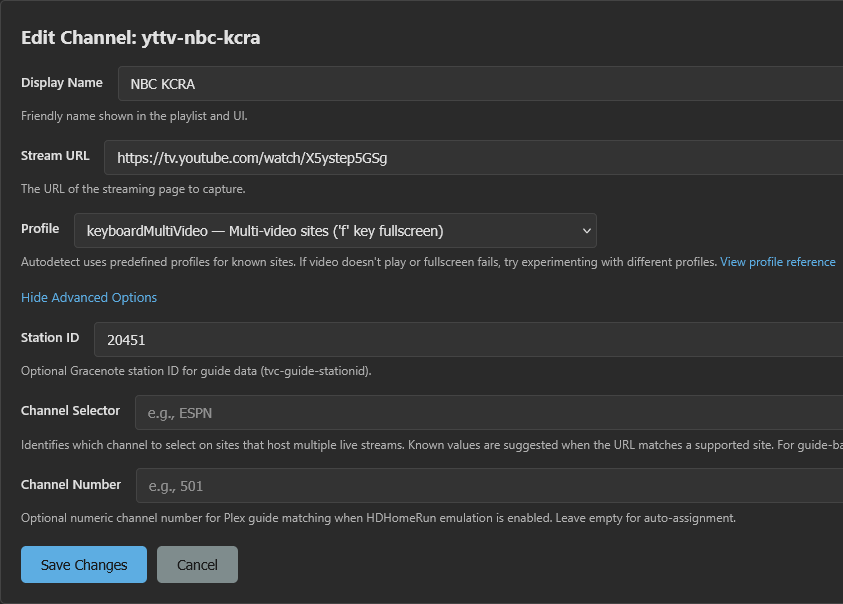
This one I created works, plugging http://192.168.1.9:5589/hls/yttv-nbc-kcra/stream.m3u8 directly into VLC
#EXTINF:-1 channel-id="yttv-nbc-kcra" tvg-name="NBC KCRA" tvc-guide-stationid="20451",NBC KCRA
http://192.168.1.9:5589/hls/yttv-nbc-kcra/stream.m3u8
No provider filters. I did experiment with them at one point, but removed those filters almost immediately.
OK, I fixed it by just changing the drop down from YouTube TV to Custom (youtube.com)
I obviously don't know what I'm doing (or couldn't find those instructions)!
OK, I fixed it by just changing the drop down from
YouTube TVtoCustom (youtube.com)
Enjoy. Teach others...pay it forward.
No provider filters. I did experiment with them at one point, but removed those filters almost immediately.
Once you create the override for NBC, ensure you select that custom channel for that entry explicitly. In the next release, this edge case is caught and automatically dealt with, but for now...that's what I would advise.
Man, this has been such a welcome addition. Since I run off of a Mac mini m2, having a native plugin like this is such a welcome change.
I can run a 4 screen multiview off of this. Silky smooth - a bunch better than anything on an encoder.
Amazing stuff.