The search for the Holy Grail continues but in the meantime I've discovered another contender for "Best Multiview Client of 2025" and its name is "Snappier IPTV."
Took me just a couple of minutes to get the hang of it, but I'm already liking it more than UHF for this purpose. Note that the free version is basically a demo, the stream stops after 4 minutes. But payment also unlocks multiview, which this app calls “Multi Screen.”
The cost is $50 for lifetime, $20 annual, $10 for 6 months, or $2 for one month. I sprung for a month and I've played around with it for a few hours now. The interface is bare-bones, but it works well. It covers the bases, offers some new ideas and energy and the overall UI feels reliable and snappy™.
It's pretty easy to configure too, all things considered. I'm impressed and going to stick with it for a few months. The app works pretty well right out of the gate on AppleTV 4K, and not-too-badly on macOS too, for Macs running Apple Silicon.
If anyone else checks it out too, I'm curious to hear what you think.
Hmm, I only fed it a curated Channel Collection of about 25 channels, since all I use this app for is MultiScreen, anyway. Performance and overall UI is very snappy for me, certainly compared to the previous 5 multiview apps I’ve tried over the years. At least on a 4K AppleTV...
I've Dockerized Multichannel View for those with amd64 processors. Tested and working nicely with Intel Quicksync. I'll add it to Project One-Click soon:
"I was so preoccupied with whether or not I could, I didn't stop to think if I should."
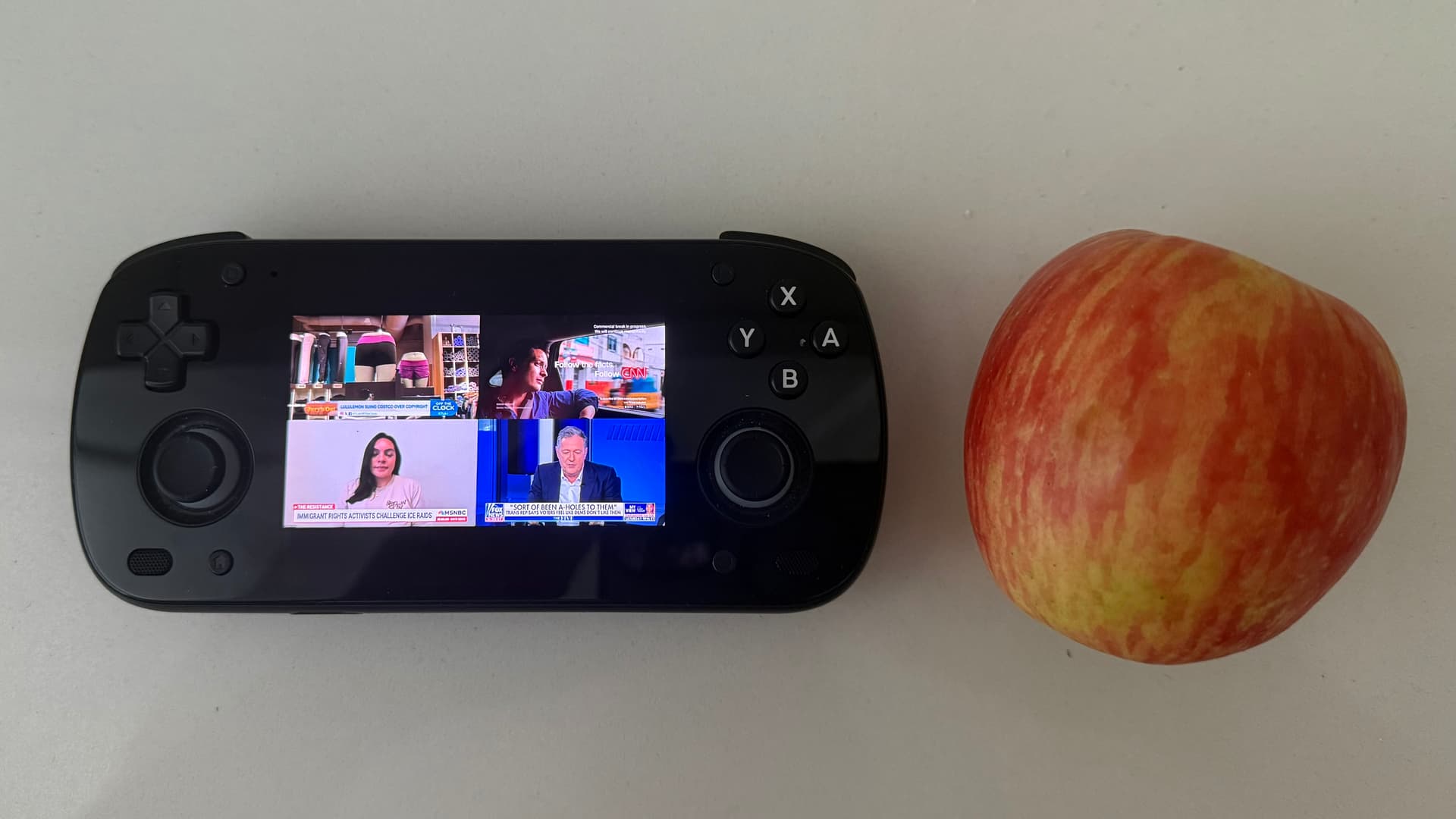
This is the Retroid Pocket Mini, with a 3.9" AMOLED touchscreen, running Android 13 and the Channels Whole Home DVR app. I'm tuned into my own "Channel 4000," a customizable 2x2 grid of News channels I configured via MultiChannel View which is running on a M1 Mac Mini server at home.
(I didn't have a banana, so I used an apple instead, for scale.)
Playback is smooth as silk, even when remote. I can channel surf to it like like any other CDVR channel, and can tap to select which grid's audio to play at any given moment. All content casts wirelessly to most TV's I've tried, too. The device's USB-C port supports video out, so I also got a long, thin HDMI adapter to bring when travelling, just to cover more TV bases.
It also is a versatile and capable gaming device, especially emulaton and Android games. I also installed Winlator, which allows for compatibility with an impressive array of PC games, via WINE.
We've come a long way since this thread started! I'm enjoying the new multiview feature in Channels. Still hoping to get a better dual-screen layout, the current one wastes a lot of space, especially on a 100" screen.
Thankfully it's on the devs' radar:
In the meantime I'm enjoying keeping track of the other multiview-capable apps out there for tvOS and AndroidTV. Chillio is a full-fledged IPTV app, filled with features, very actively developed and seems kinda vibe-coded -- but it has a "pretty good" multiiview feature I enoyed with a free trial. Relatively speaking it's kinda pricey though. I'll be keeping an eye on its progress.
What blew me away today is this new entrant:
Absolutely beautiful interface. It's well-designed and well thought-out. Any multiview enthusiast will enjoy a demo.
Yes, it's got a bit more to go but it's off to an excellent start. I'm primary impressed by the grid UI, the information that's displayed, how you can save and reload layouts, move the grids around as well as channel surf easily within any one of them.
It works really well on macOS, but I tried it on AppleTV and iPad too.