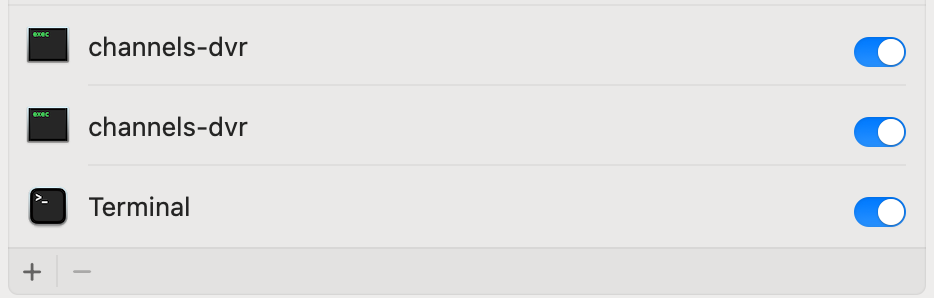
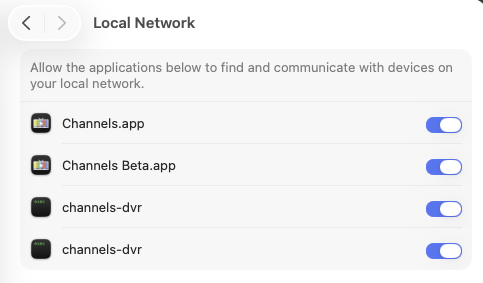
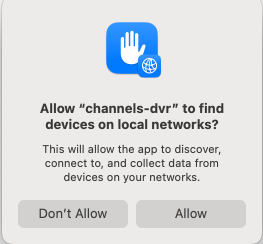
Privacy & Security pop-ups, when updating CDVR server on macOS Sequoia+

I get flashbacks

Isn't latest a directory symlink pointing to the new version directory?
i.e. ~Library > Application Support > ChannelsDVR > latest
points to ~Library > Application Support > ChannelsDVR > 2025.08.24.0217
And the directory the symlink points to changes with each update.
It is on Linux.

I'm running the server on MacOS and "latest" appears to be an actual folder. The previous versions all appeared in their own folders with the date/time naming convention you mentioned. I moved all those just to be sure and restarted the server without any issues.

Run this command in Terminal and it will show that latest is a symbolic directory link

ls -l ~Library/Application\ Support/ChannelsDVR/latest

Looks like this in Linux

$ ls -l /volume1/docker/channels-dvr-8089
total 28
drwxrwxrwx+ 2 root  root  4096 Aug 11 18:55 2025.08.09.2304
drwxrwxrwx+ 2 root  root  4096 Aug 14 14:07 2025.08.14.0637
drwxrwxrwx+ 2 root  root  4096 Aug 16 08:54 2025.08.15.1429
drwxrwxrwx+ 2 root  root  4096 Aug 19 11:56 2025.08.19.0525
drwxrwxrwx+ 2 root  root  4096 Aug 20 18:51 2025.08.21.0013
drwxrwxrwx+ 2 root  root  4096 Aug 23 11:19 2025.08.21.1637
drwxrwxrwx+ 9 root  root  4096 Aug 17 09:40 data
lrwxrwxrwx+ 1 root  root    15 Aug 23 11:19 latest -> 2025.08.21.1637

$ ls -l /volume1/docker/channels-dvr-8089/latest
lrwxrwxrwx+ 1 root root 15 Aug 23 11:19 /volume1/docker/channels-dvr-8089/latest -> 2025.08.21.1637

The executables are cryptographically signed and the details can be viewed via

$ sqlite3 "$HOME/Library/Application Support/com.apple.TCC/TCC.db"

after granting full disk access to Terminal

$ sqlite3 --box "$HOME/Library/Application Support/com.apple.TCC/TCC.db" 'select * from access where client like "%iterm2%"'

│                service                 │        client         │ client_type │ auth_value │ auth_reason │ auth_version │ csreq │ policy_id │ indirect_object_identifier_type │ indirect_object_identifier │ indirect_object_code_identity │ flags │ last_modified │ pid │ pid_version │ boot_uuid │ last_reminded │
├────────────────────────────────────────┼───────────────────────┼─────────────┼────────────┼─────────────┼──────────────┼───────┼───────────┼─────────────────────────────────┼────────────────────────────┼───────────────────────────────┼───────┼───────────────┼─────┼─────────────┼───────────┼───────────────┤
│ kTCCServiceSystemPolicyDownloadsFolder │ com.googlecode.iterm2 │ 0           │ 2          │ 2           │ 1            │ ��    │           │                                 │ UNUSED                     │                               │ 0     │ 1744937330    │     │             │ UNUSED    │ 0             │
│ kTCCServiceSystemPolicyDocumentsFolder │ com.googlecode.iterm2 │ 0           │ 2          │ 2           │ 1            │ ��    │           │                                 │ UNUSED                     │                               │ 0     │ 1754199221    │     │             │ UNUSED    │ 0             │
└────────────────────────────────────────┴───────────────────────┴─────────────┴────────────┴─────────────┴──────────────┴───────┴───────────┴─────────────────────────────────┴────────────────────────────┴───────────────────────────────┴───────┴───────────────┴─────┴─────────────┴───────────┴───────────────┘```

That’s a good idea, I’d love to take a look.

@bnhf, is this something that OliveTin could help with?

I would think so. The E-Mail Log Alerts Action already does this. It's just a question of having the right pattern or patterns to search for:

1 Like

Here is one pattern for people to try if interested. You may find some false positives though, where an email is sent but channels recovered gracefully after a retry

tail -F "$LOGFILE" |
grep --line-buffered "no such file or directory" |

@Fofer So in olive tin, you could try experimenting with the term "no such file or directory" as a search term

I haven't tried the cool email feature in olive tin yet.

Ah, thanks for that. Any idea what the error log would say when channels-dvr can't "find devices on local networks?" I'll keep an eye out on my system, certainly the next time this happens.

I don’t recall parsing the logs and seeing that specific term. The best I could do at the time that I set my email notification script up was to indirectly infer that the drive became unmounted or unavailable by the no such file or directory term.

The drawback is that there can be falls positives if for instance you move some of your personal media around or even rename you personal local media that you had previously imported into channels.

Let’s keep refining these search terms and scripts.
Now that I know that these pop ups are occurring during point updates of macOS I’ll try and take another look at the logs next time I get the pop ups and look for more specific error patterns for my custom scripts and for olivetin.

I’m in the middle of some code development at the moment. Once that is stable I’ll do another MacOs point release and I’m pretty sure I’ll see the pops again

Shouldn't CDVR report its status via some endpoint like /health ? This would make monitoring easy.

I posted a question to the forum some time ago asking if there was any benefit to moving from MacOS 14 to 15 on my M1 Mac mini DVR server. Most of the responses were "scolds" for not mindlessly upgrading with zero reasoning put forth. It appears there IS a benefit to not using MacOS 15 for your server OS at this point.

Nope, apparently not a sym link on MacOS.
Screenshot 2025-08-30 at 10.54.36 AM

Try
ls -l ~Library/Application\ Support/ChannelsDVR

does it show as a link

lrwxrwxrwx+ 1 root  root    15 Aug 23 11:19 latest -> 2025.08.21.1637
^
l means link, d would be directory

Also try stat ~Library/Application\ Support/ChannelsDVR/latest

stat /volume1/docker/channels-dvr-8089/latest
  File: /volume1/docker/channels-dvr-8089/latest -> 2025.08.28.2100
  Size: 15              Blocks: 0          IO Block: 4096   symbolic link
Device: f901h/63745d    Inode: 104628268   Links: 1
Access: (0777/lrwxrwxrwx)  Uid: (    0/    root)   Gid: (    0/    root)
Access: 2025-08-29 21:04:21.635446359 -0700
Modify: 2025-08-28 20:06:07.790632961 -0700
Change: 2025-08-28 20:06:07.790632961 -0700
 Birth: -

Sounds like the dot releases may also affect the network privacy settings

Nope, on MacOS it's a directory

ls -l ~/Library/Application\ Support/ChannelsDVR
total 16
drwxr-xr-x@ 23 doug staff 736 Aug 31 07:32 data
-rwxr-xr-x@ 1 doug staff 2840 Dec 16 2024 install.sh
drwxr-xr-x@ 9 doug staff 288 Aug 24 13:56 latest
-rwxr-xr-x@ 1 doug staff 774 Dec 16 2024 uninstall.sh

1 Like

Well, here's some good news. I've updated quite a few pre-releases of CDVR server since I started this thread, and also a few point releases of macOS Sequoia on this Mac mini, and I have NOT encountered these two Privacy & Security pop-ups again. There were pretty frequent a few months back, very noticeable, and at least twice, it proved to be a literal showstopper. And now, I'm not seeing them at all, despite doing manual updates regularly and sometimes remotely, just as before.

I even upgraded my Mac mini to macOS 26 Tahoe, then to 26.0.1, and the Channels DVR server is still launching automatically without any additional or unexpected pop-ups after restarts or reboots. So I think that was just an unfortunate bug with some earlier versions of Sequoia, an aberration perhaps? Fingers crossed that it's a thing of the past!

Felt like the tables had turned for awhile:

3 Likes

I still havent forgot about this issue. Im still holding off on upgrading to MACOS 26 , but will definitely report back my results as well once I do. Hopefully these pop ups from updates have been taken care of!

Thanks for the update - it’s encouraging.

@Fofer Well today I finally saw something very similar what you were seeing months ago. I updated to the latest beta prerelease (2025.12.12.0245) - without updating MACOS. Im still on Sequoia 15.6.

I only saw the "channels-dvr" would like to access files on a removable
volume prompt. I did not see the other local network access prompt that you observed.

I was prompted by MACOS to authenticate and enable a second channels-dvd radio button located in

MAC settings ->Privacy and Security -> App Management

Now heres another data point. I was upgrading at home, using a networked iPAD browser. On the iPAD I observed Channels think it was a new install. I got the welcome splash screen on the web browser. When I got to the actual server machine, my Mac mini , I noticed the popup and needed to authenticate. I also got a notification for a Chrome Browser helper, and "allowed" whatever that was. Ive never seen that before either.

Any ideas @Maddox @Eric ? How do I cleanly know which channels DVR instance in the Privacy submenu to get rid of - or would you recommend keeping both.

I also have multiple channels DVR entries in security settings many of which I cannot delete and appear to be rogue old entries. Has anyone else found a way to delete these manually as mine don’t appear in the finder when I click on them…