Synchronized Closed Captions for Channels

I’ve long wanted to get better closed captions support for live TV such as news broadcasts, that is synchronized with the audio instead of delayed by several seconds. I started looking for systems that can produce synchronized captions using ASR like YouTube does. I found that Whisper was generally recommended, so I started with that. After a while, I found Faster Whisper, which worked even better. I put together a shell script prototype on my own Channels server which I have running on a Debian linux box. It actually worked, but it had all kinds of problems with the way that I chose to integrate it with Channels. Then I reimplemented it using Python in MS Code with CoPilot. The AI did all the actual coding, which was awesome, BTW.

I’ve tested and used the linux version the most. It uses Docker and can be installed by simply bringing up the image. The same is true for Windows, but I found a problem with Docker Desktop. It doesn’t provide full GPU support, so I used the Docker engine in WSL instead. The installation will reconfigure WSL to use the engine instead of Docker Desktop, so please be aware of that.

The tricky part is getting the full GPU support in the Docker container. Please see the GitHub docs for a full description of the process.

You’ll also see that the documentation implies that some clients can use the SRT files alone. As far as I can tell, this is true for library files, but not for TV recordings. I’m not 100% sure of that, as the only Apple device I have for testing is an iPhone. The one test I did with that ignored the SRT files that this system created, but it’s possible that the naming convention I used is a problem. I don’t know yet. It would be great if Fancy Bits would add SRT support for recordings, because that would make CPU-only totally workable.

py-captions-for-channels

Automatic closed-caption generation for Channels DVR recordings using Faster Whisper.

Monitors your DVR for completed recordings, transcribes them with Faster Whisper, and writes SRT caption files that Channels clients pick up automatically.

Features

  • Fully Automatic β€” Detects completed recordings via Channels server API polling or ChannelWatch webhooks and queues them for captioning
  • GPU-Accelerated β€” NVIDIA CUDA + NVENC/NVDEC for fast transcription and encoding (7x faster than CPU)
  • Web Dashboard β€” Real-time status, execution history, settings, system/GPU monitoring, and manual reprocessing
  • Smart Optimization β€” Automatically tunes Whisper and ffmpeg parameters based on source type (OTA vs streaming)
  • Show Whitelist β€” Process only the shows you care about; interactive toggle from the web UI
  • Personal Media Libraries β€” Caption VHS transfers, home movies, ripped Blu-rays, and other personal media stored outside the DVR. Auto-discovers mount paths from Channels DVR; supports up to three separate NAS/server mounts
  • Embedded Captions Track β€” Optional MP4 transcoding with an embedded captions track for clients that don't support sidecar SRT files (required for recorded TV shows)
  • Idempotent β€” Tracks processed recordings in a database to avoid duplicates
  • Quarantine System β€” Cleans up orphaned .srt and .orig files after source media is deleted, conserving storage space
  • Dry-Run Mode β€” Test the full pipeline without modifying any files
  • Docker Ready β€” Single docker-compose up with NVIDIA GPU passthrough

Requirements

  • Channels DVR server (with recordings accessible via network/mount)
  • NVIDIA GPU with 6GB+ VRAM (GTX 1660 Super / RTX 2060 or better)
  • NVIDIA driver β‰₯ 520 on the Docker host (supports CUDA 12.2, which the container requires). Check with nvidia-smi β€” the "CUDA Version" shown must be 12.2 or higher. If it's lower, GPU acceleration will silently fall back to CPU; the container logs a warning at startup identifying the mismatch.
  • Docker with NVIDIA Container Toolkit (nvidia-container-toolkit)
  • ChannelWatch (optional, for webhook-based detection instead of polling)

CPU-only operation is possible but significantly slower (~10 min SRT-only, ~10–20 min with Fire TV transcoding, per 1-hour recording).

Timings below are for the default SRT-only mode. TRANSCODE_FOR_FIRETV=true adds encoding time (see GPU Configuration).

Hardware 1-hr OTA Recording 1-hr TVE (Streaming) Daily Capacity
CPU only ~10–15 min ~10 min Very limited
RTX 2080 (11GB) ~3–5 min ~1–2 min 20+ hours
RTX 3060/4060+ ~2–4 min ~1–2 min 24+ hours

Installation

Linux β€” one command (run on the server; installs Docker, GPU toolkit, and the container):

bash <(curl -fsSL https://raw.githubusercontent.com/jay3702/py-captions-for-channels/main/scripts/setup-linux.sh)

Windows β€” one command (run in an Administrator PowerShell window; installs WSL2, Docker, GPU toolkit, and the container):

Set-ExecutionPolicy -Scope Process -ExecutionPolicy Bypass

irm https://raw.githubusercontent.com/jay3702/py-captions-for-channels/main/setup-windows.ps1 | iex

You can also clone the GitHub repository and run the setup-linux or setup-windows scripts in the scripts folder.

I plan on adding support for Intel GPU’s, but I don’t have a way to test AMD GPU’s at this time.
I added a simple player for Channels content to the main web page. It allows you to play items in the Recordings dialog, and it enables browsing and playing all of the Channels DVR content.

I also created a stand-alone Windows player for Channels DVR: WinChannels

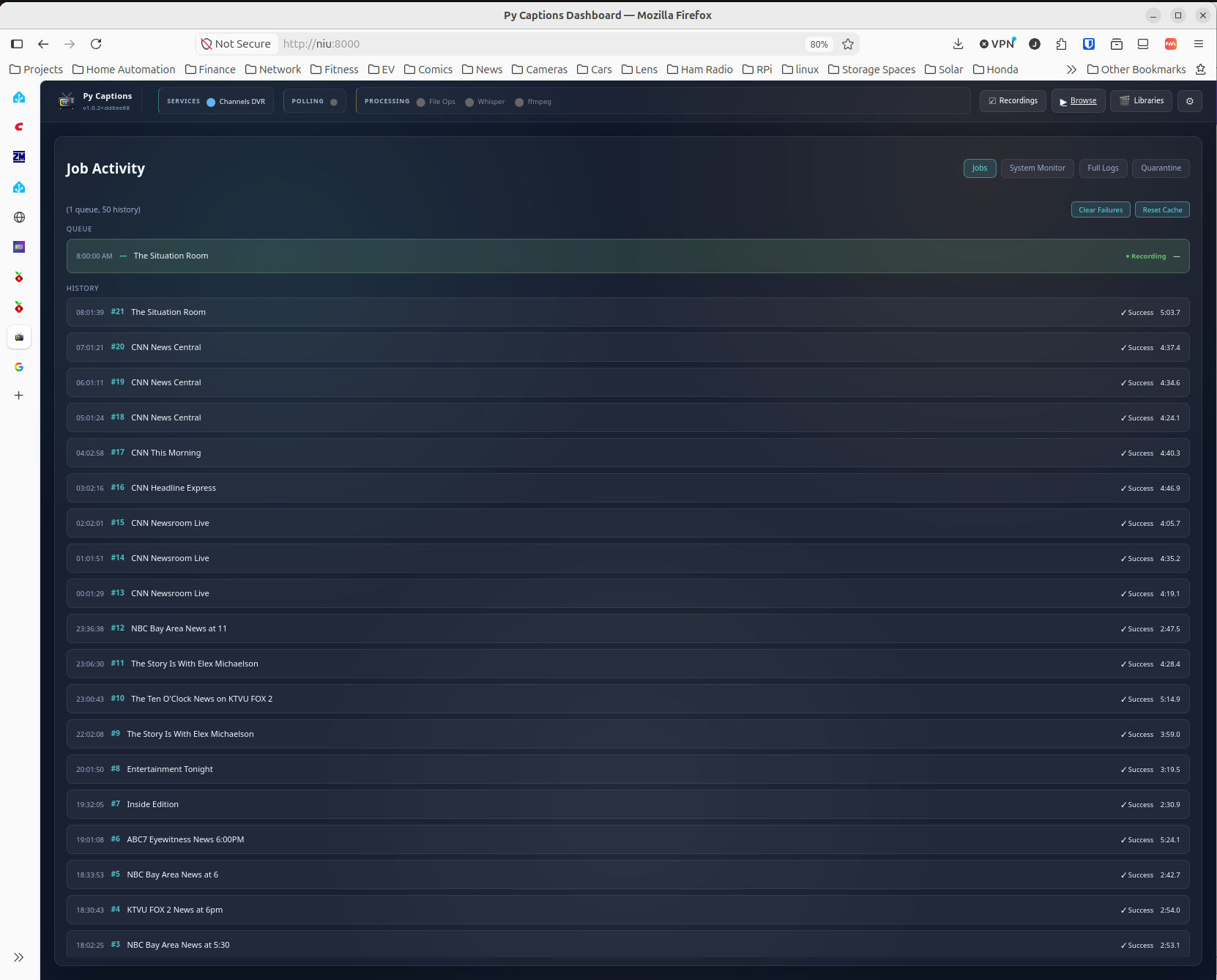
Here's a screencap of it with recently completed processes. This is on my media server, an I-7700k with an RTX 2080 running Ubuntu 24.04. The server is also hosting the Channels server, CC4C, as well as a few other Docker images. As you can see, it is taking about 5 minutes per hour of recorded programming to process.

You should be able produce similar results with an i5-8000 class SFF computer with a low profile NVIDIA GPU such as the GTX 1660 Super. That combo is about $250 - $300 on Ebay.

Have you looked into low cost BYOK cloud providers. Many have generous free tiers.

Also Parakeet is quite efficient and can run on my phone.

The free tier is limited to 60 minutes per month (for 1 year) for both Google and AWS. The cost of my typical monthly rate (about 317 hours/month) would be between $100 and $200 per month using their batch rates. It's higher for streaming. So, buying the hardware would pay for itself an just a few months.

That's interesting. In addition to being more efficient and faster than Whisper, it is also reported to be more accurate. It's mostly English only, and there is no Intel GPU support (naturally), but it's worth a look - thanks!

Take a look at Groq https://groq.com and https://www.cerebras.ai both have very generous free tiers. I am very much into speech to text. Also consider dockerizing this. People can use an iGPU with most of these models including Parakeet. So a docker with /dev/dri would play nicely with the channels ecosystem.

1 Like

Groq is definitely cheaper. If I'm reading the pricing and rules correctly, my workload would end up costing only $3/month, provided I stay within their hourly and daily limits. It would cost $12 - $35 without the free tier. It's hard to imagine that they will keep that level of free service once they feel that they are established enough. 8 hours a days is a lot!. They also limit the number of hours of transcribed audio to 2 per hour, so throttling would be needed, or just paying extra. This is definitely a possibility for lighter workloads.

I can't find any reference to a product or service from cerebras.ai for speech to text.

NO! DON'T ENABLE THE GROQ PAID TIER!!!! THAT COSTS REAL MONEY!!! LOL

The free their gets you 28.8K seconds per day of Whisper Large V3 Turbo for nothing. So 8 hours a day for free!

Ha - Never! But, it's too good to be true forever. I might try it...

It's been like that for ages.

BTW - this is already implemented as a Docker image using the NVIDIA Container Toolkit. Intel is not supported in this build because Faster Whisper uses CTranslate2 which has no Intel support. Neither does Parakeet. The cloud method would fix that though...

1 Like

I believe these models can run on Intel.
I use Superwhisper just for voice dictation, which uses Whisper models, and I run them on Intel iGPUs all the time. Locally, not cloud. Same with Parakeet.

Cohere transcribe is what I am using now locally, and it is fantastic.

Thanks for that insight! Turns out that Claude was wrong about Intel support. I probably needed to push back harder! Anyway, it looks like whisper.cpp can be used with Intel. Cohere is impressive, but it has a fatal flaw for this project, which is that it does not provide timestamps. To use it, I'd need to run a post process synchronization pass which would likely nullify it's performance benefit, not to mention yet another way the the pipeline could misbehave. I have some benchmarks that are interesting. These are results for a 15 minute broadcast TV audio file:

Engine Backend Elapsed time (900s clip) Real-time factor Status
Groq (whisper-large-v3-turbo) cloud API 2.7s ~0.003x reliable, verified correct
niu production (35 real jobs, matched) RTX 2080 Ti, medium (faster-whisper) 40.7s (scaled) ~0.045x reliable β€” transcription-only, n=35 sample
Parakeet TDT CPU only (XPS 15, i7-12700H) 86.1s ~0.096x reliable, verified correct
whisper.cpp medium.en Iris Xe / Vulkan (XPS 15) 268.8s (4m29s) ~0.30x reliable, verified correct
Parakeet TDT Iris Xe / Vulkan (XPS 15) β€” β€” broken β€” crashes or produces zero output
Parakeet TDT RTX 3050 Ti / Vulkan (XPS 15) β€” β€” broken β€” fixed ~6GB buffer exceeds 4GB VRAM
  • The niu row is this project's real aggregate production average scaled to a 900s clip, not a direct test of this same file
  • Both Parakeet GPU rows are left blank rather than given a number, since every GPU run today either crashed outright or completed with zero usable transcript text despite real decode activity in the timing counters β€” there's no trustworthy speed figure to report for GPU Parakeet on this build.

The numbers from niu are from my media server.

The surprise is the CPU-only run for Parakeet. It looks like the GPU drivers are not ready for production yet (or I haven't figured out how to use them properly yet).

The Groq result is encouraging. The trick with that one will be scheduling when and if more than two jobs are needed per hour. I haven't scrutinized the billing rules yet, so I don't know what actually happens when you exceed the hourly or daily limits. I noticed that Groq is offering free keys, but not development keys. TBD...

Parakeet is incredible on a cell phone with an ARM processor, let alone a real x86 CPU :grin:

Groq and Parakeet are now implemented, however, I have not tested Parakeet yet. I want to see how it performs on a small system like an N100 or N95 based server. If you choose to use Groq, it will keep track of your usage and fall back on whatever local processing is available on your system. Here are my results for the past 24 hours:

Groq usage β€” rolling 24-hour window

Window: 2026-08-13 19:50 β†’ 2026-08-14 19:50 Pacific (right now, this is the actual quota-enforcement window β€” not calendar day)

Job time (local) Chunks Audio minutes
08-13 20:17 7 61.0 min
08-13 20:33 3 31.0 min
08-13 23:01 6 60.0 min
08-13 23:07 4 31.0 min
08-14 08:02 3 26.5 min
08-14 09:02 6 60.0 min
08-14 10:03 6 60.0 min
08-14 11:03 6 60.0 min
08-14 11:32 3 31.0 min
08-14 17:07 3 31.0 min
Total 47 requests, 10 jobs 451.4 min

Free-tier ASD cap: 480 min/day (28,800 audio-seconds), rolling β€” currently 94.0% used, which is why fallbacks to local transcription have been happening throughout the day.

Pipeline throughput, normalized per audio-hour

(same window: since Groq went live, ~24h ago)

Engine Jobs Avg Median Min Max
Groq 8 122.2 s/hr 125.6 s/hr 83.1 s/hr 152.6 s/hr
Local (faster-whisper) 20 309.8 s/hr 326.5 s/hr 76.8 s/hr 411.4 s/hr
  • Median is the fairer comparison β€” Groq runs the pipeline ~2.6x faster per hour of audio (125.6 vs 326.5 s/hr).
  • Min-to-min, they do overlap: local's fastest job (76.8 s/hr, CNN News Central) edges out Groq's fastest (83.1 s/hr) and sits inside Groq's overall range β€” but that's an artifact of per-channel OPTIMIZATION_MODE tuning on a specific low-complexity show, not typical local performance. Every other local job in the sample is 2–5x slower than Groq's median.

That's comparing Groq transcription to Faster-Whisper on my I770k/RTX2080 system which is reasonably quick.

Of the total workload today, 30% β€” 6 of the 20 completed recordings today used Groq; the other 14 fell back to local (faster-whisper) transcription, mostly due to the rolling-24h ASD quota tightening as the day went on.

I still need to test this on a system with an Intel GPU because the pipeline uses ffmpeg for various parts of the process and those also benefit from acceleration.

Stay tuned...

@jay343 I had an idea and I started implementing it last night, stayed up way too late, and it just wasn't worth messing with until maybe you want to take a look at it and see if it's feasible.

I was able to kinda get it working in a sandbox, but not really in production. The idea is sort of like proxying the stream from something like AH4C or ADB tuner, like an MPEG TS stream. And then slipstreaming in the closed captions using a similar format off like an HD home run.

I had a prototype and then I got frustrated and deleted the repo, which I probably shouldn't have done.

I do have some code sitting in my machine right now if you want it, but it probably is useless. But it's more of a proof of concept rather than something that actually works, so it's basically useless.

Just an idea. I'm not sure if you want to maybe run with it and see if Claude can come up with something. I don't want to deviate too far from what you're doing, but my idea was rather than post processing later, do the captions in real time.

I also explored that general idea at one point as a proof of concept. I was thinking that if the client could use the .srt file as it was being written, maybe it could be done quickly enough to only be a few seconds behind real time. That ended up in the probably too hard or troublesome bucket since it would rely on the specific Channels client being able to use the file at all, as well as while it was open for writing. The Channels devs would need to actively support that.

But implementing it in a hardware pipeline, like the CNN machine I just built might actually work...

Claude agrees with that assessment, and also pointed out this:

Worth knowing before you or mackid rebuild anything: someone has already shipped essentially this prototype. There's a tool (Live-Caption-Encoder / cc_injector) that injects CEA-608 into a live MPEG-TS in real time, taking caption text over UDP from a Whisper audio pipeline and embedding it as A/53 CC via GA94 SEI using libx264 with a53cc=1. It's 608-only, no 708 yet, but for CNN roll-up news captions 608 is honestly fine. That's a reference implementation to fork rather than reinvent. GitHub GitHub

This isn't something I want to pursue right now, but it's interesting. Maybe something could be built out of that.

I'm actually about to push something.
It's actually for AH4C, but it works. It's very close to being a full prototype for people to actually use in real time.