WinUtil-for-Channels: A Community Windows Installer for Channels DVR and Related Projects (focusing on those not Docker-based) Plus OliveTin EZ-Start

The idea with this project is to provide a straightforward way to install community projects related to Channels DVR, along with various other "foundational" pieces required to support those projects in a Windows environment.

I'm calling it WinUtil-for-Channels, and it can be launched with a single command in a PowerShell window -- with no installation required. This project is a fork of the popular christitustech/winutil, specifically tailored for Channels users:

irm https://raw.githubusercontent.com/bnhf/cdvr-winutil/main/winutil.ps1 | iex

That will, in turn, launch two Windows. One will be your PowerShell console, where you can see what's actually happening with a given installation, and the other is the application's GUI:
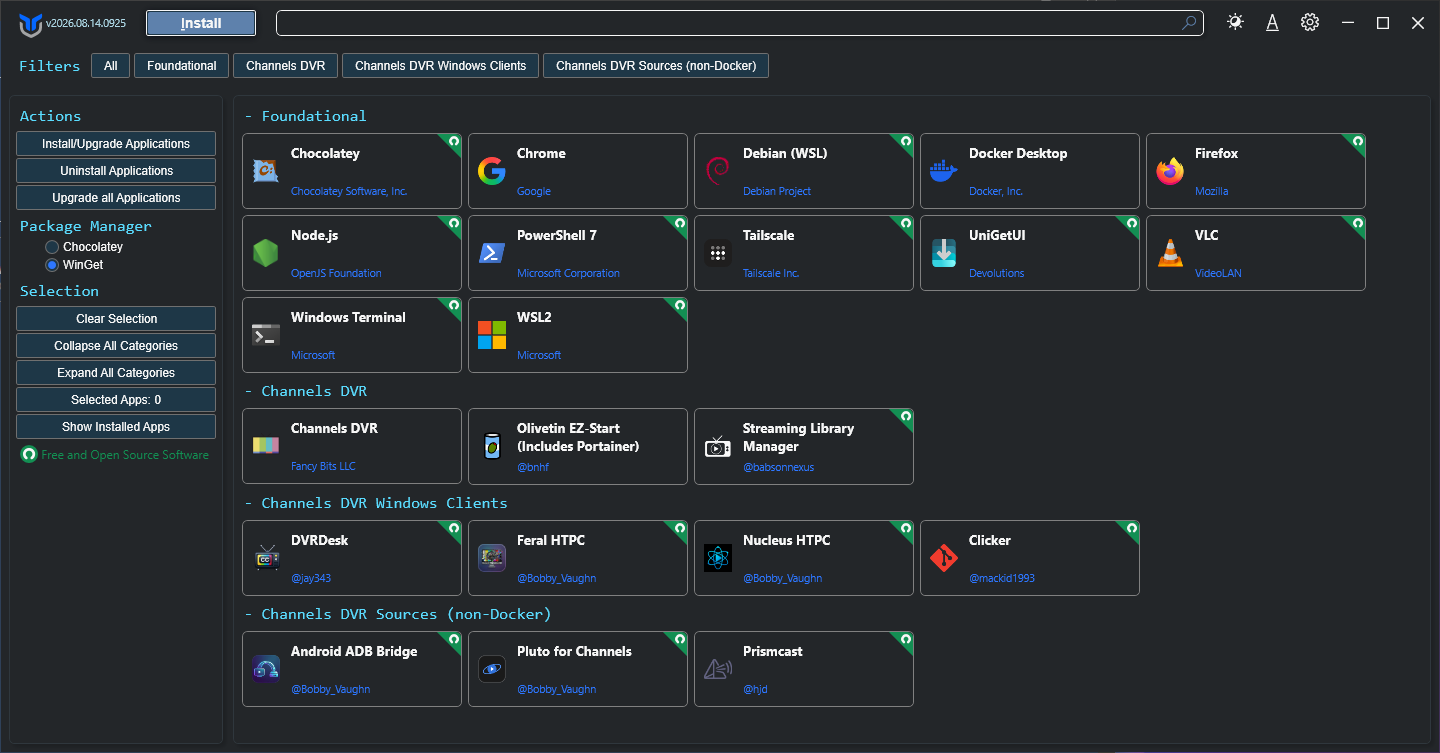
Each of the apps shown can be installed, uninstalled or upgraded using this interface. In addition to right-click options for each of those, there are also small dropdown buttons that will take you to the app's online home, to the app's local WebUI, or to an application's GUI.

This is intended to be a Windows dashboard for any and all of the pieces you might want (or need) to install Channels DVR and any of the community projects designed to work with it. Each of the buttons will install the "native" or non-Docker version of a given project.

The exception is OliveTin EZ-Start, which through its own dashboard will give you access to a variety of Docker-based projects via Project One-Click. The OliveTin EZ-Start installation requires only a single variable -- which is the password you'd like to use for Portainer (which is a WebUI for Docker):
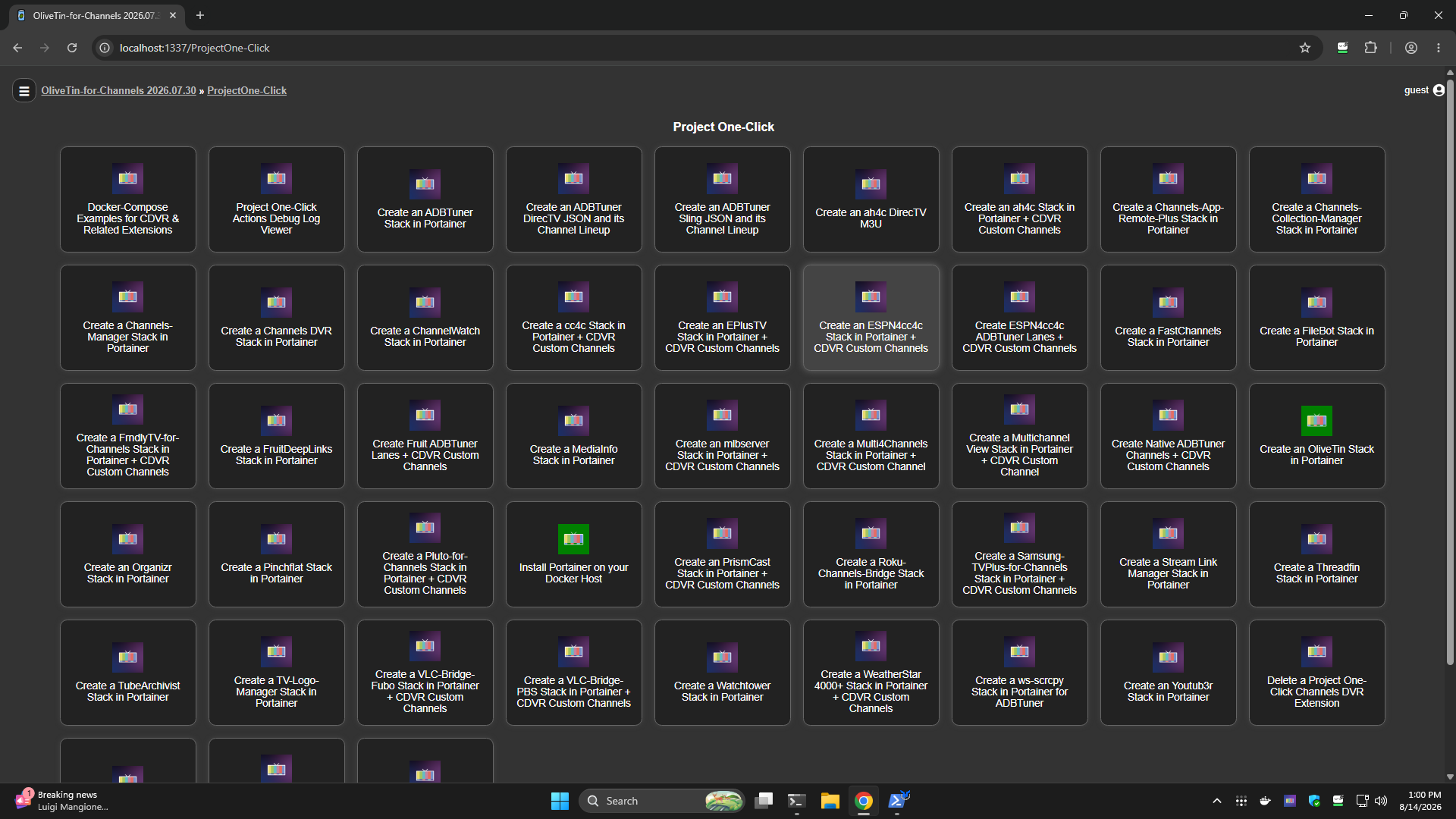
If you're a Windows user, this is your one-stop-shop for installing and maintaining everything related to Channels DVR. Combine this with OliveTin EZ-Start, and every known Windows-native or Docker-based CDVR extension is at your fingertips.

The source code can be found here, if you'd like to review it:

If you have any suggestions for other packages/projects to include -- let me know!

6 Likes

Maybe the non-docker version of Frndly TV?

Not sure if there is a big enough demand for it.

I haven't used it in quite a long time.

Are these intended to install the projects on the host Windows PC? Or, can this interface be used to install projects on another device?

On the Windows PC you're running WinUtil-for-Channels, but since it's a "no installation" script itself, you can run it wherever and whenever you want -- on any Windows system. Plus, you'll always be running the latest version right from GitHub.

That's a good thought. I'll probably add it.

since I just did this myself, I thought I'd share the target for a desktop shortcut.

powershell.exe -Command "irm https://raw.githubusercontent.com/bnhf/cdvr-winutil/main/winutil.ps1 | iex"

I'm not running arm, install failed.

[2026-08-14 21:54:16.595] [INFO] [Package] Querying latest release for mackid1993/Clicker
[2026-08-14 21:54:17.191] [INFO] [Package] Downloading Clicker-Setup-1.3.1-arm64.exe for Clicker
Clicker-Setup-1.3.1-arm64.exe
sha256:316f58fb37020abf587fc6fe07ffb3067262133e707b36cd298e2ac0ddefba5b
18.5 MB
4 hours ago

Error; This program does not support the version of windows your computer is running.


Clicker-Setup-1.3.1.exe
sha256:5d1d89073988d83cc79618bd4ffcb450ff2ce5720d7853d7b3e3eb51117f6456
21.4 MB
4 hours ago

installs and works as expected.

Looks like this is an issue with WinUtil-for-Channels. I don't believe there was an ARM version of Clicker when I was testing. I'll see what's going on with this tomorrow.

1 Like
Device name	IdeaPadSlim5-16IRU9
Processor	Intel(R) Core(TM) 7 150U (1.80 GHz)
Installed RAM	16.0 GB (15.7 GB usable)
Device ID	B0CC5420-5E9B-474F-9209-4CF54E80EE64
Product ID	00330-81627-04704-AA370
System type	64-bit operating system, x64-based processor
Pen and touch	Touch support with 10 touch points

Edition	Windows 11 Pro
Version	25H2
Installed on	‎12/‎27/‎2024
OS build	26200.8875
Serial number	INVALID
Experience	Windows Feature Experience Pack 1000.26100.334.0

lol, I know, instead of busting chops, i kept my post simple..

I really like how you implemented it like PIP, I was expecting vlc style 'Always on Top"

2 Likes

wrote many a college paper on the freeway after work on my way to class with an 11" p2 thinkpad. it fit so nicely against the steering wheel, and track point didn't bounce. :racing_car:
nowdays i'm addicted to fingerprint reader.

There are several issues with what you've put in place with SLM. I believe by trying to build your own package installer instead of using the existing .bat file directly, you've most likely created a function and maintenance gap for yourself. But if you like the work, I'm not going to stop you! For instance:

  • Missing the option to set the port, which could be a big issue given the default is 5000.
  • Also doesn't set the port in the environment variables.
  • Due to this, the Windows Firewall rule seems too open for my taste as it is opening all ports instead of just the selected one.
  • The name of the folder is StreamLinkManager instead of StreamingLibraryManager.
  • No control over where the installation happens.
  • The build sequence does not start SLM to run in the background, but is putting it as a foreground window. It should execute the Task Scheduler item since that is already set to run in the background, or do what the .bat does.
  • No ability to select the Prerelease version.

I did test the upgrade, and was pleased that it protected the program files, so no problems there (did all the steps and safety requirements I'd expect).

Uninstall did not remove the Windows Firewall rules.

You're quite right. There were issues I was trying to address with the batch file, but the result was not what I was after. I'm working on an update now that will use the batch file with just a couple of on-the-fly fixes -- but it'll be your batch file otherwise.

1 Like

@babsonnexus I believe I have it now, complete with a much faster install process. It does take 15-20 seconds before the SLM WebUI responds after installation -- but I don't think that's due to anything I'm doing.

You can test on CDVR WinUtil v2026.08.15.1411 or newer if you like, which you'll be on automatically.

1 Like

Correct, SLM first time build activities may take a little bit.

Most issues look resolved, here are a few things I found:

  • The environment variable for the SLM_PORT remains behind during uninstall.

  • The menu for "Open Web Interface" is hardcoded to port 5000. Perhaps have this read SLM_PORT and use that, otherwise use 5000 if missing.

  • Similarly, perhaps the default port should also be changed to match SLM_PORT, otherwise use 5000 if missing?

  • After install/upgrade, the task remained "Queued" until I manually forced it to run:

    image

  • If you change ports during an upgrade, the old port remains behind in Windows Firewall. Although maybe I should change the .bat file to deal with this situation?

I believe I've addressed these additional issues. Here's the latest installation log:

[2026-08-16 09:38:21.153] [INFO] [Install] Install requested for 1 selected package(s) using preference: Winget
[2026-08-16 09:38:21.160] [INFO] [Install] Install selected package(s): Streaming Library Manager (no package id)
[2026-08-16 09:38:21.435] [INFO] [Install] Install package manager split: winget=0, choco=0, direct=0, github=0, npm=0, wslFeature=0, wslDistro=0, wslCommand=0, streamLinkManager=1
[2026-08-16 09:38:22.231] [INFO] [Package] Installing Streaming Library Manager to C:\Users\slayer\AppData\Local\StreamingLibraryManager
[2026-08-16 09:38:22.497] [INFO] [Package] Downloading slm.bat
[2026-08-16 09:38:22.563] [INFO] [Package] Patched slm.bat: faster download/extract, and waits that work with a non-interactive stdin.
[2026-08-16 09:38:22.568] [INFO] [Package] Running slm.bat upgrade
Beginning upgrade...
Checking to see if Streaming Library Manager is running...
slm.exe is not running.
Downloading Streaming Library Manager files...
Extracting Streaming Library Manager files...
Cleaning up files...
Moving files to final destination...
2944 File(s) copied
Upgrade completed
[2026-08-16 09:38:55.084] [INFO] [Package] Setting Streaming Library Manager's port to 5010
Please enter a port number between 1000 and 9999 (or enter the default 5000): You entered: [5010]
Saving port number to environment variables...

SUCCESS: Specified value was saved.
Streaming Library Manager port set to [5010].
Opening port in Windows firewall...
Please wait...
Port 5010 has been opened in Windows Firewall.
Checking if port 5010 is open...
Port 5010 is open and the server is listening.
Please completely exit out of this command prompt and restart Streaming Library Manager in a new window for the port to take effect.
[2026-08-16 09:39:01.994] [INFO] [Package] Registering Streaming Library Manager to start at logon
Setting Streaming Library Manager to run on startup...
Creating task, please wait...
Startup task complete. To start now, just run 'slm.bat' with no handles.
[2026-08-16 09:39:09.035] [INFO] [Package] Starting Streaming Library Manager
[2026-08-16 09:39:09.308] [INFO] [Package] Streaming Library Manager installed - web interface at http://localhost:5010
===========================================
--      Installs have finished          ---
===========================================
[2026-08-16 09:39:09.838] [INFO] [Install] Install workflow completed.

Mostly looks good, but now I'm getting a new problem.

During initial installation and upgrade, it ended up starting on port 5000 instead of the set one. I believe this is because the launching of the startup task is happening in the same terminal as setting the port, which Windows doesn't like. You'll probably want it to launch a separate terminal just to do the startup after port setting.

Also, FYI, I've updated the SLM Wiki pages for Windows installation, startup, and upgrade, as well as prerelaease, to include and recommend this utility as the first approach.

I didn't actually see this issue myself, but I've applied a fix that hopefully will cover what you experienced. Confirm you're using CDVR WinUtil v2026.08.16.1108 or newer to test.

Confirmed working in that version, nice! I think I'm out of debugging complaints :stuck_out_tongue_closed_eyes:

1 Like

I am new to all this advanced stuff with Channels DVR (server running on windows). OliveTin Ez-Start sure looks cool, and using this project to install it seems like a great way to get it installed. I ran through the install, rebooted when told to, but I am not sure what to do next. I already had Docker desktop installed. I did run the Debian and WSL installs and rebooted as well, but still get this these warnings and errors:

[2026-08-16 13:46:42.065] [WARN] [Package] WSL2: WSL2 does not appear usable yet - if this is the first time it's been enabled on this machine, a restart is likely required.
[2026-08-16 13:46:43.693] [ERROR] [Package] Skipping Olivetin EZ-Start install - The 'docker' command is available inside Debian, but can't reach the Docker daemon. Make sure Docker Desktop is running and has finished starting, then try again.

What am I missing?
